
A corrugated box plant can know exactly what each job consumed, how many good boxes came out of every stage and where the time and paper were lost – or it can find out at month-end that the reels do not match the books. The difference is not the machines; it is how the flow from order to dispatch is recorded. This guide walks through that flow in a manufacturing ERP, the way Tejaxo ERP runs it for corrugated and multi-ply box plants: masters, reel inspection, Process Plan, Job Card and one production entry for every stage, with rejection and downtime by reason.
The flow at a glance
- Masters – stages, flutes, machines, stage routes, rejection and downtime reasons.
- Reel inward inspection – every incoming reel tested before it is accepted.
- Process Plan – the box design and the paper for every layer, once per customer and product.
- Sales order – the customer’s order: product, quantity and rate.
- Job Card – the order line plus the Process Plan, turned into a paper request for the job.
- Store issue – paper issued against the job.
- Production entries – one entry per stage: input, good output, rejection and downtime.
- Reports – output, rejection, downtime, issue vs production and stage-wise WIP.
1. Masters: set up once, use on every job
- Stages (process master): each stage has a code – for example corrugation, printing, rotary, stitching, gluing, bundling and dispatch inspection.
- Flute master: each flute profile with its take-up percentage and height, used to work out paper weight and the outer size of the box.
- Machine master: section, make, running cost and overhead cost per hour, operators and helpers, and the maximum reel width and sheet length the machine can take.
- Stage mapping: for each product, the sequence of stages with setup minutes, minutes per 1,000 units and a default and alternate machine – the basis for capacity and OEE.
- Rejection and downtime reasons: a code for every reason a box is rejected or a machine stops, so losses can be counted by cause.
2. Reel inward inspection
Paper is the biggest cost in a box, so it is checked before it is used. Against each goods receipt, every reel is recorded with its reel number, weight, deckle, GSM, burst readings and average, bursting factor, RCT and result, and the accepted and rejected weight is captured. A reel that fails is stopped at the gate instead of being found inside a weak box – see reel inward inspection: GSM, burst, BF and RCT.
3. Process Plan: the box design, once
For each customer and product, the Process Plan holds the box style, ply, flute, ups, standard quantity, pins and joints, trim margin, stitching flap, inside size, colours and the paper for every layer with its GSM, BF, shade and take-up. One click calculates the outer size, deckle, cutting size, number of boards, running length and the weight of each layer – see how the paper weight of a corrugated box is calculated or try the free corrugated box calculator. Specification rows add board GSM, cut quantity, box weight, bundle size, joint, punching, die reference and print colours.
4. From sales order to Job Card
When the order arrives, the Job Card is created from the sales-order line. Only lines whose customer and product already have a Process Plan can be picked, so no job is released without a design. The Job Card copies the plan and calculates the paper request for each layer: request = layer weight / standard quantity x job quantity, plus the standard wastage percentage. After Save, the Job Card is printed for the floor with a layer block and a specification block, and paper is issued from the store against the job, which links consumption to the job for the Issue vs Production report.
5. One production entry per stage
This is where most plants lose control. In Tejaxo ERP every stage is recorded as its own production entry against the same job. Each entry records the stage, shift, machine, team leader, operator, start and end time; the input (paper in kilograms at corrugation, boards or boxes after that); the good output in pieces; rejection by reason, in quantity and weight; and downtime by reason, with from and to time and minutes. At corrugation, side trim and core waste in kilograms are also recorded. The output of one stage becomes the input of the next, so the loss at every step is visible.
One rule makes the numbers work: record output as good quantity only, and rejection separately. If a stage rejects 10 boards and the entry still shows the full quantity as output, the next stage starts with boards that do not exist.
Worked example: one job through four stages
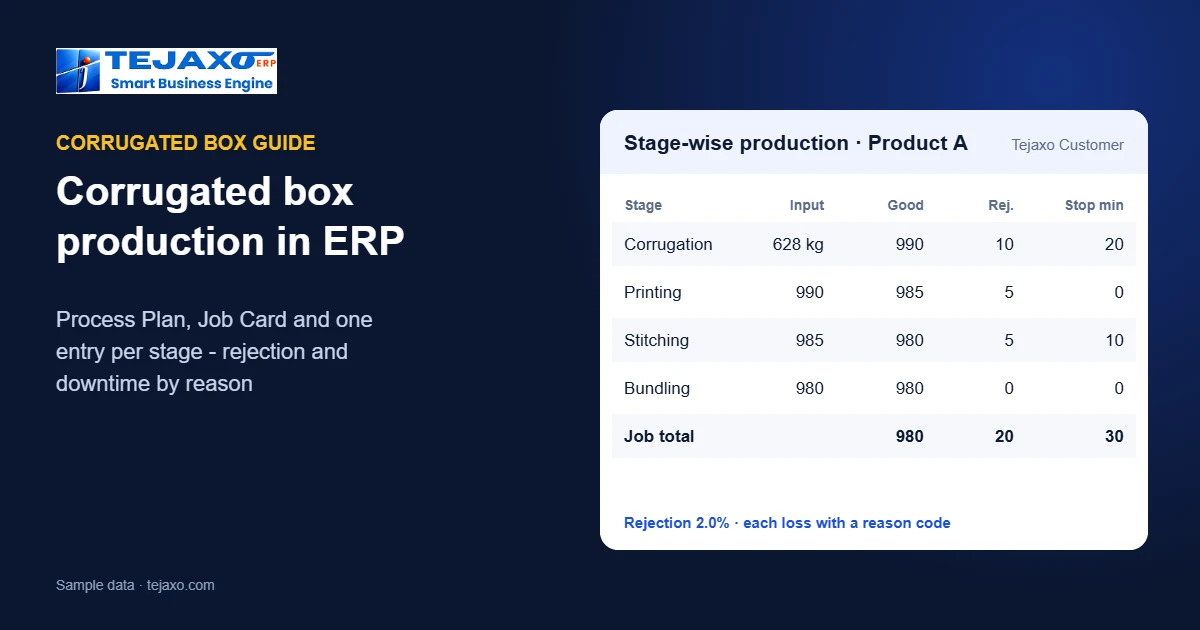
Tejaxo Manufacturing makes 1,000 5-ply boxes of Product A for Tejaxo Customer (sample numbers). The Process Plan calls for about 628 kg of paper across five layers.
| Stage | Input | Good | Rej. | Stop min |
|---|---|---|---|---|
| Corrugate | 628 kg | 990 | 10 | 20 |
| Printing | 990 | 985 | 5 | 0 |
| Stitching | 985 | 980 | 5 | 10 |
| Bundling | 980 | 980 | 0 | 0 |
(Good = good pieces passed to the next stage; Rej. = rejected pieces; Stop min = downtime in minutes.) The job lost 20 boxes (2%) – half of them at corrugation – and 30 minutes of machine time, each with a recorded reason. The owner sees this the same day, not at month-end, and the job’s cost reflects the paper actually issued and the boxes actually made.
6. Reports that close the loop
- Corrugation production report: output by machine, month and shift; downtime by stage, shift, machine and team leader; rejection and input.
- Job Card checklist: every job with product, customer, quantity and layers.
- Issue vs Production: paper issued to each job against what it produced.
- Stage-wise WIP stock: how much is lying at each stage right now.
A daily routine for the plant
- New product or customer: make the Process Plan, calculate and save.
- Order received: enter the sales order.
- Create the Job Card from the order line, enter job quantity and wastage, calculate, save and print.
- Issue paper from the store against the job.
- After every stage, make the production entry: input, good output, rejection and downtime.
- At the end of the shift, check the production report.
Common mistakes
- Recording output before rejection. Output must be good quantity, or every later stage is wrong.
- One entry for the whole job. Without stage entries you cannot see where boxes or time were lost.
- No reason codes. “Downtime 2 hours” cannot be fixed; “reel change 40 minutes, repair 80 minutes” can.
- Accepting reels without a test. A weak reel shows up as a failed box weeks later.
- Quoting from spreadsheets. Keep one Process Plan per customer and product so the quote, the job and the paper issue use the same numbers.
Next step
See the Process Plan, Job Card and stage-wise production on one of your own boxes. Book a free demo or read about ERP for corrugated and flexible packaging and machine data and OEE.
Frequently asked questions
What is a Process Plan in a corrugated box ERP?
A record kept once per customer and product that holds the box design – style, ply, flute, ups, inside size, trim and flap – and the paper for every layer. It calculates the outer size, deckle, cutting size, boards and the weight of each layer, and every Job Card for that box is created from it.
How is production recorded stage by stage?
Each stage – corrugation, printing, stitching, gluing, bundling and so on – is a separate production entry against the same job, with input, good output, rejection by reason and downtime by reason. The output of one stage is the input of the next.
Why record rejection and downtime by reason?
Because a total cannot be fixed but a cause can. Reason codes show which stage, machine and shift lose the most boxes and time, so the team knows what to fix first.
What is checked in reel inward inspection?
Reel number, weight, deckle, GSM, burst readings and average, bursting factor, RCT, the result and the accepted and rejected weight, against the goods receipt.
How is paper issued to a corrugation job?
The Job Card calculates the paper request for each layer from the Process Plan and job quantity, plus standard wastage. Paper is then issued from the store against the job, so the Issue vs Production report shows consumption job by job.
Which reports does a box plant need?
Production by machine, month and shift; downtime and rejection by reason; issue vs production per job; a Job Card checklist; and stage-wise WIP stock.