
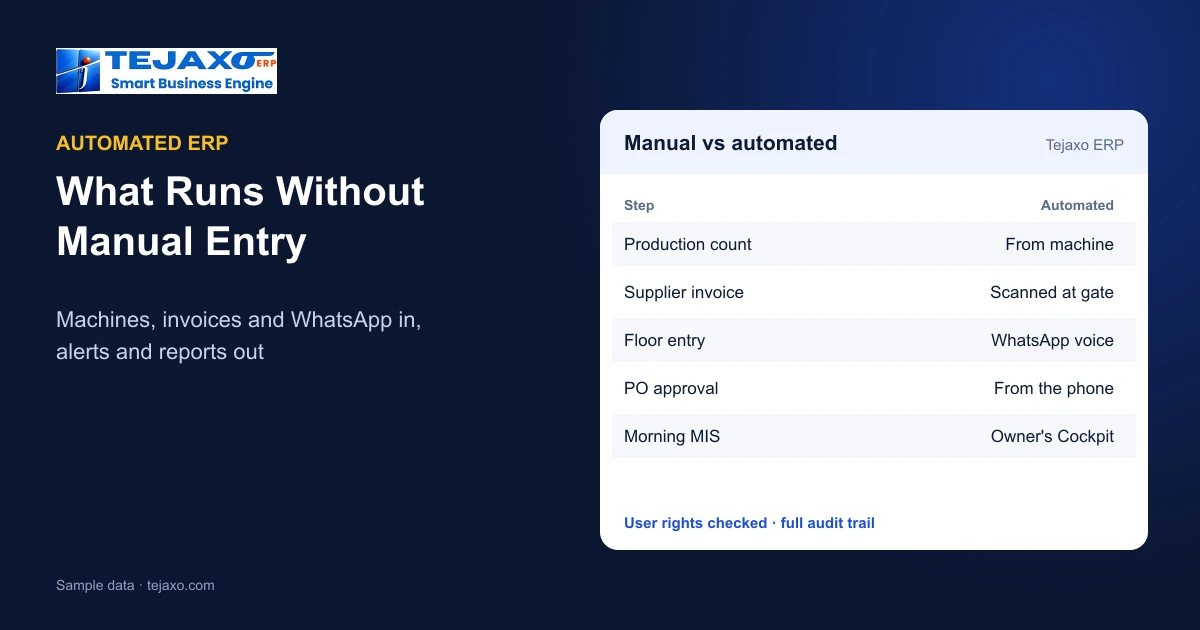
Most factories bought an ERP to stop working in Excel, and then found that someone still has to type everything into it: production counts from the machines, supplier invoices at the gate, approvals that wait for the owner to open a laptop, and reports that someone prepares every morning. An automated ERP removes as much of that typing as possible. Data comes in from machines, documents and phones; the ERP checks it against the same rules as a manual entry; and answers and alerts go out on their own. This guide explains what can be automated in a manufacturing ERP today, how Tejaxo ERP does it, and which steps should always stay with people.
What an automated ERP means
Automation in an ERP is not one feature. It is three kinds of work that the system takes over:
- Data in without typing: machine counts, scanned supplier invoices and WhatsApp messages become ERP entries.
- Checks that run themselves: mandatory fields, duplicate bills, purchase order matching, user rights and approval rules are applied automatically.
- Answers and alerts out: dashboards, reports, reminders and approval requests reach the right person without anyone preparing them.
The test of a good automated ERP is simple: the figure on the owner’s screen should come from the source – the machine, the invoice, the posted voucher – and not from someone retyping it.
1. Machine data straight into production
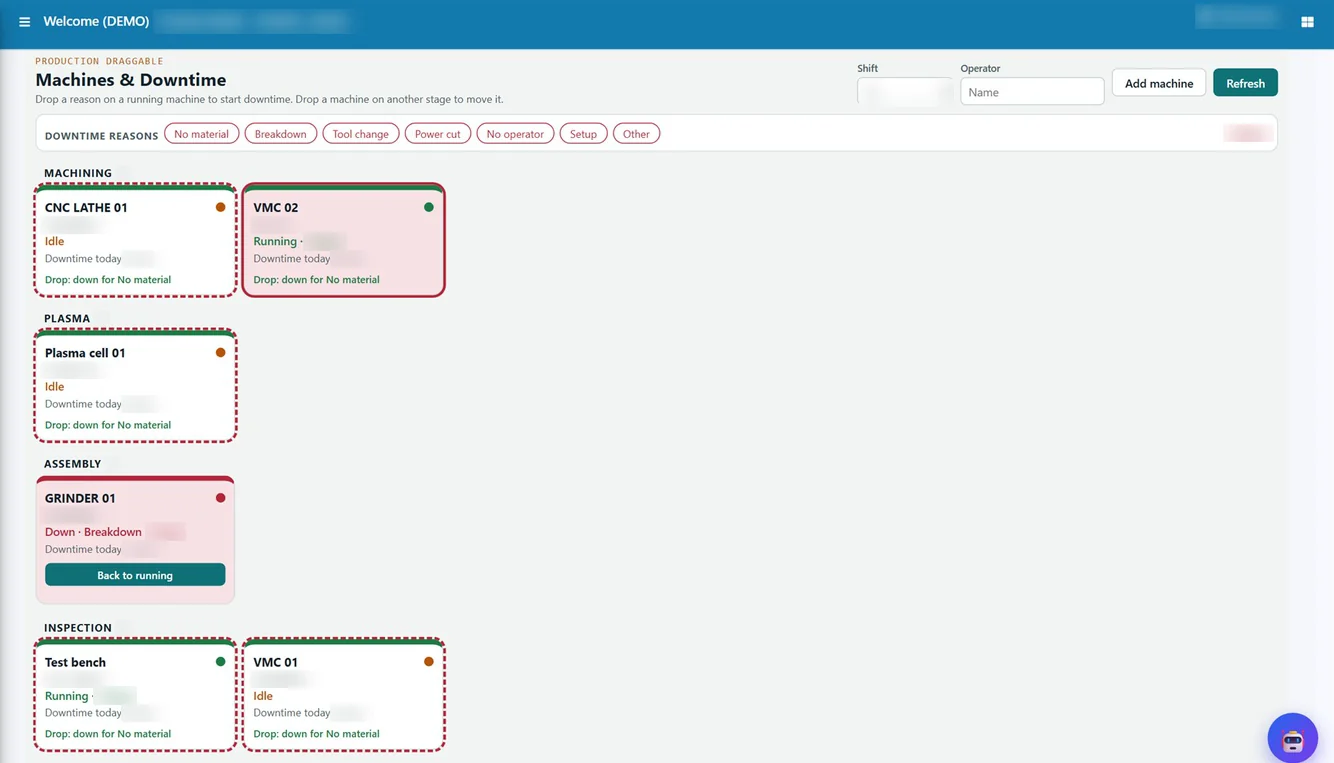
On a machining shop floor, production counts are usually written on a slip and entered at the end of the shift, often a day late and sometimes rounded. In Tejaxo ERP, CNC and VMC machines send cycle counts, run and idle time, downtime and OEE directly. The flow is: machine or device (CNC, VMC, SCADA, data logger) – Tejaxo connector, which reads, cleans and buffers the data – ERP and dashboards for production, OEE, maintenance and quality. Machine counts and OEE are posted as production confirmations. This is live at a Tejaxo ERP client manufacturer.
Where a stop needs a human reason, the supervisor records it with one click on the shop-floor board, so the downtime register shows both the machine time and the reason. For the formula behind the numbers, see how to calculate OEE and machine data to ERP for CNC and OEE.
2. Supplier invoices read at the gate
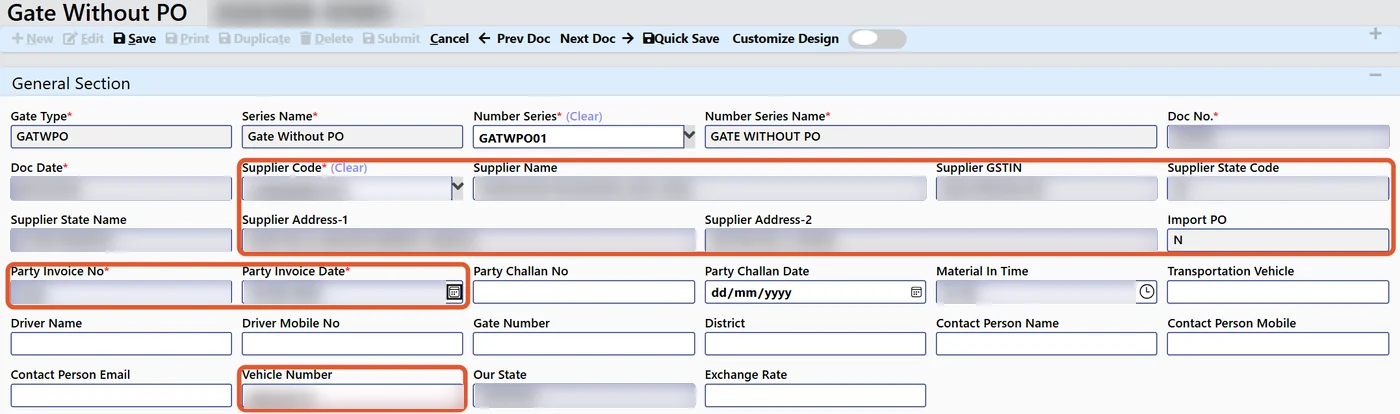
The gate is where most manual typing starts: the guard copies the supplier name, bill number, vehicle and items from a paper invoice. With AI gate entry in Tejaxo ERP, a PDF, JPG, PNG or phone photo of the supplier invoice is uploaded and the system extracts the GSTIN, vendor, bill number and date, vehicle, items, quantity, rate and taxes. It checks the vendor and plant against the masters, blocks duplicate bills and matches the open purchase order, highlights anything that does not fit, and the guard confirms a pre-filled gate entry. The GRN then carries the gate number and the supplier bill details forward. AI gate entry is available to almost all Tejaxo ERP clients; the full flow is explained in AI invoice scanning for gate entry and GRN.
3. Entries by voice or text on WhatsApp
People who are not at a desk – supervisors, store keepers, sales staff on the road – can make ERP entries by typing or speaking a WhatsApp message, in Hindi, English, Hinglish or another language. The ERP checks the message against the mandatory fields of that document, asks on WhatsApp for whatever is missing, and saves the entry only when it is complete and the user linked to that mobile number has the right to save it. If not, it replies, for example, “You do not have rights to save invoice”. Details: WhatsApp ERP: entries and reports by voice.
4. Approvals that come to the approver
A purchase order that waits two days for a signature is a manual step that automation can remove without removing control. In Tejaxo ERP, purchase requisitions, purchase orders and payments follow menu-level rights and approval workflows, and the approver can release them from the phone on WhatsApp. The approval rule itself does not change; only the waiting does. See approval workflows and user rights in ERP.
5. Alerts and documents that send themselves
WhatsApp is built into Tejaxo ERP with message templates, alerts and a visual flow builder. The ERP sends invoices, reports and reminders, and alerts the right people on approvals, stock and dues. New website enquiries also arrive as WhatsApp alerts. Instead of someone remembering to follow up, the rule does it.
6. Reports that arrive instead of being prepared
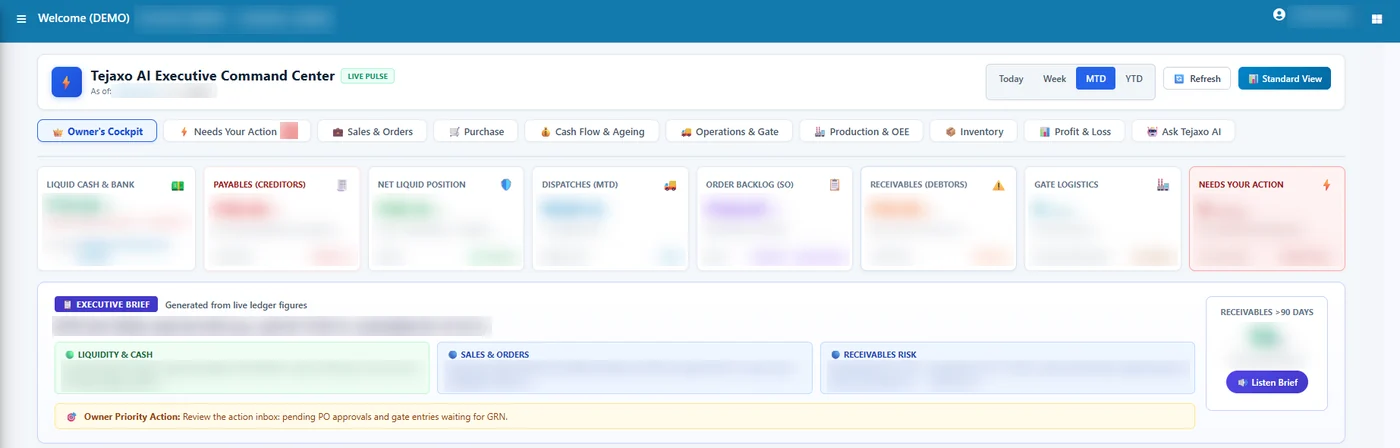
The morning MIS is often a person’s first two hours. In Tejaxo ERP the Owner’s Cockpit shows cash and bank, payables due, net liquid position, dispatches today and month to date, order backlog, receivables due and inward trucks on one screen, with every tile drilling down to its records. Owners can also ask in plain English or Hinglish – for example “top 10 overdue debtors” or “dispatch this month vs last” – and get an answer with a drill-down table, on screen or on WhatsApp as an image with a link to the ERP report. Ask Tejaxo AI is read-only: it cannot change or delete data, and verified query templates run before any free-form AI (why that matters).
7. Batch and instrument data in process plants
In chemical, pharma and food plants, automation also covers the process itself. Tejaxo SCADA runs recipe-driven batches with live plant graphics, trends, alarms and a complete electronic batch record, while valves, pumps and interlocks stay with the plant controller or DCS. Tejaxo Logger reads temperature and process instruments over RS-485 / RS-232 (Modbus RTU) and logs every reading with trend and MIN / MAX / AVG reports. Both are Tejaxo’s own products and are linked to Tejaxo ERP. More on the Tejaxo Automation page.
Manual vs automated: a typical factory day
| Step | Manual way | Automated in Tejaxo ERP |
|---|---|---|
| Production count | Slip at shift end, typed next day | Machine counts and OEE posted as production confirmations |
| Supplier invoice at gate | Guard types bill, vendor and items | Invoice scanned, fields extracted, PO matched, duplicates blocked |
| Entry from the floor or the road | Phone call, then someone types it | Voice or text on WhatsApp, missing details asked, saved under user rights |
| PO and payment approval | Waits for the approver’s laptop | Released from the phone under the same approval rules |
| Reminders and dues | Someone remembers to call | WhatsApp alerts and reminders from ERP rules |
| Morning MIS | Prepared in Excel | Owner’s Cockpit and plain-language questions with drill-down |
What should stay with people
Automation should remove typing, not judgement. In Tejaxo ERP:
- Every WhatsApp entry is saved only after the mandatory details are complete, and only under the rights of the ERP user linked to that number.
- The guard confirms the pre-filled gate entry; highlighted mismatches are not saved silently.
- Approvals stay with the approver – automation only brings the request to them.
- The AI answers questions but cannot write data; writes go only through approved interfaces, and every action is in the audit trail.
- In process plants, the controller or DCS keeps control of valves and interlocks, and may refuse a SCADA command.
Already running an ERP?
Automation does not always mean replacing your system. Tejaxo also connects SAP, Microsoft Dynamics 365, Oracle, Infor M3 and Tally to machines, SCADA and loggers, adds WhatsApp approvals and invoice scanning around them, and does this without changing the ERP’s core code – starting with a proof of concept on one plant with real data.
How to start
- List the three entries your team types most often, and where the data already exists (machine, invoice, phone).
- Pick one flow – usually gate entry or machine counts – and pilot it on one plant with real data.
- Measure the typing removed and the delay saved, then extend to approvals, alerts and reports.
See how this fits with AI ERP vs traditional ERP, or book a free consultation to see machine data, invoice scanning and WhatsApp entries on your own items.
Frequently asked questions
What is an automated ERP?
An ERP that takes data in without manual typing – from machines, scanned supplier invoices and WhatsApp messages – applies the same checks and rights as a manual entry, and sends reports, alerts and approval requests on its own.
Can machine production counts go into the ERP automatically?
Yes. In Tejaxo ERP, CNC and VMC machines send cycle counts, run and idle time, downtime and OEE through the Tejaxo connector, and counts are posted as production confirmations. This is live at a Tejaxo ERP client.
Can the ERP read supplier invoices at the gate?
Yes. With AI gate entry, a PDF or phone photo of the supplier invoice is read for GSTIN, vendor, bill number, vehicle, items, quantity, rate and taxes; the vendor and PO are checked, duplicate bills are blocked, and the guard confirms a pre-filled gate entry.
Does automation mean no one checks the data?
No. Entries are saved only when mandatory details are complete and the user has the right to save; mismatches are highlighted for a person; approvals stay with the approver; and every action is in the audit trail.
Can AI in the ERP change our data?
Not in Tejaxo ERP. Ask Tejaxo AI is read-only: it answers questions with a drill-down table but cannot change or delete data. Writes go only through approved interfaces.
Can we automate around our existing SAP, Dynamics or Tally?
Yes. Tejaxo connects SAP, Microsoft Dynamics 365, Oracle, Infor M3 and Tally to machines, SCADA and loggers and adds WhatsApp approvals and invoice scanning, without changing the ERP’s core code, starting with a proof of concept on one plant.