
In many plants every purchase order waits for the owner’s signature. The owner becomes the bottleneck, urgent orders sit for days, and people start buying first and asking later. The opposite is just as common: anyone with a login can raise, change or delete a document, and nobody can say afterwards who did what. A well-designed approval workflow with clear user rights fixes both – it sends each decision to the right person at the right level, lets them approve quickly from wherever they are, and leaves a record of every action. This guide explains how to design one, with a worked example of an approval matrix.
Rights first: who can do what
Approvals only work if the basic rights are right. Three principles cover most plants:
- Individual logins – no shared user IDs, so every entry has a name against it.
- Rights per menu and per action – the person who can create a purchase order is not automatically the one who can delete it. Separate view, save and delete rights per screen.
- A full audit trail – who created, changed, approved or deleted each document, and when.
With these in place, an approval means something: the system knows who asked, who approved and what changed in between.
Designing the approval matrix
An approval matrix says which documents need approval, at what thresholds, and by whom. Value bands are the most common basis for purchase orders; other documents may use different rules – for example, any rate above the last purchase rate, or any order for a new supplier. Keep the bands few and the rules written down, and share them with everyone who raises documents so nobody is surprised.
Worked example: one month of purchase orders
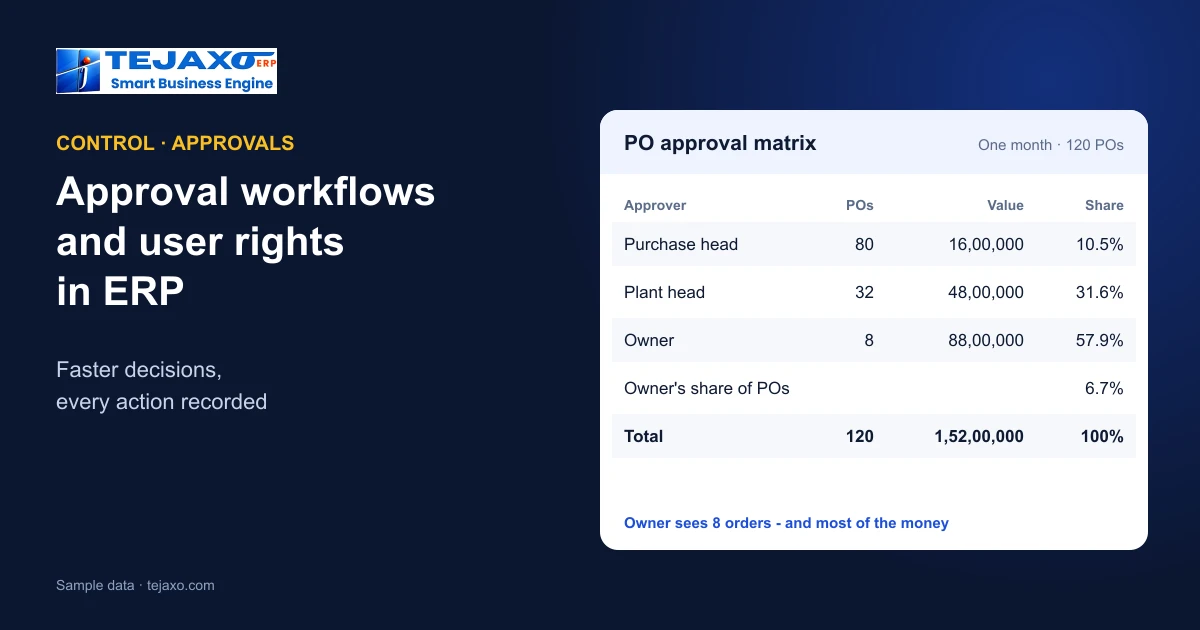
Tejaxo Manufacturing (sample data) raised 120 purchase orders in a month and set three approval bands:
| PO value | Approver | POs | Value | Share |
|---|---|---|---|---|
| Up to 50,000 | Purchase head | 80 | 16,00,000 | 10.5% |
| 50,001 to 5,00,000 | Plant head | 32 | 48,00,000 | 31.6% |
| Above 5,00,000 | Owner | 8 | 88,00,000 | 57.9% |
| Total | 120 | 1,52,00,000 | 100% |
The owner now approves only 8 of 120 orders – 6.7% of the count – but those eight carry 57.9% of the value. The routine 80 small orders no longer wait for the owner at all, and the decisions that matter most still reach the top. Before the matrix, all 120 sat in one queue, and the small orders for consumables waited behind the large ones for raw material, delaying both.
Approving where people are
An approval that needs someone to sit at a desktop is an approval that waits. Two things speed it up without weakening control:
- An action inbox on the owner’s or manager’s screen, listing everything waiting, with the key facts and one-click approval – see the owner’s daily dashboard.
- Approvals on WhatsApp, where the approver receives the summary and approves or rejects from the phone, with the action recorded in the ERP – see ERP with WhatsApp automation.
Either way, the approver should see enough to decide – supplier, items, rate against the last purchase, value, and the requisition or MRP line it came from – without opening five screens.
What to put under approval
- Purchase orders above a value, or with a rate above the last purchase or agreed rate – see purchase price variance.
- Rate or term changes on an existing order.
- Credit notes and debit notes, which change what customers and suppliers owe.
- Stock adjustments and write-offs after physical verification.
- Dispatch to a customer with overdue dues, where the business has decided that needs a check – see receivables ageing.
Everything else should flow without approval. Every extra approval step costs time; add one only where a wrong entry would cost more.
Delegation and absence
Approvals stall most often when the approver is travelling, unwell or on leave. Decide in advance who stands in for each approver and for which bands, and make the delegation a recorded setting rather than a shared password. When the owner is away for a week, the plant head may approve up to a higher limit for that week only; the audit trail should still show that the approval was given under delegation. Review delegations when the approver returns, so temporary arrangements do not quietly become permanent.
Regulated plants
Pharmaceutical and other regulated manufacturers need more than speed: they must show that every record was created and approved by an identified person, that changes are traceable and that nothing was deleted without trace. Individual logins, rights per action, password ageing, automatic log-off and a complete audit trail are the building blocks. Tejaxo ERP’s audit trail is designed to support 21 CFR Part 11 requirements; validation for a specific site remains the plant’s responsibility – see ERP for pharmaceuticals.
Measuring the workflow
- Approval time by approver and document type – long waits show where the bottleneck is.
- Share approved without change – if almost everything is approved as raised, the threshold may be too low.
- Rejections and reasons – repeated rejections for the same reason point to a training or master-data problem.
- Purchase TAT – the time from requisition to receipt, where approval delays show up first.
How Tejaxo ERP handles it
Tejaxo ERP provides individual logins, role-based menu rights with separate save and delete rights, access rights per command, password ageing and automatic log-off, and a full audit trail of every entry, approval and AI action – who, what and when. Approval workflows apply to documents such as purchase orders; the Owner’s Cockpit has an action inbox with one-click PO approval; and the Tejaxo WhatsApp AI agent delivers alerts and approvals on WhatsApp. Purchase reports include purchase TAT alongside the 3-way match and vendor rating – see 3-way match and GRNI.
Rolling it out
- Clean up the logins – one person, one user ID, and remove leavers.
- Map rights by role – store, purchase, quality, accounts, plant head – and give each role only what it needs.
- Write the approval matrix with the owner, starting with purchase orders.
- Turn on mobile approvals so the new rules do not slow anything down.
- Review after a month using approval time and rejections, and adjust the bands.
Common mistakes
- Shared logins, which make the audit trail meaningless.
- Everything to the owner, which turns approval into delay without adding control.
- Approval after the fact – material ordered on the phone and the PO approved later.
- Delete rights for everyone. Corrections should be a new entry or a reversal, not a silent deletion.
Next step
See role-based rights, the approval inbox and WhatsApp approvals on your own documents in a free demo.
Frequently asked questions
What is an approval workflow in ERP?
A set of rules that sends documents such as purchase orders to the right approver – usually by value band or exception – and records who approved what and when before the document takes effect.
How do I set purchase order approval limits?
Divide orders into a few value bands and assign an approver to each – for example purchase head, plant head and owner – then review the bands after a month using approval times and rejections.
Why separate save and delete rights?
So the people who enter documents cannot quietly remove them. Corrections should be new entries or reversals, which keeps the audit trail complete.
Can approvals be done on a phone?
Yes. Tejaxo ERP supports approvals from an action inbox on the cockpit with one click, and alerts and approvals through the Tejaxo WhatsApp AI agent, with the action recorded in the ERP.
What should an audit trail record?
Who created, changed, approved or deleted each entry, and when – including approvals and AI actions.
Does Tejaxo ERP have role-based rights?
Yes: individual logins, role-based menu rights with separate save and delete rights, access rights per command, password ageing, automatic log-off and a full audit trail.