Modules
Industries
Areas we serve
Resources
Company

Automated ERP · WhatsApp voice · AI · machine data

Automated ERP System for Manufacturers: No Manual Data Entry, Answers by Voice

Tejaxo ERP – the automated ERP for manufacturers. Data comes in without typing; owners get answers by voice. Machine counts and OEE are posted from CNC and VMC machines, supplier invoices are read at the gate, and staff make entries by speaking or typing on WhatsApp in any language – while every entry is saved only under the user’s rights and recorded in the audit trail.

✓ No manual entry   ✓ Run by voice   ✓ Control stays with people

Entries made today without typingSample data
Tejaxo Manufacturing · Plant 1 (sample)
From machines
126
From scanned bills
18
From WhatsApp
42
Latest automatic entries
Voice note → Payment receipt · Tejaxo CustomerSaved
Scanned bill → Gate entry · Tejaxo VendorPO matched
Owner asked by voice
"Dispatch this month vs last" → graph sent with a link to the ERP report
Illustration with sample data

Why ERP data is late and wrong

Most ERP data is still typed in by hand

In most factories the ERP is only as good as the person typing into it. Production is keyed in after the shift, supplier bills are copied line by line, and the owner waits for someone to prepare a report. The data arrives late, with errors, and the ERP becomes a record of the past instead of a tool to run the plant.

Typing after the shift

Output, rejections and downtime are entered from memory, hours later.

Bills copied line by line

GSTIN, items, rates and taxes are retyped from every supplier invoice.

Staff away from the desk

Supervisors, salespeople and drivers cannot reach a computer when the work happens.

Reports on request

The owner asks for a figure and waits for someone to build it in Excel.

How an automated ERP works

From the source to the ERP to the owner's phone

01 · Capture at the source

Machines, scanned invoices and WhatsApp messages – spoken or typed – become the input, not a keyboard.

02 · Check before saving

Masters, mandatory fields, duplicates and open POs are checked; if data is missing, WhatsApp asks for it.

03 · Save under rights

The entry is saved only if the user linked to that mobile number has the right to save that document.

04 · Answer by voice

Owners ask on WhatsApp and get the figure or graph back, with a link to the report in the ERP.

What is automated

Automation built into Tejaxo ERP

WhatsApp voice entry

Sales orders, gate entries, GRNs, expenses, attendance, production entries, payment receipts, invoices and more – spoken or typed on WhatsApp in Hindi, English, Hinglish or other languages.

Questions for missing data

If payment terms, a rate or any mandatory field is missing, WhatsApp asks the user and saves the entry only when everything required is received.

AI invoice scanning at the gate

Upload a PDF or phone photo of a supplier invoice: GSTIN, vendor, bill number, items, quantity, rate and taxes are read, checked against masters and the open PO, and duplicate bills are blocked.

Machine data to ERP

Cycle counts, run and idle time, downtime and OEE come straight from CNC and VMC machines into the ERP – live at a Tejaxo ERP client.

Reports and graphs by voice

Ask “top 10 overdue debtors” or “dispatch this month vs last” and get the answer as a graph on WhatsApp, with a link to the same report in the ERP.

Ask Tejaxo AI

Questions in English or Hinglish return an answer, a summary and a drill-down table; period, plant and GST basis are stated with every answer.

Approvals from the phone

Release purchase requisitions and purchase orders and approve payments on WhatsApp.

Alerts and reminders

Approvals, stock, dues, invoices and reports sent automatically on WhatsApp to the right person.

Real Tejaxo ERP screens

Automation in real Tejaxo ERP screens

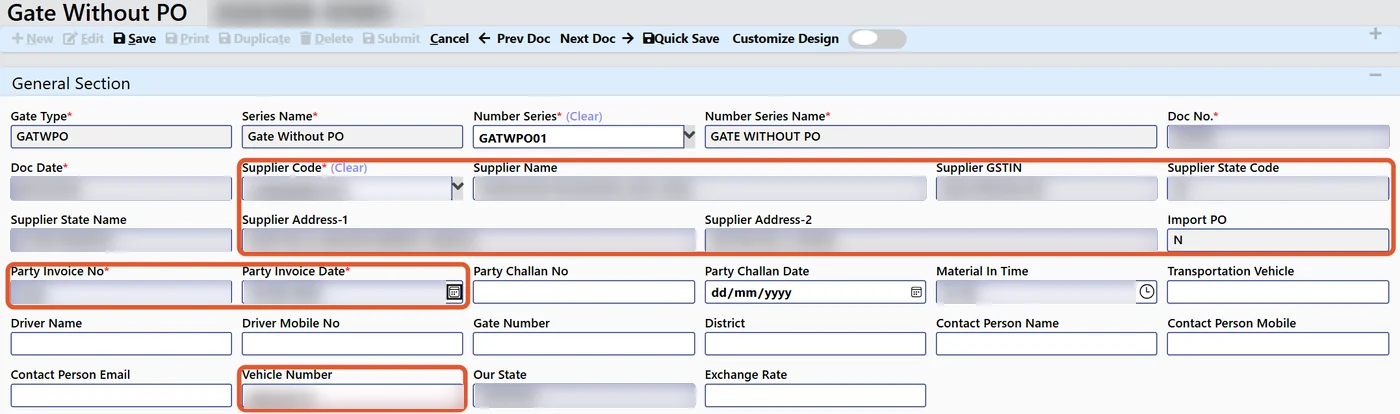
Tejaxo ERP AI gate entry filled from a scanned supplier invoice
AI gate entry in Tejaxo ERP: supplier, invoice and vehicle fields filled from the scanned invoice (data hidden)
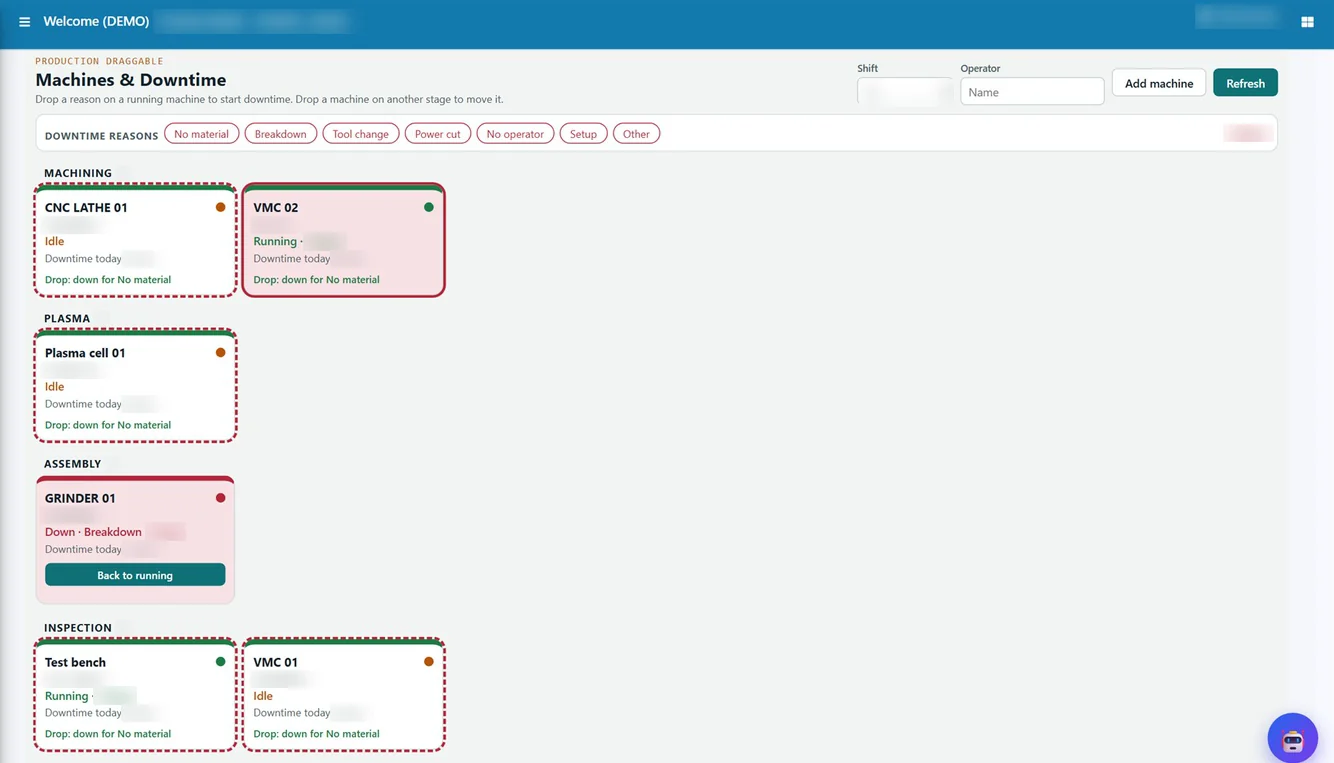
Tejaxo ERP machines and downtime board
Machines and Downtime board in Tejaxo ERP: machine status by stage with one-click downtime reasons (data hidden)
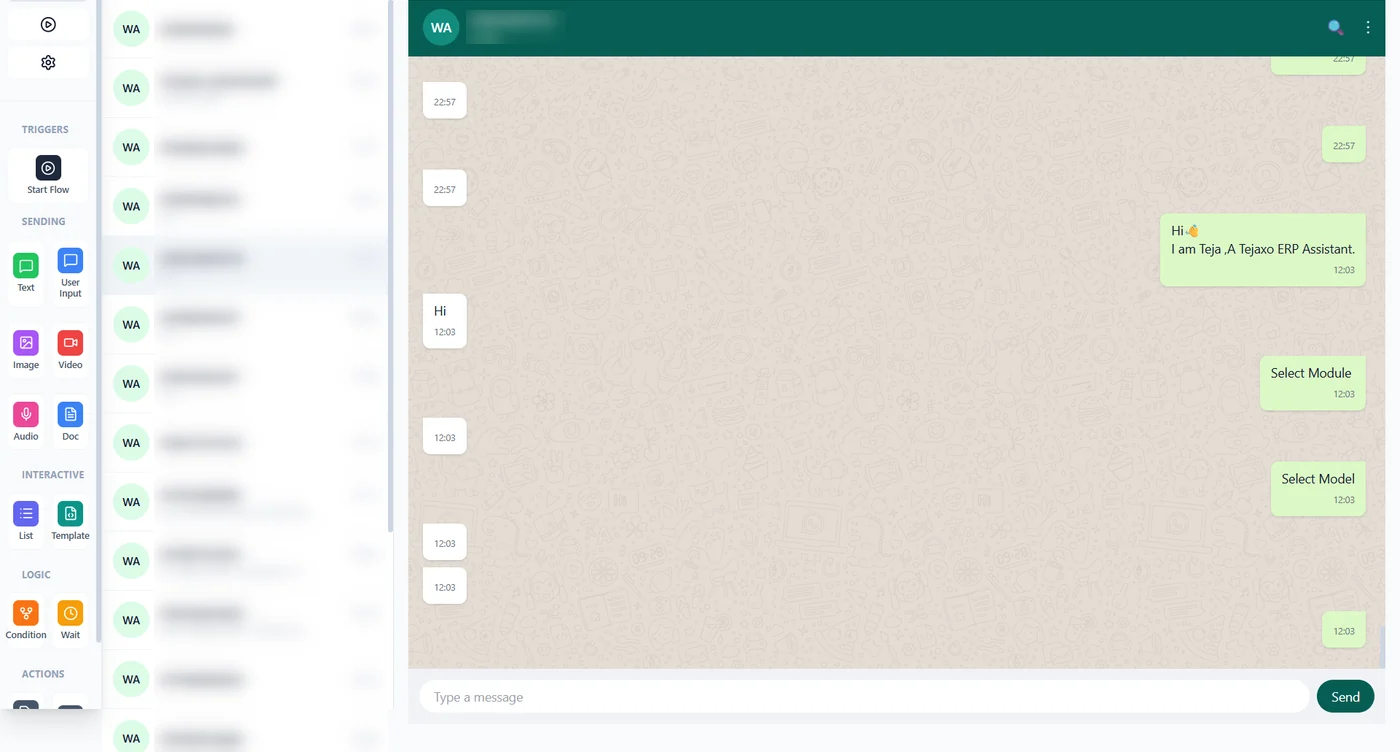
Tejaxo ERP WhatsApp inbox with chat conversation
WhatsApp inbox inside Tejaxo with every customer conversation in one place (data hidden)
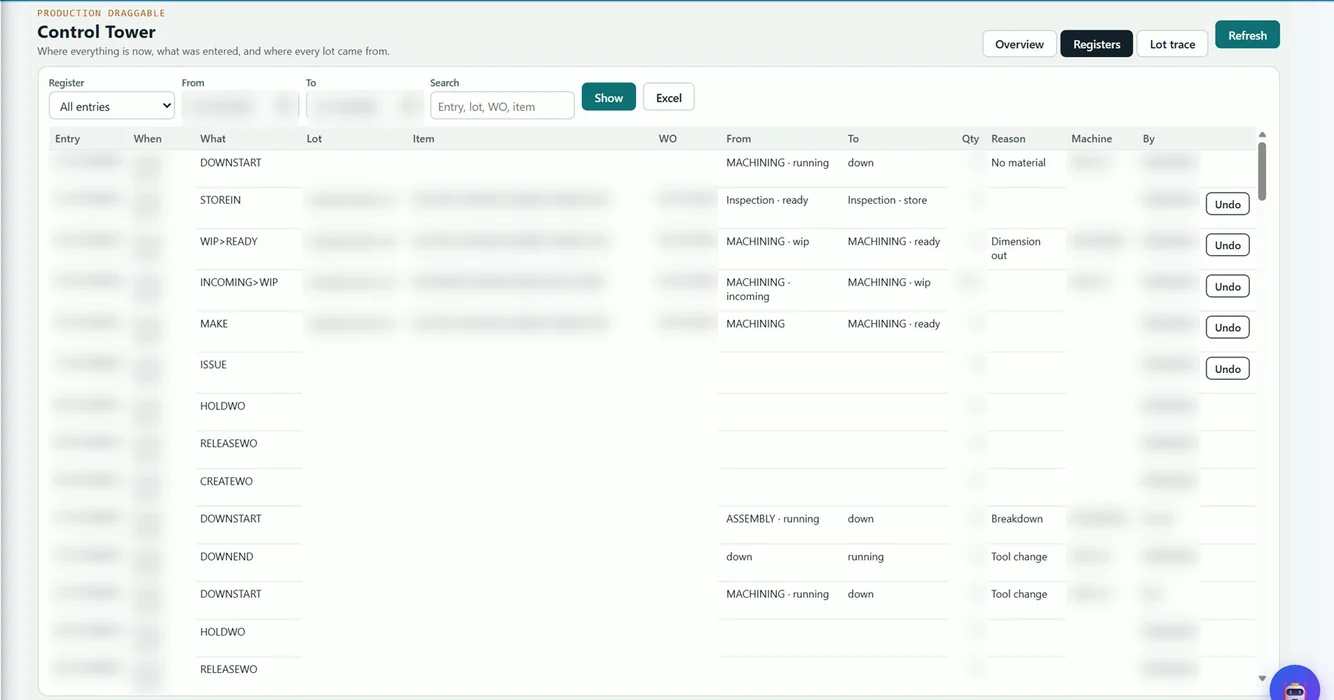
Tejaxo ERP control tower register of production entries with from and to stages and reasons
Control tower register: every move, downtime and work-order action recorded with an undo option (data hidden)

For the owner

Automated does not mean uncontrolled

Automation in Tejaxo ERP never bypasses people. An entry from a voice note follows the same rights and mandatory checks as an entry on the screen; the AI only reads data and cannot change or delete it; and every entry, approval and AI action is in the audit trail – who, what and when. Read more: what AI agents in an ERP should and should not do.

User rights first

No right to save an invoice? WhatsApp says so, and nothing is saved.

Read-only AI

Ask Tejaxo AI runs read-only queries only.

Full audit trail

Every entry, approval and AI action recorded.

Reports owners use

1000+ ready reports, including

Entries by source (machine, scanned bill, WhatsApp, screen) · OEE and downtime by reason · gate entry and GRN register · purchase and sales registers · receivables ageing · approvals pending and done · audit trail by user – plus live dashboards and Power BI.

Where we work

Automated ERP across India

Tejaxo implements on-site and remotely across India, with fast on-site support from our Palwal office in Faridabad, Gurugram, IMT Manesar, Bhiwadi, Noida and the rest of Delhi NCR. The automation cluster in detail: automated ERP for manufacturing, WhatsApp voice data entry and reports, agentic ERP and AI agents and AI invoice scanning at the gate.

Related: AI ERP vs traditional ERP · modern ERP for manufacturers · machine monitoring and OEE · Tejaxo Automation · AI agent integration · interactive demo

FAQ

Questions about automated ERP

An ERP where data comes in from its source – machines, scanned documents and messages – instead of being typed in, and where reports come to the user on request. In Tejaxo ERP that means machine data from CNC and VMC machines, AI invoice scanning at the gate, WhatsApp entries by voice or text, and answers by voice, all under user rights and an audit trail.

Tejaxo ERP, from Tejaxo Technologies Pvt. Ltd. (Palwal, Haryana, in business since 2017), is built to remove manual entry: machine counts and OEE are posted from CNC and VMC machines, supplier invoices are read at the gate, and staff make entries by speaking or typing on WhatsApp in any language.

Yes. Sales orders, gate entries and GRNs, expenses, attendance, production entries, payment receipts, invoices and other entries can be spoken or typed on WhatsApp in Hindi, English, Hinglish or other languages. If something required is missing, WhatsApp asks for it before saving.

No. An entry is saved only if the ERP user linked to that mobile number has the right to save that document and all mandatory fields are complete; otherwise WhatsApp replies that the user does not have the right, or asks for the missing data. Every action is recorded in the audit trail.

No. Ask Tejaxo AI is read-only by design – only read queries run. Entries are created only through the ERP’s own screens and rules, under the user’s rights.

The gate uploads a PDF or a phone photo of the supplier invoice. GSTIN, vendor, bill number and date, vehicle, items, quantity, rate and taxes are read, checked against masters and the open purchase order, duplicate bills are blocked, and the guard confirms a pre-filled gate entry.

Yes. The owner asks on WhatsApp by voice or text – for example “top 10 overdue debtors” or “dispatch this month vs last” – and gets the answer or graph back with a link to open the same report in the ERP.

Tejaxo Technologies implements Tejaxo ERP on-site from its Palwal office for factories in Faridabad, Gurugram, IMT Manesar, Bhiwadi, Noida and across Delhi NCR, and remotely across India.

Show us one entry you type every day - we will automate it

Book a free demo at your plant or online. The second demo runs on your own items and customers.

Stay connected

ERP insights, product updates and automation tips for manufacturers.

You have been successfully subscribed! Oops! Something went wrong, please try again.
© 2017–2026 Tejaxo Technologies Pvt. Ltd. All rights reserved. Privacy policy · Sitemap · Contact