
When raw material prices move, most plants find out at month-end, when the margin is already lower than planned. The purchase team knows each rate it agreed, but nobody adds up what the movement cost across all receipts, or checks whether the quotations sent to customers still assume last quarter’s price. Purchase price variance (PPV) measures that cost, and a price trend report shows which way each item is moving. Together they turn rate changes into a number management can act on – in purchasing, in costing and in pricing. This guide explains both with a worked example.
What purchase price variance is
PPV = (actual purchase rate – standard rate) x quantity purchased. The standard rate is the rate the plant planned with – in its product costs, budgets and price lists. A positive PPV means the plant paid more than planned (unfavourable); a negative one means it paid less (favourable). Calculated per receipt and added up by item, supplier and period, it shows exactly where price movements are hurting or helping.
Choosing the standard rate
- Budget or standard cost – the rate in the product cost sheets, fixed for a year or a quarter. Best for measuring the effect on margins.
- Last purchase rate – shows the latest movement, but the base keeps changing.
- Contract or rate-agreement price – shows whether buyers are paying above agreed rates.
Use one base consistently. For imported material, compare landed rates – including duty and clearing – not the supplier’s price alone; see landed cost explained.
Worked example: one item, one quarter
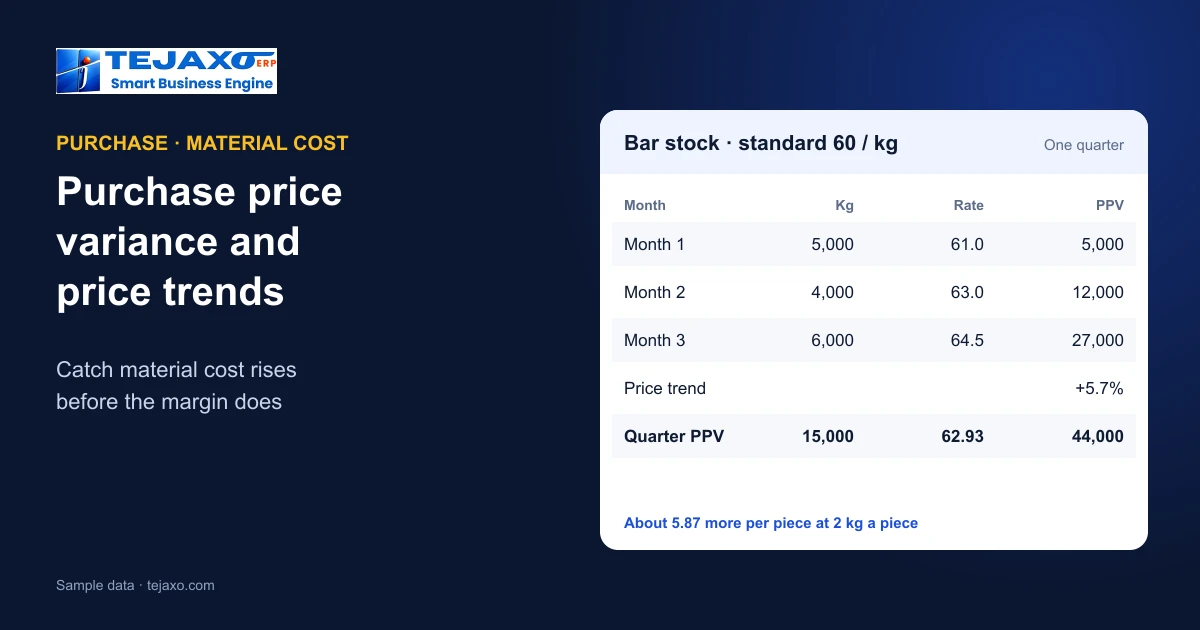
Tejaxo Manufacturing (sample data) plans bar stock for Product A at a standard rate of 60 per kg. Receipts in the quarter:
| Month | Kg | Rate | Diff | PPV |
|---|---|---|---|---|
| Month 1 | 5,000 | 61 | 1 | 5,000 |
| Month 2 | 4,000 | 63 | 3 | 12,000 |
| Month 3 | 6,000 | 64.5 | 4.5 | 27,000 |
| Quarter | 15,000 | 62.93 | 44,000 |
The quarter’s PPV is 44,000 unfavourable, and the weighted average rate is 62.93 against the standard of 60. The price trend is clear too: from 61 in month 1 to 64.5 in month 3, a rise of 5.7%. If Product A uses 2 kg of bar per piece, each piece now carries about 5.87 more material cost than the quotation assumed – on every order quoted at the old standard. Across a few thousand pieces a month, that difference decides whether the order makes money.
What to do with the numbers
- Review quotations. Items with a rising trend and a large PPV are where customer prices need revisiting first.
- Negotiate with evidence. A supplier’s rate history against other suppliers of the same item is the strongest argument in a negotiation; see vendor rating.
- Update the standard when a move is lasting, not temporary – otherwise every report shows the same variance and stops being noticed.
- Time the buying for items that move with commodity prices, within what storage and cash allow; see the reorder point and EOQ calculator.
- Separate price from quantity. A higher material cost on a job can come from paying more or from using more; PPV isolates the price part, and scrap and yield explain the rest.
Reading a price trend report
A useful price trend shows, for each item, the rate of every receipt over the last six or twelve months, by supplier, with the percentage change. Sort by the change and the top of the list shows the items where cost is moving fastest. Compare suppliers on the same line: if one supplier’s rate rose 6% while another’s rose 2%, the conversation is about that supplier, not the market. Read the trend together with quantities – a rate paid on a tiny emergency purchase should not set the trend for the item.
A favourable variance is not always good news
Paying less than standard looks like a saving, but it is worth asking why. A lower rate may come from a new supplier whose material is rejected more often, a larger order that ties up cash and shelf space, or a cheaper grade that causes trouble on the machines. Read a favourable PPV next to incoming PPM, delivery performance and stock levels for the same item before treating it as a win; the cheapest rate is only a saving if the material works and arrives when needed.
Looking at PPV by supplier and by buyer
The same total can be cut different ways. By supplier, it shows who is raising rates faster than the market. By item group, it shows which part of the bill of materials is under pressure. By buyer or purchase team, it shows whether rate agreements are being followed or bypassed with spot purchases. Each view leads to a different conversation, so look at all three in the monthly review rather than one total.
Where it shows up in product cost
Product costs built at a standard rate stay steady until someone updates them. Job costs built at the actual rate of the batch issued move with the market straight away. Comparing the two each month is how a plant sees that its margins are eroding before the quarterly results do; see work order costing and the free stock valuation calculator for how FIFO, weighted average and standard valuation treat the same receipts differently.
How Tejaxo ERP handles it
Tejaxo ERP records the rate on every purchase order and goods receipt, so purchase reports include price trends alongside vendor rating, schedule vs actual, the 3-way match and GRNI – see 3-way match and GRNI. Stock can be valued by FIFO, LIFO, weighted average or standard, imported material carries its landed rate as the stock rate, and work-order costing charges material at the receipt rate of the batch actually issued. Quotations draw on price lists, so updated rates flow into new quotations.
Setting it up
- Fix a standard rate for each major raw material, and the period it applies to.
- Capture the rate on every receipt – including freight or landed cost where it applies.
- Review PPV and price trends monthly with purchase, costing and sales together.
- Agree a trigger – for example a lasting change of more than a few per cent – for updating standards and quotations.
Common mistakes
- Comparing supplier price, not landed rate, for imported material.
- Letting standards go stale, so the variance is always large and nobody reacts.
- Averaging away the trend – a quarterly average hides a steady monthly rise.
- Not telling sales. PPV that never reaches the people who quote prices does not protect the margin.
Next step
See price trends, purchase reports and work-order costing on your own items in a free demo.
Frequently asked questions
What is purchase price variance?
The difference between what was paid and the planned (standard) rate, multiplied by the quantity bought: PPV = (actual rate – standard rate) x quantity. Positive is unfavourable, negative is favourable.
How is PPV calculated over a period?
Calculate it for each receipt and add up by item, supplier and period. For example, 15,000 kg bought at rates of 61 to 64.5 against a standard of 60 gives a PPV of 44,000.
What standard rate should be used?
Usually the budget or standard cost used in product costs and quotations, fixed for a period. Last purchase rate and contract price are alternatives for other purposes; use one base consistently.
What is a price trend report?
A list of purchase rates for each item over time, by supplier, with the percentage change – showing which costs are rising fastest and which suppliers are moving most.
Should imported material be compared at supplier price?
No. Compare the landed rate, including duty and clearing, because that is the cost that goes into stock and product cost.
Does Tejaxo ERP show purchase price trends?
Yes. Purchase reports include price trends with vendor rating, schedule vs actual, 3-way match and GRNI; stock can be valued at standard, and imports carry their landed rate.