
Ask a manufacturer what a job earned and the answer is usually an estimate: the selling price minus a standard material cost and a rough percentage for everything else. The books show whether the month made money, not which jobs did. Work order costing answers the question job by job: what material, machine time, labour and overhead this order actually consumed, and what was left after the invoice. This guide explains the four cost elements, works through a full example and shows how an ERP builds the figure from records the plant already keeps.
Why estimated job costs mislead
- Material is costed at a standard or average rate, while the steel, paper or polymer actually issued was bought at a different price.
- Machine time is assumed, not measured – a job that ran twice as long as planned looks as profitable as one that ran to plan.
- Labour and overhead are spread evenly across products, so complex low-volume jobs are subsidised by simple high-volume ones.
- Rejections and rework disappear into the month’s totals instead of being charged to the job that caused them.
The result is quoting by habit: some products are priced too low for years without anyone noticing.
The four elements of a work order’s cost
- Material = quantity issued from each batch x that batch’s receipt rate. If the job used two lots of raw material bought at different prices, each is charged at its own rate.
- Machine = run minutes on each machine x that machine’s rate.
- Labour = paid minutes of operators and helpers on the job x their rates.
- Overhead = a rate per machine hour (or another driver) for power, supervision, maintenance and other indirect costs.
Profit on the job = invoiced value – cost of the units sold.
Worked example: one work order, four elements
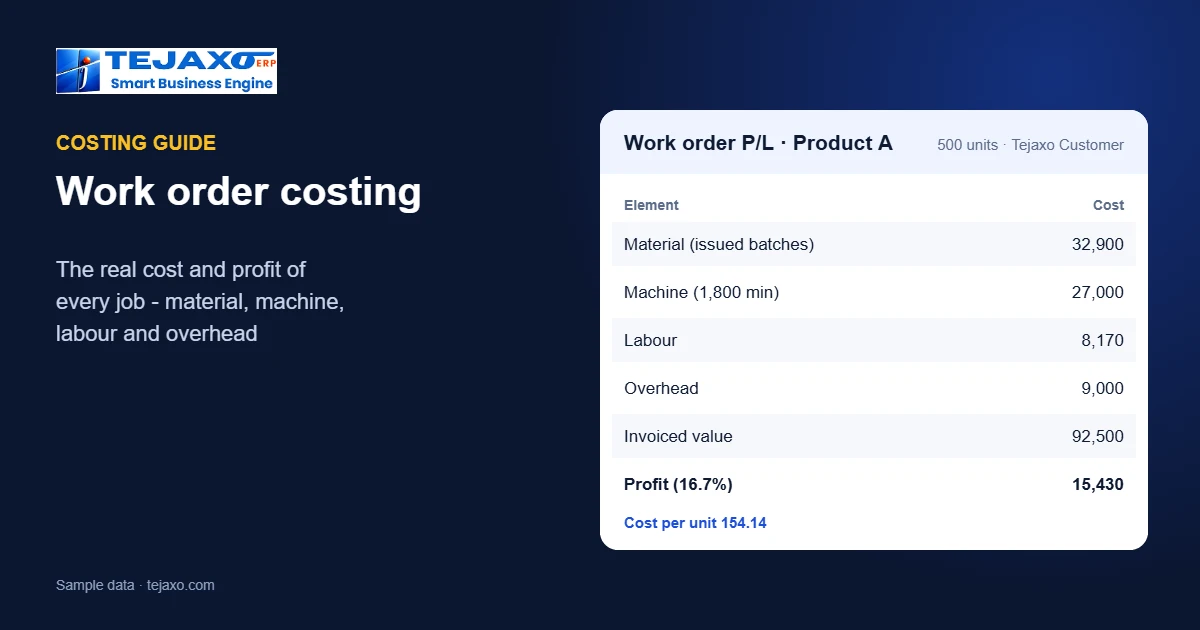
Tejaxo Manufacturing makes 500 units of Product A for Tejaxo Customer, invoiced at 185 per unit (sample numbers in rupees).
| Element | Basis | Cost |
|---|---|---|
| Material | 300 kg @ 62 + 220 kg @ 65 | 32,900 |
| Machine | 1,800 min @ 900 / hr | 27,000 |
| Labour | 1,900 min operator + helper | 8,170 |
| Overhead | 1,800 min @ 300 / hr | 9,000 |
| Total | 154.14 per unit | 77,070 |
The invoice is 92,500, so the job made 15,430 – a margin of 16.7%. Two details change the picture compared with an estimate. Material was charged at the rates of the two lots actually issued, averaging about 63.27 per kg; at a standard rate of 60 per kg the material would have shown 31,200, overstating the profit by 1,700. And the machine ran 1,800 minutes: had the job been costed at a planned 1,500 minutes, another 4,500 of machine cost and 1,500 of overhead would have been hidden.
Where the numbers come from in an ERP
None of these figures needs a separate costing exercise if the plant’s everyday records are complete:
- Material: goods receipts give the rate of each batch; issues to the work order record which batch went in – see batch and heat traceability.
- Machine and labour time: production entries record run minutes per machine and the operators and helpers on the job; machine data can come straight from CNC and VMC machines – see machine data and OEE.
- Overhead: a rate per machine hour kept on the machine master.
- Invoice: the sales invoice against the order closes the loop.
In Tejaxo ERP the work-order report brings these together: material at the issued batch’s receipt rate, machine time at the machine rate, labour at paid minutes, overhead, and profit as invoiced value minus the cost of the units sold. Imported material carries its landed cost, duty and clearing included – see landed cost explained.
Outside processes: job work in the job cost
Many jobs leave the plant for plating, heat treatment, machining or painting. Those vendor charges belong to the work order too. When material goes out on a returnable gate pass against the job and the job-work charges are recorded against the same job, the cost of the outside process is added to that order instead of disappearing into a monthly purchase total. The same records show what is still lying with each vendor – see job work software.
Job costing or process costing?
Job (work-order) costing suits plants that make to order – machined parts, forgings, fabricated assemblies, printed boxes – where each order has its own material, routing and time. Process costing suits continuous or batch plants – chemicals, food, paper – where cost is averaged over a period’s output. Many plants need both: batch plants still want the cost and yield of each batch, and job shops still compare average costs per product family. What matters is that the cost is built from actual issues and actual time, whichever unit you report it on.
What to do with job costs
- Re-price products that lose money. Sort jobs by margin; the bottom of the list is where quotations need attention.
- Find the cost drivers. If machine time is far above plan, look at set-ups, downtime and cycle times; if material is high, look at scrap and the rates of the lots issued.
- Quote from history. The actual cost of the last similar job is a better starting point than a spreadsheet estimate.
- Charge rejections to the job. Material and machine time spent on rejected parts belong to the order that caused them.
Getting started
- Set a rate for each machine (running cost per hour) and an overhead rate per machine hour.
- Make sure every issue to production names the work order and the batch.
- Record run minutes and operators on every production entry – or connect the machines.
- Close each work order when the job is invoiced, and review the margin report every week.
The first weeks usually reveal a handful of products whose margin is far below what the team believed. That short list alone is often worth the effort, because it changes how the next quotations for those products are priced and which jobs the plant chases.
Common mistakes
- Costing material at the latest purchase price instead of the batch actually issued.
- Leaving machine time at the planned value. The difference between planned and actual time is often the whole margin.
- One overhead rate for every machine. A press and a manual bench do not cost the same per hour.
- Closing jobs before the invoice. Profit is invoiced value minus cost; without the invoice there is no margin to read.
Next step
See work-order costing and P/L on one of your own jobs in a free demo, or read about production planning and the free OEE calculator.
Frequently asked questions
What is work order costing?
Calculating the actual cost of each production order – material, machine time, labour and overhead – and comparing it with the invoiced value to get the profit on that job.
How is material cost charged to a job?
As the quantity issued from each batch multiplied by that batch’s receipt rate, so lots bought at different prices are each charged at their own rate.
How are machine and labour costs calculated?
Machine cost = run minutes on each machine x the machine rate; labour = paid minutes of operators and helpers x their rates. Both come from production entries or machine data.
How is overhead added?
Usually as a rate per machine hour covering power, supervision, maintenance and other indirect costs, applied to the job’s run time.
Why does the job cost differ from the standard cost?
Because actual material rates, run times, rejections and labour differ from the standard. Work order costing shows the actual figures so pricing and improvement can be based on them.
Does Tejaxo ERP calculate job profit automatically?
Yes. Its work-order costing and P/L report charges material at the issued batch’s receipt rate, machine time at the machine rate, labour at paid minutes and overhead, and shows profit as invoiced value minus the cost of units sold.