
A factory owner’s day is full of numbers, but most of them arrive late, in different formats, from different people: the bank balance from accounts, dispatches from the store, pending orders from sales, overdue payments from someone’s register. By the time they are put together, the moment to act has passed. An owner’s dashboard – a single screen built from the live books – answers the questions that matter every morning, and the most important number on it for most manufacturers is the net liquid position: whether the cash coming in over the next few days covers what has to go out. This guide explains what such a screen should show and how to read it.
Five questions an owner asks every day
- Am I making money? Sales, margin and profit for today, the month and the year.
- Is cash safe? Cash and bank, what customers owe, what is due to suppliers.
- Are customers happy? Dispatches against plan, the order backlog, overdue lines.
- Is the operation flowing? Production, inward trucks, stock and machines.
- What needs my attention? Approvals waiting, exceptions, overdue items.
A good dashboard is organised around these questions, not around modules. The owner should not have to know which report or menu holds an answer.
Net liquid position
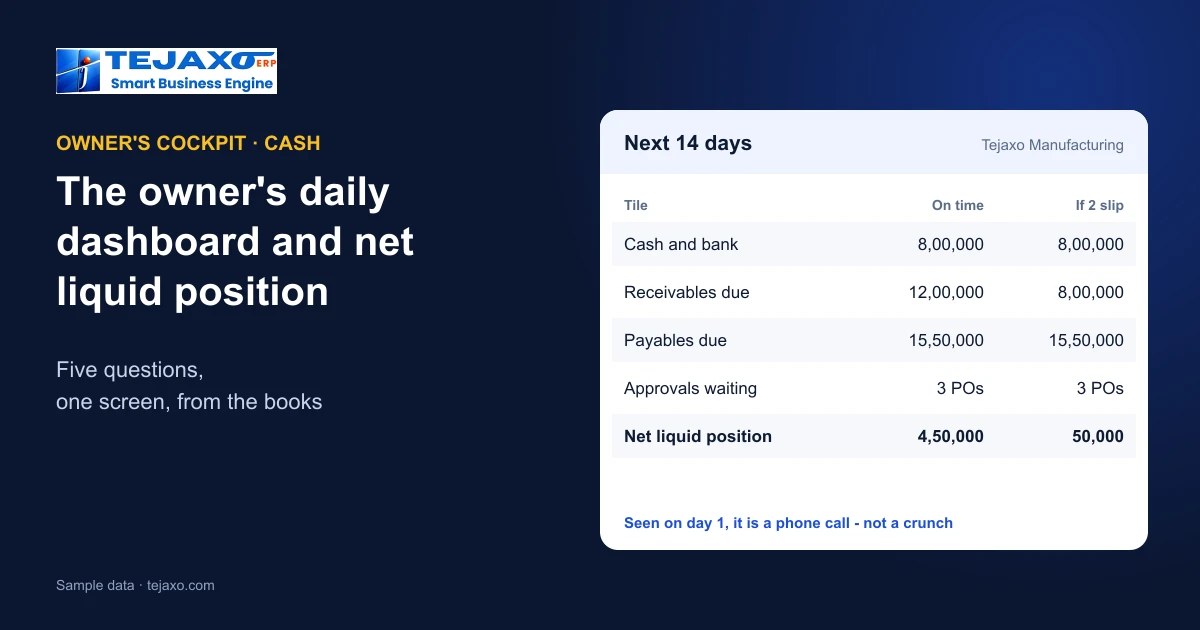
Net liquid position = cash and bank + receivables due – payables due, taken over the same short horizon – often the next one or two weeks. It answers a simple question: if customers pay what they owe on time and the plant pays what it owes on time, how much cash is left?
| Tile (sample data) | Amount |
|---|---|
| Cash and bank | 8,00,000 |
| Receivables due in 14 days | 12,00,000 |
| Payables due in 14 days | 15,50,000 |
| Net liquid position | 4,50,000 |
Tejaxo Manufacturing (sample data) is comfortable at 4,50,000. But if two customers slip and 4,00,000 of the receivables does not arrive on time, the position falls to 50,000 – barely positive, with salaries and GST still to come. Seen on the first morning of the fortnight, that is a reason to call those two customers and re-sequence supplier payments; seen at the end of the fortnight, it is a cash crunch. The receivables side is only as good as the ageing behind it – see receivables ageing and collections.
Using the figure to plan payments
The net liquid position is most useful as a planning tool, not a score. Look at it with the list behind each side: the receivables that make up the incoming total, sorted by size and reliability, and the payables that make up the outgoing total, sorted by due date. A large receivable from a customer who usually pays late deserves a call before it is counted on. Statutory payments – GST, TDS, salaries – come first and cannot move. Among suppliers, those whose material keeps the line running come before those who can wait a few days. Agreed this way, payment decisions stop being made in a hurry on the day the money runs short.
What the screen should show
- Cash: cash and bank, payables bill-wise due, receivables due, net liquid position.
- Customers: dispatches today and month-to-date, the order backlog and overdue lines – see OTIF and order backlog.
- Operations: inward trucks waiting at the gate, production against plan, stock exceptions.
- Action inbox: purchase orders and other documents waiting for approval, approved with one click.
Each tile should show today, the week, the month and the year, and every number should open the records behind it. A tile that cannot be drilled into invites argument instead of action.
Rules that make a dashboard trustworthy
- Built from the ledgers, not from a spreadsheet someone updates on Friday.
- Same definitions every day – what counts as “due”, which date ageing starts from.
- Restricted to the people who should see it. Cash and margin are not for every login.
- Few tiles, chosen for decisions. If a number never changes what anyone does, remove it.
Asking instead of searching
Even a good screen cannot hold every question. “Top 10 overdue debtors”, “dispatch this month versus last”, “which supplier’s material was rejected most” – an owner should be able to ask such questions in plain language and get the answer with the period and plant stated, plus the table behind it. The safe way to build this is to run proven, verified query templates first and fall back to free-form AI only when no template fits, so the same question always gets the same answer – see AI ERP vs traditional ERP.
One screen for several plants
Owners of more than one plant need the same view across plants and the ability to compare them: sales and growth by plant, state and customer, month on month and year on year. See one-screen MIS for multi-plant owners and how goods in transit between plants keeps group stock correct.
How Tejaxo ERP handles it
The Owner’s Cockpit in Tejaxo ERP is built around five questions – Am I making money? Is cash safe? Are customers happy? Is the operation flowing? What needs my attention? Its tiles include cash and bank, payables bill-wise due, net liquid position (cash + debtors – dues), dispatches today and month-to-date, the order backlog, receivables due, inward trucks and an action inbox with one-click PO approval. Every tile has today, week, MTD and YTD views and drills to its records; figures are computed from the ledgers and visible only to authorised users. Ask Tejaxo AI answers questions in English or Hinglish with a summary and a drill-down table, stating the period, plant and GST basis, and runs verified query templates before any free-form AI. The same answers are available on WhatsApp – see ERP with WhatsApp automation.
Setting up the habit
- Agree the horizon for the net liquid position – one week or two – and keep it fixed.
- Clean the inputs: receipts adjusted bill-wise, supplier bills booked with due dates, dispatches posted the same day.
- Look at it at the same time every morning and act on one thing from it.
- Review the tiles every quarter – drop the ones nobody acts on, add the one everyone keeps asking for.
Common mistakes
- Too many tiles. Thirty numbers on one screen hide the three that matter.
- Numbers from spreadsheets that are a week old by the time they are seen.
- Cash without dues. A healthy bank balance means little if a large supplier payment falls due on Monday.
- No drill-down, so every surprising number turns into a phone call to accounts.
Next step
See the Owner’s Cockpit and Ask Tejaxo AI on your own data in a free demo.
Frequently asked questions
What is net liquid position?
Cash and bank plus receivables due, minus payables due, over the same short horizon such as the next one or two weeks. It shows how much cash remains if customers and suppliers are paid on time.
What should a factory owner’s dashboard show?
Answers to five questions: am I making money, is cash safe, are customers happy, is the operation flowing, and what needs my attention – with tiles for cash, receivables and payables due, dispatches, order backlog, inward trucks and pending approvals.
Why build the dashboard from the ledgers?
So the figures are current and match the books. Dashboards fed from spreadsheets are late and invite argument about which number is right.
How many tiles should an owner dashboard have?
As few as possible – only the numbers that change decisions. Review the set every quarter and remove tiles nobody acts on.
Can an owner ask the ERP questions in plain language?
Yes, if the ERP supports it safely. Tejaxo ERP’s Ask Tejaxo AI answers English or Hinglish questions with a summary and drill-down table, running verified query templates first.
Does Tejaxo ERP have an owner dashboard?
Yes. The Owner’s Cockpit shows cash and bank, payables due, net liquid position, dispatches, order backlog, receivables due, inward trucks and an action inbox, with today, week, MTD and YTD views.