
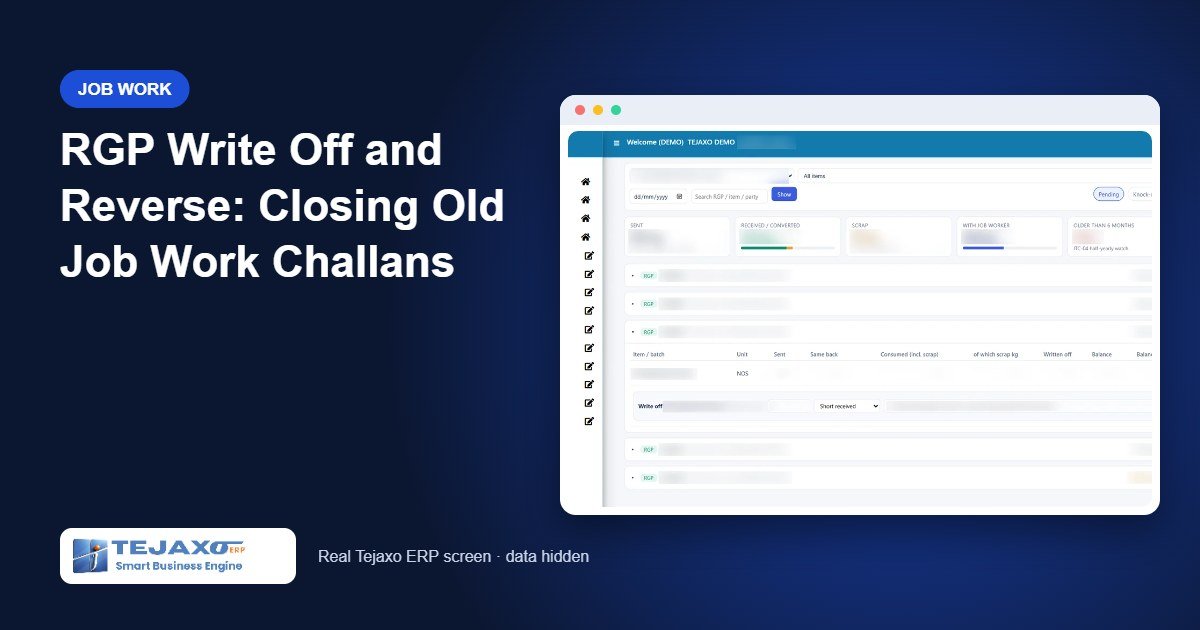
Every plant that sends material out for plating, coating, heat treatment or machining has the same quiet problem: a stack of old returnable gate passes that still show as open. The material came back months ago, but the receipt was booked without linking it to the challan, or a few pieces were short and nobody closed the line. An RGP write off, done properly, is how you settle these lines. Done badly, it becomes a way to hide stock.
An RGP challan (returnable gate pass) is the document that records material sent out of the plant for job work and expected back. It stays open until every piece is received or accounted for, which is why old RGP challans pile up when receipts are not linked to them.
This article explains how Tejaxo ERP handles old job work documents: how it finds receipts that were never knocked off, how an administrator closes them in one action, how a genuine shortage is written off with a reason, and how any write-off can be reversed later without touching the original documents.
Why old job work challans stay open
An RGP (returnable gate pass) records material leaving the plant for a job worker. It is closed only when the material comes back and the receipt is linked, or “knocked off”, against the RGP line. In practice, three things keep old challans open:
- Receipts booked without a link. Before a structured RGP process was in place, stores often received returned material on an ordinary MRR. Stock went up, but the RGP line never learnt that the material was back.
- Small shortages. One bracket out of fifty is lost or rejected at the job worker. The line shows a balance of one, forever.
- Nobody owns the clean-up. Stores think it is an accounts issue; accounts think it is a stores issue.
The cost is real. Your pending-with-job-worker figure is inflated, follow-up calls go to vendors who owe you nothing, and old lines can land in the deemed supply list that your accountant reviews for ITC-04. We cover that rule in detail on our ITC-04 filing from ERP page.
Step 1: See what is really pending
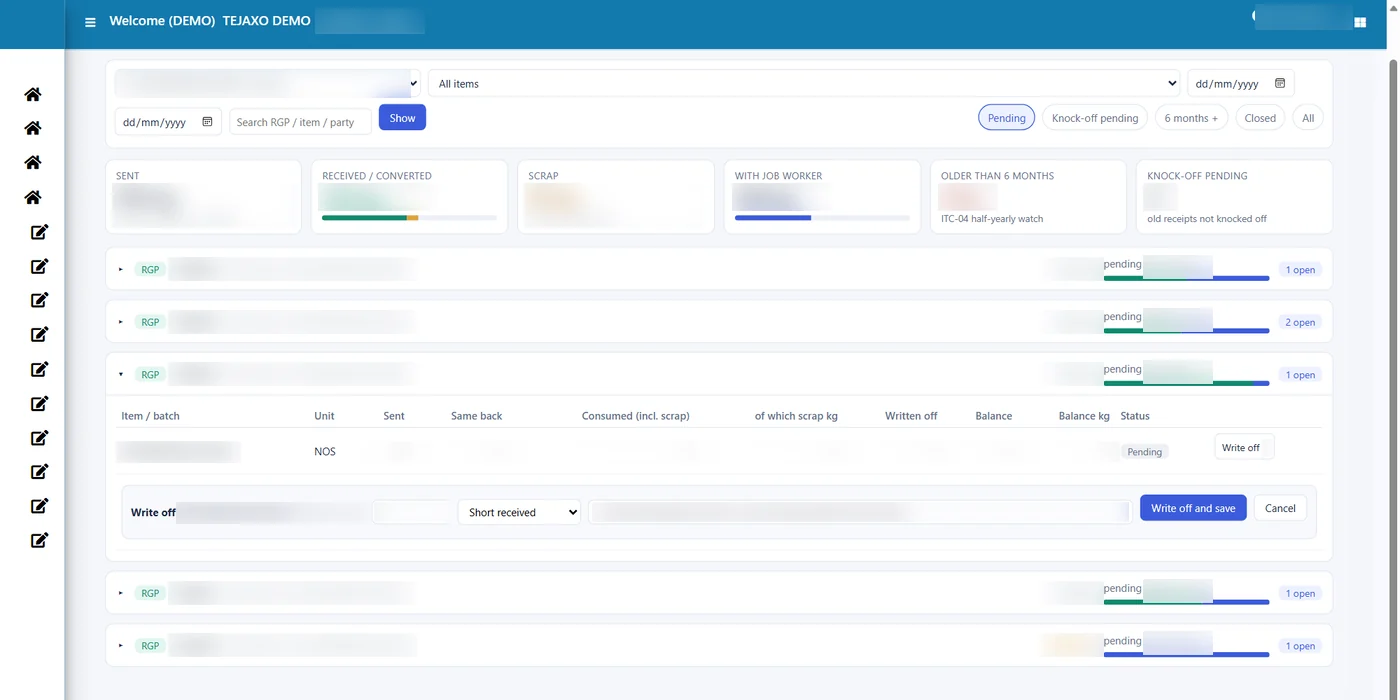
Tejaxo ERP counts old documents from day one. Nothing is ignored just because it was entered before the RGP module was set up. In RGP Reco, the filter Show: Knock-off pending (old receipts) lists every RGP line where a matching receipt exists on an old MRR but no knock-off row has been written.
This is different from a genuinely pending line. A knock-off-pending line means “the material is probably back, but the link is missing”. A pending line means “we have not received it”. Separating the two is the first step to a clean register.
Step 2: One-time admin knock-off for old receipts
Linking hundreds of old receipts one by one is not realistic. Tejaxo ERP provides Propose Knock-off For Old Receipts in RGP Reco. The administrator runs it once and the system:
- Matches old MRR lines to RGP lines where the item is the same and the challan link agrees.
- Writes a knock-off row for each match, saved with link type ADMIN so everyone can see it was a clean-up entry and not a normal receipt.
- Reports the result, for example “2 old receipt(s) knocked off (3 rows)”.
- Closes the RGP lines whose balance becomes zero. Switching the filter to Show: All shows them as Closed.
Because ADMIN rows are separate entries, they are reversible. If a match turns out to be wrong, it can be undone without editing the MRR or the challan.
Step 3: Write off a genuine shortage
Some balances are real. The job worker returned 49 painted brackets out of 50, and the missing piece is not coming back. That quantity should not sit on the pending list for years, but it also should not disappear silently.
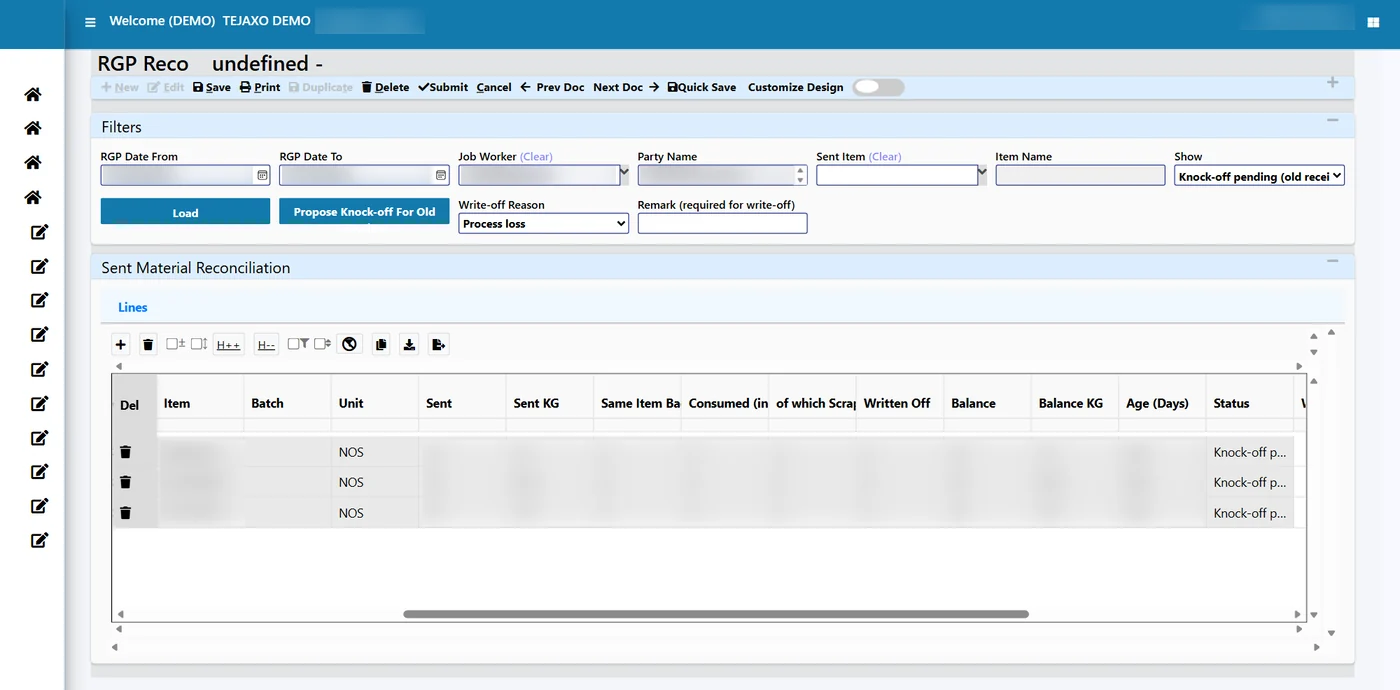
In RGP Reco Studio, open the RGP and click Write off on the line. An inline drawer asks for:
- Quantity to write off from the balance on the line.
- Reason, for example “Short received” or a process loss.
- Remark, a mandatory note explaining what happened.
On save, the message “Write-off saved” appears, the RGP leaves the Pending filter, and under Closed the line shows “Written off 1, balance 0”. The write-off is its own document with its own number. The original RGP, the gate entry and the MRR are untouched.
A practical note: a quantity lost at a job worker may have GST consequences. Discuss the treatment of written-off quantities with your tax adviser. The ERP gives them what they need to decide: the challan, the date, the quantity, the reason and the remark.
Step 4: Reverse a write-off when the material turns up
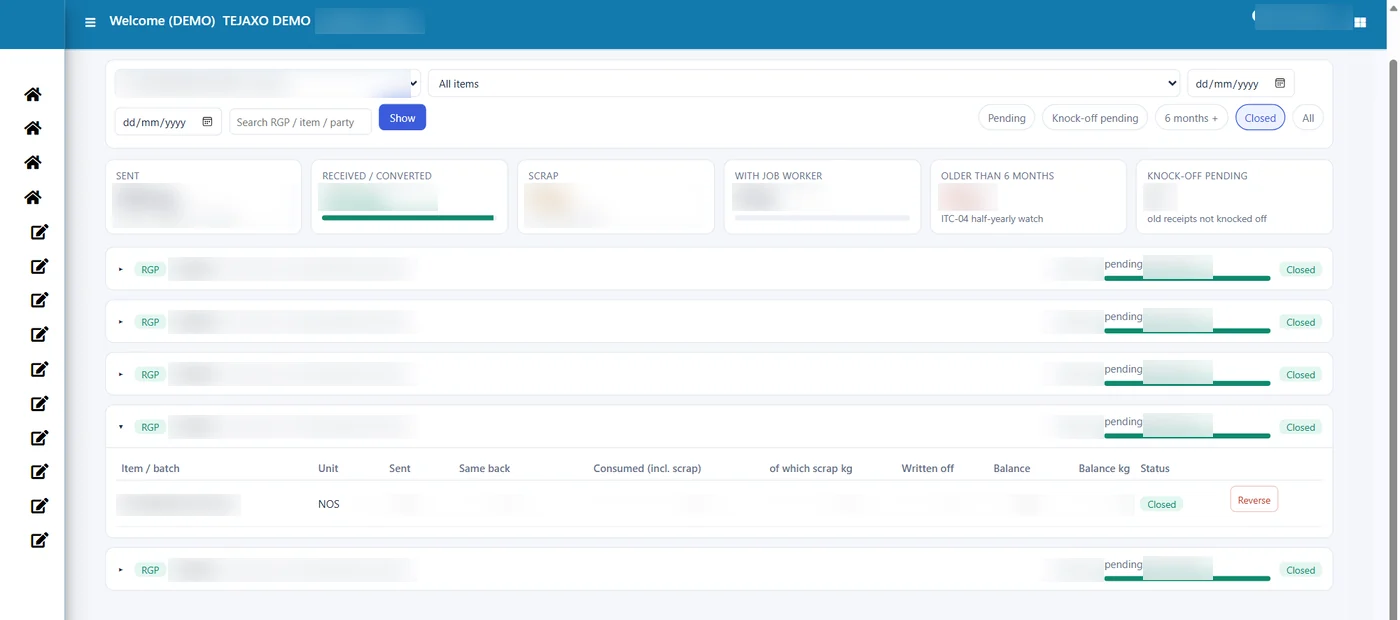
Three weeks later, the missing bracket arrives with the next lot. In most systems someone would edit the old entry or create a confusing adjustment. In Tejaxo ERP, the closed line in Reco Studio has a Reverse button. Reversing:
- Marks the write-off with status R (reversed). It stays in the system for audit.
- Restores the balance on the RGP line, both in pieces and in kg, so it appears under Pending again.
- Lets stores receive the late piece in the normal way, linked to the same line.
This is the core principle of the module: every adjustment, whether an admin knock-off or a write-off, is a separate reversible row. Nothing is fixed by editing a source document.
Worked example: cleaning up two old challans
The table below follows two sample challans at Tejaxo Manufacturing through the clean-up. Quantities are illustrative.
| Document | What happened | Action in Tejaxo ERP | Result |
|---|---|---|---|
| RGP-0118: 48 tools sent for coating (12 + 16 + 20) | All tools came back, received on old MRR-0451 and MRR-0452 without a link | Propose Knock-off For Old Receipts | 3 ADMIN rows, balance 0, RGP closed |
| RGP-0124: 50 brackets sent for painting (250 kg) | 49 returned and linked; 1 bracket (5 kg) missing | Write-off WO-0031: 1 nos, reason Short received, remark entered | Written off 1, balance 0, RGP closed |
| WO-0031 | The missing bracket arrives with a later lot | Reverse in Reco Studio | WO-0031 status R; balance back to 1 nos / 5 kg, pending again |
| RGP-0124 | Late bracket received at the after-job-work gate | Normal receipt linked to the line | Balance 0, closed with no write-off |
At the end, both challans are closed, the register shows exactly how, and an auditor can see every step, including the write-off that was later reversed.
Reports that show the clean-up
The clean-up is visible across the RGP reports, which read old and new documents together:
- Job Work Pending (Vendor / Item / Batch): per job worker, then per RGP line, with sent, same back, converted, scrap, written off and balance.
- Job Work In-Out Register: every movement in date order, including write-offs.
- Job Work Aging: pending lines bucketed by age, so you can see which ones are approaching the one-year mark.
- ITC-04 Deemed Supply (1 / 3 Years): the list your accountant reviews. Clearing old receipts with the admin knock-off shrinks it to genuine cases.
- RGP Insights: job worker cards with pending kg, open challans, oldest days and a “knock-off pending” count.
These sit alongside the stock and batch reports described on our inventory management software for manufacturing page.
Common mistakes and how the ERP prevents them
Editing the old MRR or challan
Changing quantities on a source document destroys the trail and usually breaks stock. Tejaxo ERP closes lines only through knock-off rows and write-off documents.
Writing off to make a report look clean
A write-off needs a reason and a remark, and the audit trail records who saved it and when. Role-based rights decide who may write off at all.
Writing off what is only unlinked
If the material is back but not linked, a write-off is the wrong tool. The knock-off-pending filter shows these lines separately, so the admin knock-off is used instead.
Receiving more than was sent
Receipts can never exceed what is pending on the RGP line, so a late piece can be received only after the write-off is reversed and the balance is open again.
Who this is for
This process matters most to plants with heavy outward job work: sheet metal and pressing units, forging companies sending parts for heat treatment, and auto component suppliers sending brackets for plating or powder coating. It is equally useful when a company moves to Tejaxo ERP from another system and brings its open challans across.
How Tejaxo implements this
We start with a discovery session with your stores and accounts teams to understand how job work is sent and received today. We then run a pilot on your own masters and your own open challans, including a trial of the admin knock-off, so you can see the result before anything goes live. After go-live and training, the same Tejaxo team supports you. Tejaxo Technologies Pvt. Ltd. has been building manufacturing ERP since 2017 and serves 50+ clients.
If your pending-with-job-worker list has not been trusted for years, it can be fixed without rewriting history. Book a free demo and we will show the knock-off, write-off and reverse on sample data, or WhatsApp us on +91 96717 27474.
Frequently asked questions
What is an RGP challan?
An RGP challan (returnable gate pass) records material sent out for job work, such as plating, coating or machining, that must come back to the plant. In Tejaxo ERP it is created in the RGP module under Material Management; only quality-passed stock can be sent, and receipts can never exceed the quantity still pending on the RGP line.
What is an RGP write off in an ERP?
It is a separate, dated entry that closes a quantity still pending on a returnable gate pass line, for example material short received or lost in process. In Tejaxo ERP it carries a reason and a remark and never edits the original challan.
Can a write-off on a job work challan be reversed?
Yes. In Tejaxo ERP every write-off has a Reverse button. Reversing marks the write-off as reversed and the quantity becomes pending again on the same RGP line.
Why do old RGPs still show as pending when the material came back long ago?
Usually the material was received on an MRR that was never linked to the RGP line. Tejaxo ERP shows such lines as knock-off pending, and an administrator can propose the knock-off for all old receipts in one action.
Does closing old RGPs affect ITC-04?
Yes, indirectly. Lines that are wrongly pending can appear in the deemed supply list for inputs older than one year. Closing them with a proper knock-off keeps that list limited to genuine cases.
Who should be allowed to write off RGP quantities?
Only authorised users. Tejaxo ERP uses role-based menu rights with separate save and delete rights, and the audit trail records who made each entry and when.