
MES software for manufacturing in India is the layer that turns ERP plans into controlled, recorded work on the shop floor. ERP decides what to make and what it costs, SCADA watches and controls the equipment in real time, and the MES manages the orders, materials, people, checks and records that sit between them. Most plants do not need three separate products, but they do need all three jobs done properly.
Why the MES vs ERP vs SCADA question comes up
Plant heads and owners usually ask this question for one of three reasons. The ERP shows a production order as open for days, yet nobody can say which stage it is at. The SCADA shows live tank levels and temperatures, but nobody can link them to a batch, an operator or a customer order. Or an auditor asks for a batch history and the answer is spread across registers, Excel sheets and loose printouts.
Each of these is a gap between layers, not a failure of one system. The industry reference model for this is ISA-95 (IEC 62264), which divides a factory’s systems into levels. Sensors and controllers sit at the bottom, SCADA above them, MES above that, and ERP at the top. Understanding which job belongs to which level is the first step to buying the right software and not paying twice for the same function.
What ERP does: the business layer
ERP is the system of record for the business. It handles sales orders, purchase, inventory, finance and accounts, GST, payroll and management reporting. Its time horizon is days, weeks and months. Its questions are commercial: what is the order book, what material do we need to buy, what is stock worth, what is the margin on a job.
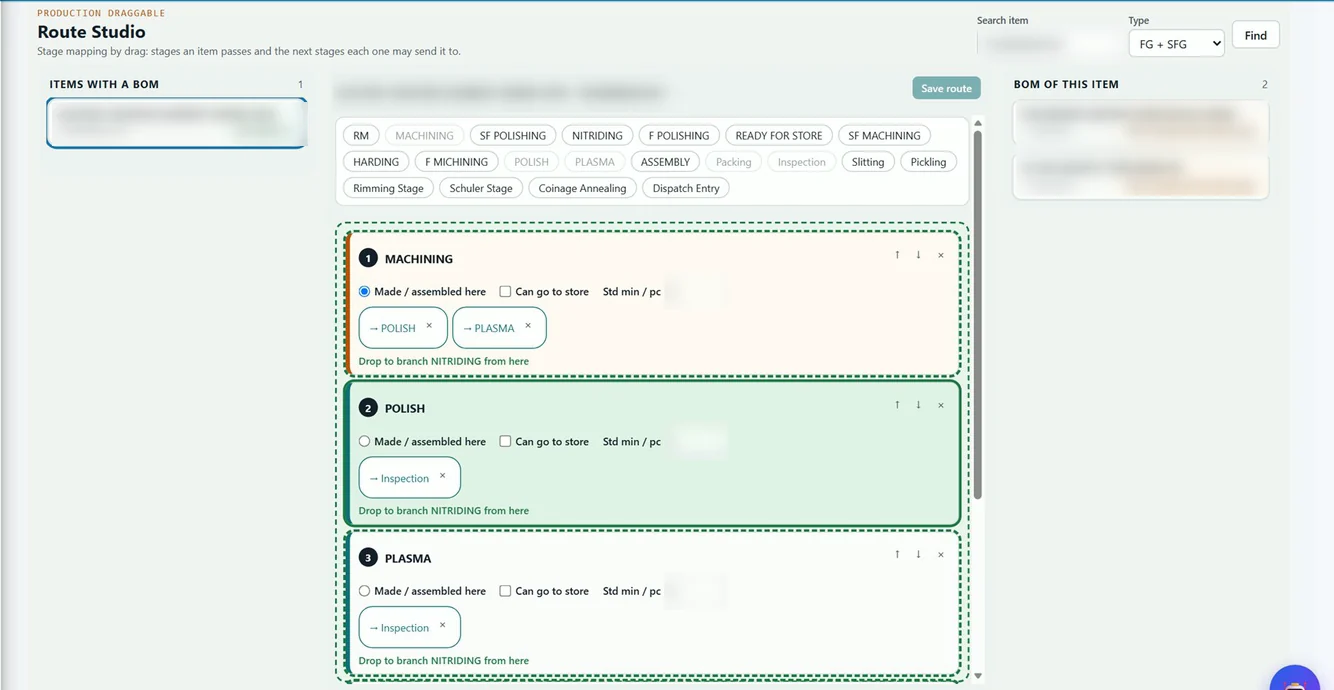
In a manufacturing ERP this also includes the planning data: item masters, bills of material, routes and work orders. The ERP releases a work order and expects confirmation back of what was consumed and produced. A good ERP can also carry a fair amount of shop-floor detail, such as job cards, stage-wise production entry, rejection and downtime reasons. That is why many small and mid-sized plants find that a well-built ERP covers most of what they need from an MES.
What SCADA does: the equipment layer
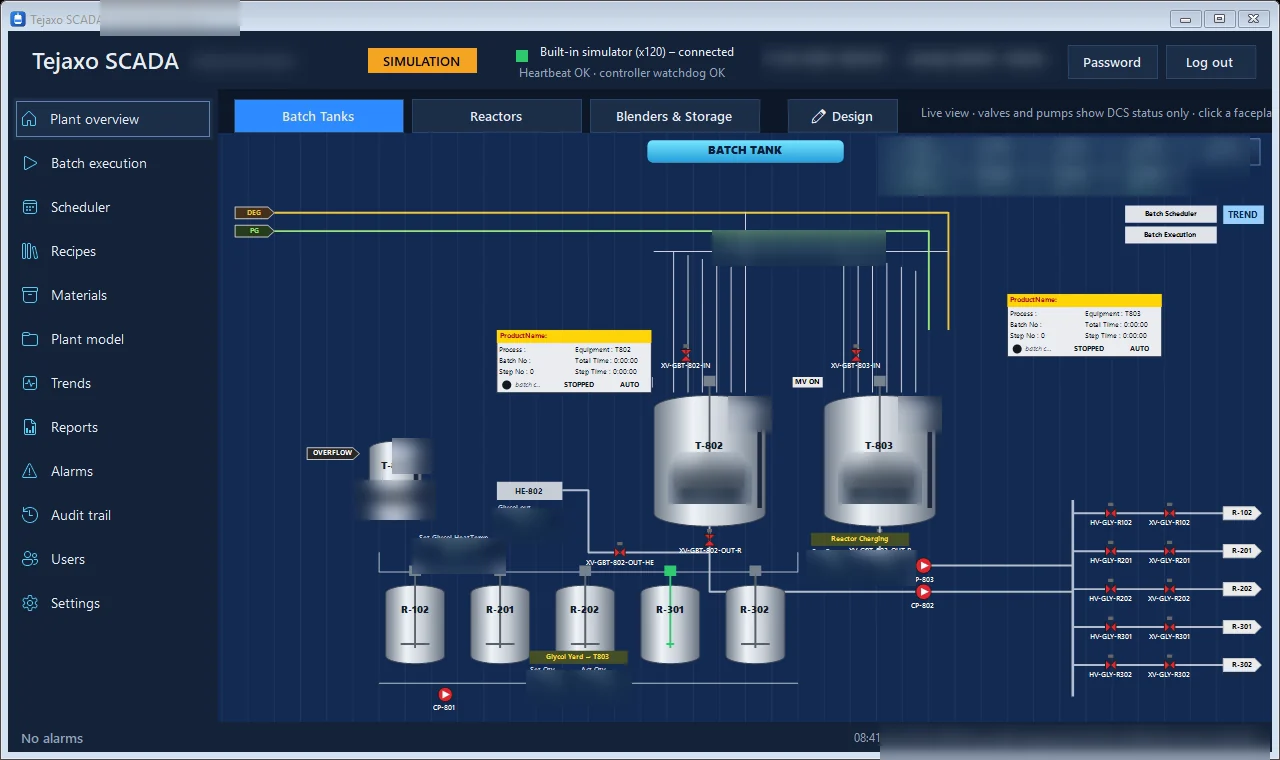
SCADA (supervisory control and data acquisition) works at the speed of the process, in seconds. It reads values from PLCs and instruments, shows them on a live plant graphic, raises alarms, trends readings and records events. In a batch plant it displays tanks, reactors, valves and pumps and lets operators act on them within defined limits.

What SCADA does not know is the business context. It does not know which customer order a batch belongs to, which raw material lot was charged, whether the operator was trained for that step, or whether the quality check was done. This is why buyers who treat SCADA as an MES end up with excellent live screens and weak traceability.
A batch management layer on top of the control system narrows this gap. In Tejaxo SCADA, for example, the software works as a batch layer above the DCS: it downloads recipe step data to unit sequencers and sends batch commands, while the controller remains the final authority over the equipment. You can read more in our guide to Tejaxo SCADA batch process software.
What MES does: the execution layer
MES (manufacturing execution system) sits between planning and control. Its time horizon is shifts and hours. Its job is to make sure that the work released by ERP is actually done correctly, and that the evidence is captured while the work happens, not typed in afterwards.
Typical MES functions are:
- Work order execution: releasing jobs to stages or machines, in the right sequence, with the right instructions.
- Finite scheduling and dispatch: sequencing jobs against real machine capacity, not an Excel sheet.
- Material consumption and genealogy: recording which lot or batch went into which product.
- In-process quality checks: capturing inspection results at the stage where they happen.
- Downtime, rejection and OEE capture: with reason codes, per stage and per shift.
- Electronic batch and production records: a complete history for audit and customer complaints.
You do not always buy these as one product labelled MES. Some plants get them from the ERP’s production modules, some from a batch layer, and some from a dedicated MES package. What matters is that the function exists and is connected to both neighbours.
MES vs ERP vs SCADA: a side-by-side comparison
| Question | ERP (Level 4) | MES (Level 3) | SCADA (Level 2) |
|---|---|---|---|
| Main purpose | Run the business: orders, money, stock | Execute and record production work | Monitor and supervise equipment |
| Time scale | Days to months | Hours to shifts | Seconds |
| Main users | Owners, CFO, planners, purchase, sales | Plant head, supervisors, quality, stores | Operators, maintenance, process engineers |
| Typical data | Orders, BOMs, invoices, stock, payroll | Job status, consumption, checks, downtime | Temperatures, levels, states, alarms |
| Decision it supports | What to make, buy and ship | What to run next and was it made right | Is the process within limits right now |
| Common failure when missing | No cost or stock control | No traceability or stage visibility | No live process view |
Notice that the three layers overlap at the edges. ERP holds routes and capacity assumptions, MES holds actual stage status, and SCADA holds raw readings. The skill is in deciding where each piece of data is owned, and moving it once.
How the three layers connect: one order’s journey
Consider a sample order at Tejaxo Manufacturing: 500 units of Product A. Here is how it should flow through a properly connected plant.
- ERP releases the work order. The sales order becomes a work order with a BOM and a route. The ERP checks material availability.
- MES receives and schedules it. The job is placed on the planning board against machine capacity and appears at its first stage with the right instructions and material.
- Machines and SCADA supply live data. Counters, cycle signals, temperatures or batch states flow from PLCs, loggers or SCADA into the MES context, tagged to this job and stage.
- Operators and inspectors confirm. Output, rejection, downtime reasons and quality results are recorded at each stage.
- MES confirms back to ERP. Consumption and finished quantity update stock and cost in the ERP, so finance sees the same numbers as the plant.
The common failure points are predictable: item or route masters that differ between systems, machines with no signal at all, manual re-entry between stages, and interfaces that break when someone changes a master. Our SCADA and ERP integration guide for India covers these in more detail.
Do you actually need a separate MES?
Honest advice: not always. A separate MES is worth considering when several of these are true:
- You run multiple stages or lines with complex routing and need finite scheduling.
- Customers or regulators demand lot-level genealogy and complete batch records.
- You are a process or batch plant where recipe control and records matter, such as chemicals or pharma.
- Your ERP shop-floor entries are late, incomplete or typed from paper at the end of the day.
- You have machine data available but nobody connects it to jobs.
You probably do not need a heavy standalone MES if you are a smaller plant with a few stages, a stable product range and a manufacturing ERP that already handles job cards, stage-wise production entry, rejection and downtime. In that case, add machine data capture and the right reports before buying another platform. Our article on drag-and-drop production control boards shows how much execution control an ERP can carry when it is designed for the shop floor.
If you already run a larger ERP
If your company runs an established ERP and it is working for finance and purchase, there is no reason to replace it for the shop floor. The sensible approach is to extend it: keep the ERP as the system of record, and add execution, traceability and machine data around it.
Brownfield reality: older machines, mixed plants
Most Indian plants are not greenfield. A typical factory in an industrial area has machines of different ages and makes, some with PLCs, some with only analogue instruments, and some with no electronics at all. A realistic plan accepts this.
- Machines with PLCs or controllers: read data through the controller or SCADA.
- Instruments with serial outputs: data loggers can read them over standard serial links and store readings with audit trails.
- Machines with no signal: start with operator entry at the stage, using barcode or QR scanning, and add sensors where the value justifies it.
Power cuts and unstable networks are real constraints, so ask any vendor how data is buffered and what happens when the connection drops. For the connectivity options, see our overview of IoT, ERP, machines, SCADA and loggers.
A phased roadmap that suits MSME budgets
You do not have to do everything at once. A sensible order is:
- Fix the masters. Clean items, BOMs, routes and machines in the ERP. Every later step depends on this.
- Digitise stage entry. Replace paper job cards with stage-wise entries for output, rejection and downtime reasons.
- Add traceability. Introduce batch or lot tracking, with QR labels where needed.
- Connect machines. Start with the machines that matter most to output or compliance.
- Add scheduling and reporting. Use real stage and capacity data for planning and OEE.
Each step delivers value on its own, which makes it easier to justify and to get operators on board.
MES selection checklist for Indian manufacturers
Use this list when you evaluate any MES software or any ERP claiming MES features.
| Check | What to ask |
|---|---|
| ERP fit | Does it work with your existing ERP, or does it force a replacement? |
| Machine connectivity | How does it connect to old machines, serial instruments and PLCs? |
| Traceability depth | Can you trace a finished lot back to material lots and forward to customers? |
| Compliance | Does it support audit trails and electronic records for your regulatory needs, such as 21 CFR Part 11 for exporters? |
| Operator usability | Can operators use it on the floor without heavy typing? |
| Offline behaviour | What happens during a network or power failure? |
| Change control | Are recipes, routes and masters versioned and locked after release? |
| Support | Is there on-site and remote support in your region, and who owns the integration after go-live? |
| Lock-in | Can you export your data and configuration if you change vendors? |
For pharma plants, regulatory expectations around GMP, data integrity and documentation keep evolving, so confirm the current requirements and deadlines with your regulatory adviser before fixing the scope.
How Tejaxo approaches the MES layer
Tejaxo does not treat MES as a separate silo. Tejaxo ERP covers sales, purchase, inventory, production, quality, finance and HR on one database, and its production control boards take work from sales order through stage-wise execution. Route mapping, capacity data and stage boards are part of the same system, so the plan and the shop floor do not drift apart.
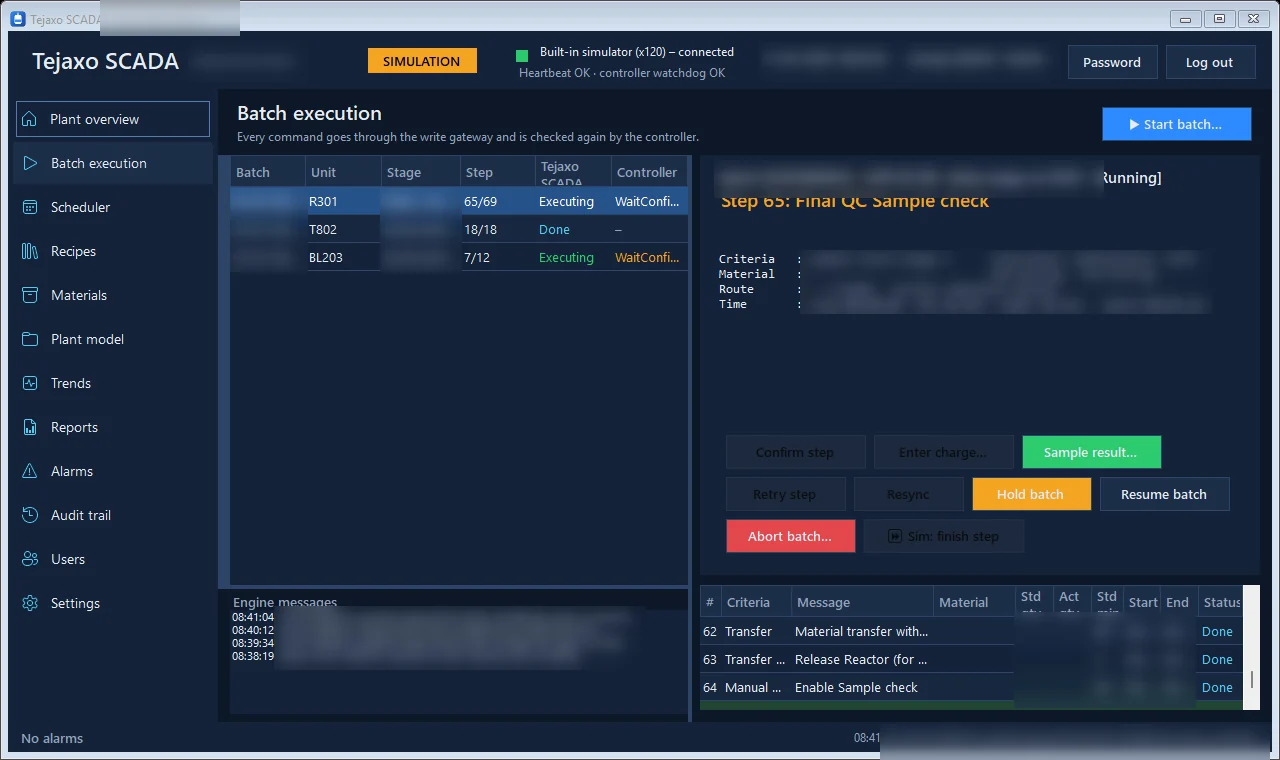
On the equipment side, Tejaxo SCADA provides the live plant view and recipe-driven batch execution for process plants, with recipes locked after release and changed only through a new version. Tejaxo Logger reads temperature and process instruments and keeps audit-ready records. Machine data, scanned documents and WhatsApp voice or text entries go in without typing, owners can ask questions and approve by voice on WhatsApp, and people stay in control of every decision.
If you use another ERP, the message is simple: we do not replace it, we extend it into the shop floor. Tejaxo has been in business since 2017, has worked with 50+ clients, and supports plants across India on-site and remotely.
Next step: map your three layers
The most useful first exercise is a one-page map of your plant. List what your ERP does today, what your machines and SCADA record, and what is still on paper or in Excel. The gaps tell you whether you need a dedicated MES, a stronger ERP shop-floor layer, or better machine data capture. Book a free consultation with Tejaxo and we will walk through that map with you, with no obligation to buy anything.
Frequently asked questions
What is the difference between MES, ERP and SCADA?
ERP manages the business: orders, purchase, stock, finance and costing. SCADA monitors and supervises equipment in real time, in seconds. MES sits between them and manages the execution of work orders on the shop floor, including material consumption, quality checks, downtime and production records. ERP plans, MES executes and records, and SCADA watches the machines.
Do I need MES software if I already have an ERP?
Not always. If your ERP handles job cards, stage-wise production entry, rejection, downtime and batch tracking, it may cover your needs. A separate MES makes sense when you have complex routing, strict lot-level traceability, batch records for regulators, or shop-floor data that reaches the ERP late or incomplete.
Can SCADA replace an MES?
No. SCADA shows and controls what equipment is doing right now, but it does not know which customer order, material lot, operator or quality check is linked to that activity. A batch management layer on top of SCADA closes part of the gap, but traceability and order execution still need MES functions.
How does an MES connect to ERP and machines?
The ERP sends work orders, BOMs and routes down to the MES. The MES collects machine data from PLCs, SCADA, loggers or operator entries, and sends confirmations, consumption and output back to the ERP. Clean item and route masters are essential, because mismatched masters are the most common cause of broken interfaces.
Can older machines work with MES software in India?
Yes. Machines with PLCs can share data through the controller or SCADA, serial-output instruments can be read by data loggers, and machines with no signal can start with operator entry using barcode or QR scanning. Sensors can be added later where the value justifies it, so older plants can start without replacing machines.
How should a small manufacturer start with MES?
Start by cleaning item, BOM, route and machine masters in the ERP. Then replace paper job cards with stage-wise digital entry, add batch or lot traceability, connect the most important machines, and finally use the data for scheduling and OEE. Each step gives value on its own, so you do not need a big-bang project.
2 Responses