
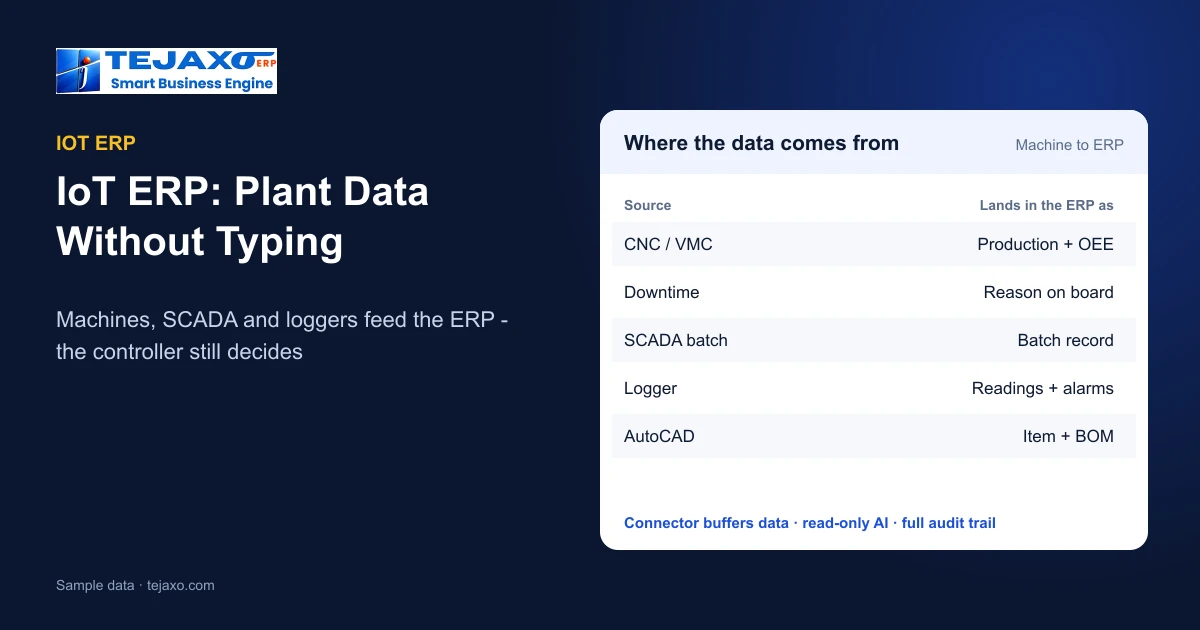
An IoT ERP is an ERP that reads data directly from the plant – machine counts, batch records from process control and readings from instruments – instead of waiting for someone to type them in. The ERP still plans, costs and invoices; the difference is that production, downtime and quality figures arrive from the source, on time and unrounded. In Tejaxo ERP this is done through a connector that sits between the plant and the ERP, and the machine-to-ERP link is live at a client’s plant today.
This guide is for plant heads and owners who keep hearing “IoT” and want to know what it means in practice: which data is worth connecting, how it travels, what the ERP must never do on the shop floor, and how to start without replacing the systems you already run.
Why typed shop-floor data is not enough
In most factories the ERP knows what was planned, but what actually happened on the machine reaches it late and by hand. A production slip is written at the end of the shift, a supervisor adds downtime from memory, and the office types it the next morning. Short stops vanish, counts are rounded and an idle machine looks the same as a running one on paper.
Everything that depends on those numbers inherits the error – capacity planning, scheduling, work-order costing and OEE. Connecting the plant to the ERP is not about dashboards for their own sake; it is about making the ERP’s numbers true. The full shop-floor case for CNC and VMC machines is covered in machine monitoring software: CNC counts and OEE in the ERP.
Three kinds of plant data an IoT ERP should read
“IoT” covers very different equipment. In a manufacturing plant it usually means three sources, plus design data:
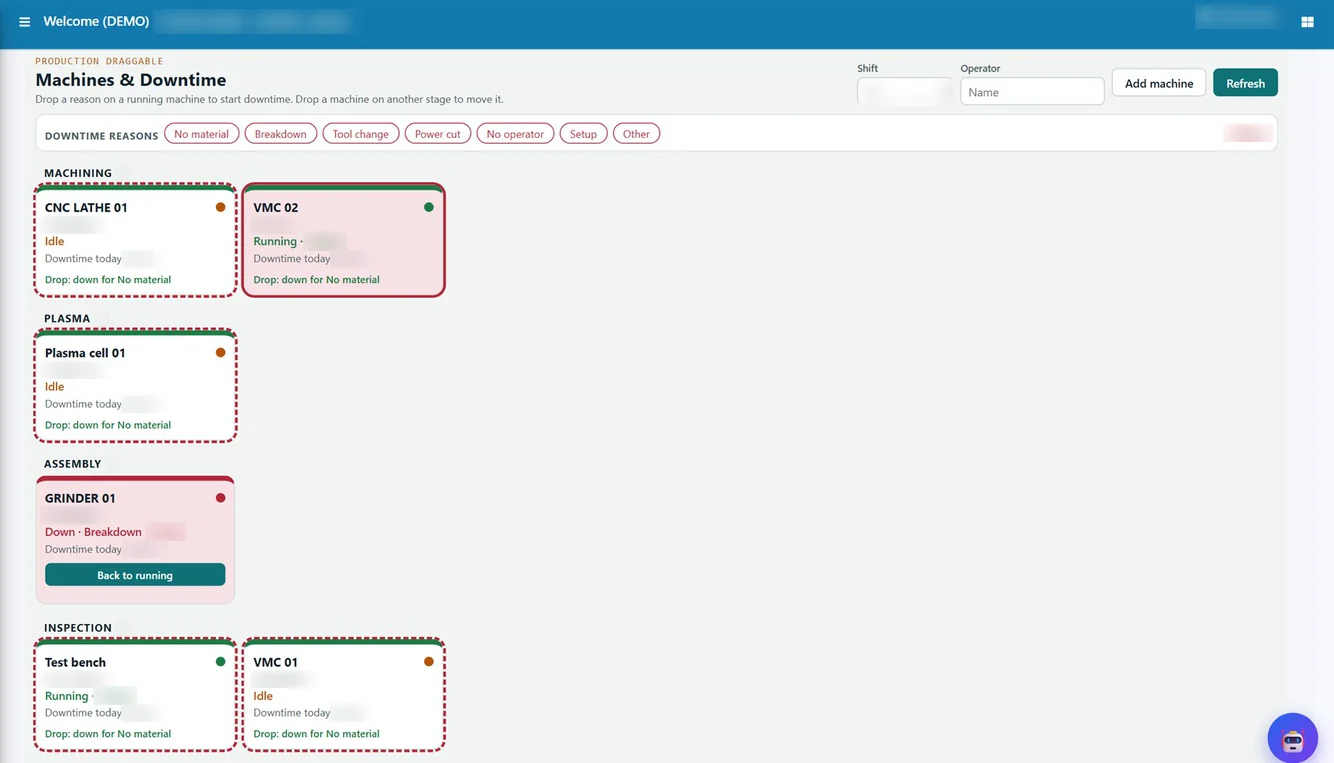
- Machines (discrete manufacturing): from CNC and VMC machines, Tejaxo reads cycle counts, run and idle time, OEE and downtime. These are posted to the ERP as production confirmations, so the job card and the work order move without a production slip.
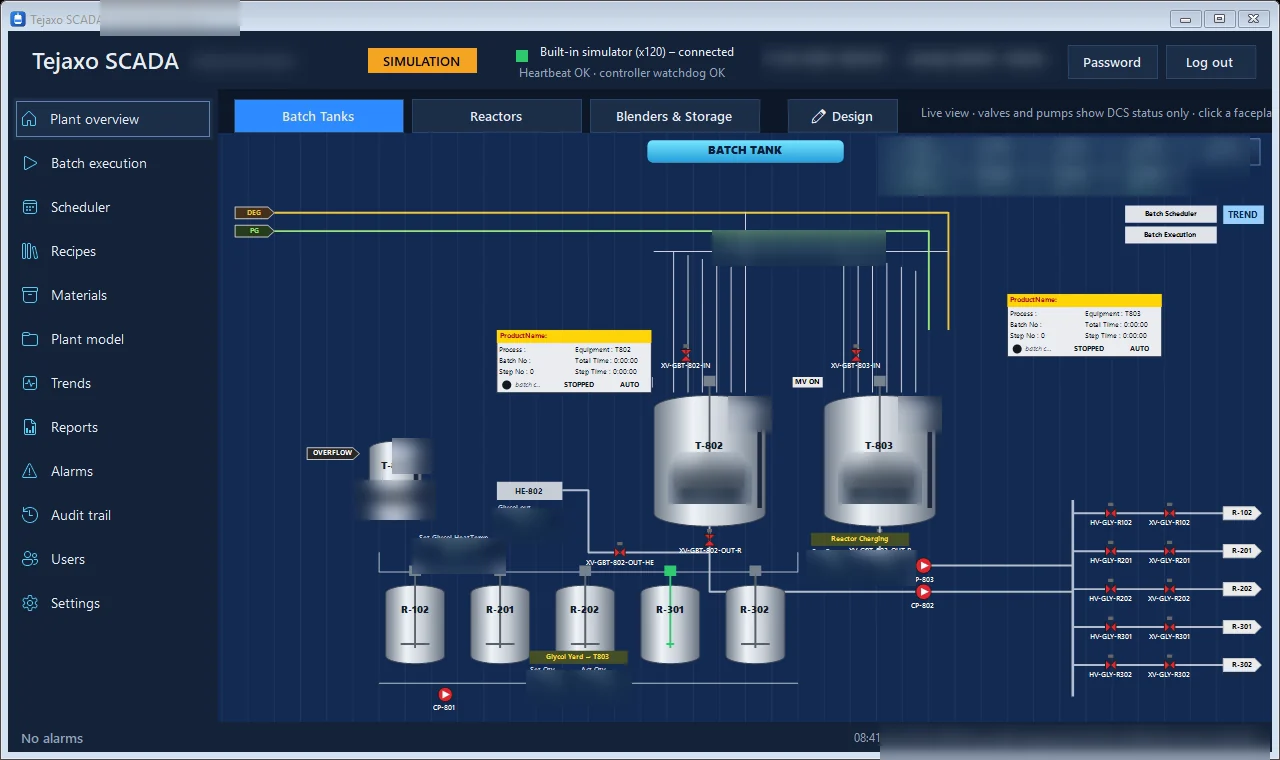
- Process control (batch plants): Tejaxo SCADA runs recipe-driven batches with live plant graphics, trends, alarms and a complete electronic batch record of every step, charge, sample and time. It connects to controllers and DCS over OPC UA.
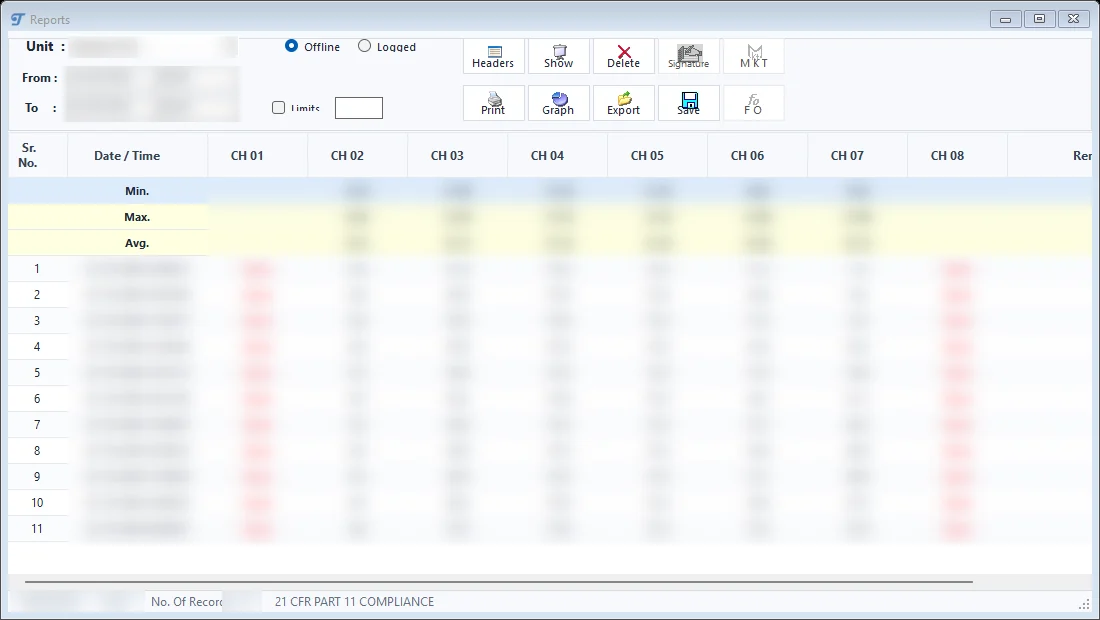
- Instruments (temperature and process readings): Tejaxo Logger reads temperature and process instruments over RS-485 or RS-232 using Modbus RTU and logs every reading, with alarms, trend graphs, MIN / MAX / AVG reports and MKT and F0 calculations.
- Design data: drawing and BOM data from AutoCAD can flow into ERP item masters and BOMs, so engineering changes are not re-typed by the planning team.
Tejaxo SCADA and Tejaxo Logger are Tejaxo’s own products and are linked to Tejaxo ERP, so the batch record and the readings sit next to the work order, the stock and the quality record rather than in a separate PC on the shop floor.
How the data travels: machine, connector, ERP
Tejaxo uses a simple three-layer architecture:
- Machine or device – CNC and VMC machines, SCADA and loggers.
- Tejaxo connector – reads the data, cleans it and buffers it, so a short network break does not lose readings and noisy signals do not become false counts.
- ERP and dashboards – the data lands in production, OEE, maintenance and quality in Tejaxo ERP.
Once the data is in the ERP, the existing modules use it. The Machines and Downtime board shows each machine as running, idle or down with a reason, and a downtime reason is recorded by dragging a reason chip. Reports cover OEE, utilisation, MTBF, MTTR and scrap-yield, and work-order costing uses measured run minutes multiplied by the machine rate instead of an estimate. The formulas are explained in OEE calculation with a worked example and MTBF and MTTR for machine reliability.
ERP, MES and IoT: who does what
Buyers often see the terms ERP, MES and IoT platform used for the same thing. They are different layers, and a plant needs the work of all three to be covered – whether by one vendor or several.
| Layer | What it does | How it is covered with Tejaxo |
|---|---|---|
| Device / control | Runs the machine or the process; owns valves, pumps, interlocks and cycles | The machine’s own controller, PLC or DCS – Tejaxo SCADA sends recipe steps and batch commands, the controller decides |
| Connectivity (IoT) | Reads signals, cleans and buffers them, forwards them reliably | Tejaxo connector; Tejaxo Logger for Modbus instruments |
| Shop floor (MES-type work) | Job cards, WIP by stage, downtime reasons, machine status, quality checks | Production boards in Tejaxo ERP: Stage Board, Machines and Downtime, Control Tower |
| ERP | Orders, planning, stock, purchase, costing, accounts and GST | Tejaxo ERP, or your existing ERP extended by Tejaxo |
| Answers | Reports and questions in plain language | OEE, MTBF, MTTR and downtime reports; Ask Tejaxo AI (read-only) |
The practical point: an IoT project that stops at a dashboard leaves the ERP unchanged. The value comes when the machine count becomes the production confirmation and the measured run time becomes the costing input.
Safety first: the ERP reads, the controller decides
Connecting software to a plant raises a fair worry – can a software fault start a pump or open a valve? Tejaxo SCADA is designed so that it cannot:
- Valves, pumps, agitators and interlocks are operated only from the DCS. SCADA sends recipe step data and batch commands, and the controller may refuse them.
- A heartbeat makes the controller hold its sequences if SCADA stops responding.
- SCADA has three controller modes: simulation for training and recipe testing, read-only for commissioning and shadow running, and live. A new plant can run in read-only mode alongside the existing system before anything is switched over.
- Alarms (Hi, HiHi, Lo, Fault) are acknowledged with history, permissions are role-based, and the system locks sign-in after repeated wrong attempts.
On the ERP side the same rule applies: Ask Tejaxo AI is read-only by design, and every entry is saved only under the user’s rights and the ERP’s mandatory checks. Machine data informs decisions; people stay in control of the plant.
Already running SAP, Dynamics or Tally?
You do not need to change your ERP to connect the plant. Tejaxo connects SAP, Microsoft, Oracle, Infor and Tally with machines, SCADA, loggers and AutoCAD, using APIs, database connectors, scheduled sync and secure file exchange. Our approach for companies on an existing system is “We don’t replace your ERP. We extend it.” A typical project of this kind is machine-to-ERP, with CNC and VMC counts and OEE posted as production confirmations in the system you already use. For Tally users, the two-way bridge is described in Tally integration with Tejaxo ERP.
Asking the plant a question
Once machine and plant data is in the ERP, the owner does not need to open a dashboard to use it. With Ask Tejaxo AI, a question in English or Hinglish – a metric, a period, a grouping, a top-N or a comparison – returns an answer, a short summary and a drill-down table. The same questions can be asked on WhatsApp by voice or text, as described in voice ERP on WhatsApp. This is where IoT and an automated ERP meet: data comes in without typing, and answers go out without searching for reports.
How to start: one plant, real data
- List the data sources. Note which machines, controllers and instruments you have, how they communicate today, and which figures are typed by hand.
- Pick the decision you want to improve. Capacity, downtime, costing or batch records – start where a wrong number costs the most.
- Prove it on one plant with real data. Tejaxo’s engagement runs discovery, then a proof of concept on one plant with your real data, then roll-out and support – no rip-and-replace.
- Shadow-run before switching. Compare connected counts with your registers for a few weeks; for process plants, use read-only mode first.
For the wider picture, read Automated ERP: what runs without manual entry and see Tejaxo automation, SCADA and IIoT, or book a free consultation to map your own machines and instruments with us.
Frequently asked questions
What is an IoT ERP?
An IoT ERP is an ERP that reads data directly from machines, process control and instruments – such as CNC cycle counts, SCADA batch records and logger readings – so production, downtime and quality figures reach the ERP without manual entry.
Which machine data can Tejaxo ERP read?
From CNC and VMC machines, Tejaxo reads cycle counts, run and idle time, OEE and downtime through the Tejaxo connector and posts them as production confirmations. The machine-to-ERP connection is live at a client’s plant.
Can SCADA connected to the ERP start a pump or open a valve?
No. In Tejaxo SCADA, valves, pumps, agitators and interlocks are operated only from the DCS. SCADA sends recipe step data and batch commands, the controller may refuse them, and a heartbeat makes the controller hold sequences if SCADA stops responding.
How do temperature and process instruments connect to the ERP?
Tejaxo Logger reads temperature and process instruments over RS-485 or RS-232 using Modbus RTU, logs every reading and gives alarms, trends, MIN / MAX / AVG reports and MKT and F0 calculations. Tejaxo Logger is Tejaxo’s own product and is linked to Tejaxo ERP.
Is IoT ERP the same as MES?
Not exactly. IoT connectivity reads the signals, MES-type work runs job cards, WIP, downtime and quality on the shop floor, and the ERP handles orders, stock, costing and accounts. Tejaxo covers the connector, the production boards and the ERP, and can also extend an existing ERP.
Do we need to replace SAP or Tally to connect our machines?
No. Tejaxo connects SAP, Microsoft, Oracle, Infor and Tally with machines, SCADA, loggers and AutoCAD using APIs, database connectors, scheduled sync and secure file exchange, and starts with a proof of concept on one plant with real data.