
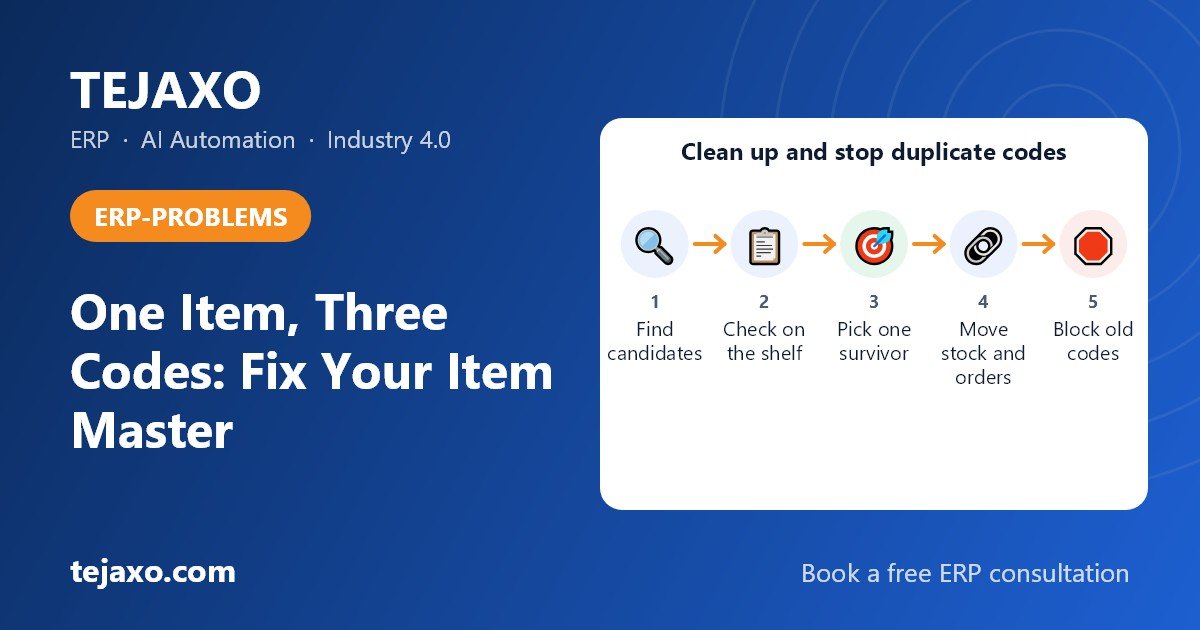
To stop duplicate item codes in an inventory master, you need three things: a written naming rule for every item category, a mandatory search-before-create step, and a small group of trained people who alone can approve new items. Cleaning up the existing duplicates is a separate, one-time job: find them, pick one surviving code, move the stock and open documents to it, and block the rest.
This article is written for the stores in-charge of a plant that carries thousands of spares, fasteners and raw material items. Note that it is not about the software error message “duplicate item code already exists”. That error is easy to fix by renaming or auto-numbering. The problem here is harder: the same physical item lives under different codes, and the system sees nothing wrong.
How do duplicate items get created in an item master?
Duplicates appear when anyone can create an item without a naming rule or a duplicate check. Each person describes the item in their own way, and the system accepts every version as a new, valid record.
The usual root causes are:
- Free-text descriptions. Nothing forces a structure, so “Bolt HEX M12x50 GR8.8”, “HEX BOLT 12X50” and “M12 bolt 50mm HT” become three items.
- Urgency. A breakdown happens, the storekeeper cannot find the item quickly, and a new code is created so the issue can be posted today.
- Different names for the same material. Stainless steel may be written as SS, 304 or A2 depending on the person, the vendor or the drawing.
- Local and trade names. In many Indian plants, spares are also called by Hindi or regional words, or by a local trade name, typed in English letters. The store knows the part by one name and the purchase team by another.
- Vendor and manufacturer part numbers. Each supplier sends its own part number, and a new code is created for each one.
- Superseded part numbers. The manufacturer replaces a part number, and the new number is created as a new item while the old stock stays under the old code.
- Several plants or departments. Maintenance, purchase and production each create items for their own use, in their own abbreviations, sometimes in another language.
- Legacy data. Items imported from old systems or spreadsheets carry old naming habits into the new system.
Duplicates also stay hidden. They sit under variant descriptions, old vendor codes or superseded numbers, so nobody sees them unless someone goes looking.
Start your review with the category that has the most items and the most buyers, for example fasteners or electrical spares. Expect duplicates to cluster where entry formats vary, such as size variants typed in different ways, and where items were raised in a hurry during a breakdown, so look there first. Most are not deliberate. That is why one busy category gives you the most duplicates for the least effort, and why it also shows you which entry habits to fix first.
What do duplicate item codes actually cost a plant?
Duplicates split stock. One code shows zero on the shelf record while another code for the same part is overstocked, so the plant buys again what it already owns. The cost shows up as repeat purchases, idle stock and wrong reorder levels. Estimate your own by pricing the stock sitting under the secondary codes after your first clean-up. The effects are easy to recognise:
- Surplus stock that is never consumed because the system does not show it for the open requirement.
- Emergency purchases of items that were physically available in the store.
- Wrong reorder levels, because demand history is spread across several codes and each looks slow-moving.
- Distorted analysis. An ABC or FSN classification built on split consumption misjudges what is critical (see our guide to ABC and FSN analysis with cycle counts).
- Longer audits and cycle counts, because the same item must be counted in several locations under several names.
How do I find duplicates in the item master?
You can find duplicates in a spreadsheet without special software. The time depends on how many items you have and how consistent the descriptions are; start with one category. Export the item master and work through these steps.
- Begin with the export. Pull the fields that matter: item code, description, category, unit, HSN code, vendor part number, manufacturer, last purchase date and current stock.
- Next, normalise the description. Convert to upper case, remove punctuation and double spaces, and replace known abbreviations (for example “HT” to “HIGH TENSILE”). Replace only abbreviations you have confirmed against the drawing or standard; flag ambiguous ones such as SS, 304 and A2 for a manual check, because replacing them mechanically can create false matches.
- Pull out the attributes. For fasteners, give type, diameter, length and grade their own columns. Matching on attributes works better than matching on description text.
- Group by category plus attributes. Items that share the same attribute set are duplicate candidates.
- A fuzzy match comes after that. Audit software such as IDEA has a fuzzy-duplicate function, and a similarity of around 85 to 90 percent on the description field is a reasonable starting point. Treat that figure as a number to test on one category and adjust, not as a rule. IDEA is a paid audit tool, so for a free route use the Fuzzy Lookup add-in for Excel or the fuzzy merge option in Power Query, and ignore each row’s match with itself. The output is a candidate list, not a verdict.
- Manufacturer and vendor part numbers give the quickest cross-check. Two codes with the same manufacturer part number are almost certainly the same item.
- Finally, send someone to the shelf. A stores person should check the physical item before any pair is declared a duplicate. Two items that look alike on paper can differ in grade or finish.
Here is a worked example, using clearly sample data:
| Sample code | Description as entered | Normalised attributes | Sample stock |
|---|---|---|---|
| FAS-0101 | Bolt HEX M12x50 GR8.8 | Hex bolt, M12, 50 mm, grade 8.8 | 0 nos |
| FAS-0287 | HEX BOLT 12X50 | Hex bolt, M12, 50 mm, grade not stated | 400 nos |
| FAS-0455 | M12 bolt 50mm HT | Hex bolt, M12, 50 mm, high tensile | 150 nos |
One part, three codes. The first shows zero, so purchase raises a new order, while up to 550 pieces may sit under the other two, if the physical check confirms grade 8.8. The middle record has no grade at all, so the real quantity of the grade 8.8 part is only known after someone checks the shelf. That is exactly why physical verification comes before any merge.
What is a good item naming convention for spares and fasteners?
A good convention gives every category a fixed list of attributes in a fixed order, so two people describing the same part will write the same description. The rule follows the way the item is bought and identified, not the way one person remembers it.
| Category | Mandatory attributes, in this order | Sample description |
|---|---|---|
| Fasteners | Type, size, length, grade, finish, standard (ISO or DIN) | HEX BOLT, M12, 50 MM, GR 8.8, ZINC PLATED, ISO 4017 |
| Bearings | Type, series, make | BALL BEARING, 6205 2RS, MAKE X |
| Raw material | Material, grade, form, dimension, standard | ROUND BAR, STAINLESS STEEL 304, 20 MM DIA |
| Electrical spares | Item type, rating, pole or phase, make | CONTACTOR, 32 A, 3 POLE, MAKE X |
Two design choices matter more than the exact format:
- Code structure. You can use meaningful codes (parts of the code carry category and size) or simple sequential codes with structured attributes held in separate fields. Sequential codes plus mandatory attributes are easier to maintain, because a meaningful code breaks the day a size or grade changes.
- One glossary. Decide once that stainless steel is written as “STAINLESS STEEL 304”, not SS, 304 or A2, and publish the list of approved abbreviations. Add the common local and Hindi names your store uses as search aliases, so people find the item without creating a new one. ISO 8000, the international series on master-data quality, is a useful reference framework for this kind of discipline. It is not a compliance mandate, and a small plant does not need to certify against it.
Who should be allowed to create items?
Only a small group of trained data owners, usually in stores or a central master-data role, should create items. Everyone else raises a request. Limiting who can create items is the control that works best at the source, because a clean-up only fixes the past.
A workable governance model has four parts:
- Item creation request. The requester states category, the mandatory attributes, manufacturer and part number, and the reason a new item is needed.
- Search before create. The data owner searches the existing master by attributes, part number and keywords before agreeing that the item is new.
- Two-person approval. One person prepares, another approves. See how approval workflows and user rights can be set up in an ERP.
- A monthly duplicate-rate KPI. Count the duplicates found in the month against the new items created. If the figure rises, the process is leaking.
For emergencies, allow a temporary code with a clear flag, and review it within a week, so urgency does not become a back door.
Can I merge duplicate item codes without losing history?
Yes, if you merge by choosing a surviving code and moving everything to it, rather than deleting records. Never delete an item that has transactions. Follow these steps:
- Choose the survivor. Pick the code with the cleanest description, the most history and the correct unit of measure.
- Check the HSN code and unit of measure. Compare both on every duplicate with the survivor. If they differ, decide which is correct and fix the survivor before you merge, because GST documents, purchase bills and stock valuation will follow whatever sits on the survivor.
- Freeze movements on the duplicate codes for the duration of the merge.
- Confirm on the shelf that the items are really the same, including grade and finish.
- Transfer the stock from each duplicate to the survivor through a stock transfer or an adjustment entry with a clear reason, so the audit trail explains it.
- Repoint open documents: open purchase orders, requisitions, bills of material, reorder levels and approved vendor lists.
- Block the old codes or mark them obsolete. They stay in the system for history, but cannot be selected in new transactions.
- Keep a cross-reference. Store the old code, old vendor part number and superseded number as aliases on the survivor, so a search for any of them finds the right item.
- Write the merge into a log: who, when, which codes, which quantities.
If bills of material are involved, do the repointing carefully, because a wrong swap changes product costing. A multi-level structure such as a BOM tree makes it easy to see where an item is used before you change it.
Where stock is batch-controlled, a printed label on each batch gives every physical lot one identity after the merge. More on that in our guide to barcode inventory software for factories.
How do I handle stock that has split across codes?
Treat it as a reconciliation exercise: count what is physically on the shelf, compare it with the combined system stock of all duplicate codes, and book the result to the survivor code. Do not simply add the system quantities, because the split may already hide errors.
- Count by physical location and label the bins with the survivor code.
- If the combined system quantity differs from the count, post the difference as an adjustment with a reason, approved by someone other than the storekeeper.
- If the item is batch-controlled, move the stock batch by batch, so batch numbers, dates and traceability survive the merge.
- Update the shelf and bin labels at the same time. Storekeepers find parts by what is printed on the bin, so if the old code is still on the label, the next issue slip gets posted against the blocked code, or a new code is raised, and the duplicate is back within weeks.
How should I treat vendor part numbers, superseded numbers and abbreviations such as SS, 304 and A2?
Keep one internal item code and store every external name as an attribute or alias against it. The item is defined by what it is, not by who supplies it or what they call it.
- Vendor part numbers: hold them in a vendor-item cross-reference. Two vendors supplying the same bearing means one item with two vendor references, not two items.
- Manufacturer part number: store it as a searchable field. It is the best single field for detecting duplicates.
- Superseded numbers: when a manufacturer replaces a part number, add the new number to the existing item if it is form, fit and function compatible. Create a new item only if it is not interchangeable.
- Material names: SS, 304 and A2 are not always the same thing. Confirm against the drawing or standard before treating them as equal, then record the approved name in the glossary.
Should one material code serve multiple plants?
Yes. The same material should carry one code across all plants, with plant-specific data such as stock, reorder level and storage location held separately. Separate codes per plant make it hard for a group to see its total stock or transfer surplus from one plant to another. If your plants run on one database, this is straightforward; if not, consolidated reporting becomes a recurring manual job.
Manual, Excel or ERP: which approach stops duplicates?
Only enforcement at the moment of creation stops duplicates. Manual rules and Excel checks help detect and clean up, but they depend on people remembering to follow them.
| Approach | What it does well | Where it fails | Effort |
|---|---|---|---|
| Manual rules and a register | Quick to start, no tools needed | Relies on memory and discipline; no check at the point of entry | Low to start, high to sustain |
| Excel clean-up | Good for a one-time audit and fuzzy matching | Cleans the past but does not prevent new duplicates; the duplicates tend to return | Medium, repeated each audit |
| ERP-enforced creation | Mandatory fields, HSN code and unit held per item, search before create, approval, audit trail | Needs a clean-up first and a defined naming rule | Setup effort once, then low |
| AI or specialist data-cleansing tools | Can match large messy catalogues using attributes | Still needs governance behind it, and may be more than a mid-size plant needs | Depends on scope |
A sensible combination for many mid-size plants is Excel for the first clean-up and ERP-enforced creation to keep the master clean afterwards.
How should a good ERP stop duplicate item codes?
A good ERP makes the correct way the easy way: it forces structure, shows the user what already exists, and puts a second person between a request and a new code. Use this checklist when you evaluate any system:
- Structured attributes per category, with mandatory fields, instead of one free-text description.
- A search that tolerates spelling variations, abbreviations and part numbers, shown at the moment of creation.
- A warning or block when an item with matching attributes or part number already exists.
- HSN code and unit of measure held on each item, so GST documents stay correct after a merge.
- Role-based rights, so only named users can create or change items.
- An approval step before a new item becomes active.
- A merge or alias facility, so old codes and vendor numbers still find the surviving item.
- Blocking of obsolete codes without deleting history.
- An audit trail of who created or changed each item and when.
- One item code across plants on one database.
Tejaxo ERP runs stores, purchase, production and finance on one live database, so everyone reads the same item master and one item code serves every module. Approval workflow and user rights can be set up in the ERP; ask us how they would be applied to item creation in your setup. For the duplicate warning and merge, ask for a live demo of the current screens. In any vendor demo, ask to see the exact creation screen, the duplicate warning, the approval and the merge, rather than relying on a feature list. Our overview of inventory management software for manufacturing explains the wider stock controls. And if you run SAP or Microsoft Dynamics already, the message is simple: we do not replace your ERP, we extend it.
If you are moving from Excel, Tally or an older system, clean the item master before you import it. Our guide on migrating masters and opening balances covers the migration steps.
What should a stores in-charge do in the first 30 days?
Start small and finish one category completely before touching the next. A four-week plan for one category looks like this:
- Week 1: export the item master, pick the category with the most items and the most buyers (for example fasteners or electrical spares) and write its naming template.
- Week 2: run the Excel normalisation and fuzzy match, and list candidate duplicate groups.
- Week 3: verify candidates physically, choose survivors and agree the glossary with maintenance and purchase.
- Week 4: merge, relabel the shelves, block the old codes and switch on the creation request and approval process.
The pace depends on how many items the category has and how many open purchase orders and BOMs reference them. For a category with thousands of items, stretch weeks 3 and 4, and merge in batches of a few groups at a time rather than all at once. Then repeat for the next category, and track the monthly duplicate rate.
Talk to us about your item master
Book a free consultation and bring a sample export of your item master, or write to info@tejaxo.com or call or WhatsApp +91 96717 27474.
Frequently asked questions
Why does the same item get created under different codes?
Because nothing checks for an existing item at the moment of creation, and each person describes the part their own way. Free-text descriptions, vendor part numbers, local names, urgent breakdown purchases and separate plants or departments all add new records for an item the store already holds.
How do I find duplicate items in Excel?
Export the item master, normalise the descriptions, extract attributes such as type, size and grade into columns and group by them. Then run a fuzzy match, starting around 85 to 90 percent similarity and testing on one category. A free route is the Fuzzy Lookup add-in for Excel or the fuzzy merge in Power Query. Treat the result as a candidate list and verify each pair on the shelf before merging.
Can I delete a duplicate item code?
Not if it has transactions. Deleting breaks history, purchase records and audit trails. Instead choose one surviving code, move the stock and open documents to it, mark the old codes obsolete or blocked, and keep the old code and vendor part number as aliases so searches still find the right item.
How should I treat vendor part numbers and superseded part numbers?
Keep one internal item code and store each vendor and manufacturer part number as a cross-reference against it. If a manufacturer replaces a part number, add the new number to the existing item when the part is interchangeable in form, fit and function; create a new item only when it is not.
Who should be allowed to create new items in the item master?
A small group of trained data owners in stores or a central master-data role should create items; everyone else raises a request, and a second person approves before the code goes live. Before agreeing that an item is new, the data owner searches the existing master by attributes and part number.
Should different plants use the same item code for the same material?
Yes. Use one code for the same material across plants and hold plant-specific data such as stock, reorder level and storage location separately. That lets the group see total stock and move surplus from one plant to another instead of buying again.
What if I need an item code urgently and cannot find the item?
Search first by manufacturer part number and size. If nothing turns up, issue a temporary code with a clear flag so it stands out in reports, and have the data owner review it within a week. At the review, either approve it as a genuinely new item or merge it into the existing code.
Is ISO 8000 mandatory for item master data?
No. ISO 8000 is an international series of standards on data quality and master data, and it is useful as a reference framework for characteristic data and quality identifiers. It is not a regulatory requirement, and a plant can improve its item master without seeking certification.