Modules
Industries
Areas we serve
Resources
Company

Proof from the shop floor

ERP Implementation Stories: Five Real Projects from the Shop Floor

Every factory runs differently. These are five systems Tejaxo has configured or built for manufacturers – a CNC and VMC machining plant in Faridabad, a metal strip processor, a rubber moulding plant, a calibration-services business and a multi-plant group. Each story shows the problem, the workflow step by step, real screens with all names and values blurred, and what changed.

The five projects

At a glance

#IndustryProblemWhat Tejaxo delivered
1CNC / VMC machining, FaridabadAre there enough machines and shifts for this month?Machine-capacity planning from work orders and cycle times
2Metal strip processingNo coil-level history; quality checked only at the endBarcode per coil, tablet scanning, stage-wise quality, coil history
3Rubber mouldingWrong or expired compound reaching the machineQR app: scan-matched issue, QA by scan, expiry control, 13 reports
4Calibration servicesBookings and status chased by phoneCustomer app: booking, quote, stage tracking, invoices, live van
5Multi-plant groupPlant reports late and in different formatsOne-screen MIS: growth patterns, plant / state / customer drill-down

Story 1 · CNC / VMC machining · Faridabad

CNC and VMC machining plant, Faridabad: monthly machine capacity planning

A precision machining plant in Faridabad replaced its capacity spreadsheet with a machine-capacity module inside Tejaxo ERP that turns the month’s work orders and part cycle times into machines required per machine type.

At a glance

IndustryPrecision machining (CNC, VMC and other machine types)
LocationFaridabad, Haryana
SystemTejaxo ERP - production planning and control (PPC): plant capacity planning
DocumentsMachine Master PPC · Capacity Machine Master · Product Machine Linking (one-time) · Production Work Order (daily) · Process Plant Capacity (monthly) → Machine Summary
UsersProduction planning (PPC) and plant management
StatusLive (in use at the plant)

The challenge

Every month the planning team had to answer one question before committing to delivery dates: do we have enough CNC and VMC machines and shifts for this month’s orders? The answer lived in a spreadsheet that had to be rebuilt by hand from orders, stock and cycle times, so it was always late and never matched the live work orders.

What changed

  • The capacity spreadsheet was retired: the same formula now runs row by row inside the ERP, on live work orders.
  • Planning sees, before the month starts, which machine type needs an extra shift, overtime or outside capacity.
  • Parts that cannot be planned (no machine link) are visible at once instead of being discovered on the shop floor.

How it works, step by step

  1. Machine master for planning. Every machine is recorded with an automatic machine code, its section and costing fields: running cost, overhead cost, operators and helpers.
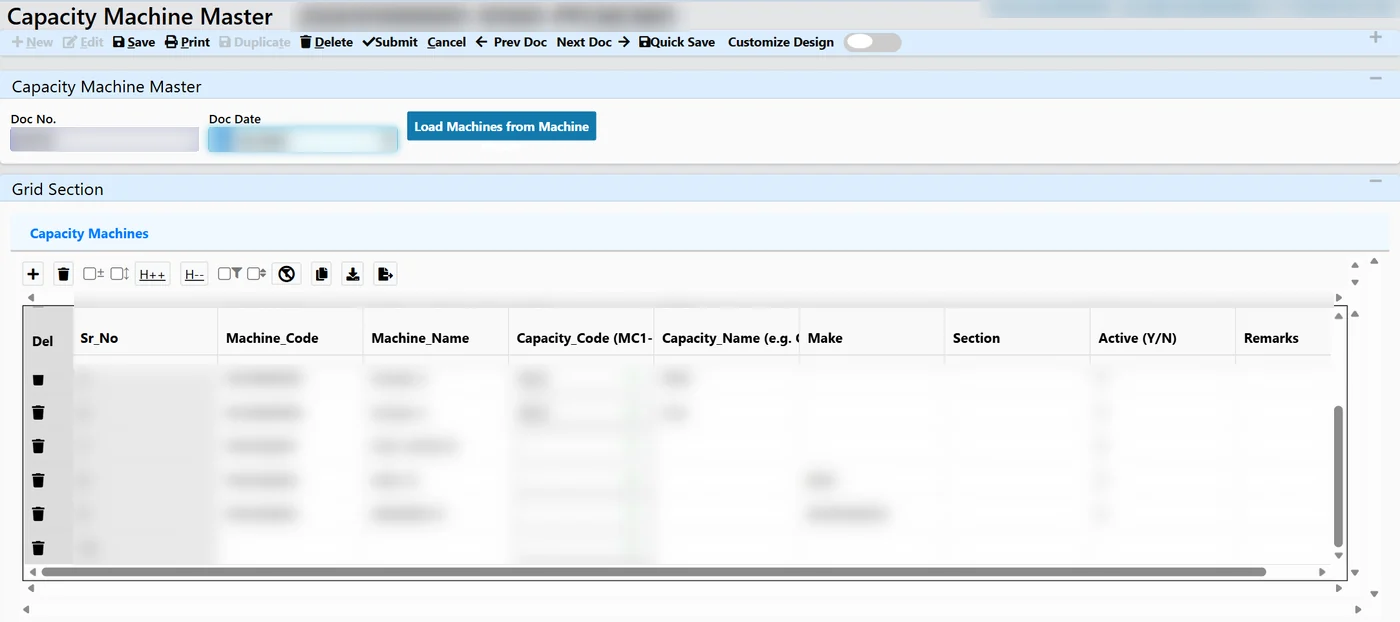
  2. Capacity groups. Up to 20 machine types (for example CNC, VMC and others) are defined, and each machine is linked to its group. The planning grid takes its column headings from these group names.
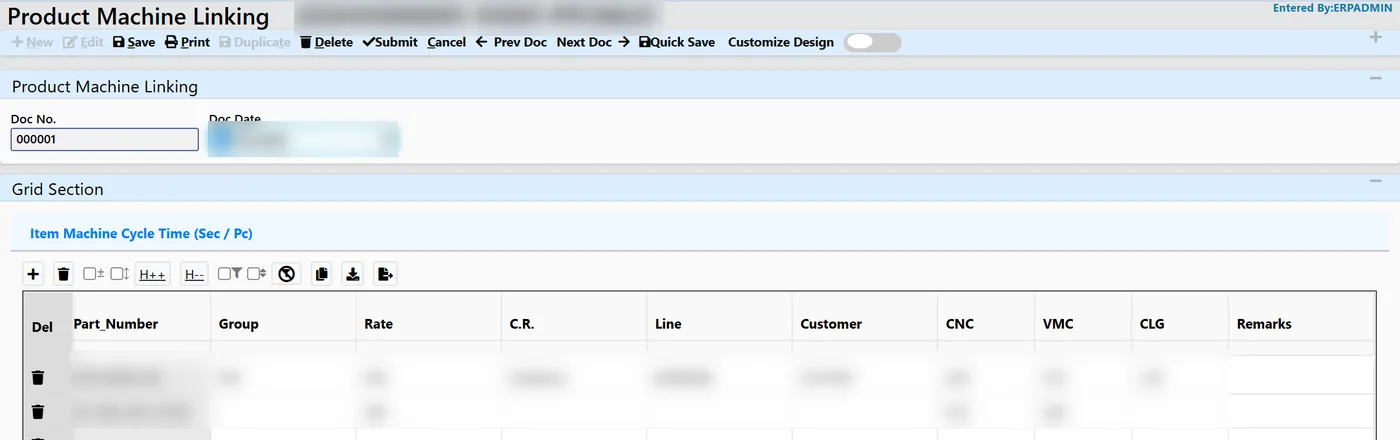
  3. Cycle time per part. For every part, the cycle time in seconds per piece is entered once for each machine type it runs on.
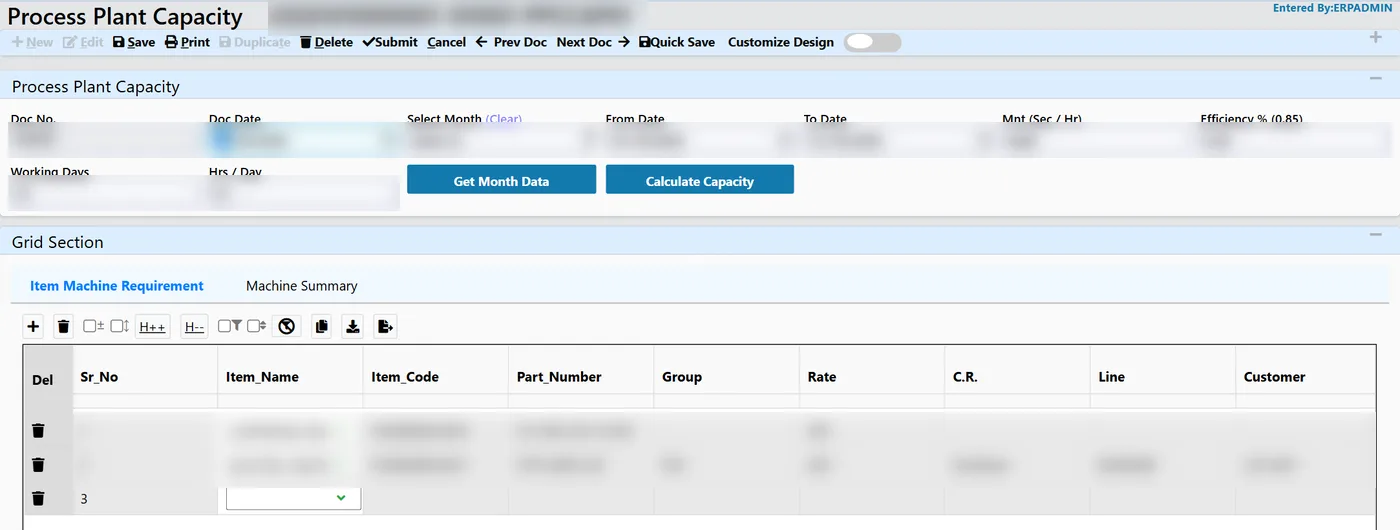
  4. Demand from work orders. “Get Month Data” pulls every production work order dated in the selected month, deducts finished-goods stock already made against those orders, and allows add / less corrections to give the revised net production.
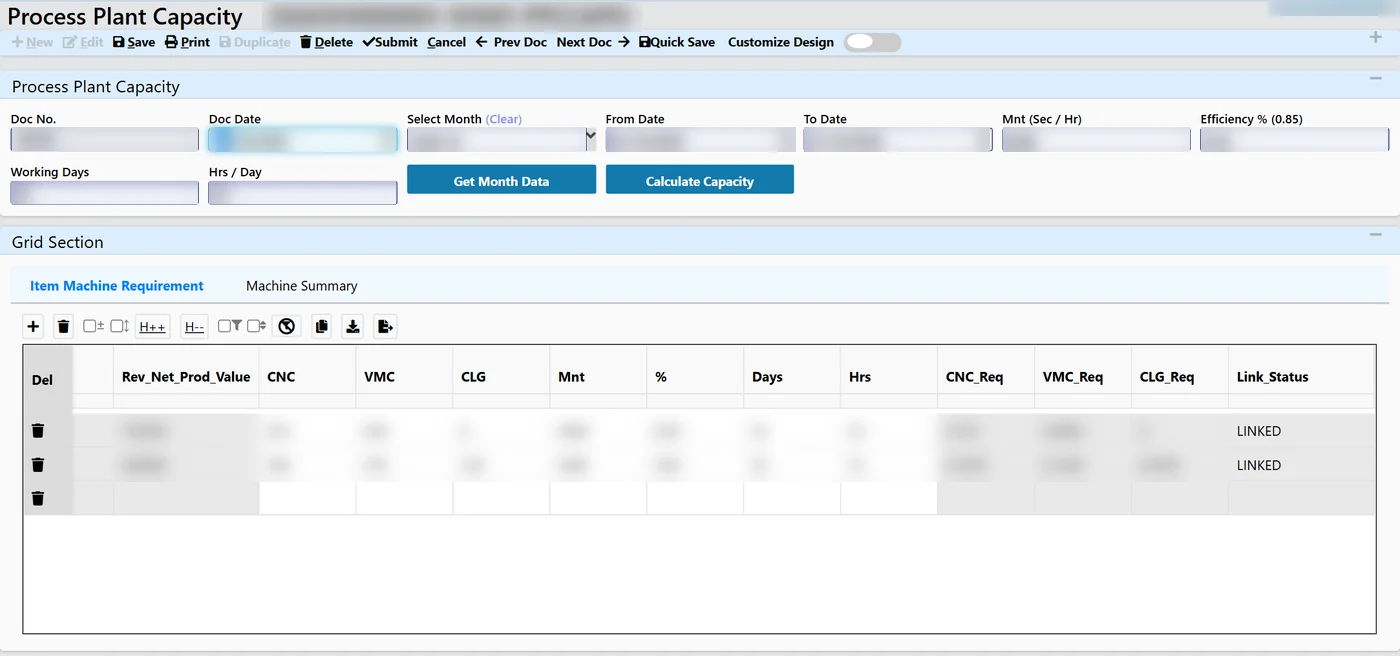
  5. The calculation. Machines required = revised net production × cycle seconds ÷ (seconds per hour × efficiency × working days × hours per day). Efficiency, working days and hours per day have defaults and can be changed on each line.
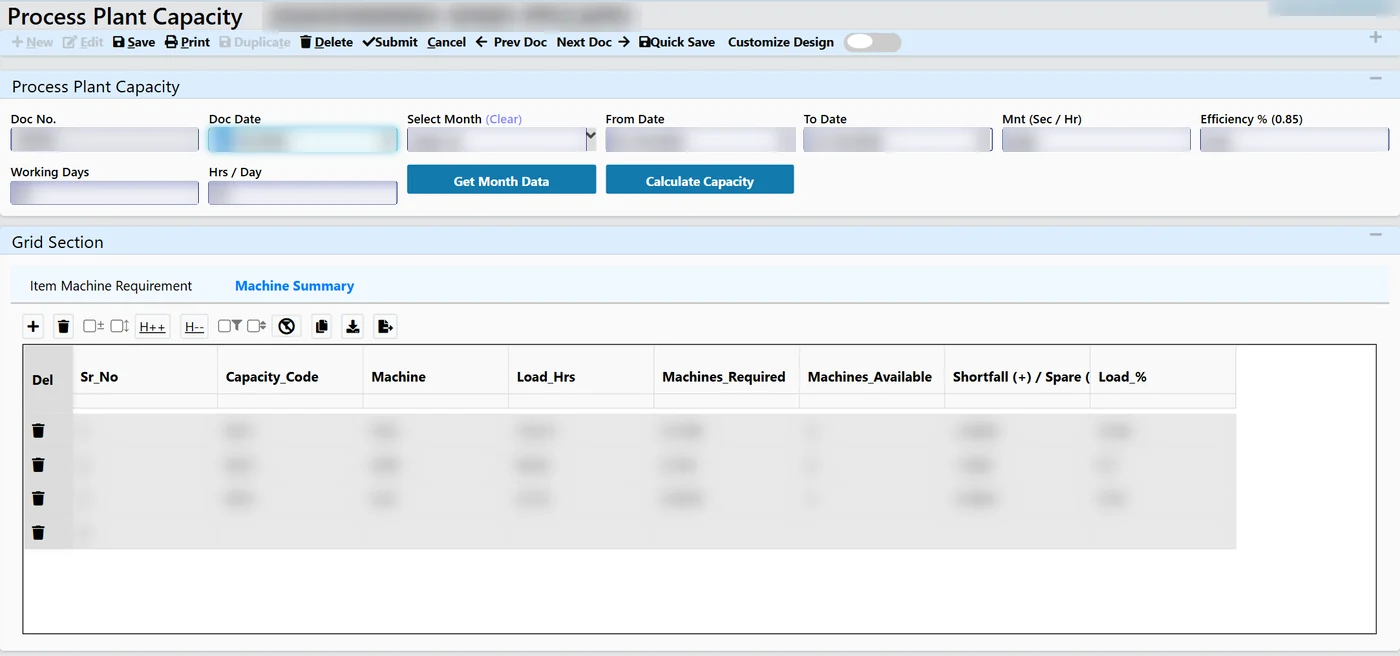
  6. Machine summary. For every machine type the plant sees load hours, machines required, machines available, shortfall (+) or spare (−), and load %.
  7. Controls. Parts with no machine link are flagged, one name is enforced per code, negative cycle times are rejected, and everything recalculates on save.

Screens from the project

Tejaxo ERP process plant capacity machine summary screen
Machine summary: load hours, machines required against machines available, shortfall or spare, and load % for each machine type
Tejaxo ERP process plant capacity month data screen
Process plant capacity: month, efficiency, working days and hours per day, then "Get Month Data" pulls demand from work orders
Tejaxo ERP item machine requirement grid in the plant capacity screen
Item machine requirement: net production converted into required CNC, VMC and other machine hours for every part
Tejaxo ERP product machine linking with cycle time per part
Product machine linking: cycle time in seconds per piece for each part on each machine type
Tejaxo ERP capacity machine master screen
Capacity machine master: every machine linked to a capacity group such as CNC or VMC

Real screens from the project. Company, product and party names and all values are blurred. Click a screen to enlarge.

Who this suits

Machine shops, auto-component suppliers and engineering plants where the bottleneck is machine hours, not material: CNC turning, VMC, grinding, gear cutting and press shops.

Story 2 · Metal strip processing

Metal strip processor: coil-wise traceability from casting to finished product

A metal strip processing plant runs its whole line in Tejaxo ERP coil by coil: a barcode on every coil, tablet scanning at each stage, quality recorded after every step, and the complete history of any coil on one screen.

At a glance

IndustryMetal strip and coil processing (casting, rolling, annealing, slitting and finishing)
SystemTejaxo ERP - production module configured for coil-wise, stage-wise production
ModulesProduct and production masters (line, machine, stage) · material inward with element details · furnace charge and casting · barcode labels · shop-floor stage entry on tablets · stage-wise quality · rejection · production and coil reports
DevicesDesktop for planning and stores; tablets with QR scanning on the shop floor
StatusConfigured and deployed for the plant

The challenge

Each coil passes through a long chain of stages, and its weight, thickness, width and hardness change at every one. On paper it was impossible to say which cast a finished coil came from, what happened to it at each stage, or why material ended up as scrap. Quality was checked at the end, when it was too late to act.

What changed

  • Every coil’s history, from casting to the finished product, is available from one scan or one report.
  • Quality is recorded at every stage, so a problem is caught where it starts instead of at final inspection.
  • Scrap is separated and visible stage by stage, with live production status for management.

How it works, step by step

  1. Masters. Products are set up by group with mandatory fields; line, machine and process-stage masters define the route.
  2. Material inward. Incoming material is received with its element details.
  3. Charge and casting. A furnace charge is generated and the casting entry records the charge details for each cast.
  4. One barcode per coil. A label with the coil’s details and QR code is printed for every coil at casting.
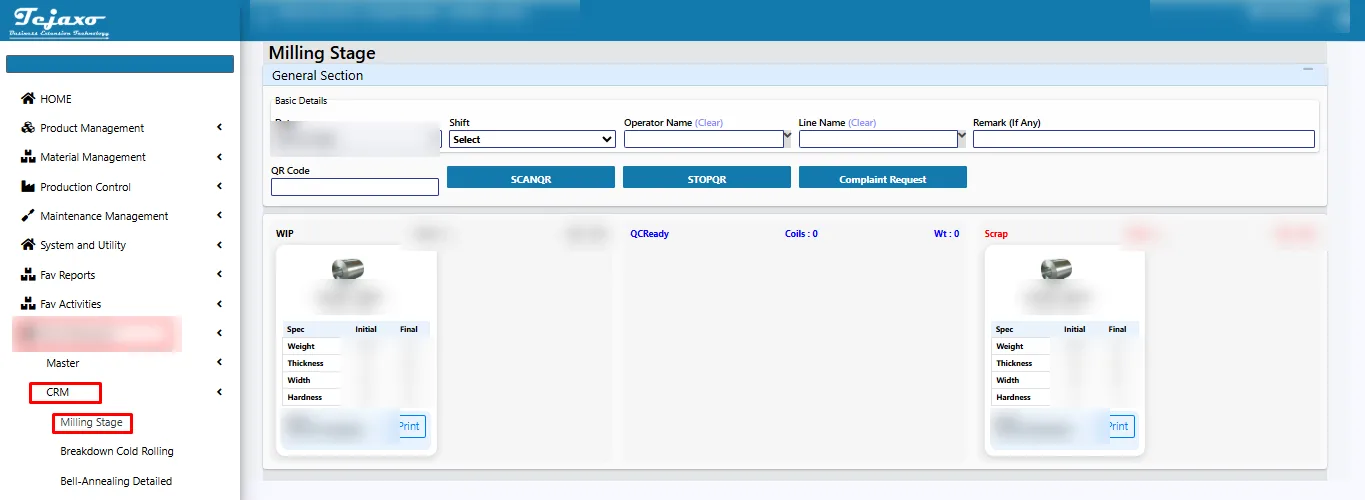
  5. Shop-floor entry by scan. At each stage the operator scans the coil on a tablet and moves it through the process; the entry is saved automatically. Coil cards sit in WIP, QC-ready or scrap.
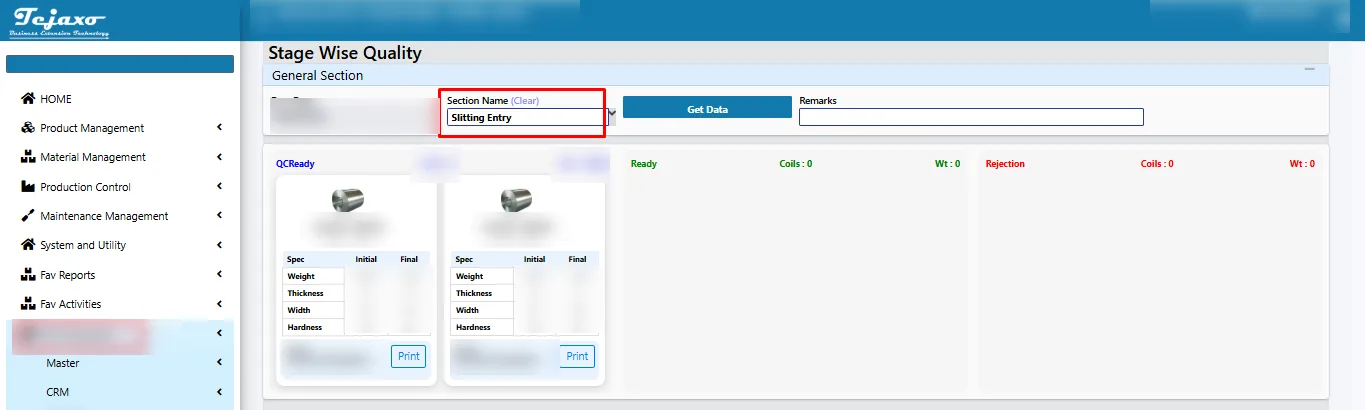
  6. Stage-wise quality. After every stage the quality team pulls the coils for that stage and records results; slitting records final weight, width, thickness and hardness.
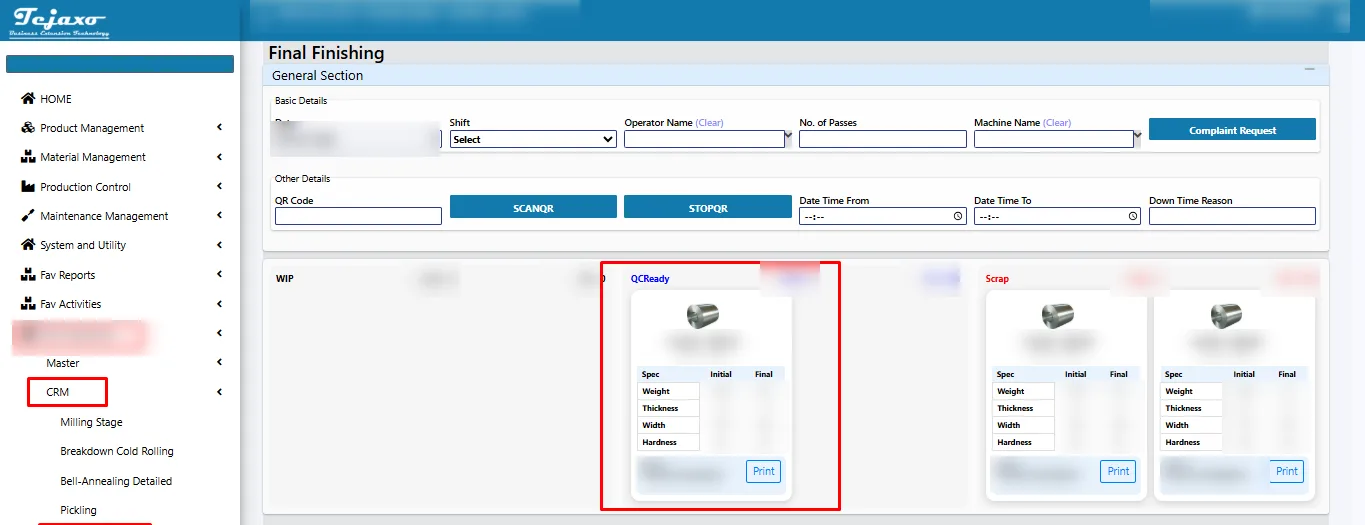
  7. Rejection and scrap. Rejections are received back with a rejection entry; finishing stages separate QC-ready coils from scrap.
  8. Reports. Production status for any date range, coil status, and the full coil movement history.

Screens from the project

Tejaxo ERP milling stage with coils in WIP, QC-ready and scrap
Milling stage: the operator scans the coil QR code; coil cards sit in WIP, QC-ready or scrap
Tejaxo ERP stage-wise quality after slitting
Stage-wise quality after slitting: each coil card carries initial and final weight, thickness, width and hardness
Tejaxo ERP final finishing stage with QC-ready and scrap coils
Final finishing: coils dragged into QC-ready or scrap, with a printable label for every coil

Real screens from the project. Company, product and party names and all values are blurred. Click a screen to enlarge.

Who this suits

Plants that process material in coils, strips or lots through several stages: steel and non-ferrous strip, wire, tube, sheet metal, cold rolling and heat-treatment lines.

Story 3 · Rubber moulding

Rubber moulding (vulcanising) plant: QR traceability from compound to part

A rubber auto-parts moulding plant uses a Tejaxo QR-code traceability app with a web portal: compound stock on FIFO, scan-matched issue to every vulcanising machine, QA approval by scan, and expiry control – the wrong compound is stopped at the scanner.

At a glance

IndustryRubber moulding - vulcanising of rubber parts from mixed rubber compound
SystemTejaxo QR traceability app (Android) + web admin portal
ModulesCompound inward (FIFO, batch-wise) · issue request · scan-matched issue to vulcanisation · QA inspection · machine verification · material return · expiry re-validation · part-to-compound linking · QR labels · 13 reports and dashboard
DevicesDesktop, iPad / tablet and mobile; operators log in by scanning their ID QR
StatusBuilt and deployed for the plant

The challenge

Rubber compound is mixed in batches and has a limited life. In a busy press shop the risks are clear: a wrong compound loaded into a machine, an expired batch used, and no way to trace a defective part back to its compound batch. The plant needed a scan at every hand-over, not a register.

What changed

  • A wrong compound is stopped at the scanner, before it reaches the machine.
  • Every part has a complete scan trail: compound batch, machine, operator, inspection result.
  • Expired compound is controlled and its re-validation is recorded.
  • Management sees stock, issues, returns and pending checks in one portal, with 13 reports.

How it works, step by step

  1. Login by scan. Operators log in by scanning their ID QR code or with a user name and password.
  2. Compound inward. Compound from mixing is received batch-wise and stocked on FIFO.
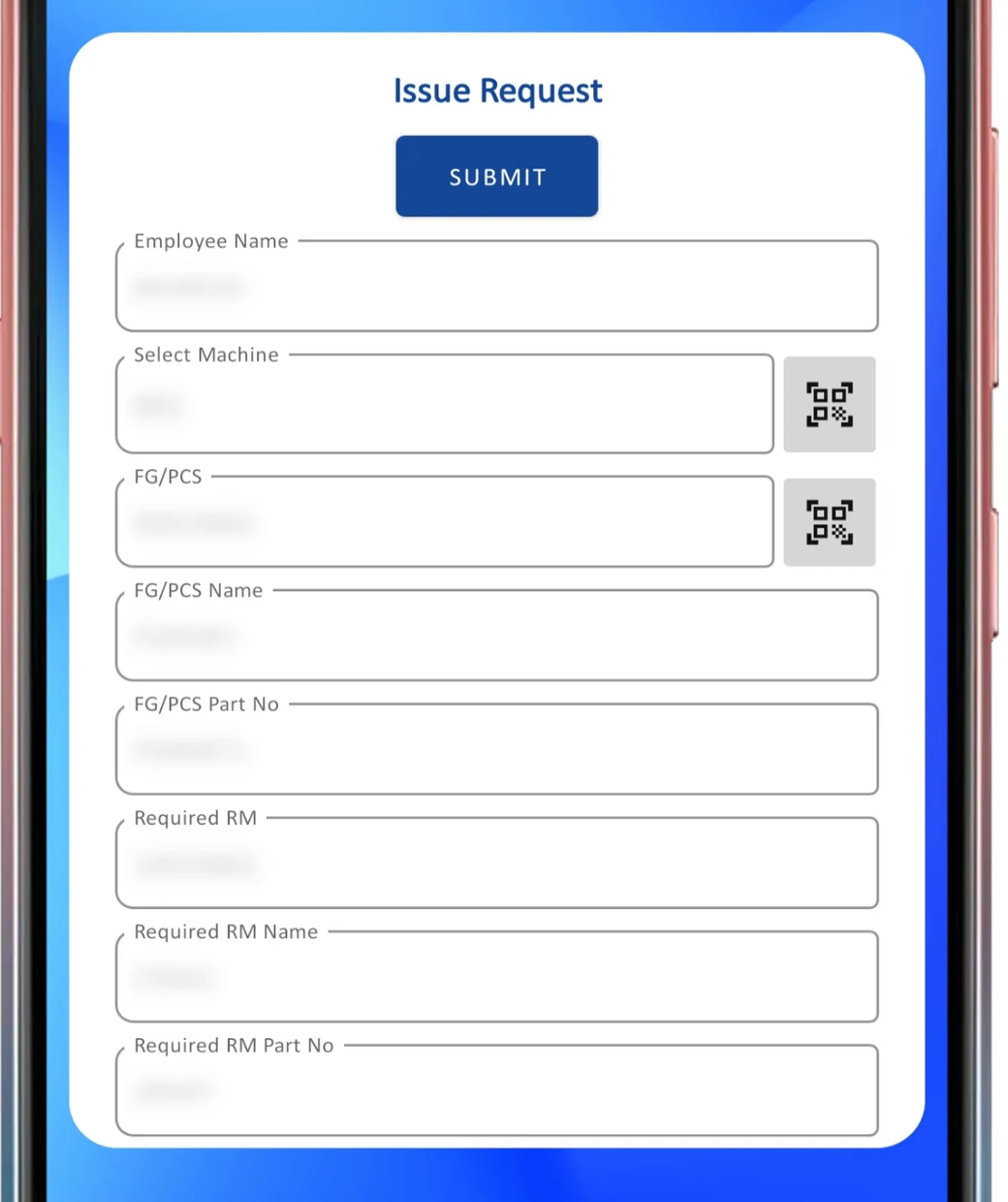
  3. Issue request. The operator scans the machine and the part; the app fills the required compound from the part-to-compound link.
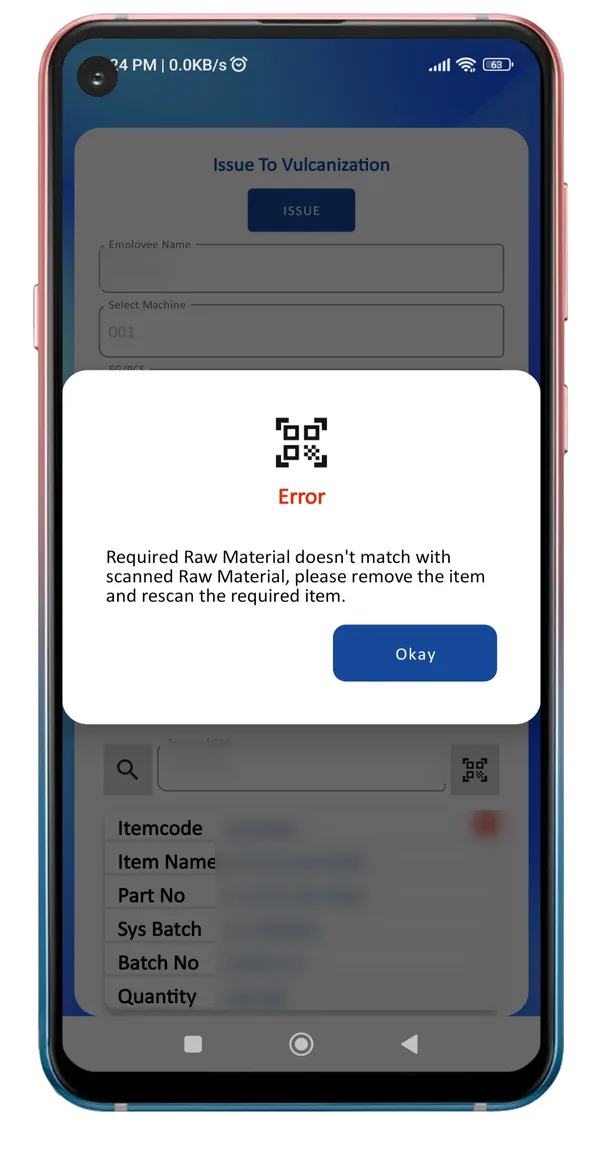
  4. Issue to vulcanisation, scan-matched. The store scans the compound batch. If the scanned compound is not the required one, the app shows an error and the issue cannot be completed.
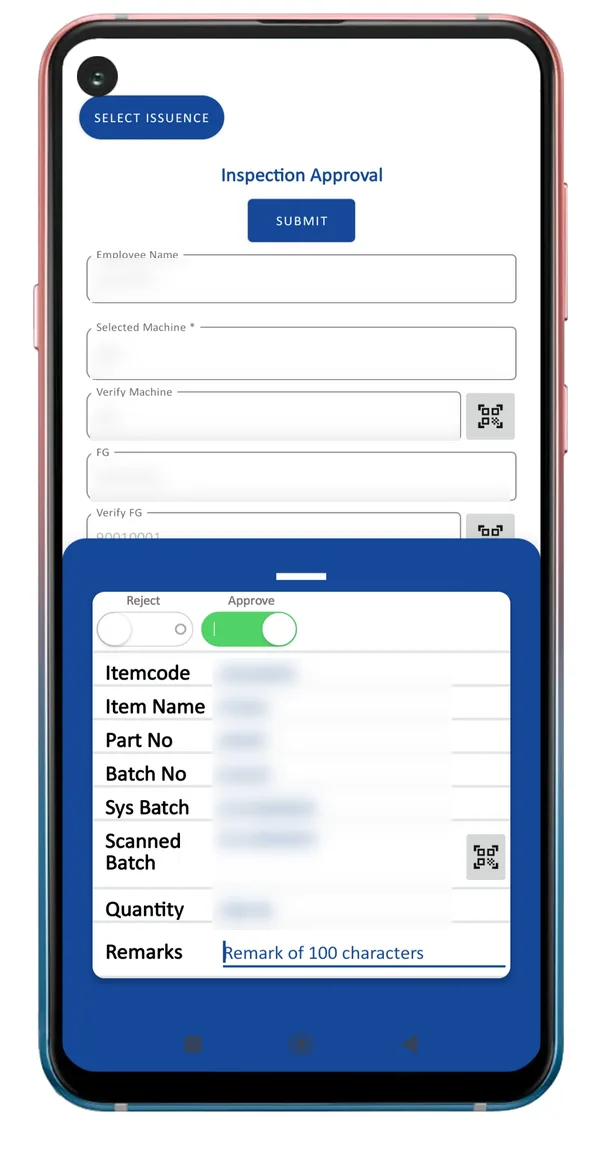
  5. QA inspection. Quality scans the machine, the finished part and the compound batch, then approves or rejects with remarks.
  6. Machine verification. The machine is re-scanned at production time to confirm the right part is on the right machine.
  7. Return and expiry. Unused compound is returned to stock; an expired batch can be re-validated with a new expiry date, with a record of who did it.
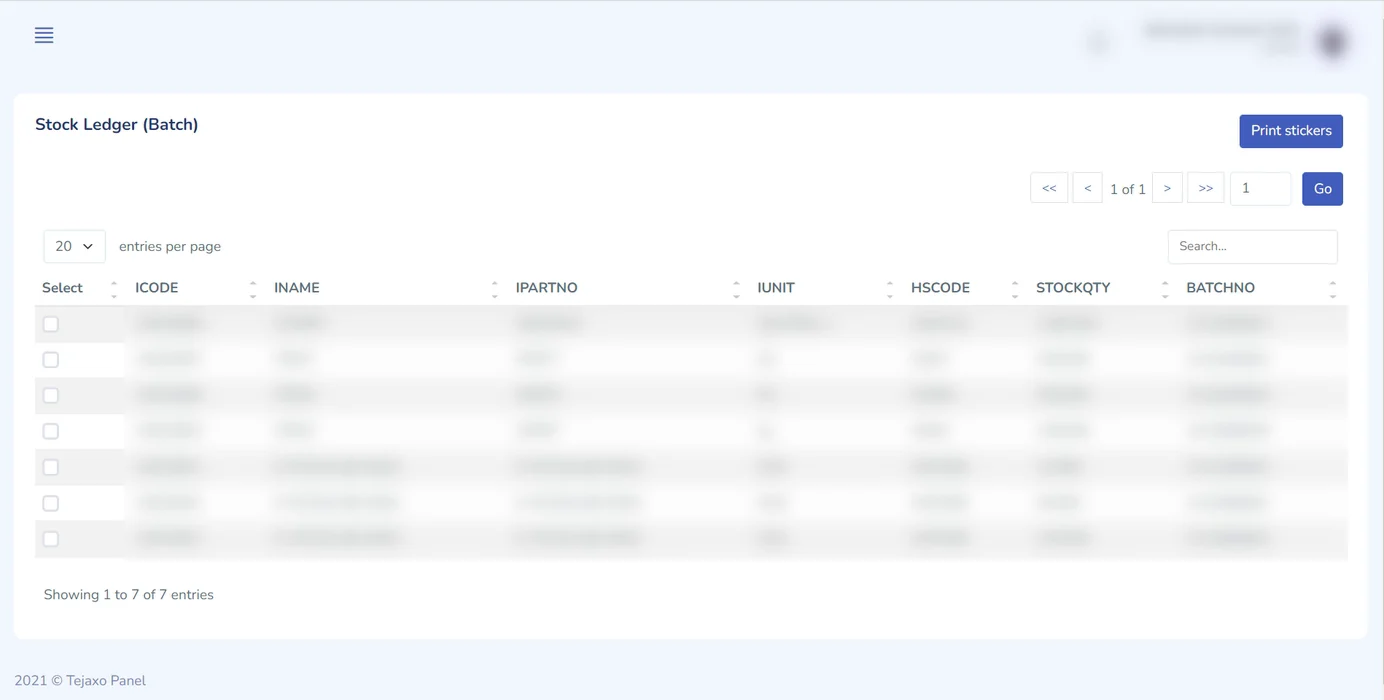
  8. Web portal. User rights, part and compound masters, part-to-compound linking, QR slips and batch cards, a batch-wise stock ledger, and reports for pending quality, pending machine verification and expired compound.

Screens from the project

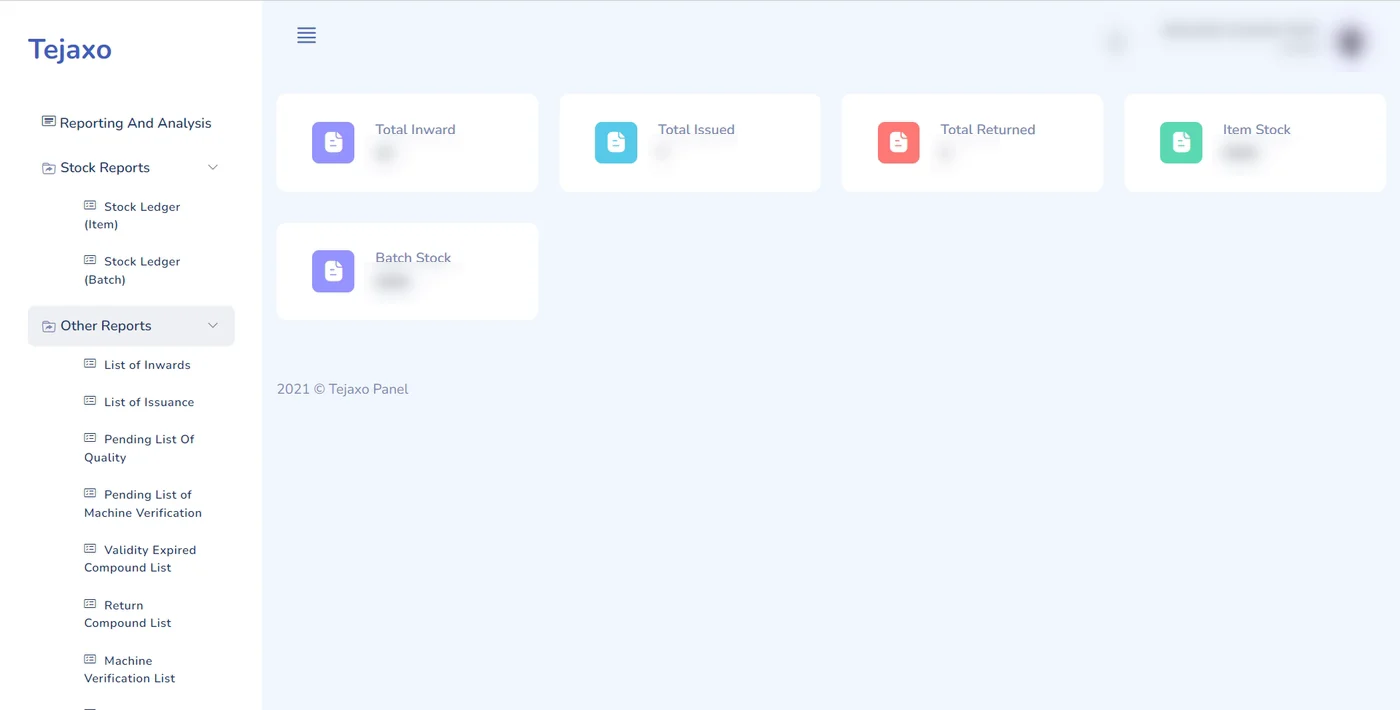
Traceability web portal dashboard with stock summary and report menu
Web portal: inward, issued, returned, item and batch stock, with reports for pending quality, machine verification and expired compound
Batch-wise stock ledger with QR sticker printing
Batch-wise stock ledger with QR sticker printing for every batch
Mobile app issue request form with QR scan buttons
Issue request: machine, part and required compound are filled by scanning QR codes
QR traceability app error when the scanned compound does not match
The scan check: "Required raw material doesn't match with scanned raw material" - the wrong compound never reaches the machine
QR traceability app inspection approval screen
Inspection approval: verify machine and part by scan, then approve or reject with remarks

Real screens from the project. Company, product and party names and all values are blurred. Click a screen to enlarge.

Who this suits

Rubber and plastic moulding, compounding, and any plant where the wrong input material at a machine is the costliest mistake: adhesives, coatings, pharmaceuticals and food.

Story 4 · Calibration services

Instrumentation company: calibration and repair booking app

For the Indian calibration-services business of a global instrumentation company, Tejaxo built a customer mobile app and admin panel: customers book calibration or repair, get a tentative quote, track every stage and download invoices – with WhatsApp integration.

At a glance

IndustryPressure, temperature and flow instruments - calibration and repair services
SystemCustomer mobile app + admin web panel, built by Tejaxo
FeaturesBooking for calibration and for repair & maintenance · three service modes · tentative quote and request number · stage-wise tracking · booking history and invoice download · toll-free call · live van location · WhatsApp integration
Calibration typesElectrical, temperature, pressure, mass and flow
StatusLive since September 2022

The challenge

Customers booked calibration by phone and e-mail, asked for status by phone, and waited for invoices by post or mail. The service team spent its time answering “where is my instrument?” instead of calibrating instruments.

What changed

  • Customers book, track and download invoices themselves, at any hour.
  • Every request has a number and a visible stage, so status calls drop away.
  • The service team sees its whole pipeline – by laboratory, van and engineer – on one dashboard.

How it works, step by step

  1. Customer login. Sign-up, login and password reset in the app.
  2. Choose the service. Book calibration, or repair and maintenance, from the home screen.
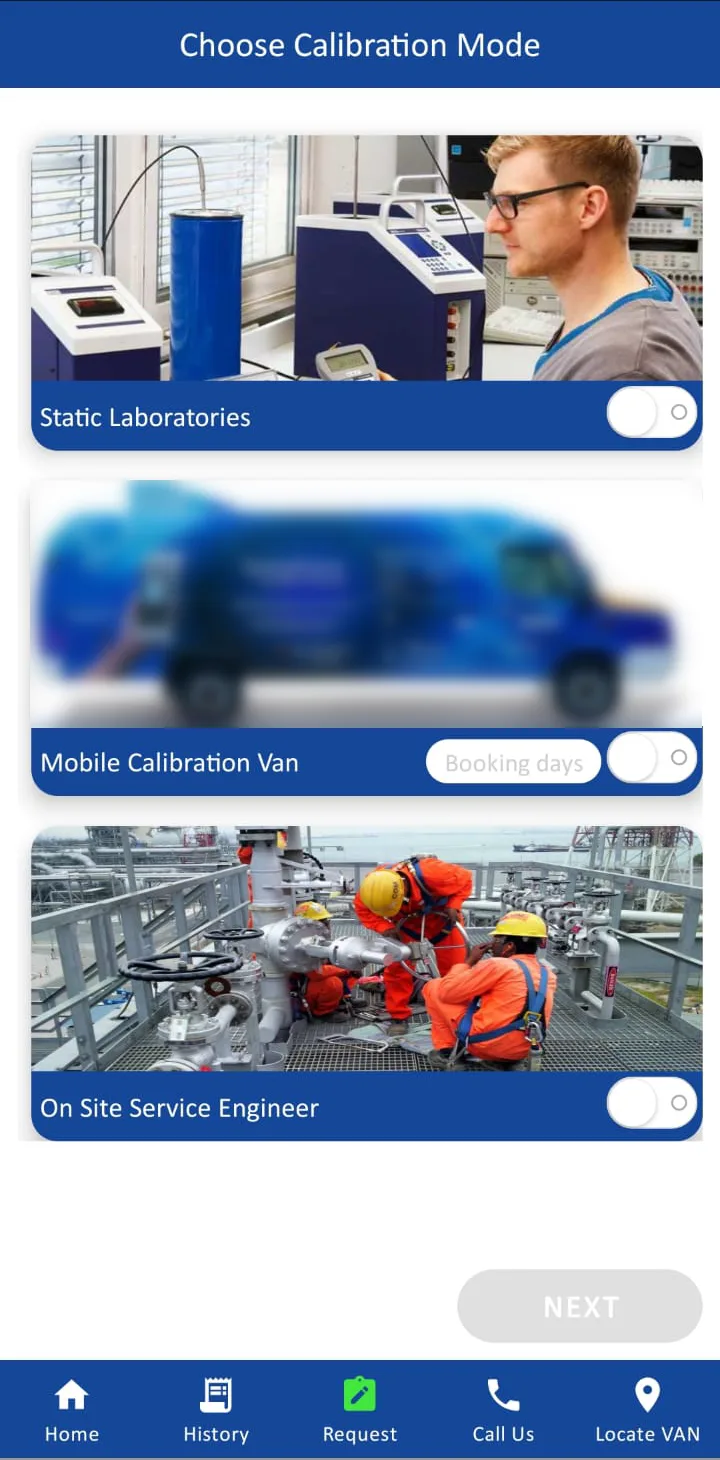
  3. Choose the mode. A static laboratory, the mobile calibration van, or an on-site service engineer.
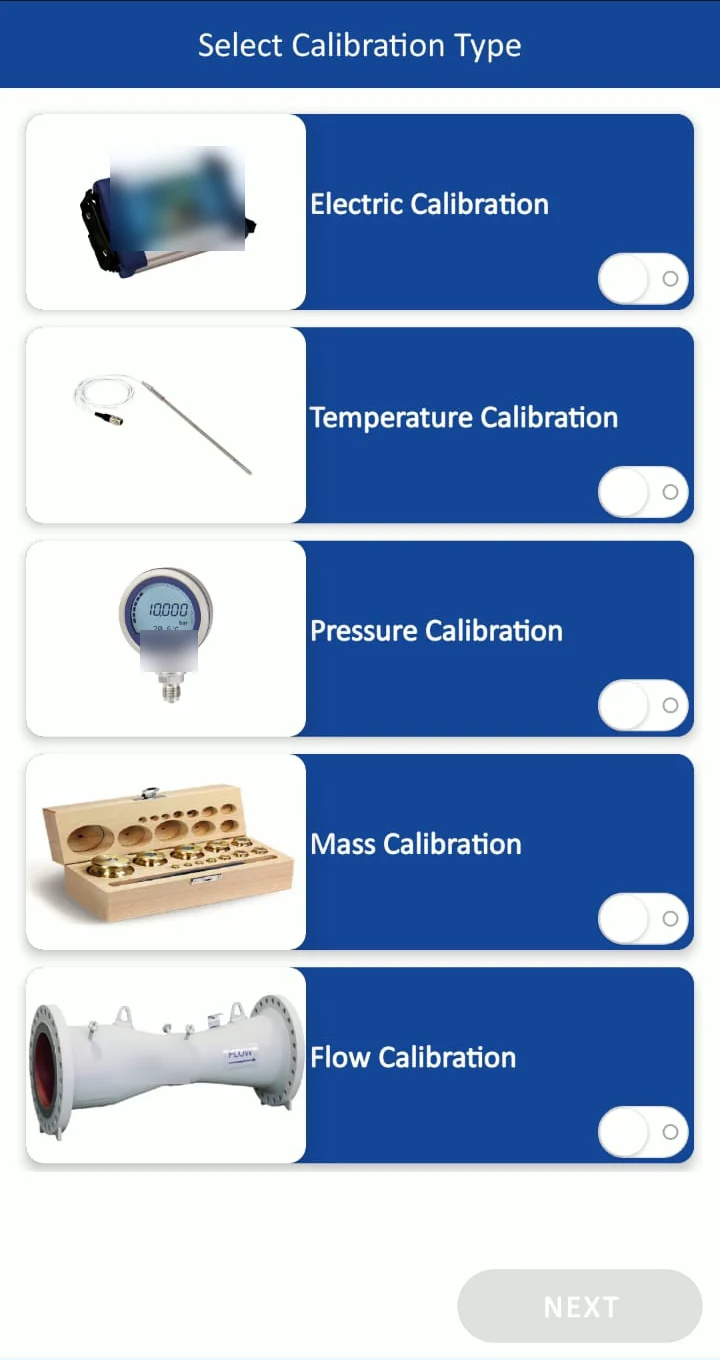
  4. Choose the calibration type. Electrical, temperature, pressure, mass or flow.
  5. Request form. Instrument, range, accuracy, quantity and photos or technical documents, with pre-filled drop-downs.
  6. Tentative quote and request number. The customer sees a tentative quote at once and gets a request number to track.
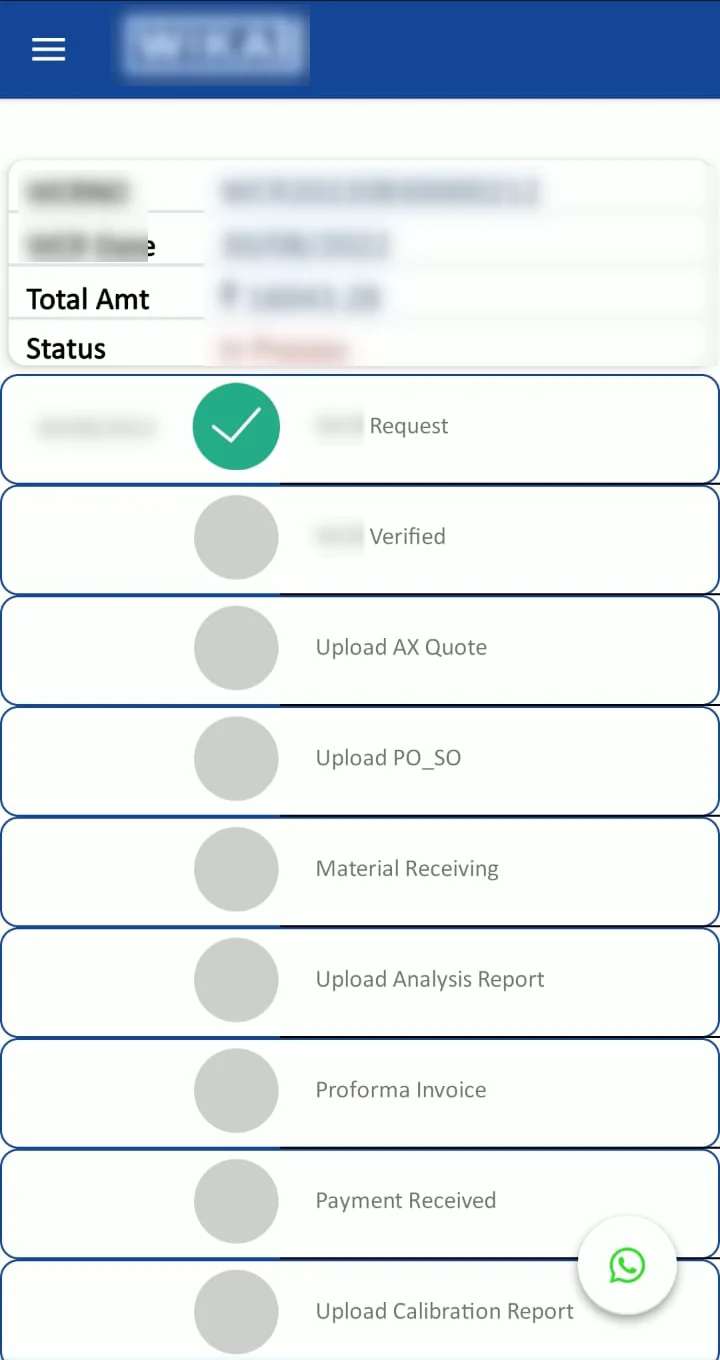
  7. Stage-wise tracking. Request, verification, quotation, PO / SO, material receiving, analysis report, proforma invoice, payment and calibration report – each stage turns green as it is completed.
  8. Self-service. Booking history, invoice download, a toll-free call button, WhatsApp chat and the live location of the calibration van.
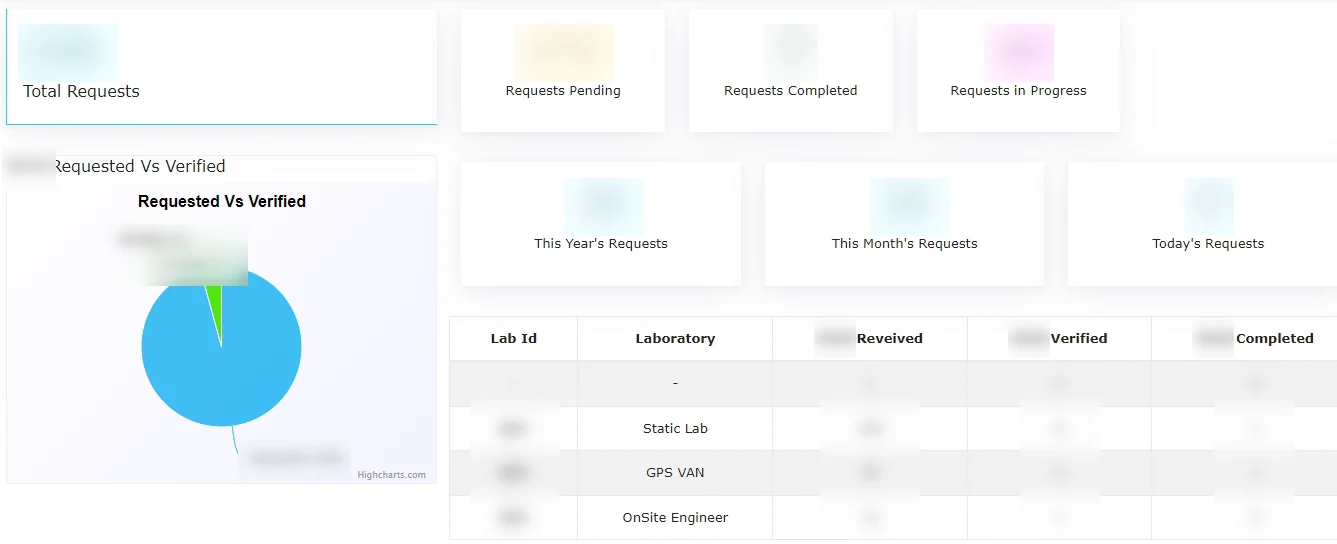
  9. Admin panel. Pending, completed and in-progress requests, requested vs verified, and status by laboratory, van and on-site engineer.

Screens from the project

Service request admin dashboard with laboratory-wise status
Admin dashboard: requests pending, completed and in progress, requested vs verified, and status by laboratory, van and on-site engineer
Calibration booking app: choose laboratory, mobile van or on-site engineer
Choose the service mode: static laboratory, mobile calibration van or on-site service engineer
Mobile app screen to select a calibration type
Choose the calibration type: electric, temperature, pressure, mass or flow
Mobile app timeline of a service request
Request tracking: the customer sees every stage, from request and verification to the calibration report

Real screens from the project. Company, product and party names and all values are blurred. Click a screen to enlarge.

Who this suits

Any service business attached to manufacturing: calibration labs, instrument and equipment repair, AMC and field service, testing laboratories.

Story 5 · Multi-plant MIS

Multi-plant manufacturer: all MIS on one screen

The owners of a multi-plant manufacturing group see sales, growth and purchase MIS for every plant on one screen in Tejaxo ERP, and drill down from the group to a single customer.

At a glance

IndustryMulti-plant manufacturing group
SystemTejaxo ERP - MIS, reports and dashboards over sales and accounts
ReportsSale candles (daily, weekly, monthly, yearly) · YTD, MTD and QTD growth · year-on-year, month-on-month and quarter-on-quarter across years · sales by plant, state and customer · top purchase items and suppliers
UsersOwners and senior management
StatusIn use

The challenge

Each plant sent its own reports in its own format, a few days after month-end. Comparing plants, or this year with last year, meant combining spreadsheets by hand – so the owners saw the business late and only at the total level.

What changed

  • Every plant is compared on one screen, the same day, from the same data.
  • Owners drill down from the group total to a plant, a state and a single customer without asking anyone for a report.
  • Reports can be subscribed and e-mailed automatically.

How it works, step by step

  1. Home dashboards with sales and purchase charts the moment the owner logs in.
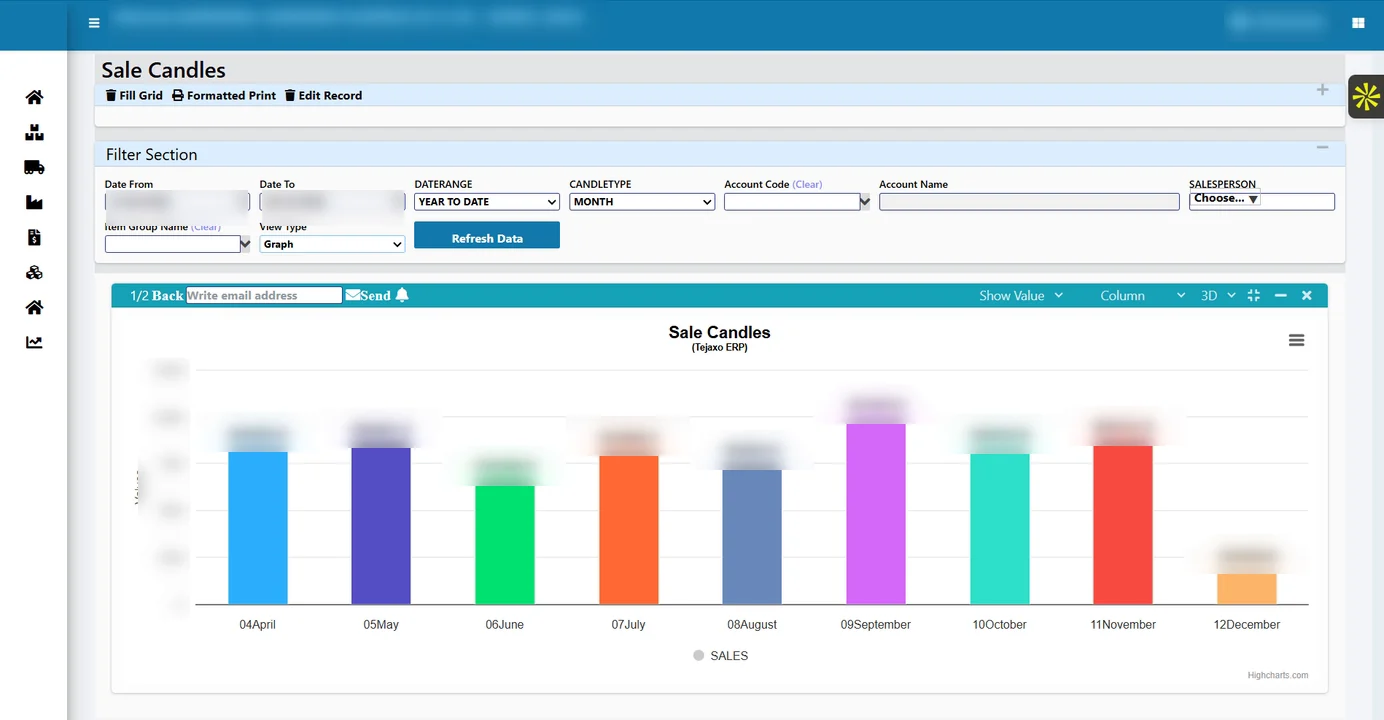
  2. Sale candles – sales as a candle chart by day, week, month or year, filtered by date range, customer and salesperson.
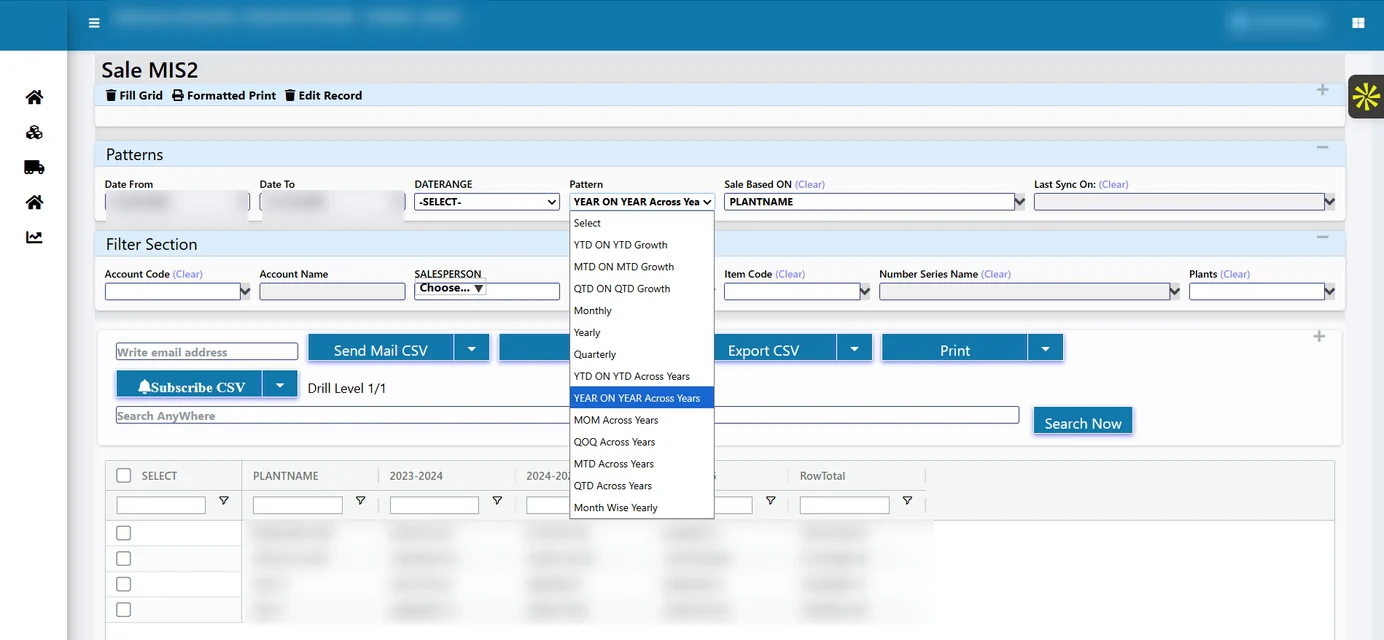
  3. Growth patterns – YTD on YTD, MTD on MTD and QTD on QTD growth; year on year, month on month and quarter on quarter across years.
  4. Dynamic selection – choose what the report is based on (plant, state, customer) and drill down level by level.
  5. Plant-wise, account-wise reports across years, exportable to CSV, printable, and e-mailed on subscription.
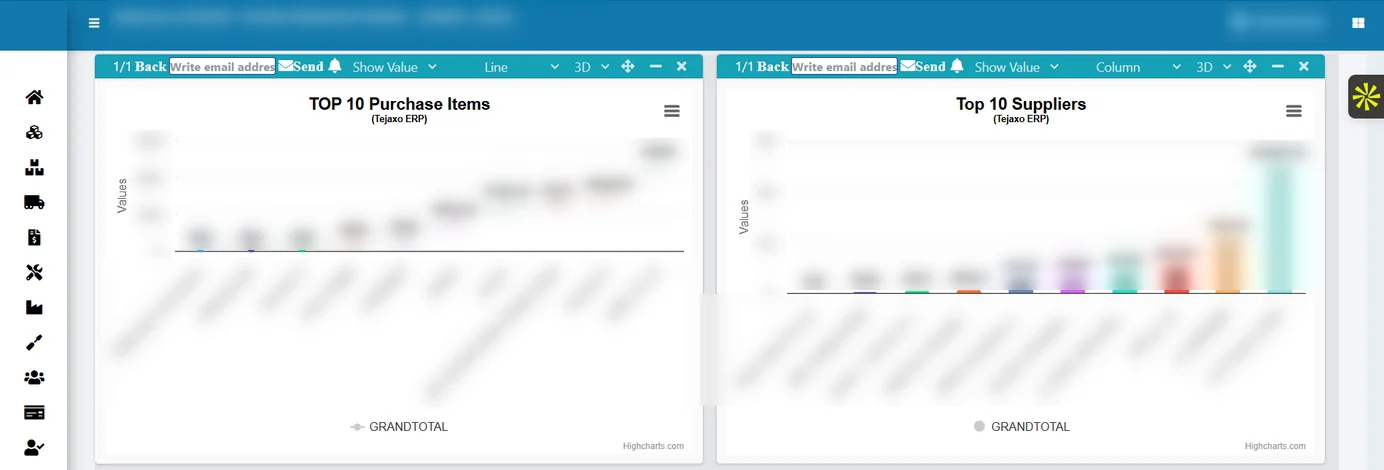
  6. Purchase dashboards – top purchase items and top suppliers.

Screens from the project

Tejaxo ERP month-wise sales column chart
Sale candles: month-wise sales with date range, customer and salesperson filters
Tejaxo ERP plant-wise sales MIS with pattern selection
Sales MIS by plant with patterns: YTD, MTD and QTD growth, year on year, month on month and quarter on quarter across years
Tejaxo ERP top purchase items and top suppliers charts
Purchase dashboards: top purchase items and top suppliers

Real screens from the project. Company, product and party names and all values are blurred. Click a screen to enlarge.

Who this suits

Groups with two or more plants or companies, and owners who want one view across units without waiting for month-end.

How we implement

The same four steps in every project

01 · Discovery

We study the plant, the process and the reports the owners need, on site.

02 · Pilot on your own masters

Your items, parties, machines and BOMs are loaded and you run a live month.

03 · Go-live and training

Each team – stores, production, quality, accounts – is trained on its own screens.

04 · Ongoing support

On-site and remote support from the same team after go-live.

Tejaxo Technologies Pvt. Ltd. has implemented ERP for manufacturers since 2017: 50+ clients, 20+ ERP modules and 1000+ ready reports, on-site from Palwal across Delhi NCR and remotely across India.
FAQ

Questions about these projects

Yes. Each one is a system Tejaxo configured or built for a manufacturing or engineering client, described from the project documents. Client names are withheld, and every screen is a real screen with company names, product names and all values blurred.

Our clients’ production data, products and customers are confidential. We describe each project by industry, process and, where the client agrees, location.

References are shared during evaluation, with the client’s consent.

Yes. Story 1 is a CNC and VMC machining plant in Faridabad that plans machine capacity every month in Tejaxo ERP. Our office in Palwal is about an hour from most Faridabad sectors, and machine data and OEE can also flow into the ERP through Tejaxo Automation.

Yes. Tejaxo builds shop-floor and customer apps – scanning, traceability, service booking, approvals on WhatsApp – that work with Tejaxo ERP, and can also extend an ERP you already run, such as SAP, Microsoft Dynamics, Oracle or Tally.

It depends on the plant and the modules. Every project follows the same four steps – discovery, a pilot on your own masters, go-live with training, and ongoing support – and we agree the plan with you after the discovery visit.

On-site from our Palwal office across Delhi NCR and its industrial belts – Faridabad, Ballabhgarh, Gurugram, IMT Manesar, Bhiwadi, Neemrana, Rewari, Noida, Greater Noida and Ghaziabad – and on-site or remotely anywhere in India.

Have a process like these?

Tell us how your plant works. The second demo runs on your own items, machines and customers.

Stay connected

ERP insights, product updates and automation tips for manufacturers.

You have been successfully subscribed! Oops! Something went wrong, please try again.
© 2017–2026 Tejaxo Technologies Pvt. Ltd. All rights reserved. Privacy policy · Sitemap · Contact