
Many large and mid-sized manufacturers already run SAP, Microsoft Dynamics 365, Oracle or Infor. The core works: finance, purchasing, sales and the main stock records. Yet the plant still runs on Excel sheets, paper registers and phone calls, because the work on the shop floor, at the gate and with suppliers never made it into the ERP. Replacing the ERP is rarely the answer. This guide explains how to extend the ERP you already have – what to build around it, how it connects and how to start without risk.
Why the shop floor stays outside a big ERP
Large ERPs are built around transactions that finance and supply chain need. The gaps usually look the same from plant to plant:
- The shop floor runs on Excel. Machine counts, downtime, rejections and shift reports are typed into sheets and keyed into the ERP later, if at all.
- Changes are slow and costly. A new screen or report in the core needs consultants, transports and testing, so small requests wait for months.
- Systems do not talk. Machines, SCADA, data loggers and design files live in separate islands, and the ERP never sees them.
- Reports instead of answers. Managers download reports and build their own MIS instead of seeing one live view.
Replace, or extend?
Replacing an ERP that finance, audit and group reporting depend on is expensive and risky. Extending it keeps the core untouched and adds what the plant needs around it. The idea is simple: your ERP runs the business; the extension connects it to everything else. The core code is not changed – new apps read from and post to the ERP through supported interfaces, so upgrades and audits are not disturbed.
If you are not on a large ERP yet, the same team offers a complete manufacturing ERP – see Tejaxo ERP. This article is for plants that want to keep their current system.
What an extension usually covers: connect, extend, automate
- Connect: bring CNC and VMC machines, SCADA, Modbus data loggers and AutoCAD into the same data flow as the ERP.
- Extend: add portals, shop-floor apps, traceability and MIS outside the core, where changes are quick.
- Automate: approvals on WhatsApp, invoice scanning at the gate and live cockpits for owners and plant heads.
Typical projects
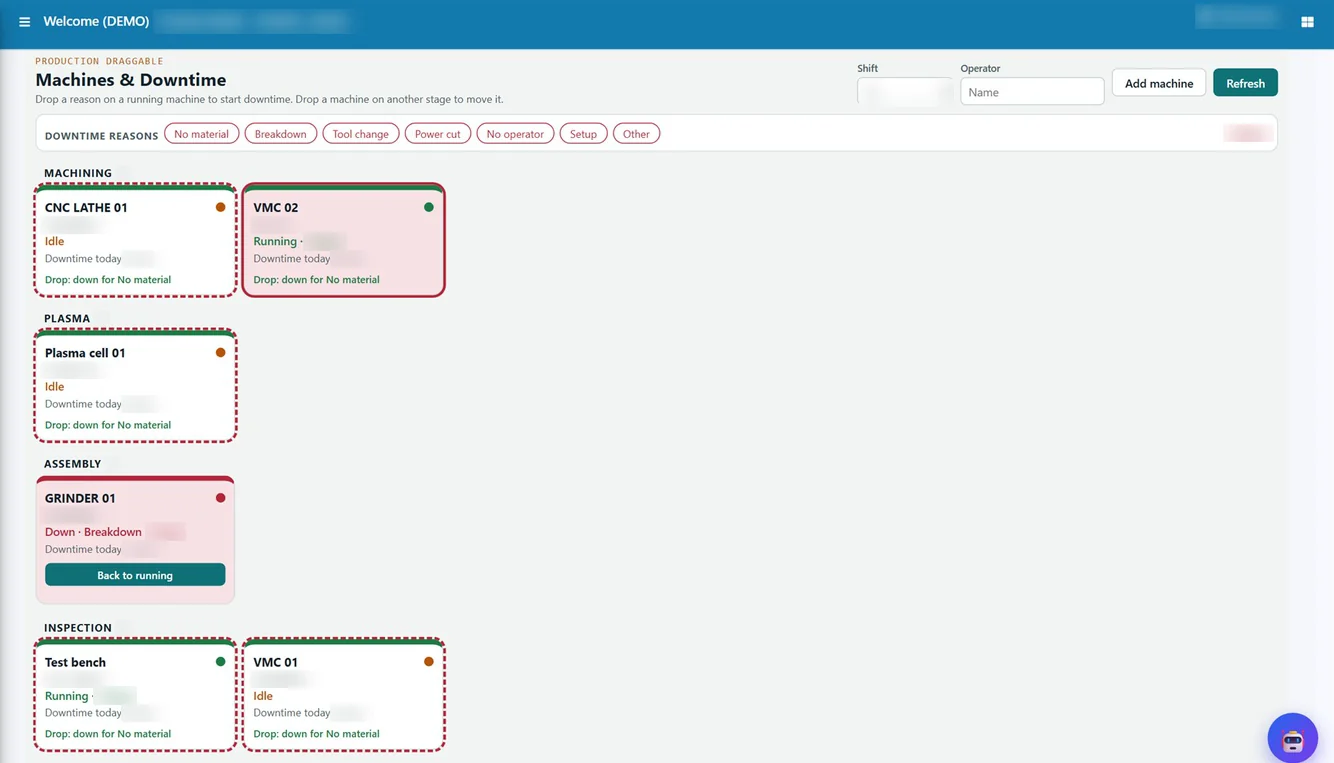
- Machine to ERP. Cycle counts, run time and downtime from CNC and VMC machines are captured automatically, and good quantity and OEE are posted to the ERP as production confirmations – see machine monitoring and OEE.
- Supplier portal. Vendors see schedules, submit advance shipping notices and check GRN and payment status without calling the plant.
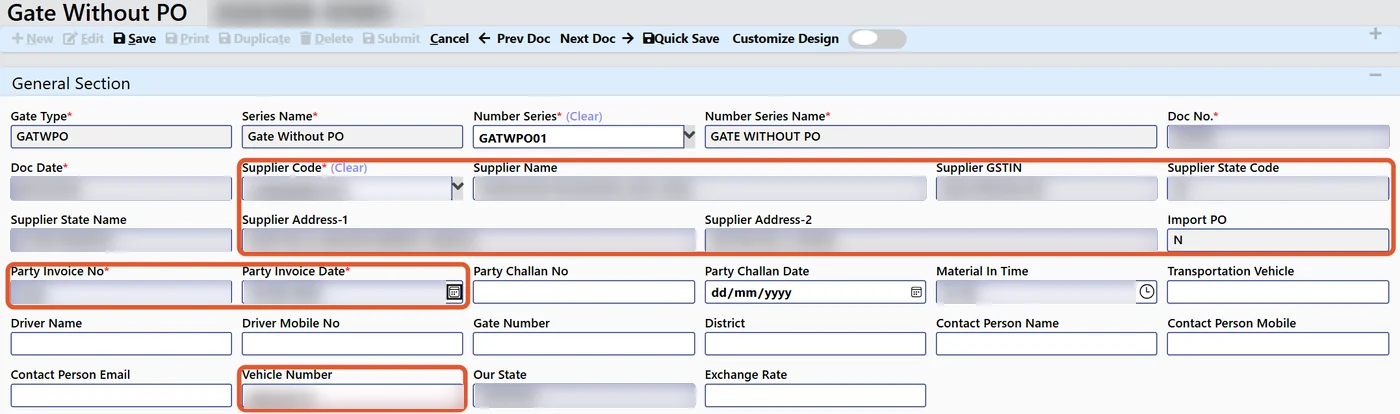
- AI gate entry. The supplier’s invoice is scanned at the gate and the gate entry and GRN details are filled from it – see AI invoice scanning.
- QR traceability. Batches are labelled and scanned through production, so a complaint can be traced back to the material lot.
- WhatsApp approvals. Purchase orders and payments waiting in the ERP are released from the phone, with an audit trail.
- Gauge and calibration. Instruments, due dates and calibration records are tracked outside the core.
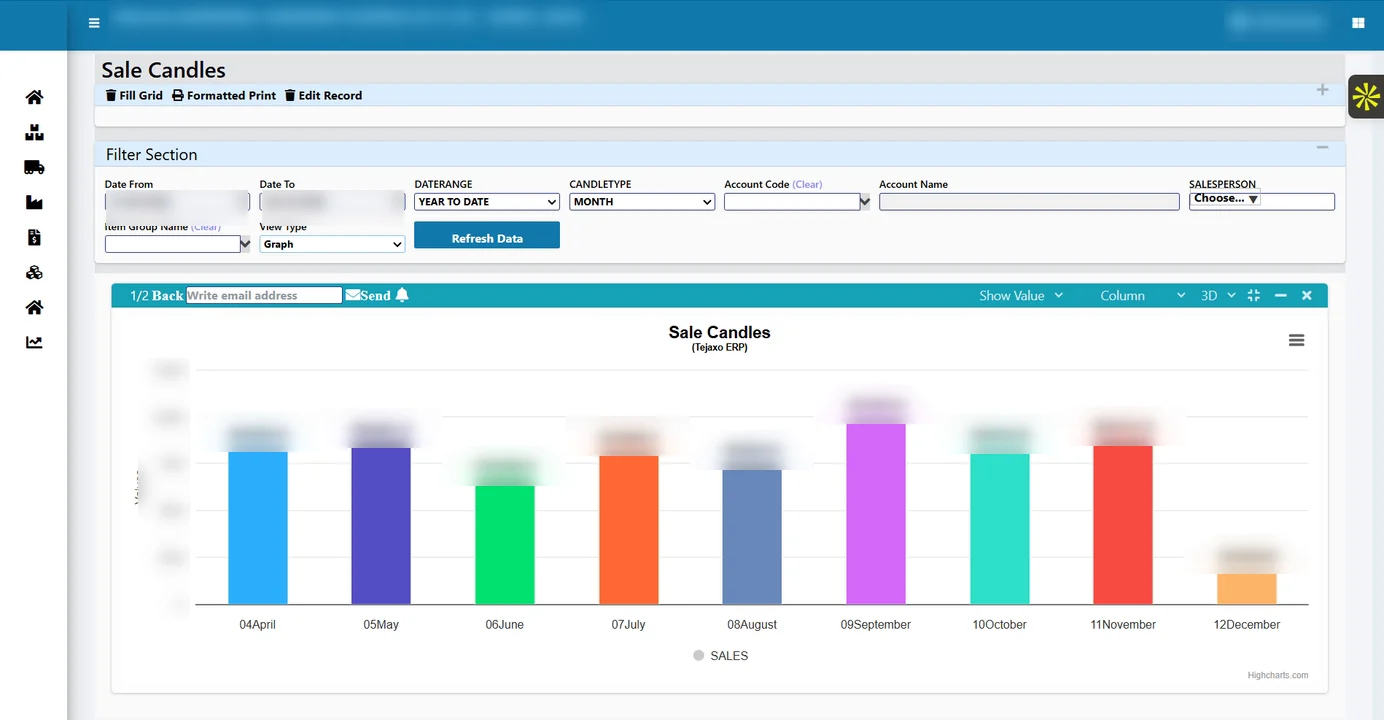
- Group cockpit. One live screen for several plants instead of a monthly MIS built by hand – see one-screen MIS for multi-plant groups.
- Visitor and contract labour. Gate passes, visitor records and contract workers handled in their own apps.
What it looks like by ERP
- SAP: vendor and customer portals, approvals and custom reports.
- Microsoft Dynamics 365 Finance and Operations: custom tools, portals and Power BI dashboards.
- Microsoft Dynamics 365 Business Central: add-ons, shop-floor apps and automatic MIS.
- Infor M3: data bridges and custom apps.
- Tally: two-way sync of masters, vouchers and GST data – see when to move from Tally to an ERP.
How the connection works
The extension talks to the ERP in the way your IT team is most comfortable with: the ERP’s APIs, database connectors, scheduled sync, or secure file exchange. Each project agrees which system is the master for each kind of data – for example, item and vendor masters stay in the ERP, while machine counts and downtime are captured in the shop-floor app and posted back. Two design choices matter for IT teams: Ask Tejaxo AI is read-only by design, with verified query templates running before any free-form question, and OCR for invoice scanning runs on the client’s own server.
Worked example: one machine shop, before and after
Tejaxo Manufacturing runs Microsoft Dynamics 365 for finance and supply chain across two plants, with forty CNC machines (sample numbers). Operators write counts and stoppages on a shift sheet; a supervisor types the totals into Excel the next morning, and production confirmations reach the ERP two days late.
After the extension, each machine’s counts and run and idle time are captured automatically, operators pick a downtime reason with one tap, and good quantity is posted to the ERP as a production confirmation at the end of the shift. The plant head sees OEE and the top downtime reasons for both plants on one screen. The ERP itself was not changed – it simply receives correct production data on time.
How to start without risk
- Discovery: list the gaps on the floor, at the gate and with suppliers, and pick the one that costs the most.
- Proof of concept on one plant with real data: connect a few machines, one gate or a handful of suppliers.
- Roll-out: extend to the other lines and plants once the numbers match.
- Support: the same team supports the apps and the connection after go-live.
There is no rip-and-replace at any stage.
Common mistakes
- Customising the core for every plant request. Each change makes the next upgrade harder; keep plant-specific screens outside the core.
- No agreed data master. When the same item or vendor is edited in two places, the numbers drift apart within weeks.
- Starting with every plant at once. A proof of concept on one plant shows problems while they are still cheap to fix.
- Leaving IT out. The connection method and security should be approved by the ERP team before the first machine is connected.
Questions to ask any extension partner
- Will you change our ERP’s core code? (The answer should be no.)
- Which interface will you use – APIs, database connector, scheduled sync or files – and who approves it?
- Which system is the master for each data object?
- Can the proof of concept run on one plant with our real data?
- Who supports the apps and the connection after go-live?
Next step
Tell us which ERP you run and where the plant still works in Excel. We will suggest one proof of concept on one plant with your real data. Book a free consultation, read about Tejaxo Automation for the plant-floor side, or see how we implement.
Frequently asked questions
Can we keep SAP or Microsoft Dynamics and still digitise the shop floor?
Yes. Shop-floor apps, machine connections, portals and dashboards are built around the ERP and post their results to it, so the core ERP stays as it is.
Does extending the ERP change its core code?
No. The extension connects through the ERP’s APIs, database connectors, scheduled sync or secure file exchange, so upgrades and audits of the core are not disturbed.
Which ERPs can be extended?
SAP, Microsoft Dynamics 365 (Finance and Operations and Business Central), Oracle, Infor M3 and Tally.
What is a typical first project?
Usually the gap that costs the most: machine data and OEE posted to the ERP, a supplier portal, AI gate entry, QR traceability or WhatsApp approvals, started as a proof of concept on one plant with real data.
Is the AI allowed to change data in our ERP?
Ask Tejaxo AI is read-only by design, and verified query templates run before any free-form question. OCR for invoice scanning runs on your own server.
What if we want to replace our ERP later?
Tejaxo also offers a complete manufacturing ERP, so a plant can start by extending its current system and move fully later if it chooses.