
ERP automation tools fall into three groups: RPA bots that copy what a user does on screen, add-ons that automate one function such as GST, payables or payroll, and an automated ERP where the automation is part of the workflow itself. Choose RPA as a short-term bridge to a system you cannot change, an add-on for one clear gap on an otherwise sound ERP, and an automated ERP when manual entry and patchwork are the real problem.
Most pages on this topic list products. This article does the more useful job for an owner, plant head, CFO or IT head: it explains the categories, what each one actually automates, where each one fails, and how to decide without being sold the wrong thing.
The three categories of ERP automation tools
Before comparing brands, compare categories. A tool from the wrong category will disappoint you however good the vendor is.
- RPA bots (robotic process automation): software robots that log in, click, copy and paste like a person. They work at the screen level, across any application, without changing the application underneath.
- Add-ons and integrations: separate products or connectors that take over one function, for example GST filing support, accounts payable capture, a payroll engine or a WhatsApp notification layer, and exchange data with your ERP.
- An automated ERP: an ERP in which documents flow from one stage to the next, approvals are native, machine and scanned-document data enter without typing, and alerts reach people on the channels they already use.
The three are not rivals in every case. Many Indian factories end up using a mix. The question is which one should be the foundation and which should be the patch.
RPA bots: what they automate and where they break
RPA is the fastest way to remove a repetitive task when the system underneath cannot be changed. Typical jobs include copying data from a spreadsheet into a screen, downloading a report every morning, or keying the same entry into two systems.
Where RPA works well
- The ERP or accounting package is old, locked, or has no usable interface for integration.
- The task is stable, rule-based and high-volume, such as moving fixed-format data between two systems.
- You need a result in weeks and accept that it is a bridge, not a destination.
Where RPA breaks
- Screen changes. A bot depends on the layout it was recorded against. When a screen, field name or login flow changes, the bot stops or, worse, enters data in the wrong place.
- Hidden maintenance. Each bot needs someone to monitor it, fix it after upgrades and handle exceptions. The cost does not end after the first build.
- It copies bad processes. A bot that re-keys data between two systems automates the duplication instead of removing it.
- It does not fix master data. Duplicate items, inconsistent party names and missing tax details will pass straight through a bot and appear in your reports.
In short, RPA reduces typing effort but leaves the structure of the work unchanged. If the reason for the bot is that two systems do not talk to each other, the long-term answer is usually an integration or a single system, not more bots.
Add-ons and integrations: fixing one gap at a time
An add-on is the right category when your ERP core is sound but one function is weak. In India the common candidates are:
- GST support: return preparation, supplier invoice matching against the portal data, and e-invoice or e-way bill preparation through the tools your ERP supports.
- Payables capture: reading supplier invoices so that a person checks instead of types.
- Payroll and statutory files: attendance rules, PF, ESI and bank files.
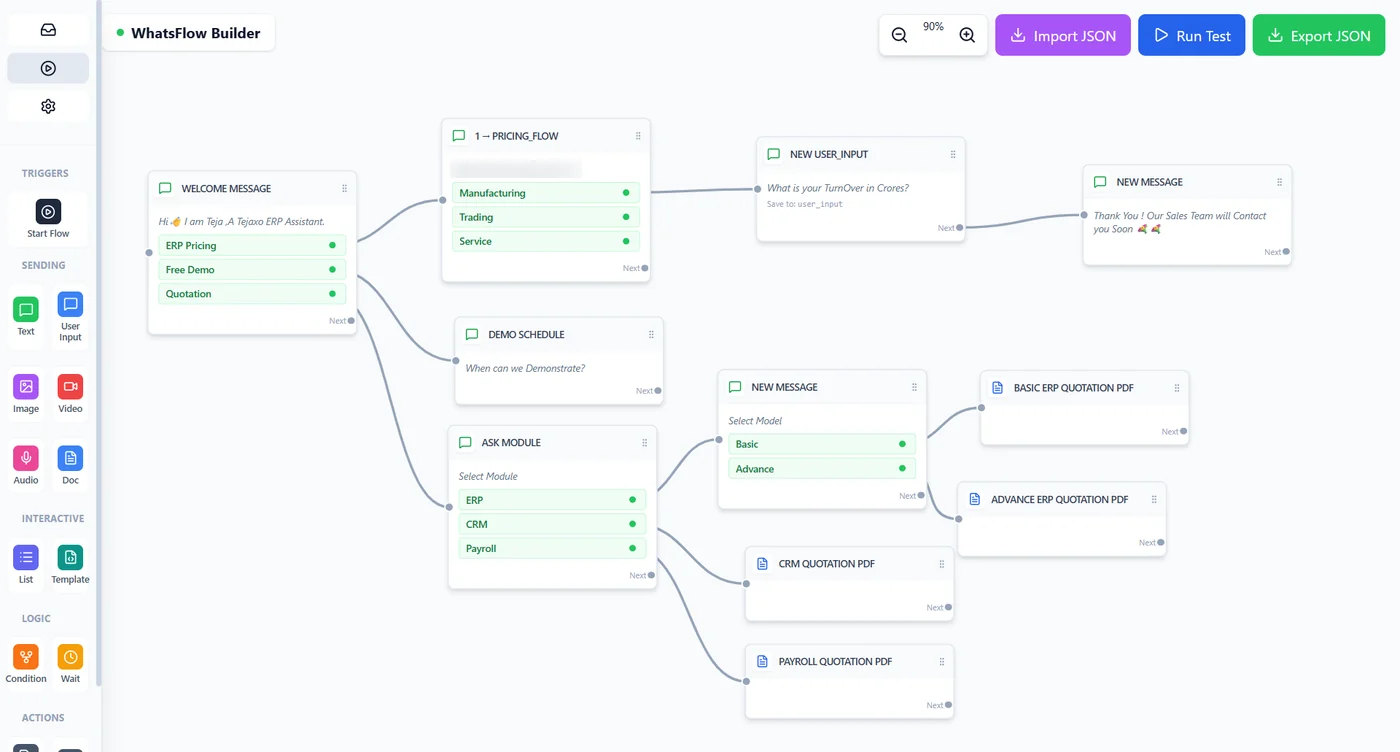
- Messaging and alerts: approvals and status updates sent over WhatsApp.
The advantage is focus. A good add-on goes deeper on its function than a general ERP module might, and it can be adopted without touching the rest of the business.
The risks of a stack of add-ons
- Data lives in several places. Each add-on keeps its own copy of parties, items or invoices, and these drift apart.
- Integration is a project in itself. Every connection needs mapping, testing and re-testing after an ERP upgrade.
- Accountability blurs. When a figure is wrong, it is unclear which system owns it.
- Licences multiply. Several subscriptions and support contracts replace one.
A single add-on to close a defined compliance gap is sensible. Five add-ons to cover what the ERP should do is a sign the foundation needs attention.
An automated ERP: automation built into the workflow
An automated ERP removes the manual step instead of imitating it. The idea is that data is captured once, close to where it is created, and every later document pulls from the one before. For a manufacturer that means enquiry, sales order, purchase, gate entry, production, quality, dispatch, billing and accounts all sit on one live database.
Tejaxo ERP is built this way. It is an automated, voice-first manufacturing ERP: machine data, scanned supplier invoices and WhatsApp voice or text entries go in without typing, owners ask questions and approve by voice on WhatsApp, and people stay in control. It has 20+ modules and 1000+ reports, and Tejaxo has worked with 50+ clients since 2017.
You can read more about the approach in our guide to an automated ERP for manufacturing, and about how typing is removed in automatic data entry in the factory.
What native automation looks like on the shop floor
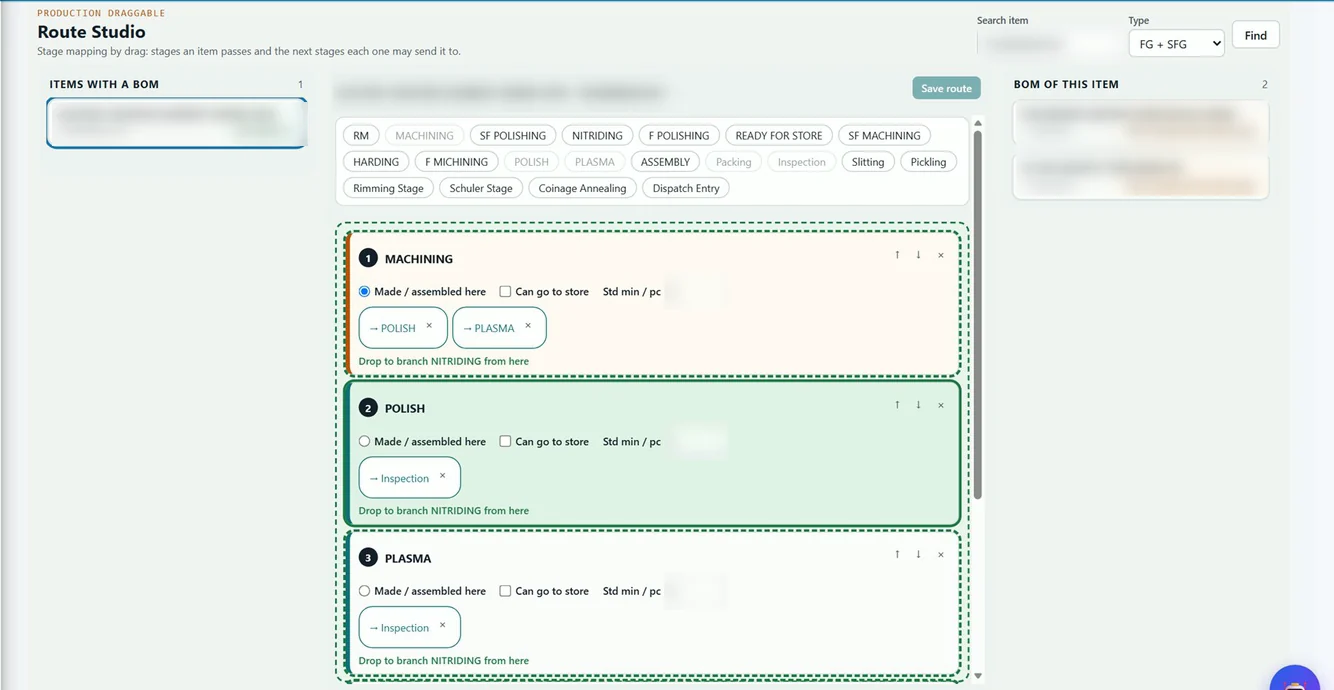
- Routes and stages defined once. Production routes are mapped by drag, with the next stages each one may send to, so material moves through the plant on rules rather than on phone calls.
- Capacity linked to machines. Each machine belongs to a capacity group, so planning uses real constraints instead of a separate spreadsheet.
- Batch and QR traceability. Stock is held batch-wise, and a sticker with a QR code can be printed for each batch.
- Approvals and alerts on WhatsApp. The owner does not have to log in to see what is waiting.
- Standard reports. Reports are ready from day one, so no bot has to export and reformat them.
The honest limits
An automated ERP is a bigger decision than a bot or an add-on. It needs master data cleanup, user training and a proper implementation. It is the right choice when the current setup is the problem, not when a single task is the problem. If your existing ERP is working, there is another route, covered below.
Side-by-side comparison of ERP automation tools
| Question | RPA bots | Add-ons / integrations | Automated ERP |
|---|---|---|---|
| What it automates | Repetitive screen tasks across systems | One function, such as GST, payables or payroll | End-to-end workflows from enquiry to cash |
| Changes the underlying system? | No | Slightly, through a connector | Yes, it becomes the system |
| Speed to first result | Fastest | Fast for a single function | Slower, needs implementation |
| Main risk | Breaks when screens change; ongoing maintenance | Data in several places; integration upkeep | Needs master data cleanup and user adoption |
| Fixes duplicate data entry? | No, it automates it | Partly | Yes, each document pulls from the previous one |
| Best as | A temporary bridge | A targeted patch | The foundation |
How to choose: a decision guide by situation
Your ERP or software is legacy or locked
If you cannot change it and need relief now, RPA can carry a few stable tasks. Treat it as a bridge and set a date for the permanent fix. If the system also blocks growth, plan a legacy-to-cloud migration alongside it.

Your ERP is sound but the shop floor is not connected
This is common in plants that run a well-known ERP for finance. You do not need to replace it. You need machine data, gate entries, job work and approvals to flow into it. Our note on how to extend your existing ERP on the shop floor explains the approach: we do not replace your ERP, we extend it.
You run an accounting package and add tools around it
Many small manufacturers start here. Bots and add-ons can stretch it for a while, but production, stock and costing remain disconnected. We compare the two paths in accounting-package automation versus an automated ERP.
You have one clear compliance or process gap
Pick an add-on. Define the single outcome you want, for example fewer unmatched supplier invoices, and judge the tool on that.
Your team spends the day re-keying and chasing
That is a structural problem. Choose an automated ERP and treat bots and add-ons as exceptions.
India-specific checks before you decide
- GST and e-invoicing rules change. Thresholds, reporting timelines and portal features are updated by notification. Check current rules on the official GST portal and with your tax adviser, and ask any vendor how it handles a rule change.
- Do not assume direct government integration. Ask exactly how e-invoice and e-way bill data is prepared and submitted: through which interface, and who is responsible when it fails.
- Job work is a manufacturing reality. If you send material to job workers or process customer material, test how the tool tracks pending material, challans and returns. Generic bots and finance add-ons rarely handle this.
- MSME realities. Small teams cannot afford a tool that needs a full-time person to keep it running. Ask who maintains it after go-live.
- Data protection. Bots and add-ons that touch employee or customer data need clear access control and audit trails. Ask where data is stored and who can see it.
- Multi-site operations. Plants in industrial areas across NCR and other hubs often need one view across locations, not separate bots per site.
A practical checklist before you buy any ERP automation tool
- List the tasks. Write down every manual task, who does it, how often, and what goes wrong.
- Find the cause. Is the task manual because a system is locked, a function is missing, or the process is broken?
- Check the master data. Clean items, parties and tax details first. Automation amplifies errors.
- Ask what happens on change. What breaks when a screen, a tax rule or your ERP version changes, and who fixes it?
- Count the systems. If the plan adds a third or fourth tool to cover one process, step back.
- Test on your own documents. Use your real formats, such as supplier invoices, job work challans and routes, rather than a clean demo.
- Keep people in control. Prefer tools where a person approves exceptions and every automated step leaves an audit trail.
- Plan the exit. Know how you would move your data out if you change tools.
If you are still choosing a platform, our guide to choosing the right ERP software in India goes through selection criteria in more detail.
Where to start
Start small and specific. Pick the one process that costs you the most time or causes the most errors, trace it from the first entry to the final report, and decide whether the fix is a bot, an add-on or a change to the foundation. A short working session with someone who has seen many plants usually saves months of trial and error.
Tejaxo can review your current setup on-site or remotely and tell you honestly which of the three categories fits. Book a free consultation, or write to info@tejaxo.com or WhatsApp +91 96717 27474.
Frequently asked questions
What are ERP automation tools?
ERP automation tools are software that removes manual work from an ERP or from the lack of one. They fall into three groups: RPA bots that imitate a user on screen, add-ons that automate one function such as GST or payables, and an automated ERP where approvals, data capture and document flow are built into the system.
What is the difference between RPA and ERP automation?
RPA sits on top of existing screens and copies what a person does, so it does not change the underlying system. ERP automation is built into the workflow, so documents pull from earlier stages, approvals are native and data is captured once. RPA reduces typing effort; an automated ERP removes the need to type the same data twice.
Can I automate without replacing my current ERP?
Yes. If your ERP core is sound, you can extend it with integrations that bring in machine data, gate entries, job work and approvals, or add a tool for one function. Replacement is worth considering only when the ERP is heavily patched, locked, or the surrounding stack has become fragmented and costly to maintain.
Is RPA a good long-term solution for an Indian manufacturer?
Usually not. RPA is a useful bridge for a locked or legacy system, but bots depend on screen layouts and need monitoring and repair when screens or rules change. Over time the maintenance and the duplicated data become the hidden cost. Use it for stable, high-volume tasks while you plan a permanent fix.
How do I choose between an add-on and an automated ERP?
Choose an add-on when one defined function is weak and the rest of the ERP works. Choose an automated ERP when manual re-entry, disconnected tools and patchwork are the main problem. A useful test is whether you are about to add a third or fourth tool to cover one process; if so, fix the foundation.
One Response