
The most useful AI in ERP use cases for a manufacturing plant are four everyday jobs: answering questions from live ERP data, capturing documents such as supplier invoices at the gate, handling approvals and status queries on WhatsApp, and bringing machine data into the ERP. The safest design keeps the AI read-only and limited by each user’s rights, so it helps people without silently changing records.
Most articles on this topic give a generic list: forecasting, invoice automation, chatbots, anomaly detection. This one follows a working day in a plant instead. For each use case you will see the question, what the AI does, and what it is not allowed to do.
What AI in ERP means on a plant floor
An ERP already holds the facts of your business: stock, purchase orders, production, quality, dues and dispatch. AI in ERP means a layer that can read those facts, understand a question in plain language, and read a document or a voice note, so people spend less time searching, typing and chasing.
That is different from adding a chat window to an old system. The value depends on three things:
- One live database. If sales, purchase, stores, production and finance are separate tools, the AI has nothing complete to read.
- Permissions that the AI respects. It should see only what the asking user may see.
- A clear boundary on actions. Reading and drafting are low risk. Posting and deleting need a person.
Tejaxo ERP is built as an automated, voice-first manufacturing ERP. Machine data, scanned supplier invoices and WhatsApp voice or text entries go in without typing, owners can ask questions and approve by voice on WhatsApp, and people stay in control. The use cases below show how that works day to day.
Use case 1: Ask Tejaxo AI for answers from live data
Every plant head knows the morning routine. Someone asks for the stock of a raw material, the pending purchase orders for a vendor, yesterday’s dispatch, or which customers are overdue. The answer usually means opening three screens or asking an accountant to prepare a sheet.
With Ask Tejaxo AI, the user types or speaks the question in everyday words and gets an answer drawn from the ERP records. Typical questions:
- Which purchase orders for Tejaxo Vendor are still pending?
- How much stock of Product A is available across stores?
- What was dispatched yesterday, and what is ready but not yet sent?
- Which customer invoices are overdue by more than 30 days?
User-rights note: the answer is limited to what that person is allowed to open in the ERP. A stores user asking about salary or margins gets no data, because the AI reads through the same permissions as the screens. The AI is also read-only here, so asking a question never changes a record.
Because the answers come from your own ERP data, the quality of the answer is the quality of your data. We cover this in more detail in the section on honest limits below.
Use case 2: AI gate entry from a supplier invoice photo
The gate is where paper still rules in many Indian plants: an inward register, a handwritten slip, and later a store clerk typing the same details again. Errors at this step travel into the material receipt, the purchase bill and the GST reconciliation.

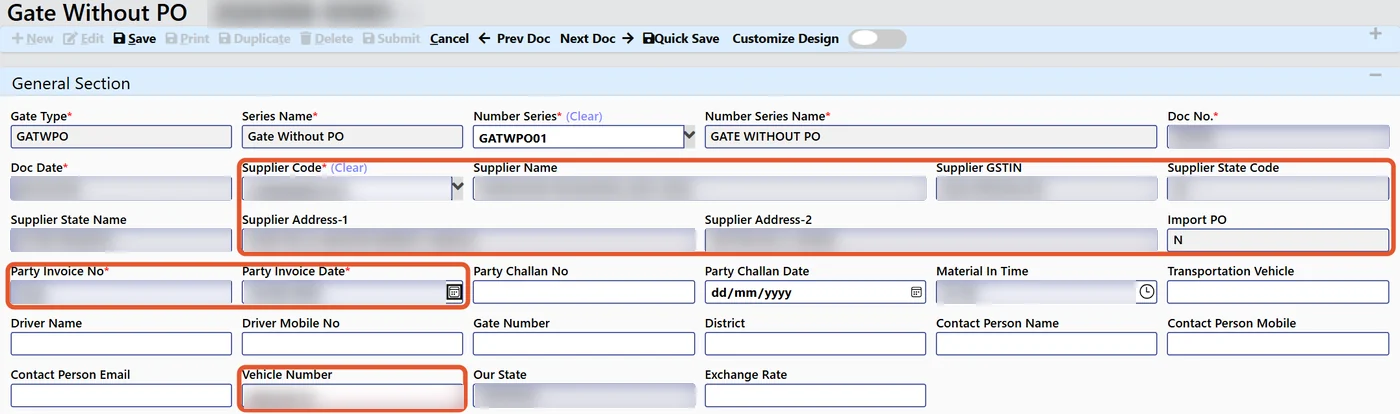
AI gate entry removes the first typing step. The security or stores user photographs the supplier invoice, the AI reads the bill, and the gate entry form is pre-filled with supplier, invoice details and vehicle information for a person to check and save. When the material receipt (MRR or GRN) is made against that gate entry, the gate number and bill details carry forward without re-typing.
A typical flow:
- The vehicle arrives with material and the supplier invoice.
- The user scans the invoice. The AI reads supplier, bill number, date, items and amounts.
- The gate entry is pre-filled, and the user corrects anything that looks wrong.
- After the quality check, the MRR is made against the gate entry.
- Short supply or rejection can later flow into a debit note.
User-rights note: the AI only fills a draft form on the gate screen. The person at the gate confirms it, and only users with gate rights can save one. Read more in our guide to AI invoice scanning from gate entry to GRN.
Use case 3: A WhatsApp agent for approvals and status queries
In Indian plants, work already happens on WhatsApp. Owners approve by message, supervisors send photos, and purchase teams chase status in groups. The problem is that none of it lands in the ERP, so there is no record and no control.

A WhatsApp agent connected to the ERP moves that habit into the system:
- Alerts: the ERP sends alerts and approval requests to the right person on WhatsApp, so owners do not have to log in just to check.
- Approvals: the approver replies on WhatsApp, and the decision is recorded against the document.
- Status queries: a manager asks about an order, a vendor or a stock item and gets an answer from the ERP.
- Voice entries: a user speaks an entry, such as a gate entry, and the AI turns it into a draft for confirmation.
User-rights note: the agent identifies the person by their registered number and applies that user’s rights. An approval can only come from someone who holds approval authority for that document. See how this works in practice in our guide to voice ERP on WhatsApp.
Use case 4: Machine data feeding the ERP
Many plants run machines, PLCs and instruments that have no link to the ERP. Production quantities are written on a sheet at the end of the shift, and downtime reasons are remembered rather than recorded.
When machine data comes into the ERP through SCADA, data loggers or machine connections, AI has real production facts to work with:
- Production counts and running time arrive without manual entry.
- Downtime can be tied to a machine, a shift and a reason.
- Managers can ask questions such as which machine stopped most last week and what it did to the plan.
- OEE and capacity views are based on recorded data, not estimates.
Tejaxo integrates with SCADA, PLCs, CNC and VMC machines and machine loggers. The approach is to connect plant data to the ERP so that the ERP and the plant floor tell the same story. See our overview of connecting IoT, machines, SCADA and loggers to ERP.
User-rights note: AI reads machine data and answers questions about it. It does not send commands to equipment. Where SCADA batch control is involved, the controller stays the final authority.
AI is read-only and works under user rights
The most common worry we hear from owners and IT heads is simple: can the AI change or delete my data? It is a fair question, and the design answer matters more than any feature list.
In Tejaxo ERP, the AI layer is designed to be read-only. It works under the rights of the user who is asking. That gives three practical guarantees:
- It cannot see more than the user can. If you cannot open payroll, neither can the AI on your behalf.
- It cannot post, edit or delete records by itself. Where it prepares a draft, such as a gate entry, a person confirms it.
- Actions stay with people. Approvals still come from authorised users, and the document trail shows who did what.
What AI can and cannot do
| Task | AI can | AI cannot |
|---|---|---|
| Answer a question | Read ERP data the user may open and explain it | Show data outside the user’s rights |
| Gate entry | Read an invoice photo and pre-fill a draft | Confirm the entry without a person |
| Approvals on WhatsApp | Send the request and record the reply from the authorised user | Approve on behalf of someone |
| Machine data | Read counts, downtime and trends and answer questions | Operate equipment |
| Master and accounting records | Read and summarise | Edit or delete in the read-only mode |
This is also why we suggest starting with read-only use cases. Once the team trusts the answers, you can talk about agents that take actions, with approval steps in place. Our page on agentic ERP and AI agents explains where that path leads.
Is this just a chatbot on top of an old ERP?
It is a fair challenge. A chatbot placed over a system with scattered data can only repeat what it is given. The difference shows up in how the ERP is built.
| Question to ask | Chatbot on an old ERP | AI built into a connected ERP |
|---|---|---|
| Where does the data live? | Several tools and sheets | One live database across modules |
| How do documents flow? | Often re-typed between steps | Each document pulls from the one before |
| Who sees what? | Depends on the add-on | Same user rights as the ERP screens |
| Where do users work? | Inside the ERP only | ERP plus WhatsApp for alerts, approvals and queries |
| Reports | A fixed set | 1000+ reports, live dashboards and Power BI |
For a fuller comparison, read AI ERP vs traditional ERP. If you already run SAP or Microsoft Dynamics, our position is that we do not replace your ERP; we extend it on the shop floor and at the gate.
The India context: GST, WhatsApp and data protection
Some points matter more in Indian plants than in the generic lists you see online.
- WhatsApp-first habits. Meeting people where they already work improves adoption. It is often the difference between a system people use and one they avoid.
- GST and e-invoicing. Clean supplier invoice capture at the gate helps with purchase bill accuracy and later GST matching. Check current GST rules with your tax advisor, as thresholds and timelines change.
- Personal data. Gate entries, visitor passes and WhatsApp messages involve names and phone numbers. India’s Digital Personal Data Protection Act, 2023 applies to personal data, so review the current Rules and your retention practice with your legal adviser.
- MSME realities. Many plants have data in Excel and Tally, and worry about cloud and security. A staged start, with cloud, on-premise or hybrid deployment, keeps the decision practical.
Honest limits: clean masters come first
AI is not magic, and any vendor who says it is should be questioned. Three limits are worth stating plainly:
- Poor masters give poor answers. Duplicate items, inconsistent units and unclear vendor names confuse people and AI alike. Clean the item, vendor and customer masters before you expect sharp answers.
- Document reading needs a human check. A blurred invoice photo can lead to a wrong draft. That is why the person confirms the entry.
- Not every process needs AI. A well-designed ERP with good rights and approvals solves many problems without it.
How to start: a simple four-step path
- Pick one painful question. For example, stock and pending PO status, or overdue dues.
- Fix the data behind it. Tidy the masters involved.
- Add document capture at the gate. Move from the inward register to scanned invoices and gate entries.
- Bring in WhatsApp and machine data. Add alerts, approvals and plant data when the first steps are stable.
Tejaxo has worked with manufacturers since 2017 and has served 50+ clients, with 20+ ERP modules and 1000+ reports. We support clients across India on-site and remotely.
Book a free consultation
If you want to see these AI in ERP use cases on your own plant processes, we will walk through the gate, the stores, production and WhatsApp flows with you and tell you honestly what fits. Book a free consultation with Tejaxo, or write to info@tejaxo.com or call +91 96717 27474.
Frequently asked questions
What are the main AI in ERP use cases for manufacturers?
The main use cases are answering questions from live ERP data, reading supplier invoices to pre-fill gate entries, handling alerts and approvals on WhatsApp, and using machine data for production, downtime and OEE views. Finance and purchasing also benefit through invoice processing and clearer reports. The best start is one read-only use case with clean data.
Can AI in ERP change or delete my data?
It should not. In Tejaxo ERP the AI layer is designed to be read-only and works under the rights of the user asking. It cannot see more than that user can, and drafts such as a gate entry need a person to confirm them. Approvals and posting stay with authorised users, and the document trail records who acted.
How is AI ERP different from a chatbot added to an old ERP?
A chatbot over scattered tools can only repeat fragmented data. An ERP with AI built in reads one live database, follows the same user rights as the screens, and links documents from enquiry to cash. It also reaches users on WhatsApp for alerts and approvals, so the AI supports daily work rather than sitting beside it.
Is AI in ERP suitable for an MSME or small manufacturer?
Yes, if you start small. Pick one problem, such as stock queries or gate entry from scanned invoices, and tidy the related masters first. Cloud, on-premise or hybrid deployment lets you match your comfort with data security. You can add WhatsApp and machine data later, once the team trusts the answers.
Does AI gate entry replace the security guard or store clerk?
No. The AI reads the supplier invoice photo and pre-fills the gate entry, but a person checks the details and saves it. This removes repeat typing and the paper inward register while keeping human accountability. The material receipt is then made against the gate entry, carrying the gate number and bill details forward without re-typing.