The core ERP modules for manufacturing are sales, purchase, inventory, production, quality, HR and payroll, finance and reporting. Most Indian manufacturers should not switch all of them on at once. Start with the order-to-cash and procure-to-pay chains, keep finance underneath both, and add production depth, quality, payroll and advanced reporting in a second phase.
This guide explains what each module does, how the modules connect, the signs that you are ready for each one, and what can safely wait. It is written for owners, plant heads, CFOs and IT heads who are shortlisting an ERP and want a sensible rollout order rather than a long feature list.
What are the core ERP modules for manufacturing?
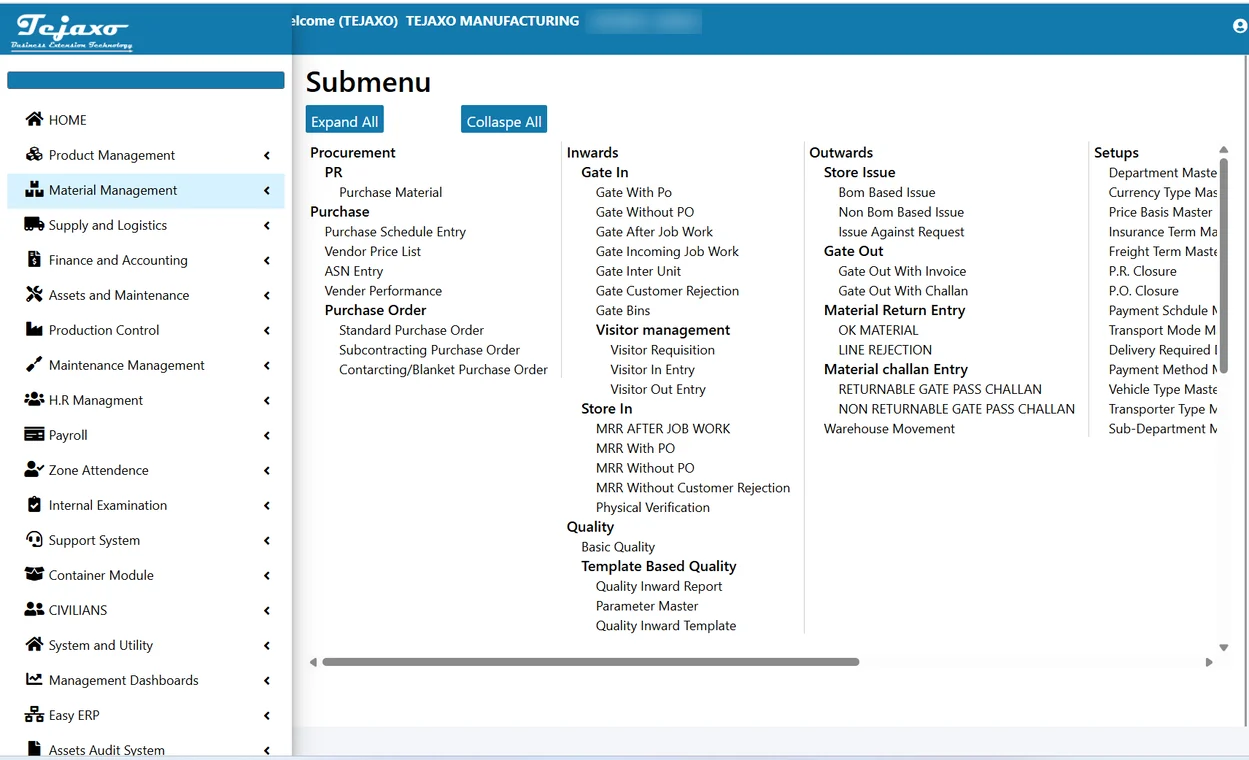
A manufacturing ERP is a set of modules working on one database. A document created in one module flows into the next, so nothing is typed twice. Tejaxo ERP offers 20+ modules on one platform, and they group naturally into eight areas:
- Sales and CRM: enquiries, quotations, sales orders, dispatch and invoicing.
- Purchase: requisitions, purchase orders, vendor rates and follow-up.
- Gate and stores: material gate entry, goods receipt and stock movements.
- Inventory: item master, batches, stock valuation and reorder levels.
- Production and planning: bill of materials, work orders, job cards, capacity and shop-floor entries.
- Quality: incoming inspection, in-process checks, rejection analysis and final inspection.
- HR and payroll: attendance, leave, salary and statutory deductions.
- Finance and reporting: ledgers, payables, receivables, GST and management reports.
You do not need to buy or enable each area in the same month. The question is which modules carry your money and your material first, and the answer is almost always the two chains below.
Start with two chains: order-to-cash and procure-to-pay
Every manufacturer earns money by turning a customer order into cash, and spends money by turning a purchase into usable stock. These two chains touch nearly every department. If they run on one system, you get most of the benefit of an ERP before any shop-floor module is live.
Order-to-cash: sales, dispatch, invoice, receivable
The order-to-cash chain starts with an enquiry and ends when the customer’s payment is matched against the invoice. The modules involved are:
- Enquiry and quotation in the sales or CRM module.
- Sales order, including customer, consignee, delivery terms and, for exporters, export terms.
- Dispatch and packing, which reduces stock automatically.
- Invoice with the correct GST treatment.
- Receivable and collection, with bill-wise outstanding and ageing.
When each document pulls from the one before it, a sales order is never re-keyed into an invoice, and the accounts team does not ask the dispatch team what was sent. Read more about connecting the front end in our guide to CRM and ERP integration from enquiry to order.
Procure-to-pay: purchase, gate, receipt, quality, payable
The procure-to-pay chain covers everything between deciding to buy and paying the vendor:
- Purchase order against an approved vendor and rate.
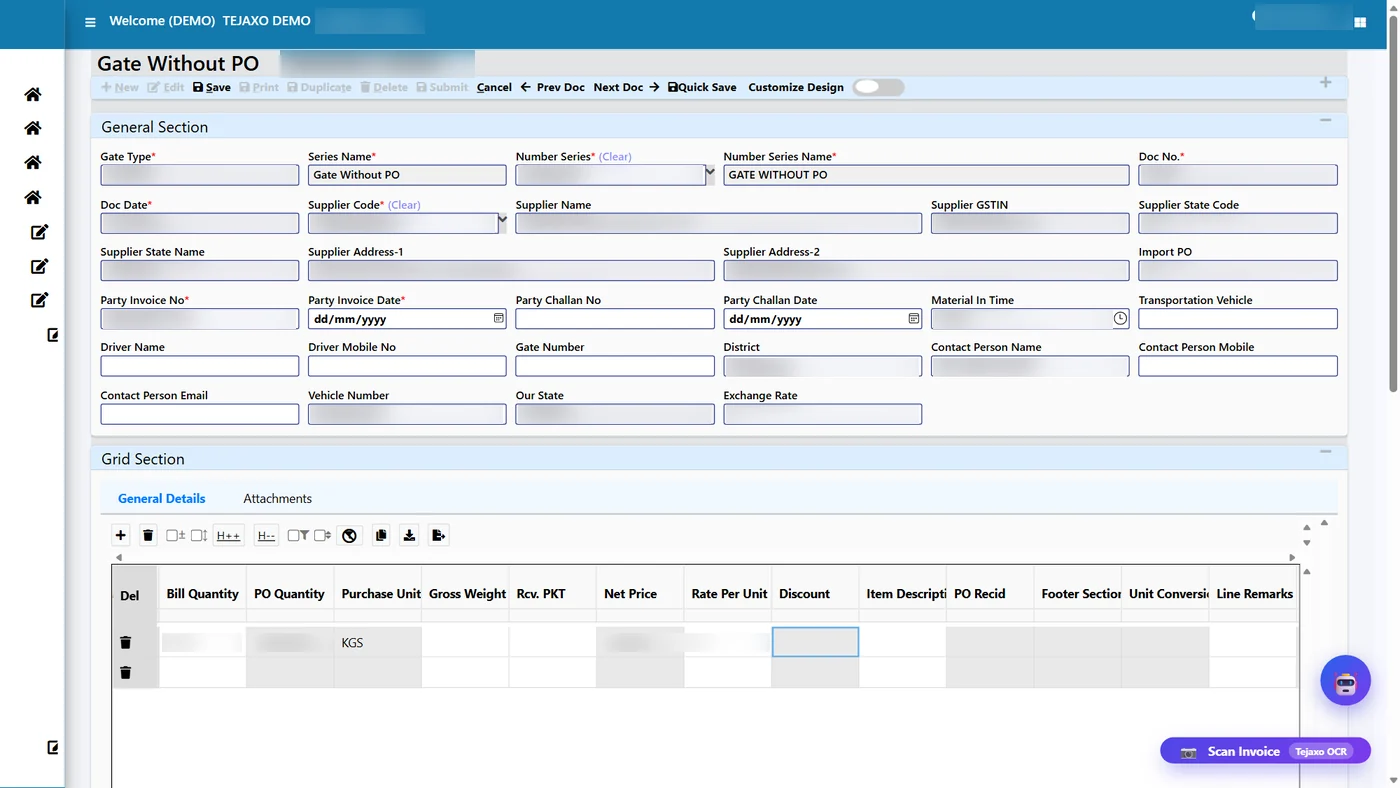
- Gate entry when the vehicle arrives with the supplier invoice.
- Material receipt note (MRR) linked to the gate entry.
- Quality inspection with accepted and rejected quantity per line.
- Purchase voucher created from the receipt, with the vendor invoice details.
- Payment against the bill.
The value of this chain is control. The gate entry proves material physically arrived, the receipt proves what was accepted, and the voucher is raised only for what was received. That is the idea behind a 3-way match between PO, receipt and bill, and it removes a large share of payment disputes with vendors.
In practice, this chain also shows you where your current process leaks: material that arrives without a purchase order, receipts that are never booked, and bills that are paid before inspection is complete.
Production, inventory and quality: add depth in phase two
Production is the module most buyers want first, and the one most often over-scoped. A plant that cannot yet trust its item master, stock balances or bills of materials will not get reliable production data from any system. That is why inventory comes with phase one, and detailed production control follows.
Inventory
Inventory is the bridge between purchase, production and sales. Stock must be right at item and batch level before planning makes sense. Keep the item master clean, define units clearly, and set reorder levels only after you have a few months of reliable consumption data.
Production and planning
Production covers the bill of materials, process or stage plan, work orders or job cards, machine capacity and shop-floor entries. Typical sub-areas are:
- BOM and routing: what goes into a product and the stages it passes through.
- Planning: converting sales orders into work orders and checking material availability.
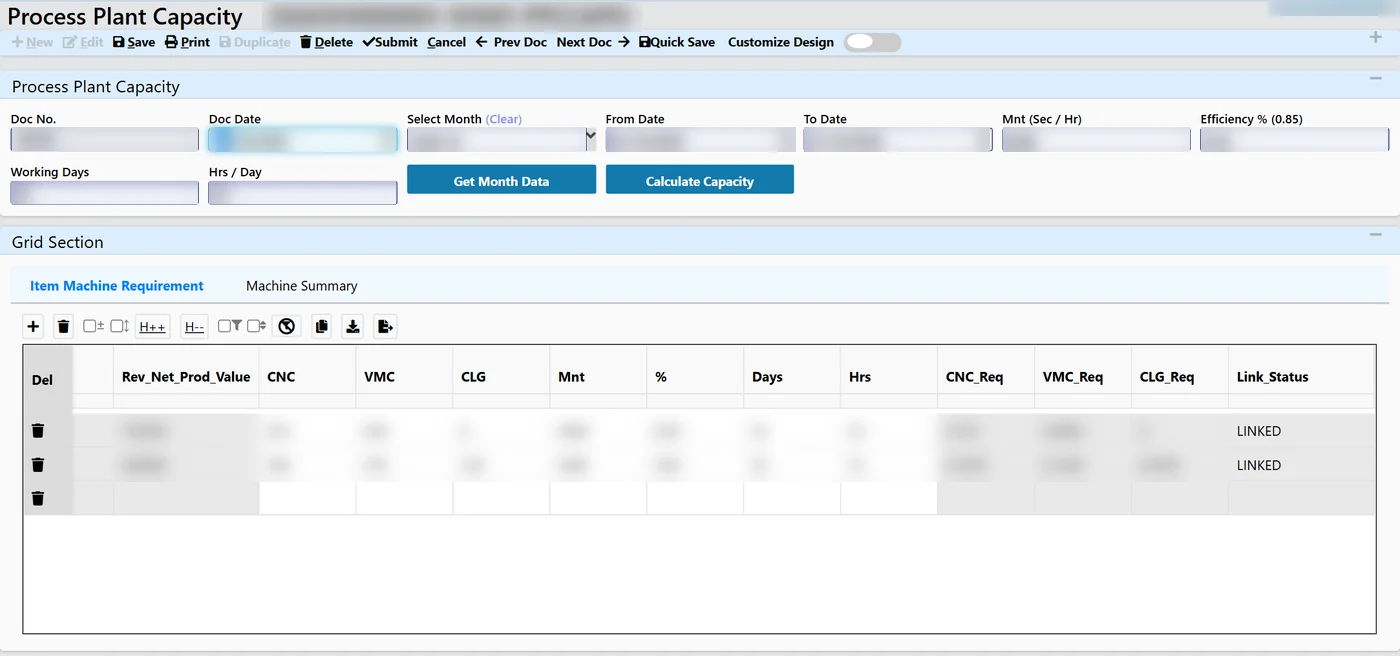
- Capacity: converting production quantity into required machine hours per machine group.
- Shop-floor entry: output, rejection and downtime recorded against each job.
Start simple. A first release with BOM, work orders and output entry already gives you order status and material consumption. Capacity planning, drag-and-drop planning boards and machine-linked data capture can follow once people trust the basic entries. See our overview of production planning software for how these layers build on each other.
Quality
Quality has two natural entry points. Incoming inspection fits into procure-to-pay, so it belongs in phase one for most plants. In-process checks, final inspection and defect analysis depend on production data and can wait for phase two. Industries such as auto components and pharma may need quality earlier because customers audit traceability, so let your customer requirements decide the order.
HR and payroll: useful, but rarely the first priority
HR and payroll carry real compliance weight: attendance, overtime, PF, ESI and bank payment files. For a factory with several hundred workers on varied shifts and pay bands, payroll errors cause immediate friction on the shop floor. Even so, payroll usually runs on a separate process that works, however painfully, so it is a good phase-two module.
Bring it forward if your attendance data is already captured on biometric devices and someone spends days each month consolidating it. A payroll module that reads attendance directly and produces statutory output saves that effort. For details, read about statutory payroll for factories covering PF ECR, ESI and bank files. Statutory rules change, so always confirm current requirements with your consultant before configuring.
Finance, GST and reporting: the foundation under everything
Finance is not a module you add later. It sits beneath both chains from day one, because every purchase receipt, sales invoice and payment creates accounting entries. The useful questions are how much of finance you move into the ERP and how quickly.
The main finance areas for a manufacturer are:
- General ledger and vouchers with automatic postings from purchase, sales and stock movements.
- Payables and receivables with bill-wise tracking and ageing.
- GST workflows covering invoice treatment, return data and input credit reconciliation.
- Special cases such as import purchases with duty and freight, export sales, and discounts received after GST.
- Bank reconciliation and fixed assets as the plant matures.
If you currently run accounts on a separate package, you can integrate first and migrate later. Many manufacturers keep their existing accounting tool for a few months while the operational chains stabilise. Our page on Tally integration explains that approach.
Reporting
Reporting is where one database pays off. When purchase, sales, production and finance sit together, you can read order backlog, stock position, payables and plant output without exporting to Excel. A good ERP ships with a large library of standard reports and then lets you build views for the owner or plant head. Tejaxo ERP provides 1000+ reports, live dashboards and embedded Power BI. Start with the dozen reports your team asks for every week, and expand later.
Module priority table: start now or wait?
Use this table as a starting point for your own phasing discussion. Your industry and customer requirements may shift some rows.
| Module | What it solves | Start | Sign you are ready |
|---|---|---|---|
| Sales and invoicing | Order status, dispatch, correct invoicing, receivables | Phase 1 | Orders live in Excel, WhatsApp and memory |
| Purchase | Controlled buying, vendor rates, follow-up | Phase 1 | Material arrives without a PO or rate check |
| Gate and stores | Proof of receipt, stock movement | Phase 1 | Supplier bills are booked without matching receipt |
| Inventory | Item and batch stock, valuation | Phase 1 | Physical and book stock rarely agree |
| Finance and GST | Ledgers, payables, receivables, return data | Phase 1 | Accounts team re-enters operational data |
| Incoming quality | Accept and reject at receipt | Phase 1 or 2 | Rejections are discovered on the line |
| Production control | Work orders, BOM, output, downtime | Phase 2 | Item master and BOMs are clean |
| Capacity planning | Machine hours versus demand | Phase 2 | Shop-floor entries are reliable |
| HR and payroll | Attendance, salary, statutory output | Phase 2 | Month-end payroll takes days |
| Advanced reporting and AI | Owner dashboards, questions by voice | Phase 2 or 3 | Core data has been stable for a few months |
One platform or stitched-together tools?
Many manufacturers arrive at ERP with a patchwork: accounting in one package, stock in Excel, payroll in another tool, and a CRM nobody updates. Each handover between tools is a place where data is retyped, delayed or lost. Reports then depend on whoever consolidates them.

A single platform removes those handovers. Documents flow from one module to the next on one database, so the owner sees the same numbers as the accountant. You can still adopt it in stages, because the modules share the same foundation. That is the practical benefit of 20+ modules on one platform: you pick a starting point and add modules without building integrations each time. Our manufacturing ERP page describes the full module set.
If you already run SAP or Microsoft Dynamics, the message is different. We do not replace your ERP, we extend it, especially on the shop floor where machine data and gate-to-receipt flows often sit outside the main system.
How to phase the rollout
A rollout that works usually follows this sequence:
- Clean the masters. Items, vendors, customers, units and opening balances need attention before go-live. Dirty masters are the most common cause of delays.
- Go live on the two chains with finance. Sales, purchase, gate, stores, inventory and accounts.
- Run for one or two month-end closes. Fix process gaps while the scope is still small.
- Add production and quality. BOMs, work orders, shop-floor entry and in-process checks.
- Add HR and payroll, then advanced reporting. Once operational data is stable, dashboards and alerts become reliable.
Allow time for user training at each step and assign one owner per module on your side. A good implementation partner will challenge your scope rather than agree to everything on day one. Our ERP implementation page describes how we plan and support these stages, on-site and remotely, for clients across India.
Common mistakes to avoid
- Switching on every module at go-live. Teams get overwhelmed and fall back to Excel.
- Starting production before inventory is reliable. Material consumption will not balance.
- Ignoring item master quality. Duplicate items and inconsistent units spoil every report.
- Running old and new systems in parallel for too long. Set a clear cut-over date.
- Treating ERP as an IT project. Process owners in sales, stores and accounts must lead their modules.
- Customising before using the standard flow. Learn what the standard module does first, then decide what really needs change.
Next step: map your own module sequence
The right module list depends on your products, customers and current tools. A short working session can map your order-to-cash and procure-to-pay chains, mark which modules to start with, and flag what can wait. Book a free consultation with Tejaxo Technologies to discuss your plant and get a phased plan.
Frequently asked questions
What are the main ERP modules for a manufacturing company?
The main modules are sales and CRM, purchase, gate and stores, inventory, production and planning, quality, HR and payroll, and finance with reporting. Together they let a sales order flow into production, purchase, stock, invoice and payment on one database. Most manufacturers begin with sales, purchase, inventory and finance, then add production depth, quality and payroll.
Which ERP modules should a manufacturer implement first?
Start with the order-to-cash chain (enquiry, sales order, dispatch, invoice, receivable) and the procure-to-pay chain (purchase order, gate entry, receipt, inspection, voucher, payment), with finance underneath. These two chains carry most of your money and material, and they give early control before you take on detailed production or capacity modules.
Can I add ERP modules later without starting again?
Yes, if the ERP runs all modules on one shared database. You go live with a core set, stabilise it for a couple of month-end closes, and then switch on production, quality, payroll or advanced reporting. Because documents already share masters such as items and vendors, later modules build on existing data instead of needing new integrations.
Do I need a separate payroll or quality system alongside my manufacturing ERP?
Not necessarily. A manufacturing ERP can include HR, payroll and quality modules on the same database, which avoids retyping attendance or inspection data. Some plants keep an existing payroll tool at first and move later. The decision depends on how much manual consolidation your team does each month and on your customers' traceability requirements.
How many ERP modules does a small manufacturer really need?
Most small manufacturers can begin with five to six areas: sales, purchase, stores and inventory, finance and GST, plus basic reporting. Production control, quality and payroll can be added when the item master and stock balances are reliable. Choosing a platform that offers more modules lets you grow without changing systems.
Is an all-in-one ERP better than separate tools for manufacturing?
For most manufacturers, one platform is easier to run because each handover between separate tools is a place where data is retyped or delayed. On a single database, the owner and the accountant see the same numbers. You can still adopt it in phases, so you get integration benefits without a big-bang rollout.