
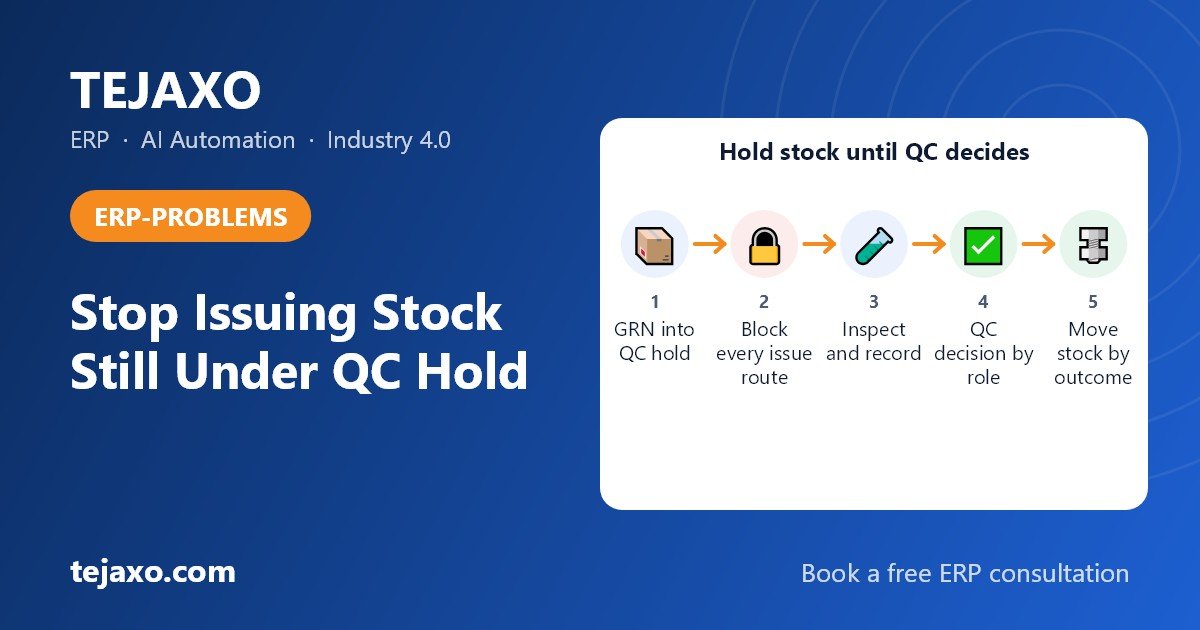
To block stock under QC hold in an ERP, post the goods receipt into an inspection status or quarantine location that stores and production cannot issue from (or hold the receipt unposted), and release the quantity only through a documented quality decision.
The planner sees stock on screen and releases a job. The QC head finds out later that the same lot was still waiting for a hardness report or a material certificate, and by then parts are already cut, machined or shipped. It is a familiar problem in plants that buy forgings and bar stock against heat numbers.
Why does material under QC inspection show as available stock?
It shows as available because the goods receipt note (GRN) posts the full quantity straight into the main stores location, and nothing in the system has to be cleared first. The ERP is doing what it was told: a receipt means stock.
The usual root causes are:
- Single stores location. Received, inspected and rejected material all sit in one bin or one warehouse code.
- GRN equals stock. The receipt increases usable quantity the moment it is saved, before any quality step.
- Inspection kept on paper or in Excel. The result never reaches the ERP in time, so the system cannot act on it.
- No ‘inspect before use’ flag on the item. A steel bar and a packing carton are treated the same way.
- Pressure to keep machines running. When a customer schedule is tight, stores issues material informally and the entry is regularised later.
- Planning reads total stock. Even if stores is careful, the planning view counts every unit as available, so jobs are released against uncleared material.
Customers who audit against standards such as IATF 16949 or ISO 9001 typically expect unreleased or nonconforming product to be identified and controlled so it is not used unintentionally. An ERP that lets uninspected stock be issued works against that expectation, whatever the paper procedure says.
What is the difference between quality inspection stock, blocked stock and quarantine stock?
Define these terms once for your plant and use them the same way everywhere.
- Quality inspection stock (QC hold): material physically in the plant, waiting for inspection. In a status-based ERP it is counted in the books but cannot be issued.
- Quarantine stock: another name for the same idea in many plants, usually a physically separated area with a red tag or a cage.
- Blocked stock: material that failed inspection or was stopped for another reason, such as a supplier complaint. It waits for a decision: return, scrap, rework or sort.
- Unrestricted (available) stock: material that has passed and can be issued, sold or planned against.
Large enterprise ERPs separate these as stock types and move quantity between them with a usage decision. You do not need a large ERP to get this behaviour. You need the same three ideas: a status, a block and a decision.
How do I diagnose whether production is issuing material that was never inspected?
Run a short audit on your stock ledger before you change anything. It gives management evidence and gives you a baseline to prove the fix worked.
- List receipts of inspectable items for the last three to six months: item, batch or heat number, GRN date and time, received quantity.
- Pull the inspection record for each receipt and note the date and time of the quality decision.
- Pull issues to production or job work for the same batch numbers, with issue date and time.
- Compare the three timestamps. Any issue earlier than the quality decision is a breach.
- Count breaches by item, by supplier and by issue shift.
- Separately list receipts with no inspection record at all. These are the most dangerous, because nobody knows whether they were ever checked.
- Compare the planner’s ‘available’ quantity with the quantity QC has actually cleared.
Here is how one breach looks when you lay the timestamps side by side. All values are sample numbers for a fictional plant, Tejaxo Manufacturing.
| Event (heat number H-4471, EN8 forged blanks) | Sample date and time | Source record | What it tells you |
|---|---|---|---|
| GRN for 500 blanks | Day 1, 10:15 | Goods receipt | Planner can see 500 as available from here |
| 200 blanks issued to CNC | Day 1, 22:30 | Stores issue | 12 h 15 min after GRN, with no decision yet |
| QC decision: 480 accepted, 20 rejected | Day 2, 14:00 | Inspection record | 27 h 45 min after GRN |
Result: the issue happened 15 h 30 min before the QC decision, and the 200 pieces issued may include some of the 20 rejected ones.
Once you have the breach list, group it. The numbers below are also illustrative:
| Supplier | Inspectable receipts reviewed | Issued before QC decision |
|---|---|---|
| Supplier A | 25 | 3 |
| Supplier B | 20 | 9 |
| Supplier C | 15 | 2 |
| Total | 60 | 14 |
Now split the same 14 by the shift that made the issue. In this sample, 2 fall in the day shift, 3 in the evening shift and 9 in the night shift. A pattern like this often appears because the inspector is not on the floor at night while the machines are. It tells you the fix is not only a system block. QC cut-off times and shift coverage need to be looked at too. Supplier B in this sample is where the largest share of breaches sits, so inspection turnaround for that supplier is the first thing to tighten.
If your ERP cannot give you the GRN time, the QC time and the issue time for one batch, that is itself a finding. Fixing the data trail is part of the project.
How do I stop production issuing material that is waiting for inspection?
Make the system, not the storekeeper, enforce the rule. These steps describe the target design for any ERP. Follow them in order.
- Decide which items need inspection. Tag items by category: bar and forging, bought-out components, packing, consumables. Over-blocking creates its own delays.
- Define the inspection plan per item or per supplier, with characteristics, sampling plan and required documents such as the material test certificate.
- Create the QC-hold status or location, or hold the receipt unposted. Inspectable items must go there automatically, with no manual choice by the storekeeper.
- Block every way out. The issue screen, BOM-based issue, job work challan, stock transfer and sales dispatch should all refuse held material. A warning message is not enough; it has to be a hard stop.
- Exclude held quantity from available stock. Show it to the planner as ‘expected, under inspection’.
- Tie release to a named role. Only authorised QC users can record the decision that makes stock available.
- Set an inspection turnaround and watch the age of held lots. If a lot waits beyond the agreed hours, the QC head and planner should know, otherwise the block simply pushes people towards workarounds.
- Migrate existing stock. Check current uninspected material physically and in the system, and move it to hold before the new rule goes live.
- Train both sides. Stores, planning and QC should practise the flow with real receipts, including the night shift, before the block becomes mandatory.
Should the quarantine be a separate warehouse or a stock status?
Either can work. What matters is that the system enforces the block. Here is how the three common approaches compare.
| Approach | How it works | Strength | Weakness |
|---|---|---|---|
| Separate QC warehouse or location | GRN posts to a QC location; a stock transfer moves accepted material to main stores | Simple to understand; matches a physical quarantine cage | Depends on someone doing the transfer; extra documents; users can still pick the QC location unless it is blocked for issue |
| Stock status flag on the same location | Quantity carries a status such as QC hold, available or blocked | No transfer step; clean audit trail of status changes | Needs ERP support for status-wise stock; reports must be status-aware |
| Mandatory inspection lot with system block | Each receipt creates an inspection record; stock stays held until the record is closed with a decision | Strongest control; decision, time and user are recorded | Needs inspection plans and discipline in data entry |
For a small or mid-size plant, a QC location that is blocked for issue, combined with an inspection record that releases stock when closed, is often the quickest route. Larger plants with many items usually prefer the status-based, inspection-lot model.
Can I post a GRN without making the stock available?
Yes, and you should. The receipt records that material arrived against an order; it does not have to mean the material is fit for use. Two models exist, and they differ in what the books show while inspection is pending.
- Status model. The GRN posts the quantity into a QC-hold status, so it is in the books and can be accrued on receipt, but it cannot be issued. For the finance side, see 3-way match and GRN-accrual logic.
- Hold-until-decision model. The material receipt is not posted as stock until quality confirms each line, so there is nothing usable for anyone to issue in the meantime.
The trade-off with the second model is that a receipt waiting for quality does not appear as stock or as an accrual, so someone must own the list of receipts awaiting a decision and its age. Choose the model that matches how your finance team wants to see goods received but not yet cleared.
How do I move stock after the QC decision?
Make the quality decision a single transaction where each outcome moves quantity automatically:
- Accept: quantity becomes available stock.
- Reject: quantity goes to blocked stock and a return or debit note process starts.
- Use as is (deviation): quantity is released with a recorded reason and approver.
- Rework or sort: quantity stays held until a second inspection confirms the good pieces.
Partial acceptance is normal. Take 500 forged blanks of EN8 received against one heat number (sample number H-4471). QC accepts 480 and rejects 20 for hardness above the limit. One decision should produce this result, with no editing of the receipt:
| Quantity | Resulting status | Sample reason code | Purchase effect |
|---|---|---|---|
| 480 pieces | Available stock | ACC – within specification | Payable against the accepted quantity |
| 20 pieces | Blocked stock | REJ-HARD – hardness out of limit | Return to supplier, debit note for 20 pieces |
How do I make QC approval mandatory before issue?
Make approval a condition in the system, not a request in the procedure. In a well-designed set-up, three controls work together:
- Item-level flag: ‘inspection required before issue’ set on the item master.
- Status check at issue: every issue, transfer and job work dispatch screen checks the status and refuses if the quantity is not available.
- Role-based release: only the QC role can close the inspection, and storekeepers and planners cannot override it. For a buyer’s-guide view of the inspection side, read our page on quality inspection software for manufacturing, and review it alongside user rights so no one can change a status without leaving a record.
How do I handle urgent production use through a deviation or concession?
Urgent needs will come, so give them a controlled path, or people will invent an uncontrolled one. In general, the planner raises a request on the specific lot with job, quantity and reason, the QC head approves or refuses after reviewing which characteristics are still pending, and any customer approval is attached to the record. Only the approved quantity is released, and the ‘conditionally released’ tag should follow the lot into the job and the finished goods. How far an ERP automates this varies, so ask for a demo of your own scenario instead of assuming it.
How do I handle material that was already issued before inspection?
Treat it as containment, with the batch or heat number as your thread: identify everything issued from the lot, put related work in process and finished goods on hold, trace dispatches, decide the disposition and record the root cause. The full method is covered in our guide on batch traceability for manufacturers. It works only if the batch number travels with the material from issue to dispatch, so check that before you need it.
How do I block invoice payment until inspection is done?
Hold payment only on the disputed lines, not the whole bill. Book the purchase invoice, pay the lines QC has accepted and keep the rest pending until the decision is recorded. Holding an entire invoice for a few rejected pieces is how a quality issue becomes a supplier-relations issue.
Set an inspection turnaround that sits well inside your payment window. Payments to micro and small enterprises are due within the agreed period, which cannot exceed 45 days, or 15 days if there is no written agreement, counted from the day of acceptance. Under the MSMED Act, unless a written objection is recorded within 15 days of delivery, the delivery date itself counts as the day of acceptance. A slow QC decision therefore does not pause the clock, so the QC turnaround and any written objection need to be handled inside that 15-day window. Section 43B(h) of the Income Tax Act links the tax deduction to paying within the period. Our page on the 43B(h) report, TDS, TCS and MSME compliance in your ERP covers the reporting side, and you should confirm the exact position for your suppliers with your chartered accountant.
Keep tax treatment separate from the QC rule. How rejected quantity is handled (return, debit note, credit note or reversal of input credit) depends on the facts and on the GST conditions, so confirm it with your tax adviser. For the mechanics of raising the document, see our page on Debit Note in ERP: From Gate Entry to Purchase Return GST. Whether your ERP can hold payment automatically against inspection status is something to ask for in a demo, rather than to assume.
How should a good ERP handle material under QC hold?
A good ERP treats the gate entry, the material receipt, the inspection and the stock position as one connected flow on one database, so quality’s decision reaches stores and purchase without re-keying. In practice it should:
- Link the material receipt to the gate entry, so every receipt starts from a physical arrival.
- Record accepted and rejected quantity per line, not per document.
- Keep inspectable receipts held until the quality decision is recorded.
- Show held material to planners separately from available stock.
- Carry batch or heat numbers through issue, production and dispatch.
- Keep an audit trail of who decided what, and when.
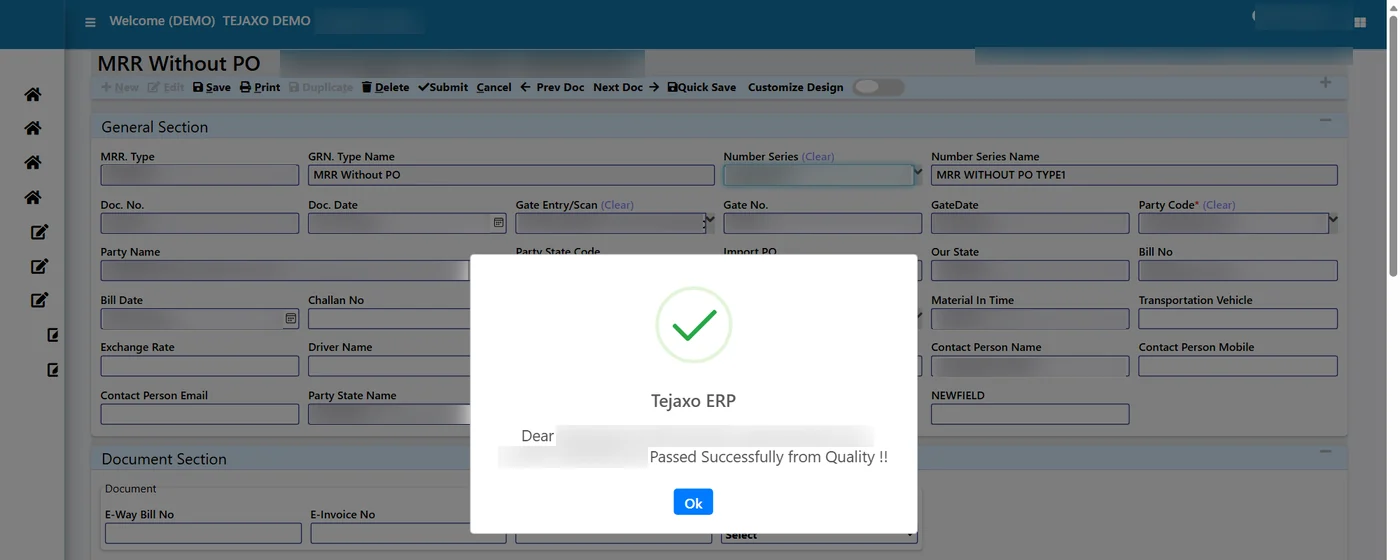
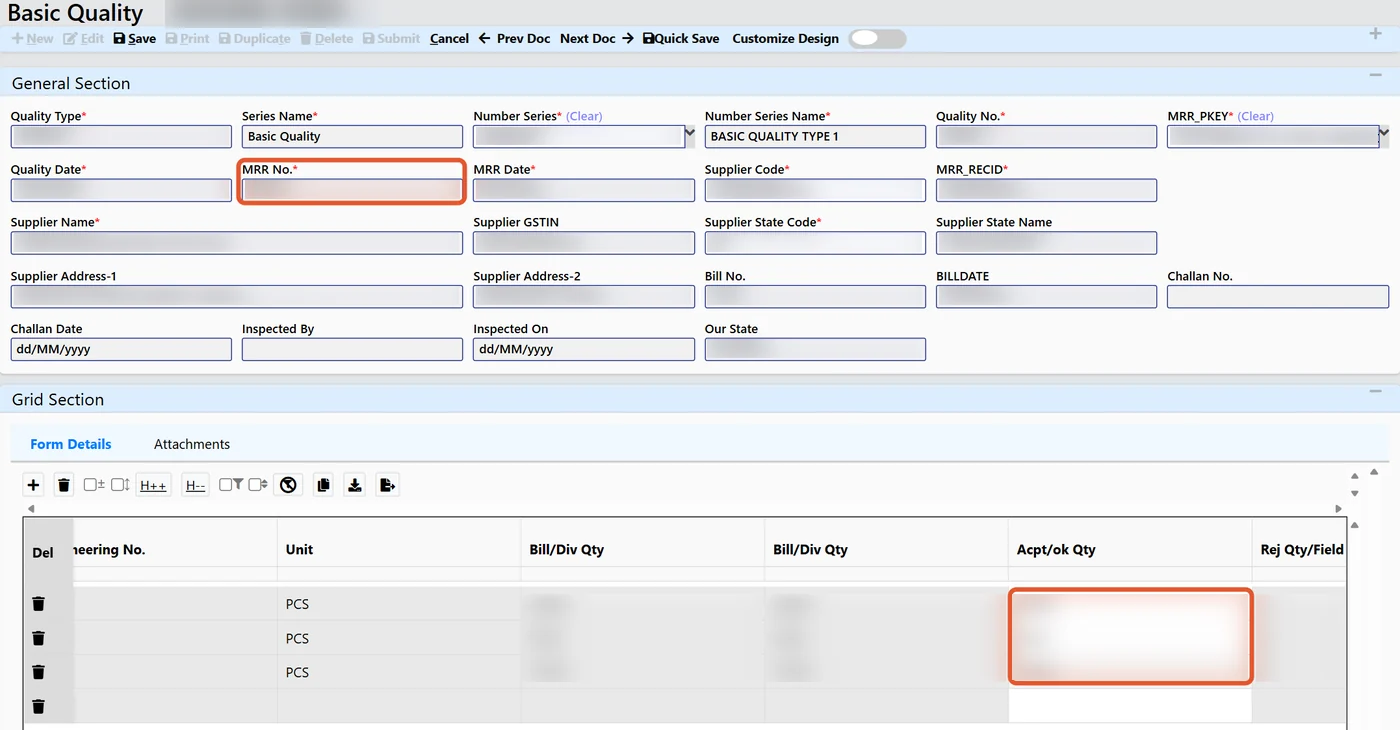
Here is what Tejaxo ERP confirms today. Gate and Logistics, Inventory and Stores, and Quality are modules on one live database. The material receipt is pulled from the gate entry, and incoming inspection records total, accepted and rejected quantity per receipt line against the supplier receipt. For paper reels, template-based inspection records per-reel tests such as GSM and burst. Batch-level tracking is also part of the product, for example coil and batch tracking in job work.
Whether deviation approval, ageing alerts to the QC head and a payment hold on inspection status fit your set-up is something to test in a demo with your own receipts, along with how issue, transfer and job work screens treat held material. If you already run SAP or Microsoft Dynamics, the message is not replacement: we extend your existing ERP rather than replace it.
What should a QC hold checklist for an auto component or machining plant include?
Use this table to test your set-up before the next customer or IATF audit. The right-hand column says what a pass looks like, so you can verify it with a real receipt rather than tick a box.
| Area | Test to run | What a pass looks like |
|---|---|---|
| Receipt | Post a receipt of an inspectable item | Quantity does not appear as available |
| Issue block | Try to issue, transfer and send on job work | Every screen refuses held quantity |
| Planning | Open the planner’s availability view | Held quantity is shown separately |
| Inspection plan | Pick one part and one material | Plan with sampling rule exists |
| Certificates | Open a recent heat number | Test certificate is attached to the receipt |
| Decision | Record a partial acceptance | One decision moves accepted and rejected quantity |
| Deviation | Ask for urgent use of a held lot | Signed, traceable approval is recorded |
| Traceability | Pick one heat number | You can list every job and dispatch that used it |
| Payment | Check a partly rejected invoice | Only disputed lines are held |
| Delay visibility | Find the oldest lot in hold | Someone is accountable for its age |
What is the practical next step?
Run the stock-ledger comparison on one critical item family, such as forgings or bar stock, and count how many issues happened before the quality decision, split by supplier and shift. Then pilot the QC-hold rule on that family, measure the delay it adds to inspection, and extend it item group by item group.
Frequently asked questions
What does QC hold mean in an ERP?
QC hold is a stock status or location for material that has been received but not yet cleared by quality inspection. The quantity is recorded in the books, but it cannot be issued to production, transferred or sold. It leaves QC hold only when an authorised user records an inspection decision such as accept, reject or use as is.
Can production issue material that is under QC hold?
It should not. A properly configured ERP applies a hard block on every issue, transfer and job work screen for stock in QC hold. If the only protection is a warning or a paper rule, material will eventually be issued under production pressure. Any exception should go through a signed deviation that the system records.
Do I need a separate quarantine warehouse for QC hold?
Not necessarily. A separate warehouse works if issue from it is blocked and a transfer follows acceptance. A stock status flag on the same location avoids the transfer step. Whichever you choose, the control should sit in the system and record who released the stock. Choose the model your ERP supports cleanly.
What should I do if uninspected material has already been used in production?
Trace the batch or heat number to every job, work in process and dispatch that used it. Place the related lots on hold, decide the disposition (sort, rework, scrap or customer notification) and record the root cause. This is only quick if batch numbers are carried from receipt through issue to dispatch.
Should QC-hold stock appear in MRP and planning?
Show it, but separately. Planners should see held stock as expected material under inspection, not as available quantity. Counting it as available causes false promises and jobs released against material that may be rejected. Once QC accepts the quantity, it joins the available stock automatically.
Ready to test your own flow? Book a free consultation with Tejaxo. We will review your current receipt-to-issue process with you and discuss how a QC hold could work for your item types.