
Quality inspection software for manufacturing records every inspection (incoming, in-process and final) in one system, forces a reason for every rejection, and keeps rejected material out of usable stock. It also turns those records into PPM, first-time-right percentage, defect Pareto and cost of poor quality, so that quality heads can act on data instead of memory. For Indian SME plants still running on paper registers and Excel, this is usually the quickest way to make customer audits and supplier discussions easier.
What quality inspection software for manufacturing actually does
It is easy to confuse inspection software with a full quality management system (QMS). A QMS covers documents, audits, training and corrective-action workflows across the company. Inspection software is narrower and closer to the shop floor: it answers three questions every day.
- What came in, and was it good? Incoming inspection against the material receipt.
- What is happening on the line? In-process and stage-wise checks, rejection and rework.
- Can we prove it? Traceability from the finished lot back to the batch, heat number or supplier certificate.
The real value appears when inspection is not a separate tool. If the quality result sits in a standalone app, someone still has to carry the decision into stores, purchase and production. When inspection lives inside the ERP, the accept or reject decision directly changes stock, vendor performance and production reports.
Why spreadsheets and paper registers fail on the shop floor
Most plants in industrial areas such as Faridabad, Manesar, Gurgaon and Bhiwadi start with a bound register or an Excel sheet at the receiving bay. It works while volumes are small. It starts to fail when the number of suppliers, parts and shifts grows. The usual symptoms are:
- Rejected material is physically segregated but still shows as available stock in the system.
- The reason for rejection is written as "not OK" or left blank, so no pattern can be found.
- Test certificates are filed in a cabinet, separate from the lot they belong to.
- Month-end quality reports are compiled by hand and arrive after the problem has repeated.
- A customer complaint takes days to trace back to a batch or a machine.
| Question | Paper or Excel | Inspection inside ERP |
|---|---|---|
| Does rejected material stay out of stock? | Depends on someone remembering | Only accepted quantity moves to stock |
| Is a rejection reason compulsory? | Optional, often blank | Mandatory field, saved with the entry |
| Can you see defects by supplier, stage or machine? | Manual filtering | Standard reports and dashboards |
| Can you trace a lot to a certificate? | Search through files | Linked records on one screen |
| Who sees it, and when? | Whoever has the file | Role-based, live |
Incoming QC register: accept, reject and only accepted quantity into stock
The incoming QC register is where most plants should start, because bad material costs the most when it is discovered late. A sound design has a simple chain: the gate records the vehicle and challan, stores raises the material receipt, and quality inspects each line against that receipt.
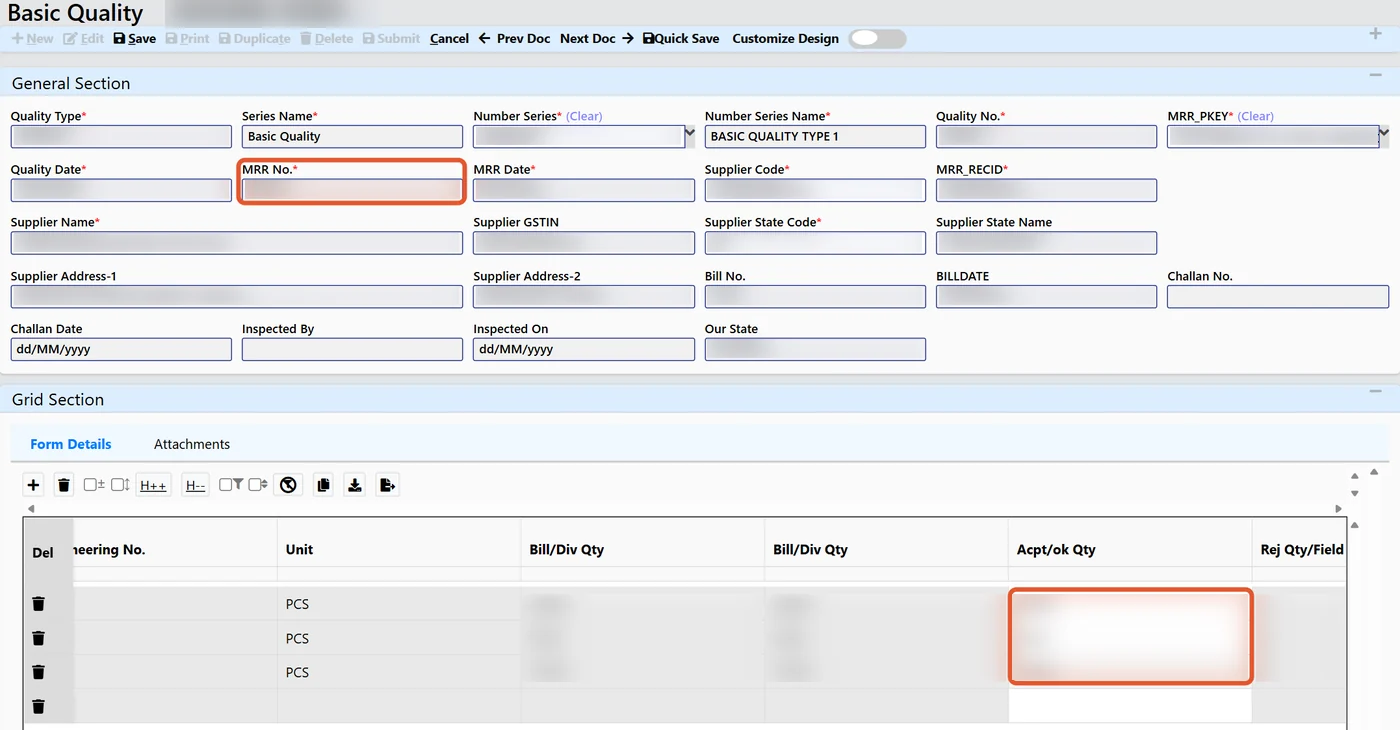
For every line the inspector records the received, accepted and rejected quantity. Three controls make the register trustworthy:
- Mandatory reason on rejection. The system will not save a rejected quantity without a reason code. Over a few months this builds a clean defect history per supplier and per item.
- Only accepted quantity enters stock. The accepted quantity becomes usable inventory; the rejected quantity is held separately for return or debit note. Production cannot issue what quality has not passed.
- Inspection is linked to the receipt. The result stays attached to the supplier, challan and item, so that vendor discussions are based on records.
Where the material has measurable properties, the inspection can use a template with parameters and acceptance limits. A good example is paper reels in packaging, where each reel is tested for properties such as GSM and strength before it is accepted. We have described this in our article on reel inward inspection for paper testing in corrugation.
Once rejection reasons and quantities are captured per supplier, they can feed a supplier score. See how that works in vendor rating and supplier performance scoring.
In-process and stage-wise QC on the production floor
Incoming inspection protects you from suppliers. In-process inspection protects you from yourself. In a multi-stage process such as cutting, machining, welding, plating and assembly, a defect found at the last stage has already consumed material, machine time and labour at every earlier stage.
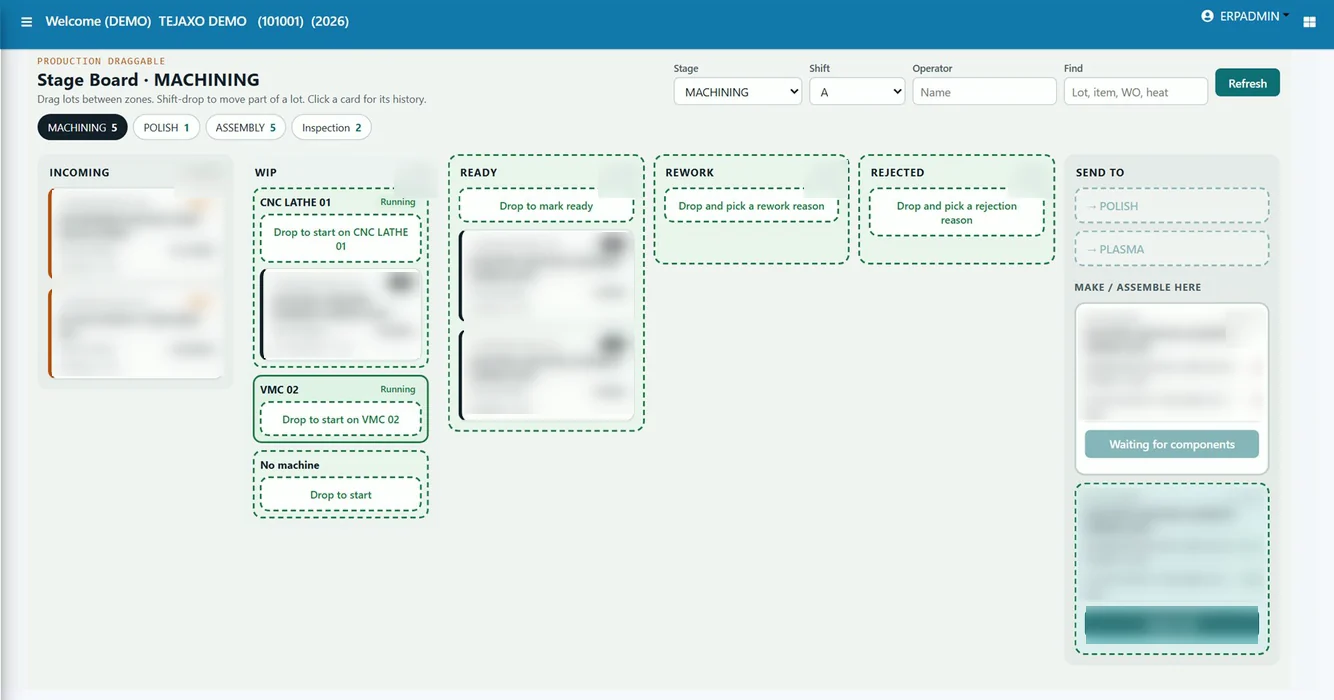
Stage-wise QC means each production stage has its own check, and every lot has a visible status. A practical stage board shows lots moving through states such as incoming, work in progress, ready, rework and rejected. The supervisor can see at a glance where lots are waiting and what quality has put on hold.
Stage-wise recording gives you three benefits that a final-inspection-only approach cannot:
- Loss is visible stage by stage. Rejection and downtime are recorded separately in each stage entry, so you know where the loss occurs, not only that it occurred.
- Rework is tracked, not hidden. A lot sent for rework is a separate status with its own count. Hidden rework is one of the main reasons first-time-right figures look better than reality.
- Rejection weight and reason are captured at the source. The operator or inspector enters the code at the machine or stage, when the facts are fresh.
The same boards that plan the work can show the quality status. Read more about this approach in drag-and-drop production control boards.
Quality metrics that matter: PPM, first-time-right, defect Pareto and cost of poor quality
Inspection data is only useful if it becomes a small set of numbers that people review regularly. Four are enough for most plants.
PPM (parts per million)
PPM is rejected parts divided by total parts, multiplied by one million. It lets you compare suppliers or lines of very different sizes on one scale. Many OEM customers ask their suppliers for PPM reports, so it is worth having it ready from the system.
Sample numbers, Product A: if a supplier delivers 40,000 pieces in a quarter and 12 are rejected, PPM is 12 / 40,000 × 1,000,000 = 300.
First-time-right percentage
First-time-right (FTR) is the share of units that pass inspection without any rework or repeat processing. It is a stricter measure than the final rejection rate, because a part that passed after rework still counts as a miss.
Sample numbers, Product A: if 1,000 units enter a stage and 920 pass without rework, FTR is 92%. The remaining 80 were either reworked or rejected, and both deserve attention.
Defect Pareto
A Pareto chart ranks defect reasons from the largest to the smallest. In most plants a small number of reasons account for most of the loss. This is why a mandatory rejection reason matters: without clean codes, the Pareto cannot be built. Fix the top one or two reasons first.
Cost of poor quality
Cost of poor quality (COPQ) puts a money value on scrap, rework, re-inspection and returns. It is what turns a quality report into a management conversation, because an owner will react to a rupee figure faster than to a percentage.
Sample numbers, Product A: if a month shows 80 rejected units at a material and conversion cost of ₹150 each, plus 120 reworked units at ₹40 each, the visible COPQ is ₹12,000 + ₹4,800 = ₹16,800, before counting returns or customer penalties.
We have covered the formulas, worked examples and how to read the charts in detail in PPM, defect Pareto and cost of poor quality.
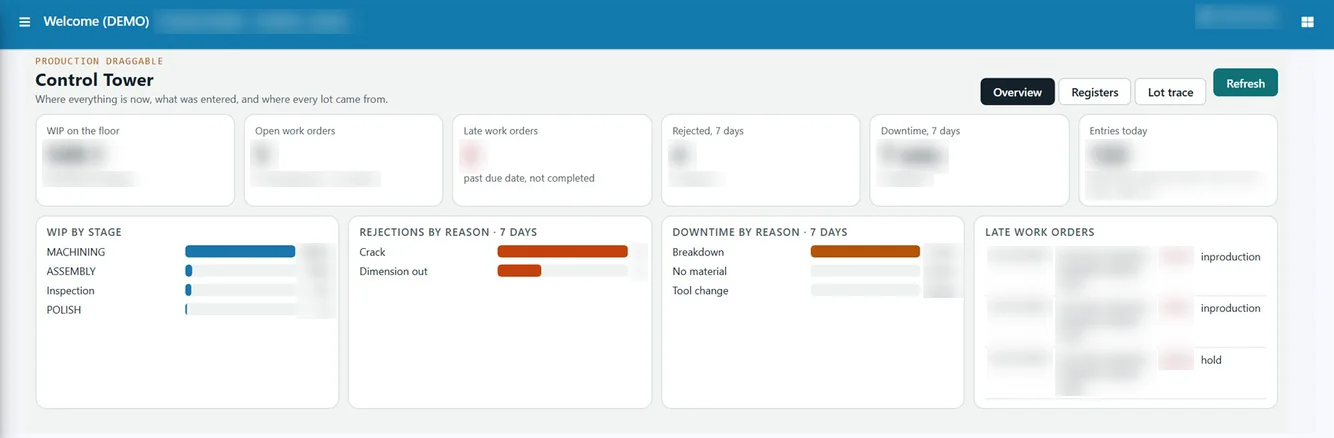
A production control tower view that shows work in progress by stage, rejections and downtime by reason helps a plant head review these numbers in one place instead of collecting them from several sheets.
Heat number and MTC traceability for forging and metal parts
For forging, casting and machined metal parts, traceability usually starts with the heat number of the raw material. The supplier issues a mill test certificate (MTC) for that heat, often an EN 10204 type 3.1 certificate when the customer requires one. If the certificate is filed apart from the lot, a customer audit or a field complaint becomes a search exercise.
An inspection system that holds heat number and MTC against the material receipt lets you:
- Record the heat number at incoming inspection and attach the certificate to it.
- Carry the heat number forward through issue, production and dispatch.
- Answer "which heat went into this lot, and where did the rest of it go?" in minutes.
- Isolate the affected lots quickly if a heat is found to be non-conforming.
Our guide to heat number traceability for forging explains the flow from receipt to dispatch.
How to choose quality inspection software: a buyer’s checklist
Most Indian plants do not need the heaviest QMS on the market. They need an inspection process that operators will actually use and that connects to stock and production. Use this checklist when you compare options.
| What to check | Why it matters |
|---|---|
| Inspection is linked to the material receipt | Results stay with the supplier, challan and item |
| Mandatory rejection reason | Needed for a usable defect Pareto |
| Only accepted quantity enters stock | Prevents rejected material being issued |
| Stage-wise and in-process checks | Shows where loss happens, not just the final result |
| Rework and rejection tracked separately | Gives an honest first-time-right figure |
| PPM, Pareto and COPQ reports without manual work | Saves the monthly effort and speeds up action |
| Heat number and certificate traceability | Essential for metal parts and OEM audits |
| Works inside your ERP, or extends it | Avoids double entry and separate data silos |
| Simple screens for operators and inspectors | Adoption on the shop floor decides success |
| Support for your plant, on-site and remote | Master data and templates need local setup |
Common mistakes when rolling out inspection software
- Starting with too many parameters. Begin with the items and checks that cause the most trouble, then expand.
- Free-text reasons. Use a controlled list of rejection codes. Free text cannot be summarised.
- Skipping the stock link. If rejected quantity can still be issued, the register is only a record, not a control.
- Ignoring rework. If rework is not a status, it disappears into the final figure.
- No review habit. Put the Pareto and PPM on the agenda of the weekly quality meeting, otherwise reports will go unread.
How Tejaxo ERP approaches inspection
Tejaxo ERP treats quality as one of its integrated modules on a single live database, alongside purchase, inventory, production and finance. That means the inspection result is not copied across: the material receipt, the quality decision and the stock all sit in one place. Incoming quality records accepted and rejected quantity against each receipt line, and production screens capture rejection by code and downtime by reason at each stage. Template-based inspection can record per-item test results against the supplier receipt.
If your plant already runs another ERP, the message is not to replace it. Tejaxo can extend an existing system with shop-floor modules; see extending your ERP on the shop floor.
Next step: see it on your own process
The fastest way to judge any inspection tool is to test it against your own incoming material, your own routing and your own rejection reasons. Bring a sample receipt, a typical job and the report your customer asks for, and we will show how it would run in Tejaxo ERP. Book a free consultation and we will walk through it with your quality and stores team.
Frequently asked questions
What is quality inspection software for manufacturing?
Quality inspection software records incoming, in-process and final inspections in one system. It captures accepted and rejected quantities, makes the rejection reason compulsory, and links results to stock and production. Good systems also report PPM, first-time-right percentage and defect Pareto, so quality heads can see problems early and act on facts.
How is inspection software different from a full QMS?
A QMS manages the wider quality system: documents, audits, training and corrective actions. Inspection software is narrower and works at the receiving bay and the production stages, recording what passed and what failed. For many SME plants, inspection inside the ERP is the practical first step, and further QMS controls can be added later.
How do I keep rejected material out of stock?
Inspect against the material receipt and let only the accepted quantity move into usable stock. The rejected quantity is held separately for return or debit note. When this rule is enforced by the system rather than by memory, production cannot issue material that quality has not passed.
How do I calculate PPM and first-time-right percentage?
PPM is rejected parts divided by total parts, multiplied by 1,000,000. First-time-right percentage is units that pass without rework divided by units inspected, multiplied by 100. For example, 12 rejects in 40,000 pieces is 300 PPM, and 920 clean passes out of 1,000 units is 92% first-time-right.
Why do forging and metal-part plants need heat number traceability?
Customers often ask which raw material heat went into a lot, supported by the mill test certificate. If the heat number and certificate are linked to the receipt and carried through production, you can answer audits and complaints quickly and isolate only the affected lots if a heat proves non-conforming.
Can quality inspection work inside my existing ERP?
Yes. Inspection can be added as a shop-floor layer that extends an existing ERP instead of replacing it. The aim is to avoid double entry and keep the accept or reject decision connected to stock, purchase and production, so that quality data is not left in a separate silo.
One Response