
Batch traceability software for manufacturers links every document a batch touches, from the sales order and purchase order to the gate entry, MRR, QC, issue, operations, finished goods batch, packing slip and invoice. When a customer complains, you start at the invoice and walk backward to the supplier lot. When a raw material lot is found faulty, you start at the lot and walk forward to every finished batch and customer. The test of good software is simple: how quickly can you do both, without opening a register or an Excel file?
What batch traceability software must actually do
Many tools call themselves traceable because they keep a lot number in the stock ledger. That is only one link. In a factory, a batch moves through many hands and documents, and a trace is only as strong as the weakest hand-over.
A usable system should do five things:
- Assign a batch or lot identity at the moment material enters the factory.
- Carry that identity through quality inspection, store issue and each production operation.
- Create a finished goods batch that records which input batches went into it.
- Tie the packing slip and invoice to the finished goods batch.
- Answer questions in both directions from any starting point.
Automotive customers audit identification and traceability under IATF 16949, and ISO 9001 also expects traceability where it is a requirement. Whatever the standard, your customer will ask the same practical question: if something goes wrong, how fast can you show where it came from and where else it went?
Forward and backward traceability: the two directions
These two terms are often mixed up, so here is a plain way to separate them.
- Backward traceability starts with a finished product or a complaint and goes back to the sources: which finished batch, which job card, which issued material, which MRR, which PO and which supplier lot.
- Forward traceability starts with a suspect input, such as a raw material lot, and goes forward to every work order, finished batch, packing slip, invoice and customer that received it.
Backward tracing answers ‘what caused this?’. Forward tracing answers ‘who else is affected?’. A recall needs both. Software that does only one leaves you guessing on the other half.
The document chain that makes a batch traceable
Traceability is not a separate report you bolt on. It is the result of documents being linked properly. In Tejaxo ERP, each document pulls from the one before, from enquiry to cash, so nothing is keyed twice. That design is what lets a batch identity survive from one stage to the next.
| Stage | What is recorded | Why it matters for tracing |
|---|---|---|
| Sales order | Customer, product, quantity, delivery | Starting point for forward tracing to the customer |
| Work order and job card | What is to be made and in which operations | Links demand to the production run |
| Purchase order | Supplier, item, terms | Identifies the source of the material |
| Gate entry | Supplier invoice, vehicle, arrival | Proof of what physically came in and when |
| MRR (GRN) | Accepted quantity, batch or lot | Where the batch identity is created in stock |
| Quality inspection | Test results against the receipt | Shows the lot was checked and passed or rejected |
| Store issue | Which batch went to which job | Connects input lots to production |
| Operations | Output, rejection and downtime per stage | Shows where quantity was lost or reworked |
| Finished goods batch | Batch made from the issued inputs | The pivot between backward and forward tracing |
| Packing slip and invoice | What was dispatched to whom | Closes the chain at the customer |
Where the chain breaks in Indian plants
In most small and mid-size plants around industrial belts such as Faridabad, Manesar, Pune or Chennai, material is received on paper, checked by one person, issued on a slip and recorded in Excel at the end of the day. The chain usually breaks in predictable places:
- At the gate. The inward register is handwritten, and the supplier invoice reaches accounts days later.
- Between MRR and QC. The lot is accepted in one file and inspected in another.
- At issue. A part of a lot goes to one job and the rest to another, but only the total is noted.
- In operations. Rework and scrap are written on a job card that never reaches the stock system.
- At dispatch. The invoice is raised without the finished batch being recorded against it.
When a complaint arrives, someone walks from file to file. It can take hours or days and still end in an uncertain answer. A comparison of spreadsheets and integrated systems is covered in ERP vs Excel for manufacturing.
Gate entry and MRR: where the batch is born
Traceability begins at the gate, not in the stores. The gate entry should record the supplier invoice, the vehicle and the material, and the MRR should be created against that gate entry so that the gate number and bill details carry forward without re-typing. Our guide to material gate entry software for factories explains the gate process in more detail.

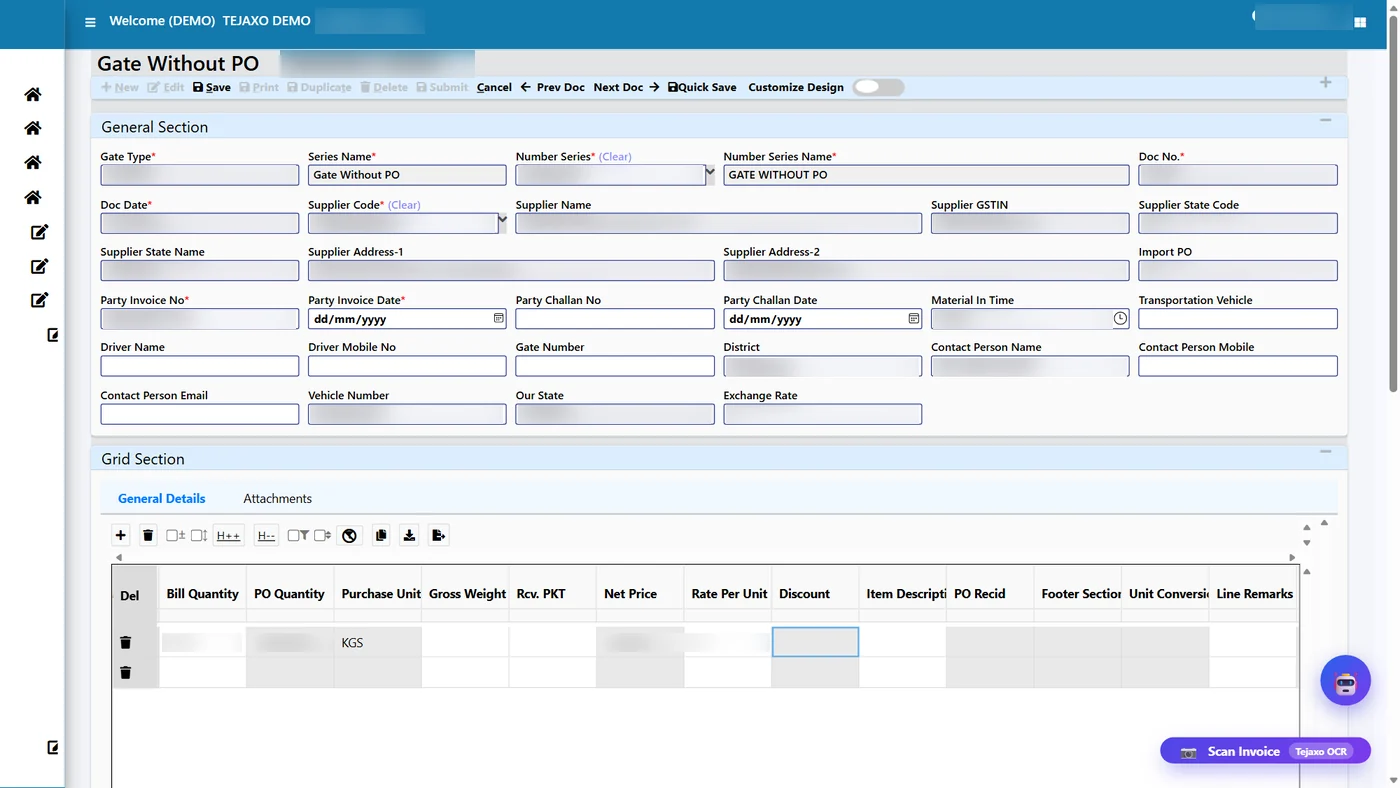
Tejaxo ERP can also pre-fill a gate entry from a photo of the supplier invoice, so there is no inward register to maintain at the gate. People review and confirm the entry; they do not type it from scratch. Fewer typing steps mean fewer wrong batch numbers entering the system at the very start of the chain.
Quality, issue and operations: keeping the batch on the shop floor
Once the material is received, three controls decide whether the trace holds.
Quality inspection against the receipt
Inspection results should sit against the MRR line, not in a separate sheet. Then a rejected lot cannot quietly be issued, and a passed lot shows its own test record when a customer asks for it. See quality inspection software for manufacturing for how inspection fits into the wider flow.
Batch-wise issue
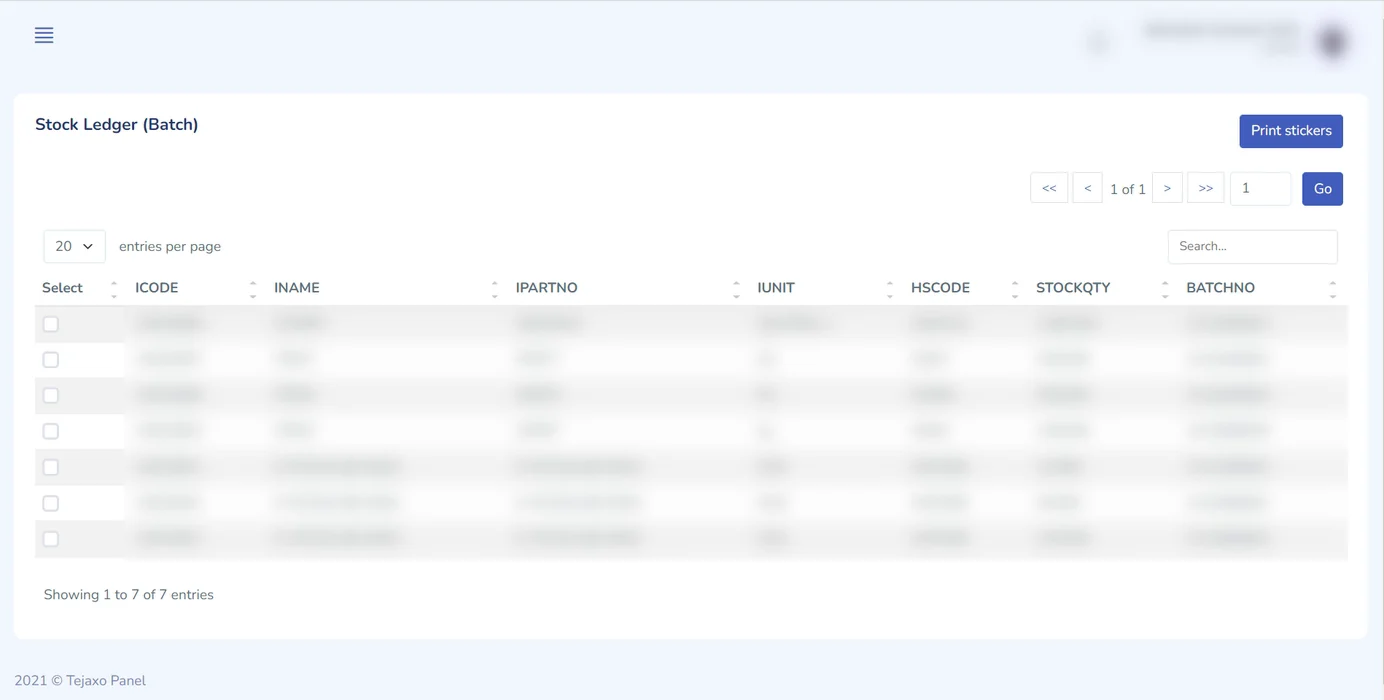
Issue is the step where most traces are lost. The store should issue from a named batch against a named job, with the batch-wise stock ledger updating immediately. Tejaxo ERP keeps a batch-wise stock ledger in the web portal, with QR sticker printing for each batch, so the sticker on the bin or bag matches the record on the screen.
Operation-wise records
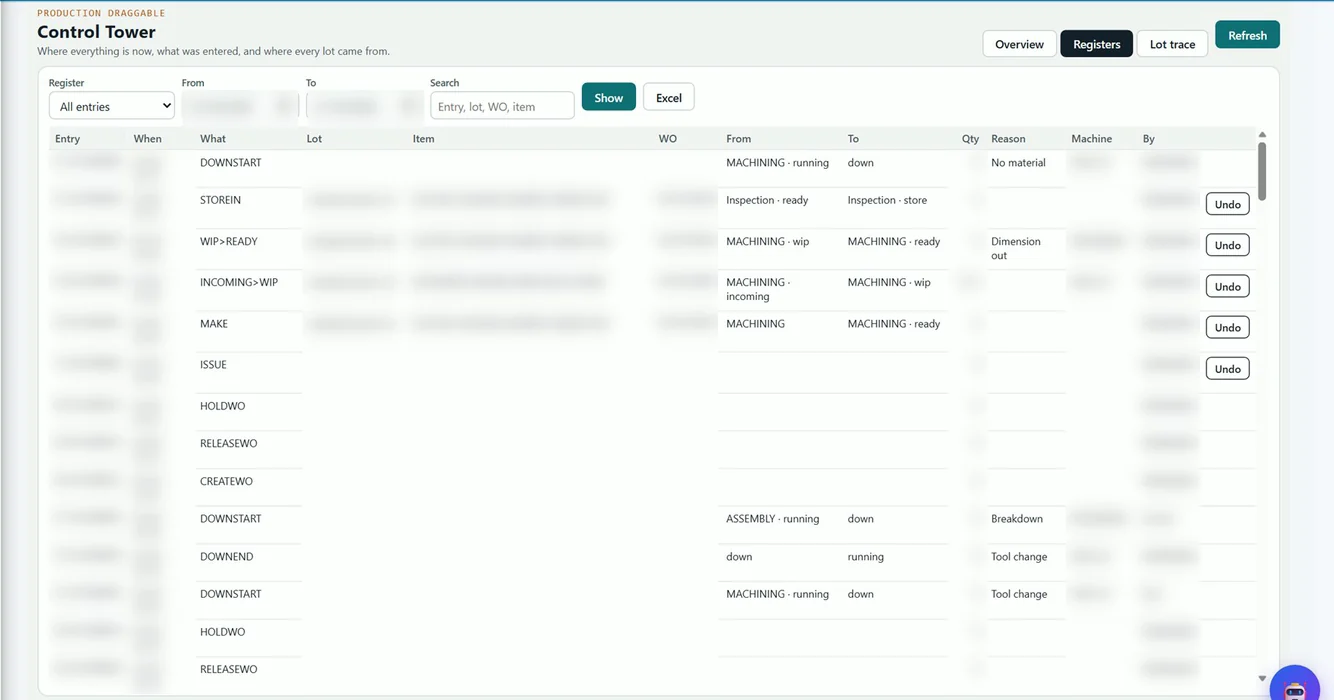
Production entries should be made per stage and per job, with input, output, rejection and downtime recorded separately for each stage. That shows exactly where quantity was lost and keeps scrap and rework inside the chain rather than outside it. A control-tower register that records every move, downtime and work-order action, with an undo option, adds an audit trail of what happened on the floor.
Finished goods batch, packing slip and invoice: closing the chain
The finished goods batch is the pivot of the whole system. Backward from it you can see the inputs; forward from it you can see the dispatches. For that to work, the packing slip must name the finished batch, and the invoice must follow the packing slip. If a team raises an invoice from memory and records the batch later, the forward trace is already broken.
Plants that need piece-level or part-level identification can look at two worked examples: heat number traceability in forging and QR code traceability in rubber moulding. The principle is the same in both: the identity is created early and never dropped.
Tracing a customer complaint backward, step by step
Take a sample case. Tejaxo Customer reports a defect in Product A and quotes an invoice. In a connected system, the trace runs like this:
- Open the invoice and see the packing slip it came from.
- From the packing slip, identify the finished goods batch that was dispatched.
- From the finished batch, open the work order and job card that produced it.
- From the job card, see which input batches were issued and which operations ran, with their rejection and downtime records.
- From the issued batch, open the MRR, its quality inspection result, the gate entry and the PO.
- Reach the supplier and the supplier’s invoice for that lot.
Each step is a click through a linked document, not a search through files. That is what turns a complaint investigation from a day-long exercise into something you can do while the customer is still on the call. The point is not speed for its own sake; it is that the answer is reliable enough to put in a corrective action report.
Tracing a bad raw material lot forward
Now reverse the case. Tejaxo Vendor informs you that lot RM-LOT-A, a sample lot code, was off-specification. The questions are different:
- Which job cards consumed RM-LOT-A?
- Which finished goods batches came from those jobs?
- Which packing slips and invoices carried those batches?
- Which customers received them, and how much stock is still with you?
With batch-wise issue and a finished goods batch that remembers its inputs, the system can list the affected batches and customers in one pass. The stock still in your warehouse can be put on hold before it ships. Without this, plants tend to either over-recall, which is expensive, or under-recall, which is risky.
Buyer’s checklist: what to test before you choose software
| Question to ask the vendor | What a good answer looks like |
|---|---|
| Is the batch created at MRR and linked to the gate entry? | Yes, with the gate number and bill details carried forward |
| Is inspection recorded against the receipt? | Yes, on the MRR line, visible during issue |
| Does the store issue from a named batch to a named job? | Yes, with the batch-wise ledger updating at once |
| Are rejection and downtime recorded per stage? | Yes, separately for each operation |
| Does the finished batch remember its input batches? | Yes, and it can be viewed from both sides |
| Are packing slip and invoice tied to the finished batch? | Yes, with no manual re-entry |
| Can you trace in both directions from a live demo? | Yes, on your own sample data |
| Can labels or QR stickers be printed per batch? | Yes, from the same record |
If you already run a larger ERP, you do not necessarily need to replace it. Tejaxo extends existing systems at the shop-floor level rather than replacing them.
Run a mock recall before you trust any system
Do not accept a slide as proof. Ask the vendor, or your own team, to run a mock recall on live data:
- Pick one finished batch dispatched last month and trace it back to the supplier lot.
- Pick one received raw material lot and trace it forward to every customer.
- Include a batch that had rework or partial issue, because that is where weak systems fail.
- Note how many documents had to be opened outside the system.
The goal is zero. Every manual lookup you note is a gap you will face during a real complaint. Run the same drill every quarter once the system is live, so that the habit of recording at each step does not fade.
Start with the gate, not with a big-bang project
Most plants do not need to change everything at once. A practical order is: gate entry and MRR first, then quality and batch-wise issue, then operation entries, and finally packing slip and invoice linkage. Each step improves the trace even before the next one is live. Tejaxo ERP covers these stages in one platform, with 12 integrated modules on one live database and 1000+ standard reports, so the batch is not handed between disconnected tools.
If you want to see a complaint traced backward and a lot traced forward on your own kind of data, book a free consultation with Tejaxo. We will walk through your current gate, store and dispatch flow and show where the chain can be tightened.
Frequently asked questions
What is batch traceability software?
Batch traceability software records the batch or lot identity of material as it moves through purchase, receipt, inspection, issue, production, packing and invoicing. It lets you trace a finished product back to its raw material lot, and a raw material lot forward to every customer who received it, using linked documents instead of manual registers.
What is the difference between forward and backward traceability?
Backward traceability starts from a finished product or complaint and finds its sources, such as the job card, issued material, MRR and supplier lot. Forward traceability starts from a suspect input lot and finds every finished batch, dispatch and customer that used it. A proper recall process needs both directions.
How do you trace a customer complaint to the raw material lot?
Start with the invoice, move to the packing slip and the finished goods batch, then open the job card that made it. From the job card, see which input batches were issued, then open the MRR, quality result, gate entry and PO for that lot. In a connected ERP each step is a linked document.
Is Excel enough for batch traceability in a factory?
Excel can hold lot numbers, but it cannot enforce that every document carries the batch forward. Gate, QC, issue and invoice are usually kept in different files, so the chain breaks when quantities are split, reworked or partly issued. For regular customer audits and complaints, a linked ERP is more reliable.
How can I test batch traceability software before buying?
Run a mock recall on live or sample data. Trace one dispatched batch back to the supplier lot, and trace one received lot forward to all customers. Include a batch with rework or partial issue. If you have to open any document outside the system to complete the trace, the software has a gap.