
When you compare ERP software companies in India, judge each one on five things you can test yourself: who actually builds the software, how it behaves in a pilot on your own data, whether engineers support you on site, how deeply it handles GST and job work, and what customers say after two years of use. This article is a vendor-neutral checklist. It does not rank or name any company, and it contains no prices.
Why a vendor list is not enough
Search for this topic and you will find many lists of top ERP companies. Most are written by vendors, and most end with a table of features that every product claims to have. For an owner, plant head or CFO, that is not the hard part. Almost every ERP says it is GST-ready, cloud-capable and scalable. The real differences show up in the second year, when a tax rule changes, a key person leaves, or your shop floor does something the standard demo never covered.
A better approach is to treat selection like an audit. Decide what you will test, ask for evidence, and score every company the same way. For a wider decision framework, including cloud versus on-premise and budgeting, see our guide to choosing the right ERP software in India. The checklist below goes deeper on the points that most buyers skip.
1. Who actually builds the software?
The Indian ERP market includes product owners, resellers, implementation partners and subcontractors. From the outside, they can all look like “an ERP company”. For you, the difference decides who fixes a problem at 6 pm on a filing day.
Ask these questions in your first meeting:
- Who writes and owns the source code of the product you are being shown?
- Does the vendor control the roadmap, or does it depend on another company’s product?
- Are the implementation consultants on the vendor’s own payroll, or are they subcontracted?
- When a bug is found, who is accountable for the fix, and how long does a fix usually take to reach you?
- If you ask for a change specific to your process, who decides whether it is possible?
A company that builds and supports its own product can answer these questions plainly. A company that resells will usually say “we will check with the principal”. That is not wrong in every case, but you should know it before you sign.
If you already run SAP or Microsoft Dynamics, the question changes. You may not need a replacement at all. Often the better route is to keep the core ERP and extend it for shop-floor, job-work or WhatsApp-based workflows. We explain that approach in extending SAP and Dynamics ERP to the shop floor. The principle is simple: a good vendor will tell you honestly when you do not need to replace what you have.
2. Run a pilot on your own data
A demo shows what the vendor prepared. A pilot shows what your business needs. Few buyers ask for one, and that is a mistake, because a demo database is clean and your real data is not.
Ask for a time-boxed pilot, ideally a few weeks, with:
- Your actual item master, including the awkward items with two units or several grades.
- Your real bill of materials for two or three products, including one that is complicated.
- Your party masters and opening balances for a limited set of customers and vendors.
- A sample of real transactions: purchase orders, gate entries, production entries, sales invoices.
Then score the result. Use pass or fail, not impressions.
- Could the vendor load your masters without weeks of manual rework?
- Did your own staff, not the vendor’s consultant, complete a full cycle from purchase to payment?
- Did the reports match your own books for the same period?
- Did the software handle your exceptions, such as partial receipts, rejections and returns, without a workaround?
- How many change requests did the pilot generate, and how were they handled?
Data migration is where many projects slip, so look at how the vendor treats it. Our note on ERP data migration of masters and opening balances lists what a sound migration plan should cover.
3. On-site support, not just a helpline
“24×7 support” is the most common and least useful claim in the ERP business. It tells you a phone exists. It does not tell you whether someone who understands your plant will turn up when you need them.
Ask for specifics:
- What is the response commitment for your location, and is it written in the agreement?
- Do engineers visit your plant, or is support remote only?
- Who supports you during GST filing weeks, when every client calls at once?
- What happens if the consultant who knows your setup leaves the vendor?
- Is there a named person responsible for your account?
Remote support works well for most queries and is faster. But go-live, training and process changes benefit from a person standing next to your operators. The best arrangement is both, and the vendor should say clearly what applies to your site. Tejaxo, for example, supports clients across India on-site and remotely, and its office is in Palwal, Haryana.
4. GST depth: test it, do not take “GST-ready” on trust
“GST compliant” is a label, not a test. Define what you will check, then ask the vendor to show it live, on your data.
- Tax masters and rate changes. Rates and HSN codes change. Ask how quickly the vendor ships updates and how invoices that straddle a change are handled.
- E-invoicing. As per current rules, taxpayers above the applicable turnover threshold, which is ₹10 crore of annual aggregate turnover at the time of writing, must report invoices to the Invoice Registration Portal. Confirm the current threshold on the GST portal. Ask exactly how the ERP prepares and records the e-invoice, and be precise about what is automated and what is done through a separate utility or a partner.
- The 30-day reporting window. From 1 April 2025, taxpayers at or above that threshold cannot report an invoice, credit note or debit note more than 30 days after the document date. Ask whether the ERP warns you before documents age out and how it handles rejected or cancelled IRNs.
- Return matching. Ask to see GSTR-2B matching against your purchase records, and how mismatches are listed for follow-up. Our article on GST return software for GSTR-1 and 2B matching shows what a working review looks like.
- Reverse charge, debit notes and credit notes. These are everyday events in a factory. Test them in the pilot, not in the sales deck.
Keep the wording honest in your own notes too. If a vendor says it “integrates with the government”, ask which exact step is direct, which goes through an intermediary, and who is responsible when a submission fails. Then verify the answer against the official GST portal.
5. Job work: the test generic ERPs often fail
Many Indian manufacturers send material out for plating, painting, machining, cutting or assembly. This is job work, and it is where generic ERPs show their limits, because the stock is yours but sits in someone else’s premises.
As generally understood, job work under the CGST Act involves sending goods under a challan, and inputs are expected back within one year and capital goods within three years, with ITC-04 reporting at the frequency applicable to your turnover. These details should be confirmed with your tax adviser or the official CBIC and GST sources before you build any process on them. What matters for selection is whether the ERP can do the following, live, in front of you:
- Track stock challan by challan at each job worker.
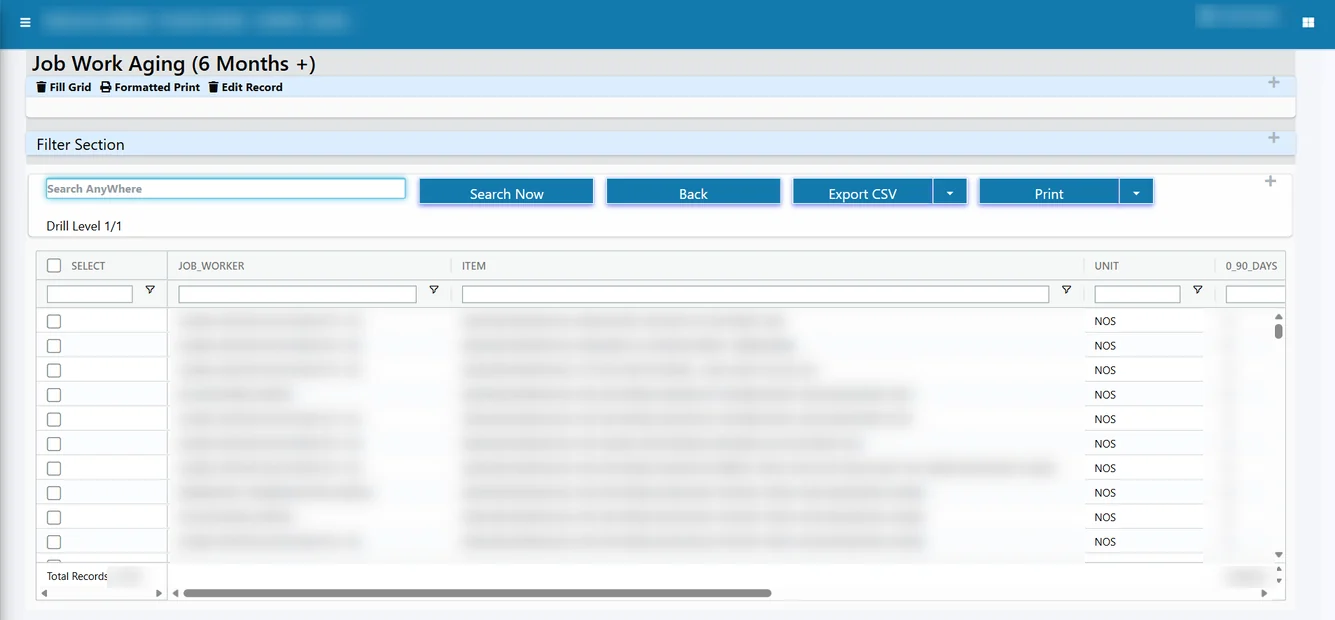
- Show ageing, so you see what is approaching the one-year or three-year limit before it becomes a tax problem.
- Receive goods back against the right challan, including goods that return in a different form, such as sheets cut from a coil.
- Handle weight and pieces on the same line, for example billing in kilograms while stock is held in pieces.
- Record scrap and small losses with a reason and an audit trail, rather than by editing old documents.
- Produce the data you need for ITC-04.
- Handle the reverse case, where a customer sends you material to process.
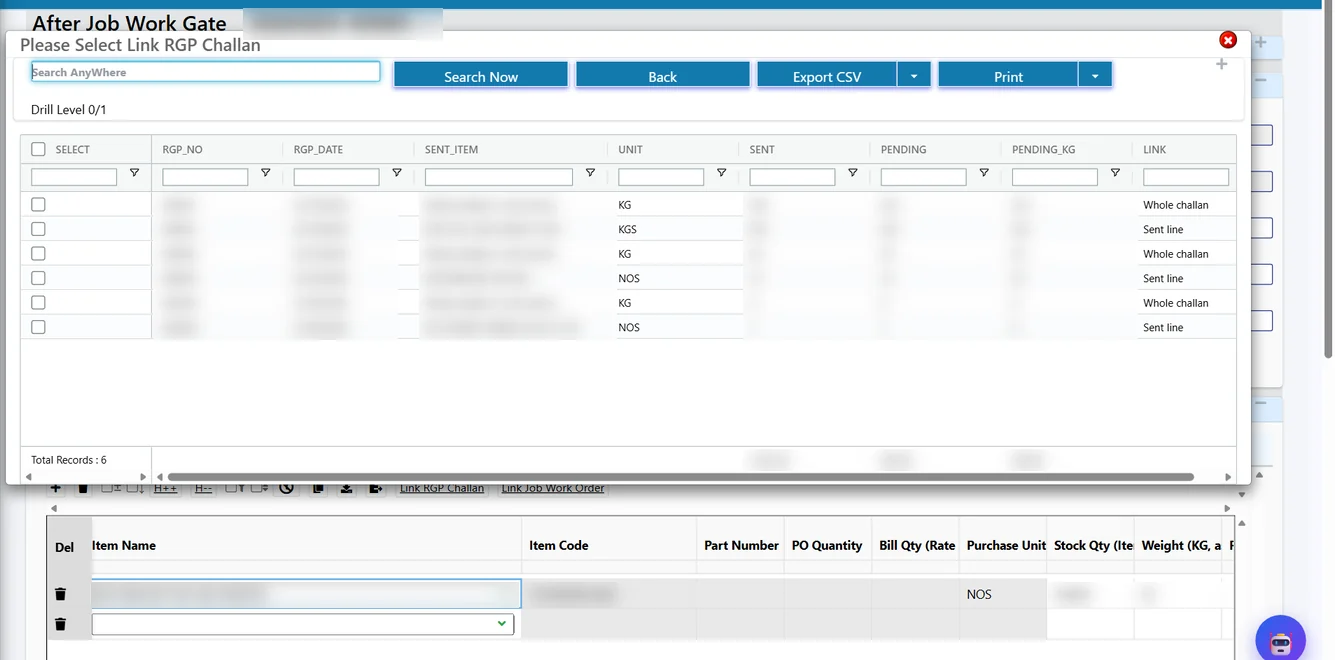
Here is how this looks in Tejaxo ERP. When material comes back, the gate entry is linked to the returnable challan, either the whole challan or a particular sent line.
Ageing is the second test. A report that buckets pending lines by age works as a watch list for the statutory limits.
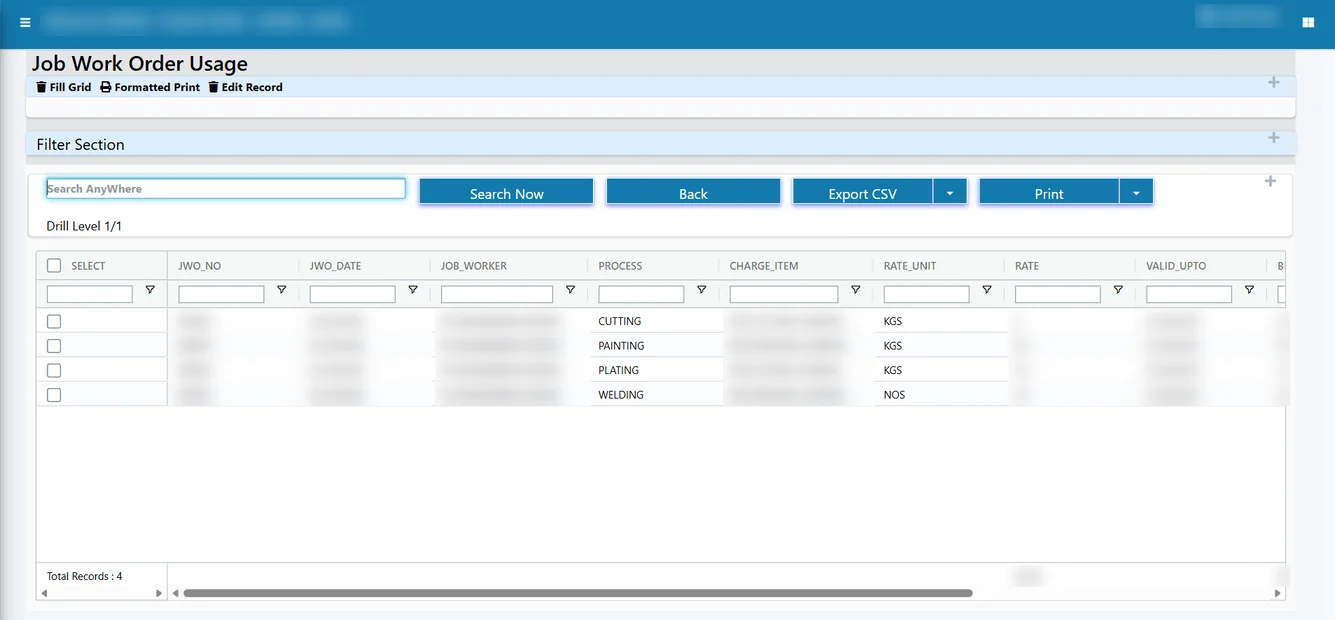
Finally, ask the vendor to show a job-work bill of materials, where several inputs sent out produce a defined output coming back, and to show how usage by process is reported afterwards.
If you want to see how these cases are worked out in detail, read our articles on many-to-many job-work reconciliation and ITC-04 filing from the ERP. Even if you do not choose Tejaxo, use the list above as your test script. A vendor who cannot demonstrate these steps on your sample case probably handles job work through manual registers.
6. References: how to check them properly
Every vendor will give you happy customers. Your job is to ask for the right ones and ask the right questions.
- Ask for customers similar to you in size, industry and tax profile, not the largest name on the list.
- Ask for at least one customer who has been live for more than two years. The first year is easy. The third year shows how the vendor behaves when the project excitement fades.
- If possible, ask to speak to a company that stopped using the vendor and ask why.
- Speak to the person who runs the system daily, such as the accounts head or stores in-charge, not just the owner who signed the contract.
Useful questions for the reference call:
- How long from signing to the first real transaction, and how long to full use?
- What broke in the first three months, and how fast was it fixed?
- How was the last GST filing season?
- What would you do differently if you chose again?
- Do you still depend on spreadsheets for anything important?
A genuine reference will mention problems. Be suspicious of a reference that has none.
A one-page scorecard
Print this table and fill it in for every company you evaluate. Score each row as pass, partial or fail, and keep notes.
| Area | What to ask | A good answer looks like | Red flag |
|---|---|---|---|
| Who builds it | Who owns the code and the roadmap? | The vendor does, with its own in-house team | “We will check with the principal” for every issue |
| Pilot | Can we test with our own masters and transactions? | A defined pilot with clear pass or fail criteria | Only a scripted demo is offered |
| Support | Who comes to our plant, and how fast? | Written response commitment and site visits | Remote-only, no named owner |
| GST | Show e-invoice handling, the 30-day alert and GSTR-2B matching | Live demo on our data, with clear boundaries on what is automated | Vague “fully compliant” claims |
| Job work | Show challan ageing, return against challan and ITC-04 data | Challan-wise stock at each job worker | Tracked in a separate spreadsheet |
| Customisation | How are our changes kept safe during upgrades? | A clear method that does not break on updates | Changes made directly in the core code |
| References | Can we speak to a similar customer live for two years or more? | Willing, with candid feedback | Only logos, no calls |
The customisation row deserves attention. Ask how the vendor keeps your changes safe when the product is updated; our note on ERP customisation without breaking upgrades explains why this matters.
Red flags to watch for
- The vendor will not let you test on your own data before signing.
- The team that sells is not the team that implements, and nobody can tell you who will.
- Every difficult requirement is answered with “it can be customised”, with no explanation of how.
- No customer similar to you is available for a call.
- Support is described only as a phone number or a ticket portal.
- The vendor cannot explain where your data is hosted and who can access it. Check this against the Digital Personal Data Protection Act, 2023 and its rules, which you should confirm with your legal adviser.
- Exit terms are unclear. Ask in advance how you can export your data if you leave.
How Tejaxo fits this checklist
We would rather you test us than trust us, so here is how we answer these questions. Tejaxo has been in business since 2017 and has served 50+ clients. Tejaxo ERP is a product built and supported in-house, on a modern web stack of React, ASP.NET Core 8 and SQL Server, with 1000+ standard reports available from day one. Job work, including returnable challans, ageing, inward job work for customer material and weight-to-pieces conversion, is part of the product and not a spreadsheet beside it.
Tejaxo ERP is an automated, voice-first manufacturing ERP. Machine data, scanned supplier invoices and WhatsApp voice or text entries go in without typing, owners ask questions and approve by voice on WhatsApp, and people stay in control. If you run another ERP, we do not ask you to replace it. We extend it where it stops short.
If you want to see how that compares with a quick overview first, our ERP implementation page explains how a project runs.
Next step
Take the scorecard, shortlist two or three companies, and ask each for a pilot with the same sample data. Compare the results, not the brochures. If you would like Tejaxo to be one of the companies you test, book a free consultation and bring one real job-work case and one GST scenario. We will walk through them on the screen with you.
Frequently asked questions
How do I choose between ERP software companies in India?
Compare them on testable points rather than feature lists: who builds the product, a pilot on your own data, on-site support commitments, GST and job-work handling shown live, and reference calls with similar customers. Score each vendor on the same sheet with pass, partial or fail, and keep notes so the decision rests on evidence, not on demo impressions.
What should I ask an ERP company about GST?
Ask for a live demonstration on your data, not a claim. Cover tax and HSN updates, e-invoice handling, the 30-day reporting window for larger taxpayers, GSTR-2B matching, reverse charge and debit or credit notes. Also ask exactly which steps are automated and which use a separate utility, then verify thresholds and rules on the official GST portal.
Why is a pilot on my own data better than a demo?
A demo uses clean data prepared by the vendor. A pilot uses your real item master, bill of materials, party masters and sample transactions, so it exposes migration problems and process gaps early. Set pass or fail criteria beforehand, and make sure your own staff, not the vendor's consultant, complete a full cycle.
Does a generic ERP handle job work and ITC-04?
Some do not, or only through spreadsheets. Test whether the ERP tracks stock challan by challan at each job worker, shows ageing against the statutory limits, receives goods back against the right challan, records scrap and losses with a reason, and gives data for ITC-04. Confirm the rules with your tax adviser or official sources.
How should I check an ERP company's references?
Ask for customers similar in size, industry and tax profile, including one live for more than two years and, if possible, one that left the vendor. Speak to the daily users, such as accounts or stores staff. Ask what broke early, how fast it was fixed, how GST season went, and what they would do differently.
Is on-site support really necessary for an ERP?
Remote support handles most day-to-day queries quickly. But go-live, operator training and process changes work better with an engineer at your plant. Ask for the response commitment in writing, the cover during GST filing weeks and a named account owner. The best arrangement combines on-site and remote support.
3 Responses