
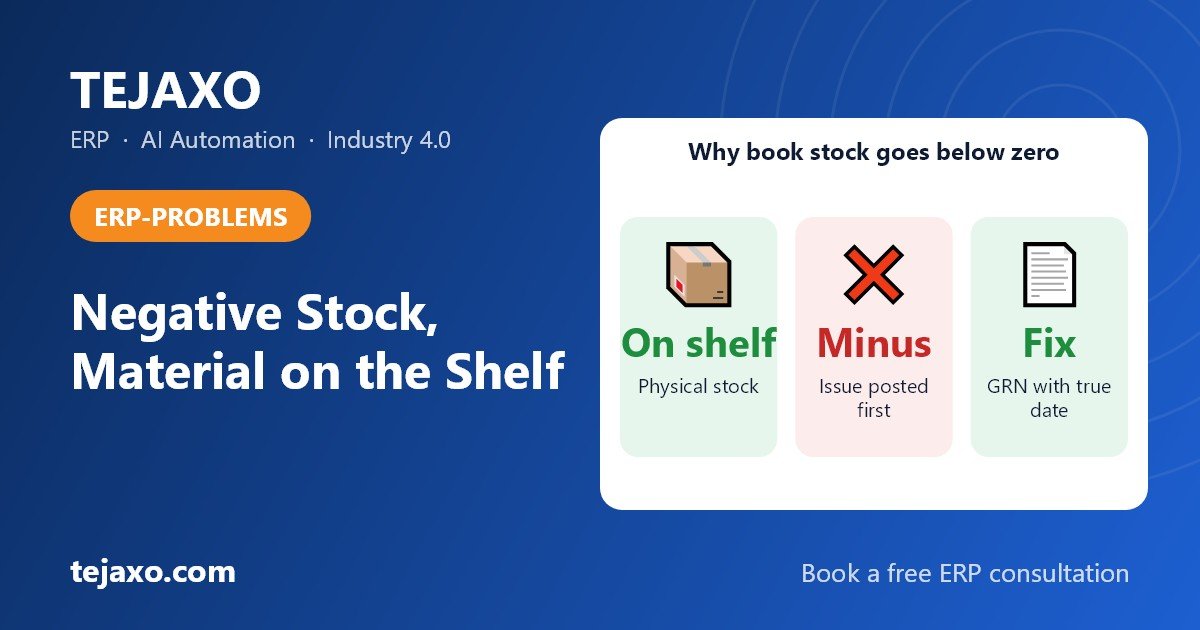
Your ERP shows negative raw material stock because a transaction that takes material out, such as a production issue or consumption entry, was posted before the transaction that brings it in, usually the goods receipt note (GRN) or the purchase bill. The material is on the shelf, but the system has no receipt to put it against, so book stock drops below zero while physical stock is fine. The correct fix is to post the missing receipt with its true date and then close the process gap that allowed the issue first. It is not to plug the number with a stock adjustment.
Why does my ERP show negative stock when the material is physically in the store?
Because the ERP only knows what has been recorded, not what is on the shelf. Physical stock is what you can count in the store. Book stock is what the system calculates: all receipts minus all issues. When an issue is entered before the matching receipt, book stock goes below zero even though physical stock is positive.
An illustrative example with sample numbers. Assume nil opening stock of MS sheet. A fabrication unit receives 1,000 kg of MS sheet at the gate at 10 am. At 11 am the shop floor needs 100 kg for an urgent job, and the store keeper hands it over straight away. The supplier’s bill reaches the accounts desk only in the afternoon, so the GRN is entered at 5 pm. From 11 am to 5 pm the system shows minus 100 kg of MS sheet, because it has an issue but no receipt.
The issue also has no reliable cost behind it during those hours. Depending on the system, it is valued at the last known rate for the item or at zero. Once the GRN is posted with the arrival date, book stock reads 900 kg and matches the shelf again, and the valuation difference is corrected through revaluation when the receipt is posted.
In a busy plant this is a normal side effect of the process, not a software bug. The real question is how long the gap stays open and whether anyone clears it correctly.
What are the most common root causes of negative raw material stock?
Almost every case falls into one of a handful of patterns. Identify which one you have before you touch any data, because each needs a different fix.
| Root cause | What you see in the ledger | Correct fix |
|---|---|---|
| Issue to production before the GRN | Issue dated before the receipt for the same item | Post the GRN with the actual material arrival date; enforce a GRN-first rule |
| Purchase bill entered before the GRN | Bill exists, but no receipt or stock movement | Create the GRN against the gate entry and link the bill to it |
| Back-dated entries | Receipt posted today with last week’s date, stock was negative in between | Allow back-dating only within a short window and with approval; reprice affected issues |
| Wrong unit of measure | Received in kg, issued in nos or metres without a correct conversion | Fix the conversion factor in the item master, then correct the affected entries |
| BOM or backflush over-consumption | System consumes more than the physical quantity used | Review BOM quantities, scrap and yield; record real scrap separately |
| Wrong warehouse or location | One location negative, another positive for the same item | Post a proper transfer instead of editing quantities |
| Transfer not posted | Material moved between stores or plants without a transfer entry | Post the missing transfer with the actual movement date. For material still travelling between plants, see goods in transit between plants |
| Batch or lot mismatch | Total is positive but one batch is negative | Correct the batch on the issue or receipt line |
| Returns or rejections not posted | Rejected material still counted as received, or returns not recorded | Post the rejection or purchase return with the right reason |
Duplicate item codes also cause trouble: the same material under two codes means one is positive and one is negative. Merge or retire the duplicate rather than adjusting quantities.
How do I find which transaction caused the negative balance?
Use the item’s stock ledger and find the first transaction where the running balance went below zero. That single line usually tells you the cause. Work through these steps in order.
- Run the negative stock report. List all items and locations with a balance below zero as on today. Sort by value or by how long they have been negative.
- Open the stock ledger for one item. Set the date range to start before the problem began, and view every movement in date order with a running balance.
- Find the first line where the balance turns negative. Note the document type, number and date. If that line is the very first entry of a period, check the opening balance carried forward before blaming a transaction.
- Look for the expected receipt. Search the gate entries, GRNs and purchase bills around that date for the same item. Is there a receipt dated later? A gate entry with no GRN? A bill with no GRN?
- Classify the cause using the table above: issue before GRN, billing before GRN, unit mismatch, wrong location, and so on.
- Check the physical count. Ask the store to count that item. If physical stock matches what the book should show after the missing receipt, it is a timing problem. If it does not match, you have a genuine stock difference as well.
Here is how the ledger looks in the MS sheet example above, using sample numbers only and assuming nil opening stock:
| Stage | Ledger line | Quantity (kg) | Running balance (kg) |
|---|---|---|---|
| Before the fix | Opening stock (assumed nil) | 0 | 0 |
| Before the fix | Issue to production (the first line where the balance turns negative) | -100 | -100 |
| After posting the GRN with the arrival date | GRN for MS sheet (dated 10 am, before the issue) | +1,000 | 1,000 |
| After posting the GRN with the arrival date | Issue to production | -100 | 900 |
When the ERP keeps purchase, sale and production data in one database, this tracing is faster because you can jump from the ledger line to the originating document without switching tools or spreadsheets.
How do I fix negative stock without distorting valuation?
Fix it at the source document, not at the balance. Post the missing transaction so the ledger tells the true story, then let the system recalculate cost. These are the steps for the most common case, material received but not yet receipted.
- Confirm the receipt happened. Match the supplier invoice, the gate entry and the physical presence of the material.
- Post the GRN with the real receipt date. Use the date the material entered the plant, not the date you are fixing the data. This puts the receipt before the issue in the ledger.
- Link the purchase bill to the GRN. If a bill was entered earlier without a receipt, connect it so the stock quantity is not counted twice or left orphaned.
- Let valuation catch up. An issue posted before the receipt had no true cost behind it. With existing stock under a weighted average method it was valued at the old average; with nil stock, the system uses the last known rate or zero, depending on how it is built. After the receipt is posted, the difference should flow through a revaluation or price difference entry. Check whether your system reposts the affected issues automatically, or review that entry manually.
- Re-run the ledger. The running balance should now stay at or above zero from the receipt date onwards.
- Count and adjust only the remainder. If, after the missing documents are posted, book stock still differs from the physical count, record a stock adjustment for that difference only, with a reason and approval.
- Record the root cause. Note whether it was a timing, unit, location or BOM problem so you can track patterns.
For a deeper look at how cost method changes the effect, see our guide on stock valuation methods: FIFO, weighted average and standard cost.
What should you never do to clear a negative balance?
Never clear it with a blind stock adjustment, a made-up receipt at zero value or a manual quantity overwrite. These make the number look right and hide the cause.
- A plug adjustment adds stock with no supplier, no cost and no document trail. Cost of goods sold and inventory value both become wrong, and the real GRN, when it arrives, now double-counts the material.
- A zero-value receipt pulls the average cost down and understates the cost of production.
- Deleting or editing the issue breaks the link between production and consumption and makes job costing unreliable.
- Switching off the check for all items hides every future error, including real ones like theft or wrong consumption.
When an auditor picks a negative line, the usual request is the gate entry, the GRN and the purchase bill for the receipt, plus the issue slip or consumption entry. A plug adjustment has none of those, so the explanation falls on whoever posted it. A clean trail from gate entry to GRN to bill to issue is worth more than a tidy report.
Does negative stock affect COGS, the balance sheet and tax credit?
Yes. A negative balance has no reliable cost behind it, so your numbers are wrong until it is corrected.
- Cost of goods sold: Material issued at a stale or zero cost misstates the production cost of that period. The correction arrives later as a revaluation, which can shift cost between months.
- Balance sheet: Inventory value is understated while stock is negative. Accounting standards such as IAS 2 and Ind AS 2 expect inventory to be measured at the lower of cost and net realisable value, which is hard to defend when a line has a negative quantity.
- GST input tax credit: Under Section 16 of the CGST Act, input tax credit depends on holding a valid tax invoice and on actually receiving the goods. A bill booked with no GRN weakens that trail. Confirm how it applies to your case with your CA.
- Month-end close: Negative lines mean manual correcting journals and a slower stock reconciliation. Run the negative stock report as on the last day of the month before you close, not after.
The control that prevents this is the three-way match between purchase order, GRN and invoice: stock rises on the GRN, and the bill is accepted only against it. For how the open balance between receipt and bill is carried in the meantime, see how GRNI is tracked. This page stays with diagnosing and fixing the negative balance itself.
Should I disable negative stock completely?
Usually the best answer is a middle path: block negative stock by default, and allow exceptions with a reason and an approval. Blocking everything can stop a production line for a paperwork delay. Allowing everything freely hides errors. The table compares the three approaches.
| Approach | Advantages | Risks | Best suited to |
|---|---|---|---|
| Block negative stock completely | Forces GRN-first discipline; cleanest data | Can stop production when receipt entry lags; people may enter dummy receipts | High-value or batch-controlled materials |
| Allow with a warning, reason and approval | Production keeps moving; every exception is visible and owned | Needs a supervisor to review exceptions daily | Discrete manufacturing stores where production pulls material before the paperwork is done |
| Allow freely | No friction at the store | Errors pile up silently; valuation drifts; audits get harder | Rarely recommended, perhaps low-value consumables |
Where your software allows it, set the rule per item group or per store. For example, block for imported or costly materials, and allow with approval for fast-moving bulk items.
How do I stop negative stock coming back?
Fix the process, not only the data. Negative stock is almost always a timing problem between the gate, the store, the accounts desk and the shop floor, so shorten and enforce those handoffs.
- Make the gate entry the starting point. Every inward delivery gets a gate entry with the supplier invoice and vehicle recorded. See how a material gate entry system for factories links the gate to the GRN.
- Set a GRN cut-off. Every gate entry becomes a GRN within a fixed time, for example the same shift.
- Use a provisional receipt. If quality inspection or the invoice is pending, post a receipt marked as pending invoice or pending inspection, so stock exists but is flagged.
- Issue only against stock. The store keeper issues against an available quantity, and any override needs a reason.
- Restrict back-dating. Allow it only within a short window and only for authorised users.
- Keep masters clean. One item code per material, a correct unit of measure and correct conversion factors.
- Review BOMs and scrap. Update standard consumption and record scrap and yield, so backflush does not over-consume.
Run this routine:
| Frequency | Check | Owner |
|---|---|---|
| Daily | Negative stock report reviewed; gate entries without GRN listed; overrides reviewed | Store keeper and store in-charge |
| Daily | Day-end cut-off: all GRNs and issues for the day posted | Store keeper |
| Weekly | Bills without GRN; GRNs without bills; items negative for more than two days | Accountant |
| Weekly | Cycle count on fast-moving materials | Store team |
| Monthly | Review of root-cause log, back-dated entries and unit conversion errors | Plant head and finance |
Where do I look for negative stock in Tally Prime, ERPNext, Odoo and SAP?
Each package has a setting that controls whether negative stock is allowed and a report or screen to start the diagnosis from. Menu names and paths change between versions and releases, so look for the equivalent in your own version, and test any setting change on a copy before touching a live company.
| Software | Setting to look for | Where to start looking |
|---|---|---|
| Tally Prime | An option to allow or block negative stock, at company or stock item level | The report listing stock items with a negative balance |
| ERPNext | An allow-negative-stock option in the stock settings; back-dated entries cause valuation to be reposted | The stock ledger report for the item |
| Odoo | Negative quantities are blocked on tracked lots and serial numbers, and otherwise allowed on the stock record | The inventory adjustments screen to correct quantities |
| SAP | A negative stock switch at material and plant level | The stock overview for the affected materials (MB52 is the transaction commonly used) |
Whichever package you use, the method is the same: find the first negative line in the ledger, post the missing receipt with its true date, and adjust only what the physical count still disputes. If you run SAP or Microsoft Dynamics, we don’t replace your ERP, we extend it.
How should a good ERP handle negative stock?
A good ERP prevents the situation where it can, flags it clearly where it cannot, and corrects valuation once the missing receipt arrives. These are the capabilities to look for in any system, ours included.
- Configurable control: block, warn or allow, set per item group or store.
- Override with a reason and approval: the exception is recorded, not hidden.
- Gate-to-GRN link: each gate entry creates an expected receipt, so open ones are visible the moment they age.
- Bill created from the receipt: stock and invoice cannot drift apart.
- Valuation repost: a late receipt corrects the cost of earlier issues, and the difference is traceable.
- Aging report: negative lines listed by age, item and cause.
- Clear separation between physical stock, book stock and stock pending quality or invoice.
What does Tejaxo ERP do for this today?
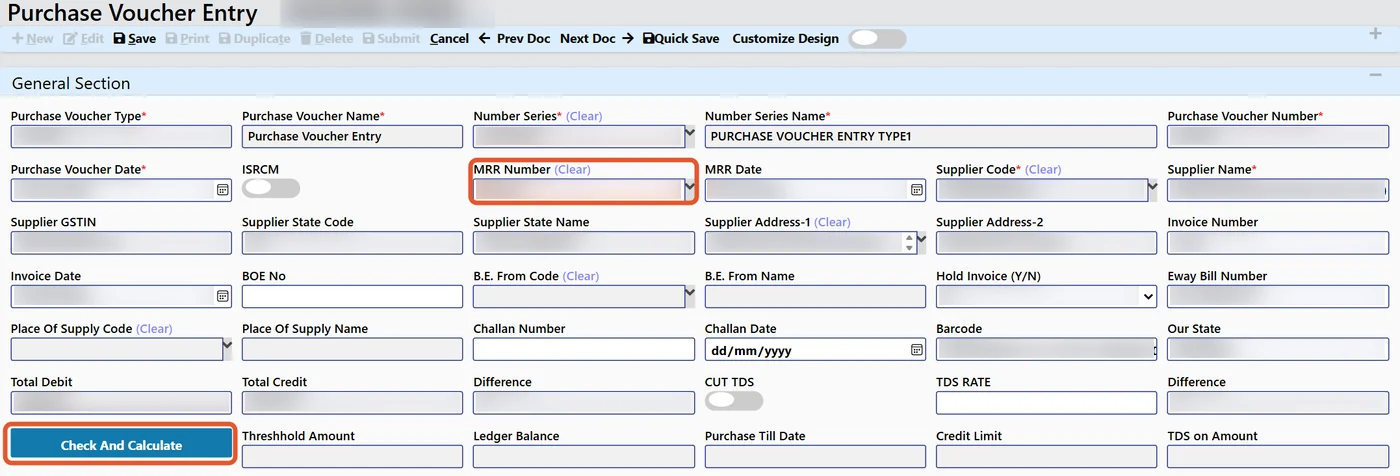
Tejaxo ERP moves material through connected documents on one live database. The gate entry records the supplier invoice and vehicle, the receipt follows from it, and the purchase voucher is created from that material receipt along with the vendor invoice details. Because each document builds on the one before, there is far less re-keying, and a delivery that has reached the gate but has no receipt is easy to see.
Scanned supplier invoices can also go in without typing, which reduces one common source of delay: waiting for someone to key in the bill. For controls such as per-item-group block or warn settings, valuation repost and negative stock aging lists, ask any vendor, including us, to show them working on your own data before you decide. Our inventory management software for manufacturing page explains the wider stock module. As with any ERP, the controls need to be set to match your own store rules, and people stay in control of approvals.
Is negative stock ever acceptable?
Briefly and with control, yes. Material is sometimes used before the paperwork is complete, as in the MS sheet example above, and a short negative window with a known pending GRN is a timing gap rather than an error. What separates a controlled plant from an uncontrolled one is how long the gap lasts and who owns it.
- Acceptable: a few hours or one shift, with a known pending GRN, on low-risk materials, cleared the same day.
- Not acceptable: weeks-old negative balances, negative lines on batch-controlled or high-value items, or negatives with no matching receipt anywhere.
A simple rule works well: any item negative beyond the agreed cut-off is escalated to the store in-charge and the accountant.
Want to see how this works on your own plant data?
If your month-end still starts with chasing negative stock lines, the fix is a tighter gate-to-GRN-to-bill flow plus sensible controls, not more adjustments. We can walk through your current process and show how a connected ERP handles it. Book a free consultation with Tejaxo or write to info@tejaxo.com.
Frequently asked questions
What is the difference between a GRN and a purchase bill for stock?
A GRN (goods receipt note) is the store’s record that material physically arrived and was accepted, with quantity and batch. A purchase bill is the supplier’s invoice, which creates the payable. Stock should rise on the GRN, because the shelf changes when material arrives, not when paperwork does. The bill is then matched to the GRN for quantity and rate before it is accepted.
Does negative stock affect GST input tax credit?
Negative stock does not change credit by itself. Under Section 16 of the CGST Act, credit depends on a valid tax invoice and receipt of the goods, so a bill booked with no GRN leaves you without clear evidence of receipt. Keep the gate entry, GRN and bill linked, and confirm the treatment for your case with your CA.
Who should own negative stock exceptions in the plant?
The store in-charge should own clearing each exception, because the store holds the gate entry and the GRN. The accountant owns the valuation correction once the receipt is posted, and the plant head reviews the aged list monthly. With ownership split this way, no negative line sits unassigned between the store and the accounts desk.
What does an auditor ask for on a negative stock line?
Typically the trail for that line: the gate entry, the GRN, the purchase bill and the issue slip or production consumption entry, plus the reason and approval if the system was overridden. They may also ask for the revaluation entry showing how cost was corrected. When these documents are linked in the ERP, the answer takes a few clicks instead of a search.