
Material gate entry software records every truck, bill and consignment that crosses the factory gate, whether inward, outward or returnable, in one system instead of a paper register. A good system links each gate entry to the purchase order, the material receipt (MRR or GRN) and the purchase voucher, blocks duplicate bills and shows which returnable material has not come back. This guide explains how it should work and what to check before you choose one.
What material gate entry software does at the factory gate
The gate is the first place where the company legally and physically takes responsibility for material. In many plants across Faridabad, Manesar, Pune or Ludhiana, that moment is still captured in a security register or a loose slip. The stores team then re-types the same details later, the accounts team types them a third time, and mistakes creep in at each step.
Typical problems with a paper gate process are:
- No audit trail: entries can be changed or torn out without a trace.
- Material received at the gate but booked late, or never booked.
- The same supplier bill entered twice, creating a duplicate payable.
- Several gate entries for one receipt, with no control over partial deliveries.
- Returnable material going out and never coming back, with nobody chasing it.
- No link between the purchase order and what actually arrived.
Gate entry software fixes this by making the gate entry a proper transaction. It captures date and time, party, vehicle, driver, invoice or challan details, material and quantity, and the user who entered it. Every later document, such as the MRR, quality check and purchase voucher, picks up that record instead of asking someone to type it again.
Inward, outward and returnable gate passes: three flows
Most generic pages blur these together. In a factory they behave differently, so your software should treat them as three separate flows that share one gate record.
| Flow | What triggers it | What the gate records | What closes it |
|---|---|---|---|
| Inward (purchase) | Supplier vehicle arrives with a bill | Supplier, bill, vehicle, material, quantity, PO reference if any | MRR after quality check, then purchase voucher |
| Outward (dispatch) | Finished goods leave with an invoice | Customer, invoice, vehicle, quantity, e-way details | Dispatch confirmation against the invoice |
| Returnable (RGP) | Parts or tools sent to a job worker or vendor | Challan, party, material, transport, expected return | Receipt back at the gate, with scrap and pending reconciled |
| Import inward | Imported consignment reaches the factory | Consignment details, vehicle, documents | MRR with currency and exchange rate, then costing |
The key point is that all four flows sit in the same ERP database. A returnable pass is not a separate notebook, and an import gate entry is not a separate spreadsheet. Visitors are a different topic and are better handled in a dedicated visitor management system for factories, which can sit alongside the material gate.
Gate entry with a PO and without a PO
Most inward material should arrive against a purchase order. When the guard or stores clerk selects the PO, the software shows the pending items and quantities, and the supplier bill is checked against them. If the vehicle carries more than the pending PO quantity, the system flags it at the gate instead of at month end.

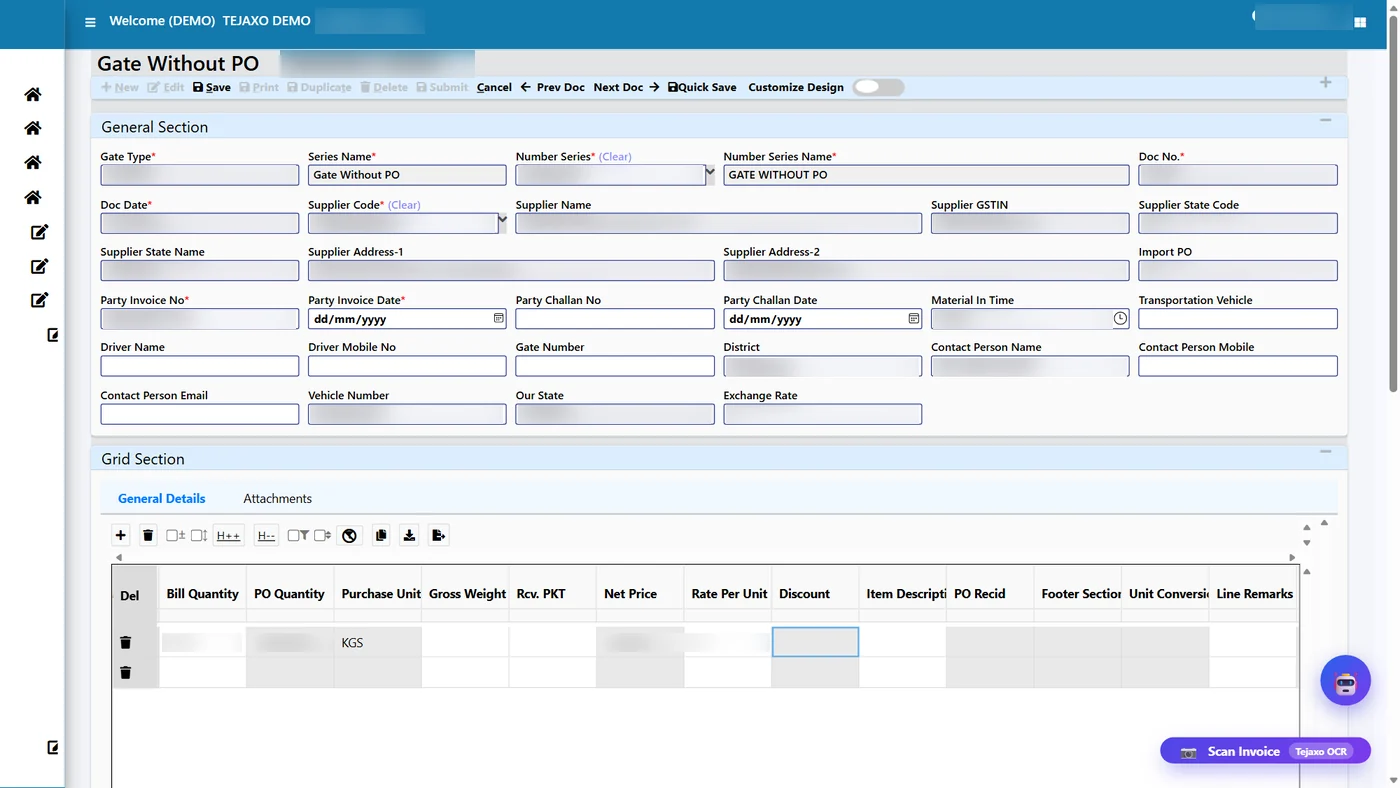
But real plants also receive material without a PO: urgent local purchases, free samples, material sent back by a customer, or replacement goods. Blocking these completely just pushes people back to paper. A sensible rule set is:
- Allow a gate entry without a PO, but make the user pick a reason such as urgent purchase, sample or replacement.
- Route such entries for approval by the purchase or stores head before the MRR can be made.
- Let purchase map the entry to a PO later, so the exception does not stay open for ever.
- Report all no-PO entries by supplier and by user, so repeated exceptions are visible.
In Tejaxo ERP the gate entry for incoming material records the supplier invoice and vehicle at the gate, and it can be created with or without a purchase order. The step-by-step process is shown in the video attached to this section.
One gate entry per MRR: controlling partial deliveries
A common weak point is the relationship between the gate entry and the material receipt. If two people can raise two MRRs against the same truck, stock is counted twice. If one MRR can be made from several unrelated gate entries, nobody can say which vehicle brought which material.
The cleaner rule is one gate entry per MRR:
- Each physical delivery gets its own gate entry, even if it is a partial delivery against the same PO.
- The MRR is made against that gate entry and carries the gate number and bill details forward, with no re-typing.
- Once an MRR exists for a gate entry, the system does not allow a second one.
- The next partial delivery for the same PO gets a fresh gate entry and a fresh MRR, and the PO balance reduces accordingly.
This gives stores, quality and accounts a common reference. The MRR is confirmed after the quality check, and the purchase voucher is created from the receipt with the vendor invoice details already in place. If you want to understand how receipt, order and bill are matched afterwards, read our note on 3-way match and GRNI in purchase. Short supply or rejection found at receipt can then flow into a debit note, as explained in debit note in ERP for purchase return and GST.
Duplicate bill block at the gate
A duplicate supplier bill is expensive in two ways. It can create a second payable that gets paid by mistake, and it can distort input tax credit when you reconcile purchases with the GST portal data. The best place to stop it is the gate, because that is where the bill first enters your system.
A duplicate bill check should compare the new entry with earlier ones for the same supplier, using the bill number and bill details, and refuse or warn before saving. Points to look for when evaluating software:
- The check runs at the gate entry, not only at the purchase voucher stage.
- It works for bills entered by hand and for bills read by AI from a scan.
- A blocked entry shows the earlier gate entry, so the user can see what was already booked.
- Overriding the block needs a reason and the right user permission.
Remember that suppliers sometimes issue a corrected bill with the same number. That is why an override with a recorded reason is better than a rigid wall with no exit.
AI gate entry from a scanned supplier invoice
Typing a long bill with many lines at the gate is slow, and it is where most spelling and quantity errors begin. AI gate entry reads the supplier bill and pre-fills the entry, so the guard or clerk checks the data instead of typing it.
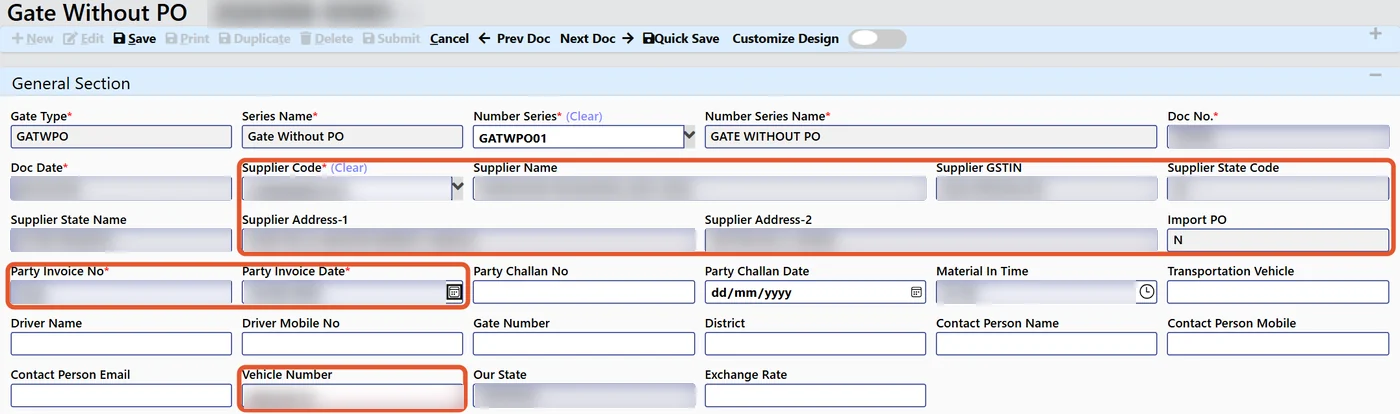
A practical flow looks like this:
- The vehicle arrives and the clerk photographs or scans the supplier invoice.
- The Scan Invoice (Auto Gate) action reads the bill and creates a gate entry with supplier, bill details and items pre-filled.
- The clerk checks the values on screen, corrects anything the AI read wrongly and saves.
- The duplicate bill check runs on the saved bill details.
- Stores later make the MRR against the gate entry, and the gate number and bill details carry forward.
Be realistic about accuracy. A blurred photo, a handwritten bill or an unusual layout can cause misreads. That is why the process keeps a person in control: the AI proposes, the user confirms. If the supplier bill carries an e-invoice QR code, it adds another useful reference, but the clerk should still compare quantities with the physical load. You can read the full walkthrough in our guide to AI invoice scanning, gate entry and GRN.
Returnable gate pass and job work control
Returnable gate passes (RGP) are where paper systems fail most quietly. Dies, fixtures, castings or semi-finished parts leave the plant for machining, plating or painting, and months later nobody knows what is still outside. Under the GST job work provisions, goods sent to a job worker are expected to return within a fixed period, commonly understood as one year for inputs and three years for capital goods, after which the movement can be treated as a supply. Please confirm the current position with your tax advisor, but the operational lesson is clear: you need ageing and alerts on every open challan.
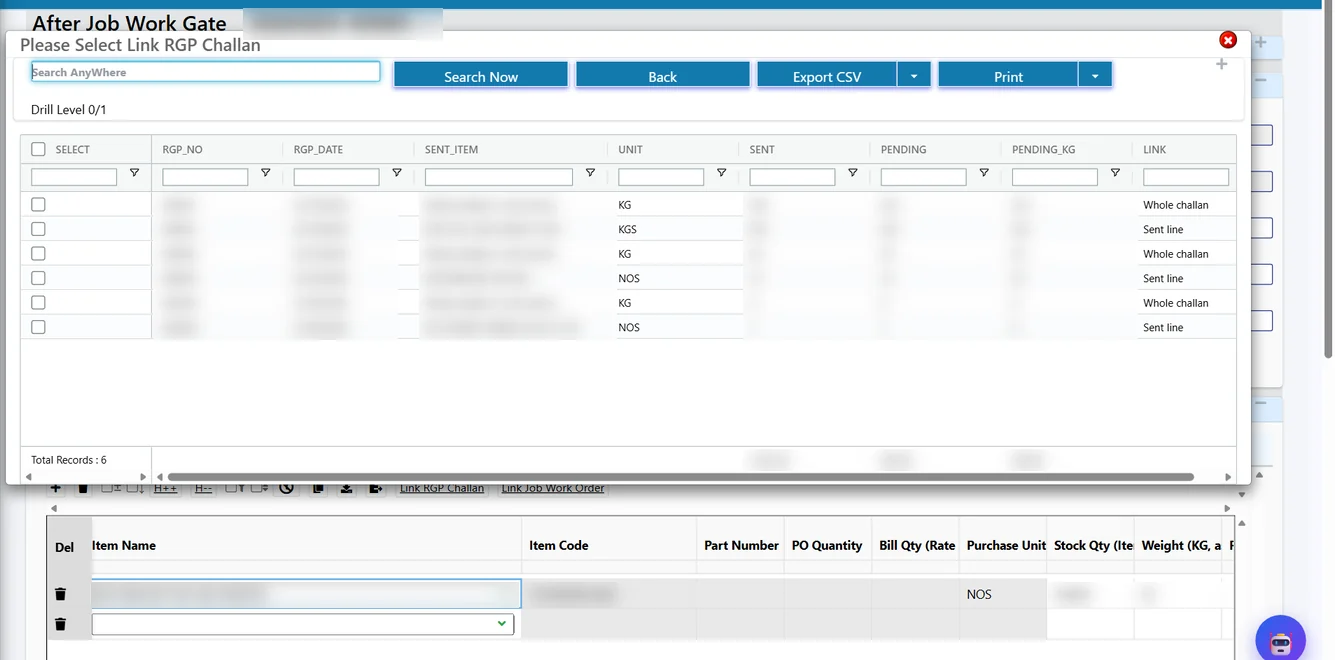
Good returnable gate pass software should give you:
- A challan entry with party, transport and e-way details recorded at the time of sending.
- A link at the return gate to the original challan, either the whole challan or a single sent line.
- Reconciliation of sent, received, scrap and pending quantity per challan.
- Handling of weight and pieces, for example material sent in numbers and billed by weight.
- An ageing view so overdue challans are chased before the statutory limit.
In Tejaxo ERP the After Job Work gate entry links to the RGP challan for returning material, and the reconciliation board shows parts sent to vendors, received, scrap and pending per challan. Material can also arrive from your own customers for processing, which needs its own register; see inward job work software for customer material. For the sending side, our page on job work software and returnable gate pass explains the full cycle.
Paper register vs gate entry software
| Area | Paper gate register | Gate entry software |
|---|---|---|
| Data entry | Written at gate, re-typed by stores and accounts | Entered once, carried forward to MRR and voucher |
| Audit trail | None, entries can be altered | User, date and time recorded on every entry |
| PO link | Checked manually, if at all | Pending PO items shown at the gate |
| Duplicate bills | Found, if lucky, at payment time | Blocked or flagged at the gate |
| Partial deliveries | Several notes for one receipt | One gate entry per MRR |
| Returnables | Separate notebook, no ageing | Challan, return link and overdue view |
| Reporting | Manual compilation | Live reports by supplier, date and status |
Buyer checklist: what to ask before you choose
Use this list when you compare material gate entry software for your plant.
- Does one gate record serve inward, outward, returnable and import movements?
- Can you make an entry with and without a PO, with a reason and approval for the exceptions?
- Is it one gate entry per MRR, and does the MRR carry the gate number and bill details forward?
- Is the duplicate bill block active at the gate, with a controlled override?
- Can it read a supplier invoice from a photo, and does a person confirm before saving?
- Does the returnable pass link back to the original challan and show ageing?
- Does it connect to quality check, purchase voucher and accounts payable in the same database?
- Does it work on the screens and devices that your gate and stores team actually use?
- If you already run another ERP, can the gate layer extend it instead of replacing it?
That last point matters for companies on SAP, Dynamics or Tally. We do not ask you to replace your ERP; we extend it where the shop floor and the gate need better data capture. See how we extend SAP and Dynamics ERP on the shop floor.
How Tejaxo ERP approaches the gate
Tejaxo ERP is an automated, voice-first manufacturing ERP built on one live database. The Gate and Logistics module sits in the same chain as Purchase, Inventory, Quality and Finance, so a gate entry is not an island. The bill that the guard records is the same bill that later appears on the MRR and the purchase voucher. Owners and stores heads can also raise questions and approvals on WhatsApp, and people stay in control of every step.
If your gate still depends on a register, a good starting point is to map your three flows, inward, outward and returnable, and list where bills are typed more than once. We can walk you through the gate entry, MRR and RGP screens on a live system.
Ready to see it? Book a free consultation with Tejaxo Technologies Pvt. Ltd. and we will show you how material gate entry works in Tejaxo ERP for your plant.
Frequently asked questions
What is a material gate entry in a factory?
A material gate entry is the record made at the factory gate when material, a vehicle or a bill enters or leaves. It captures the party, vehicle, bill or challan details, material and quantity. In an ERP, this record feeds the material receipt (MRR/GRN), quality check and purchase voucher, so the same data is not typed again.
Can I make a gate entry without a purchase order?
Yes, if your policy allows it. Urgent purchases, samples, replacements and customer returns often arrive without a PO. Good software lets you save the entry with a mandatory reason, sends it for approval, and lets purchase map it to a PO later, so the exception stays visible and does not remain open.
How does gate entry software stop duplicate bills?
The software compares a new entry with earlier gate entries for the same supplier, using the bill number and bill details, and blocks or warns before saving. Because this check happens at the gate, a repeated bill is caught before it becomes a payable. An override should need a reason and user permission.
What is the difference between a gate entry and an MRR?
A gate entry records that a delivery has physically arrived at the gate. An MRR (or GRN) records that the material has been received into stores, normally after the quality check. In a controlled process, each gate entry leads to one MRR, which carries the gate number and bill details forward.
Can the software read a scanned supplier invoice?
Yes, AI can read a photographed or scanned supplier bill and pre-fill the gate entry. Accuracy depends on the quality and layout of the bill, so a clerk should always check the values before saving. This keeps typing to a minimum while a person remains responsible for the final entry.
How do returnable gate passes help with job work?
A returnable gate pass records material sent out for job work and links the returning material back to the original challan. The system reconciles sent, received, scrap and pending quantities and shows ageing, so overdue challans can be chased in time. Check current GST time limits for job work with your tax advisor.
One Response