

CNC machine shop software is a shop-floor ERP that connects job cards, machine data, OEE and costing, so you know the real cost per part and the real load on every CNC and VMC machine. This article is about shop management and ERP, not CAM or G-code programming tools. Your CAM package still creates the toolpaths; the software described here runs everything around it: orders, job cards, cycle counts, downtime, cost and delivery dates.
CNC Machine Shop Software: ERP, MES or CAM?
Searches for this term return a mix of CAM tools, shop-management systems and machine-monitoring products. Before you compare vendors, decide which problem you are solving. Most MSME job shops have three separate needs, and they are often confused.
| Type of software | Question it answers | Typical user |
|---|---|---|
| CAM / programming | How do I cut this part and generate the program? | Programmer, CNC engineer |
| Shop-floor ERP | What is the order, what did it cost, and when can I deliver? | Owner, production head, accounts |
| Machine monitoring / MES layer | What is each machine doing right now, and why did it stop? | Plant head, supervisor |
A good shop system does not force you to choose between the last two. Tejaxo ERP covers sales, purchase, inventory, production, quality, finance and payroll on one live database, and it integrates with CNC/VMC machines and machine loggers so that the shop floor feeds the same system that raises your invoices. If you make machined parts, see how this applies to ERP for machined components.
The Typical Problems in an Indian CNC Job Shop
Most job shops we speak to describe the same pattern, whether the shop is in an NCR industrial area or any other cluster:
- Paper job cards that travel with the material and come back dirty, late or incomplete.
- Production counts typed in at the end of the shift, from memory or from a tally on the wall.
- No clear record of idle time, setup time or breakdown time per machine.
- Costing done after the job is shipped, so quotations are based on guesswork.
- Rework and scrap that never reach the cost of the part.
- A bottleneck VMC that is overloaded while another machine waits for work, and delivery dates that slip.
None of these is a programming problem. They are data problems, and they are solved by capturing the data once, at the source, and letting every report use it.
Job Cards: From Paper Travellers to Live Progress
A digital job card is more than a paper card on a screen. In a shop ERP it is created from the sales order, carries the part, quantity, route and machine, and reports progress against the same record that stores, purchase and accounts use. That removes the double entry between the planning office and the floor.
What to expect from a working job card flow:
- Created from the order: the job card inherits customer, part and quantity, so nobody retypes them.
- Route and stage sequence: each operation, such as turning, milling, drilling or inspection, has a default machine, setup time and time per piece.
- Material issue linked to the job: raw material issued against the job card makes material cost visible per job.
- Stage-wise output, rejection and downtime: every operation records its own good quantity, rejections and stoppages, so loss is visible by stage and not hidden in a single total.
Tejaxo ERP follows this approach in production control, where work moves from sales order to stock through stage-wise entries. You can see a related example in our article on work order costing and job profit, and on drag-and-drop production control boards for the supervisor view.
Live Cycle Counts from CNC and VMC Machines
The weakest number in most shops is the production count. When an operator types it, it reflects memory and goodwill. When the machine supplies it, it reflects what actually ran. Live cycle counts mean the machine signal updates job card progress, run time and stoppages without anyone typing.

Tejaxo integrates CNC/VMC machines, machine loggers and PLC-based equipment with the ERP, so a part count and machine status can flow into the job card and the OEE report. How a given machine connects depends on its controller, age and whether it has a network port. Newer controllers can usually be read directly; older machines may need a small edge device to capture a signal such as a cycle-complete output. Treat this as a machine-by-machine survey in the pilot, not a promise made in a sales call.
With automatic counts you gain:
- Job card progress that updates as parts are made, not at the end of the shift.
- Actual run time against the planned time per piece, per operation.
- Stoppages captured with a time stamp, ready to be assigned a reason.
- A count that supervisors and owners can trust enough to plan with.
For the monitoring side in detail, read our guide to machine monitoring software for CNC with OEE and ERP. The short video below shows machine integration feeding production control.
OEE: Finding Where Machine Hours Go
OEE is Availability × Performance × Quality. Availability measures lost time from breakdowns, setups and waiting. Performance measures slow cycles and small stops. Quality measures parts that are rejected or reworked. The value of OEE for a job shop is not the single percentage; it is knowing which of the three is draining the hours on each machine.
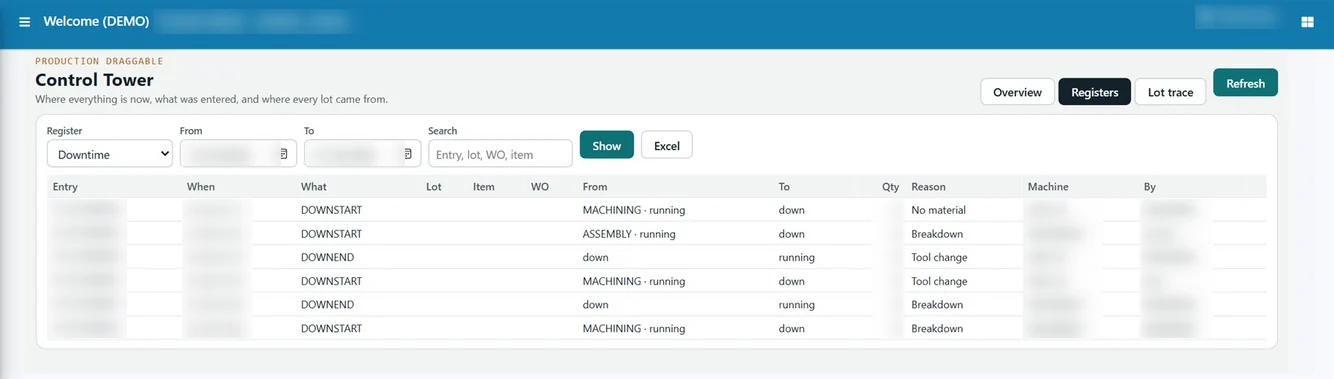
Here is a sample calculation for Product A on one VMC in a single shift. The numbers are invented for illustration.
| Item | Sample value |
|---|---|
| Planned production time | 480 minutes |
| Downtime (setup, tool change, breakdown) | 72 minutes |
| Run time | 408 minutes |
| Ideal cycle time | 6 minutes per part |
| Parts made / good parts | 60 / 57 |
| Availability | 408 ÷ 480 = 85% |
| Performance | (60 × 6) ÷ 408 = about 88% |
| Quality | 57 ÷ 60 = 95% |
| OEE | about 71% |
In this sample, the biggest single loss is the 72 minutes of downtime. If that downtime is recorded by reason, the shop can see whether it is setup, tooling or breakdown and act on it. A paper sheet rarely gives you that. Our OEE calculation formula and example goes deeper, and you can try the OEE calculator with your own figures.
Cost Per Part: A Worked Example
True cost per part needs more than material and a machine rate. It needs actual machine time, setup, tooling, labour, scrap and overhead, taken from the job rather than from an estimate. Here is a sample for 100 good parts of Product A, where 104 pieces were made and 4 were scrapped. All figures are invented for illustration.
| Cost head | Basis (sample) | Amount (₹) |
|---|---|---|
| Material | 104 pieces × ₹80 | 8,320 |
| Machine run cost | 10.4 hours × ₹900 per hour | 9,360 |
| Setup | 1.5 hours × ₹900 per hour | 1,350 |
| Tooling | 104 pieces × ₹12 | 1,248 |
| Labour | 11.9 hours × ₹150 per hour | 1,785 |
| Overhead | 11.9 machine hours × ₹100 | 1,190 |
| Total | 23,253 | |
| Cost per good part | 23,253 ÷ 100 | 232.53 |
If the quotation had assumed no scrap, the plan would have been about ₹224.25 per part. The gap of roughly ₹8 per part is invisible when costing is done by estimate, and it repeats on every repeat order. When machine hours come from live cycle data and scrap comes from stage-wise rejection entries, the cost of the job is computed from facts. Tejaxo ERP holds machine run cost per hour and overhead per hour in the machine master, and it keeps stage setup time and time per 1,000 units in stage mapping, so these inputs sit in one place.
From OEE Loss to Capacity and Promise Dates
Capacity plans fail when they assume every machine runs at its nameplate speed for every hour. Once you measure availability and performance, the plan can use real numbers. A machine that gives 70% effective hours cannot be planned as if it gave 100%.

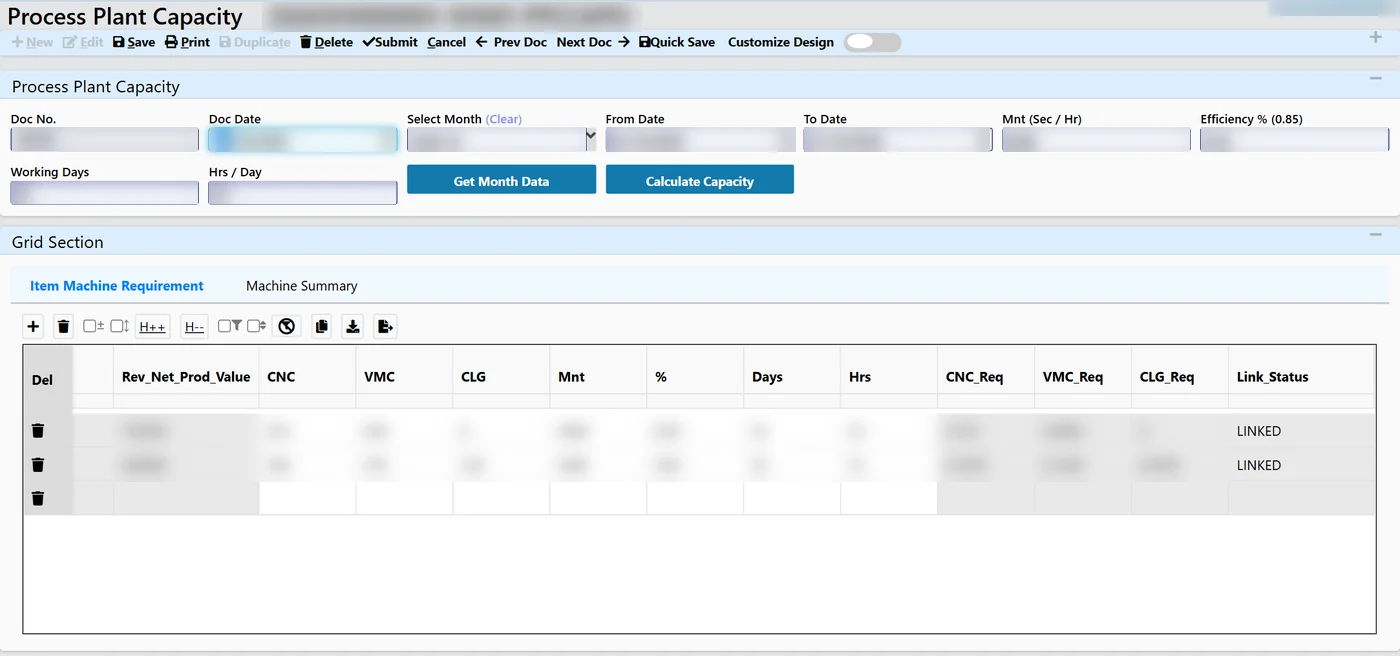
A practical capacity routine for a CNC shop looks like this:
- Group machines into capacity groups, for example turning centres and VMCs.
- Convert the order book into required machine hours per group, using the time per piece and setup from the route.
- Compare required hours with available hours per month, after allowing for measured losses.
- Move work, add shifts or outsource before you promise a date.
Tejaxo ERP has plant capacity screens that show machines required against available and load by machine group, and an item-wise requirement grid that turns production value into required machine hours. This helps you say yes or no to an order with evidence. Read more in our guide to machine capacity planning software.
Mixed Fleets: Older and Newer Machines
Few job shops have a uniform fleet. A typical floor has a newer CNC with a modern controller beside older VMCs and conventional machines. The software should handle both without forcing a machine replacement.
- Newer machines: usually offer a direct data connection, so counts and status can be read automatically.
- Older machines: may need an edge device that senses a cycle signal, or a simple operator input at the machine until a device is fitted.
- Conventional machines: can still be on the job card with operator entry, so every operation sits in one routing.
This is why a pilot on two or three machines of different ages is more useful than a demo. It shows what data you can get, and what it is worth to you, before you commit across the floor.
India Context: GST, Tally and Practical Realities
Indian job shops usually run GST invoicing, job work for other manufacturers and accounts in Tally. The shop system should fit these realities rather than replace them overnight.
- GST and invoicing: sales, purchase and GST reports should come from the same transactions as production, so the finance team does not re-key.
- Tally: if your accountant is attached to Tally, ask how data moves between the two. Tejaxo offers Tally integration, and the route from Tally to a manufacturing ERP can be phased.
- Job work: many CNC shops send material out or process customer material. Returnable gate pass and job work tracking should be part of the same system.
- Deployment: cloud, on-premise and hybrid options exist, so choose based on your network and IT comfort.
For the commercial questions, such as licence structure and implementation scope, it is best to discuss your machine count and modules directly rather than compare headline numbers from directory listings.
Buyer Checklist: What to Ask Any Vendor
| Question | What a good answer looks like |
|---|---|
| Is this CAM or shop management? | Clear statement of scope: orders, job cards, costing, capacity |
| How do cycle counts reach the job card? | Machine-by-machine connection plan, including older machines |
| How is downtime recorded? | Reason codes, time stamps, reports by machine and reason |
| How is cost per part computed? | From actual machine hours, setup, scrap and material issue |
| Can I plan capacity? | Required against available hours by machine group |
| What about Tally and GST? | Defined integration and statutory reports |
| Can I test before committing? | A time-boxed pilot on a few machines with agreed measures |
Run a 30-day pilot
Pick two or three machines and one or two repeat parts. Agree in advance what you will measure: the gap between manual and automatic counts, recorded downtime by reason, and cost per part against your current estimate. At the end of 30 days you will have your own evidence instead of a vendor’s promise. Keep people in control throughout: supervisors review and correct entries, and the system makes the data visible.
Talk to Tejaxo About Your CNC Shop
Tejaxo has worked with manufacturers since 2017 and supports clients across India on-site and remotely. If you want to see job cards, machine data, OEE, cost per part and capacity planning on one platform, book a walkthrough on your own parts and machines. Book a free consultation and we will map a pilot for your floor.
Frequently asked questions
What is the best software for a CNC job shop in India?
It depends on the problem. CAM tools handle programming, while a shop ERP handles orders, job cards, cost per part, capacity and delivery. Most job shops need the second, connected to machine data. Look for stage-wise job cards, automatic cycle counts, downtime by reason, costing from actual hours, GST support and a pilot option.
How do I calculate cost per part in a CNC shop?
Add material, machine run time at an hourly rate, setup time, tooling, labour, scrap and overhead for the whole job, then divide by good parts only. Using actual machine hours and actual rejections, rather than estimates, shows the real figure and reveals where quotations are under-priced.
Can I get live cycle counts from older CNC or VMC machines?
Often yes, but it depends on the controller. Newer machines may allow a direct data connection, while older ones may need a small edge device that senses a cycle signal. The practical way to find out is a machine-by-machine survey during a short pilot before you plan a full rollout.
How is OEE calculated for CNC machines?
OEE equals Availability multiplied by Performance multiplied by Quality. Availability is run time divided by planned time, performance compares actual output with ideal cycle output, and quality is good parts divided by total parts. Tracking each factor per machine shows whether downtime, slow cycles or rejection is the biggest loss.
Does CNC shop software work with Tally?
It can. Many Indian shops keep accounts in Tally while running production in an ERP. Tejaxo offers Tally integration, and moving fully to ERP finance can be phased. Discuss which transactions should flow between the systems so your accountant does not have to re-enter data.
Should CNC shop software be cloud or on-premise?
Either can work. Cloud suits shops with reliable internet and little IT staff, on-premise suits plants that want data inside their own network, and hybrid combines both. Tejaxo ERP supports cloud, on-premise and hybrid deployment, so the choice can follow your network and preference.