

Barcode inventory software for factories gives every coil, batch, serial number and bin location a scannable label, so each receipt, issue and return is recorded by a scan instead of typing and the stock ledger matches the shelf. For a manufacturer the real value is traceability: you can say which lot went into which job, who issued it and what is left. This guide explains what to label, which code to use, how tablet scanning works on the shop floor and how to roll it out without disturbing production.
Why the factory store needs barcode inventory software
A retail shop scans a finished product once at the counter. A factory store is harder. Material arrives as coils, reels, bags, drums or castings, is split into smaller lots, issued to machines in part quantities, comes back as offcuts or scrap and leaves again as semi-finished or finished goods. Each step is a chance for a wrong entry.
In most Indian SME plants the store still runs on registers, Excel sheets or a billing tool such as Tally. The usual symptoms are familiar:
- Physical stock and book stock never agree, so a monthly stock count becomes a firefight.
- Material is issued on a verbal request and the entry is made at the end of the shift, or not at all.
- Nobody can say quickly which supplier lot went into a rejected batch.
- Storekeepers spend hours searching for items because the location is only in someone’s memory.
- The same item is entered twice, or under two slightly different names.
Barcode and QR scanning attacks the root cause: manual keying. A scan is faster than typing, and it can only pick an item or batch that actually exists in the master. When the scan updates the same database that purchase, production and finance use, the store stops being a separate island.
What to label: coil, batch, serial number and bin
Before choosing software, decide what deserves a label. Over-labelling slows the store; under-labelling leaves gaps in traceability. In a typical factory there are four label types.
1. Coil, reel or lot labels (raw material)
Every inward unit that you need to trace separately gets its own label at goods receipt. For steel this is a coil, for packaging it is a paper reel, for chemicals it is a drum or bag lot. The label should carry the item, supplier lot or heat reference, received quantity in the stock unit and the receipt date. The code should point to a record in the system, so the printed label can stay short.
2. Batch labels (work in progress and finished goods)
When a coil is cut into sheets, a compound is mixed or a job produces a lot of parts, the output becomes a new batch with its own label. The batch record should remember its parent, for example the coil it was cut from. That parent link is what makes backward tracing possible later.
3. Serial-number labels (individual units)
Assembled products such as machines, pumps, instruments and electrical equipment need one unique serial number per unit. This is separate from a batch: a batch says these 200 parts were made together, a serial number says this exact unit was built from these components and shipped to this customer.
4. Bin and rack labels (locations)
Locations also get codes. Rack, bay and bin labels let a storekeeper confirm by scan that an item was put in the right place, and let the system tell the next person where to look.
QR code or barcode: which should a factory use?
There is no single right answer. The choice depends on how much data the label must carry, how the label is read and where it lives.
| Point | Linear barcode (for example Code 128) | QR code |
|---|---|---|
| Data capacity | Short identifier only | Can carry longer text, though a short ID is still better |
| Reading with a scanner | Needs a clean line of sight along the bars | Readable from any angle, and tolerant of some damage |
| Reading with a tablet or phone camera | Works, but slower in poor light | Usually quick and reliable |
| Label space | Needs a wide, thin strip | Compact square, suits small parts and tight racks |
| Best fit | Pre-printed supplier labels, dedicated handheld scanners | In-house labels read by Android tablets on the shop floor |
For most Indian plants that print their own labels and use tablets, QR is the practical default because any Android camera can read it. If your suppliers already send barcoded goods, the software should read those too and map them to your item master. Whichever you choose, keep the code short, make it point to a record rather than hold the whole record, and test the label in real conditions. Heat, oil, dust and moisture on a coil store are tougher than an office printer test suggests, so choose label material and placement with that in mind.
How tablet scanning works on the shop floor
A good factory workflow puts the scan at the point of action. Here is the sequence we see working best, from gate to machine.
- Receipt. Material arrives at the gate and the store checks it against the purchase order. The system creates a record for each coil, reel or lot and prints a label to stick on it. Read more about the gate side in our guide to material gate entry software for factories.
- Quality check and put-away. Once the material is accepted, the storekeeper scans the item label and then the bin label. The location is stored against the batch.
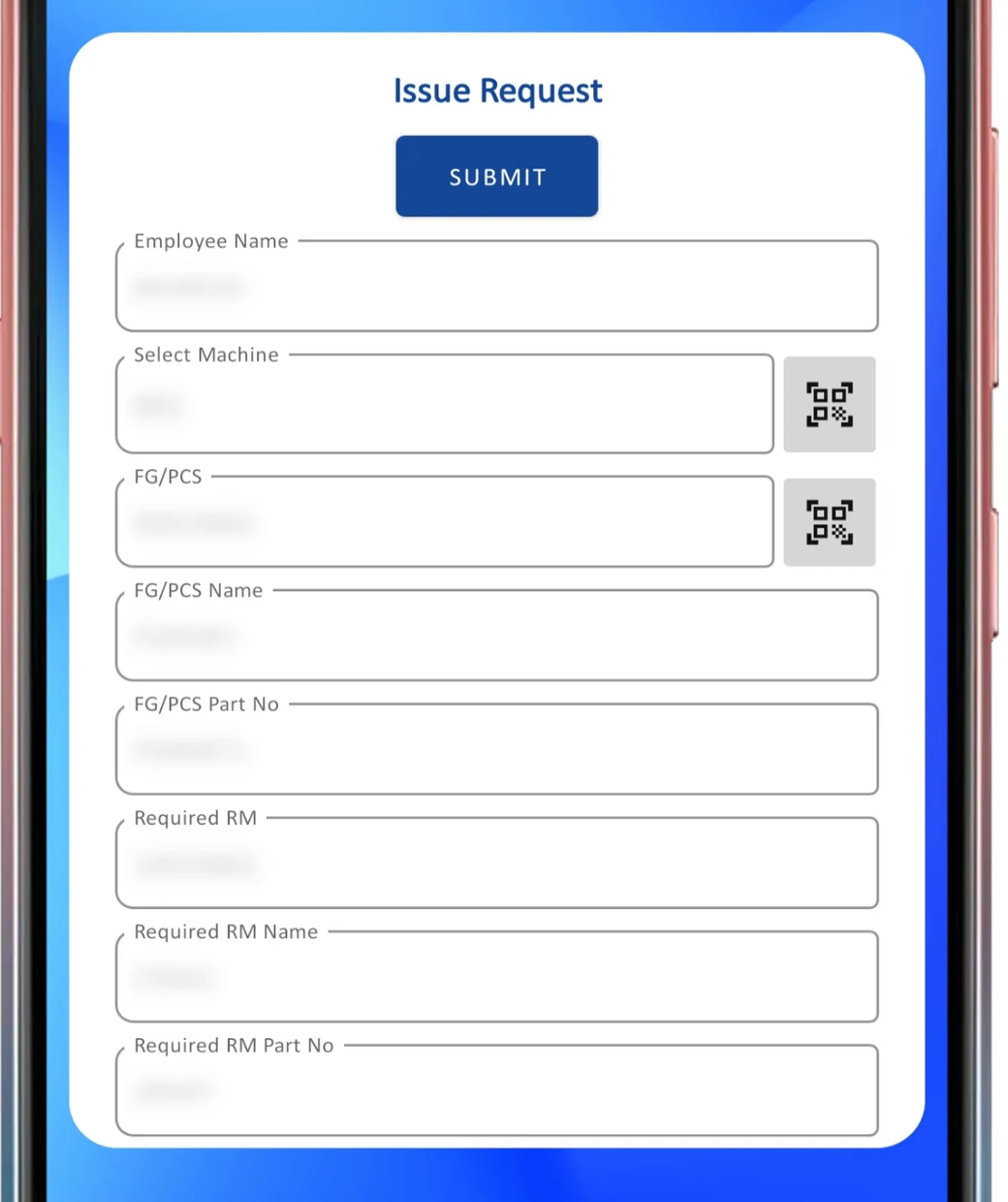
- Issue request. An operator raises a request on the shop-floor tablet. Instead of typing, they scan the machine QR, the part QR and the required material QR, and the form fills itself.
- Issue and confirmation. The storekeeper picks the matching batch, scans it and issues it. The stock ledger updates at once and the batch is now linked to the machine and job.
- Return or consumption. Unused material is scanned back in. Offcuts and scrap can be recorded against the same batch.
The same approach is used in our QR traceability app, where operators scan parts and compounds at the machine and each scan is recorded against the batch. You can see a worked example in QR code traceability for rubber moulding.
The point of the tablet is not the hardware. It is that the operator no longer needs to know item codes by heart, and the store no longer needs to guess which request came from which machine.
Coil and batch traceability from receipt to issue
Traceability is the strongest business case for barcode inventory software in a factory. When a customer complains, or a lot fails an inspection, two questions matter: where did this material come from, and where did the rest of it go?
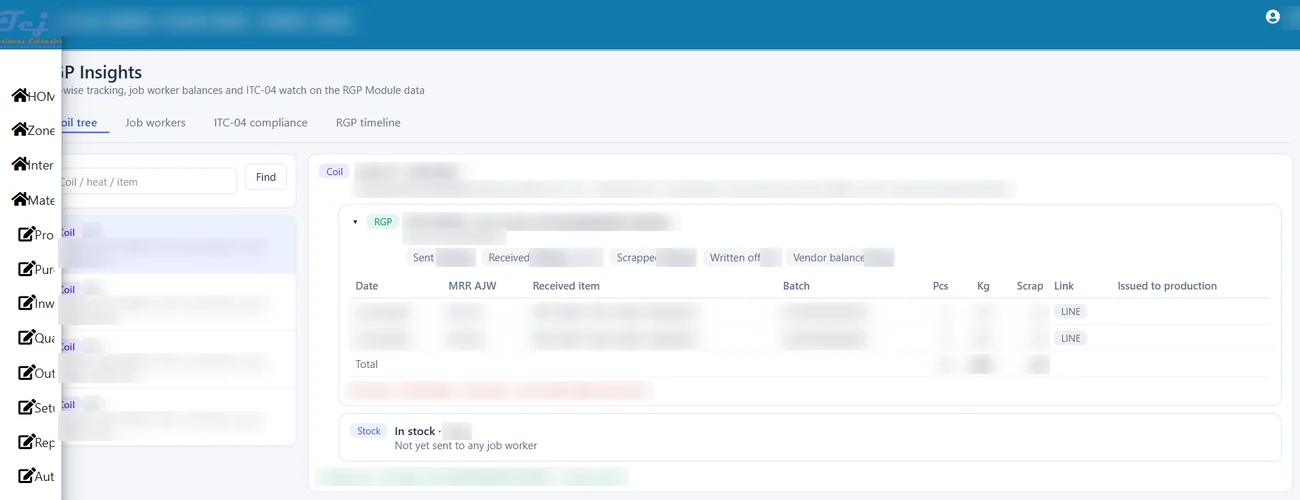
Because each label links to a batch record, the system can answer both. Going backward, it shows the supplier lot, receipt date and inspection result behind a finished batch. Going forward, it shows every machine, job and customer that received material from a given coil or lot.
For metal processing this means a coil tree: a coil is sent out, cut sheets come back, scrap is recorded, and what remains is still pending. Our write-up on coil tracking software from steel coil to sheet shows how that parent-child link works in practice, and the forging guide on heat number traceability covers the same idea for forged parts.
A few rules keep the data clean:
- Never let a batch be issued beyond its balance. The system should refuse it, not just warn.
- Record scrap and offcuts as stock movements, not as silent adjustments.
- Keep the stock unit and the billing or purchase unit separate where they differ, for example kilograms against pieces, and let the software convert.
- Use FIFO or FEFO picking suggestions where shelf life or ageing matters. Our guide to FIFO vs FEFO batch picking explains when each applies.
Serial-number tracking for assembled products
If you assemble machines or instruments, batch labels alone are not enough. Serial-number tracking adds a genealogy to each unit:
- The unique serial number assigned at assembly or final inspection.
- The component batches or serial numbers that went into it.
- Test and inspection results recorded against that serial number.
- The dispatch record showing which customer received it and when.
This is what lets a service team answer a warranty query in minutes. It also lets quality teams limit a recall to the affected units rather than the whole production run. In the software, check that serial numbers can be generated in a controlled series, scanned at dispatch and searched later from a single screen.
Bin locations that people actually follow
Bin locations fail when the naming is too clever or when scanning the bin is optional. Keep these principles in mind:
- Use a simple code. Rack, bay, level and bin, in the same order everywhere, is easier to teach than a custom scheme.
- Label the location, not just the item. Put-away is complete only when both the item label and the bin label have been scanned.
- Allow several batches per bin and one batch in several bins. Real stores need both.
- Plan for large items. Coils and heavy castings may sit on floor bays or yard areas that still need codes.
- Review slow-moving stock. Location data makes it easy to see what is occupying space.
Bin management, put-away and picking go deeper in a dedicated warehouse module. If your store is large or you run several stores, look at our warehouse management software. For the wider picture of stock linked to BOM, production and purchase, see inventory management software for manufacturing.
Indian context: GST, Tally and mixed units
Indian factories have a few realities that generic barcode tools do not handle well.
- GST and documents. Stock movements feed invoices, delivery challans and job work documents. Scanning should flow into those documents without re-entry. Check the exact e-invoice and e-way bill requirements applicable to your turnover on the official GST portal and with your tax adviser.
- Tally and legacy data. Many plants start from Tally or Excel. Opening stock, item names and units need cleaning before you print a single label. Our guide on ERP data migration of masters and opening balances covers that step.
- Mixed units. Material is bought in kilograms, stocked in pieces and billed in metres in the same plant. The software must convert without a spreadsheet on the side.
- Job work. Material sent to job workers and received back as processed items needs batch links on both legs of the journey.
- Connectivity. Not every corner of a plant has reliable Wi-Fi. Ask any vendor, including us, how the app behaves in weak coverage and test it in your own store.
Checklist: how to evaluate barcode inventory software for a factory
Use this table when comparing a standalone barcode tool, a WMS module and an ERP with built-in scanning.
| Question to ask | Why it matters |
|---|---|
| Can it label each coil, reel, lot and batch, with a parent link? | Without parent links, backward tracing breaks at the first conversion. |
| Does it handle serial numbers as well as batches? | Needed for assembled products, warranty and recalls. |
| Does the scan update the same database used by purchase, production and finance? | Separate databases bring back double entry and reconciliation. |
| Does it run on Android tablets and phones? | Avoids a dependency on special handheld devices. |
| Can it print labels in your own formats and sizes? | Labels must suit your coils, bins and parts. |
| Does it support bin locations and put-away? | Finds stock quickly and reduces search time. |
| Does it block over-issue and wrong-item scans? | Turns the system into a control, not just a record. |
| Can it integrate with your existing ERP or accounting tool? | You may need to extend rather than replace what you use. See extending SAP or Dynamics on the shop floor. |
| How does it behave with poor connectivity? | Shop-floor reality, not office reality. |
| Is there a dashboard of inward, issued, returned and batch stock? | Management needs to see the store without walking in. |
Rollout plan: start with one pilot store
Do not label the whole plant on day one. A phased rollout is safer and easier to defend to the shop floor.
- Clean the masters. Remove duplicate items, fix units and agree naming. This is the single biggest factor in success.
- Choose a pilot. One store or one material family, such as a single raw material category.
- Test labels. Print samples on the real material and place them where operators will actually reach. Check readability after heat, oil or handling.
- Train the people. Storekeepers, operators and supervisors need short, hands-on sessions. Explain the benefit to them: fewer disputes and less paperwork.
- Run in parallel briefly. Keep the old register for a short period to compare, then switch off the old process.
- Cycle count by scan. Use scanning for stock counts, starting with high-value or fast-moving items. See ABC and FSN analysis for cycle counts.
- Expand. Add WIP, finished goods, serial numbers and bin locations once the first stage is stable.
Rollouts usually stall because of rushed data or poor label placement, not because of the software itself.
Where Tejaxo ERP fits
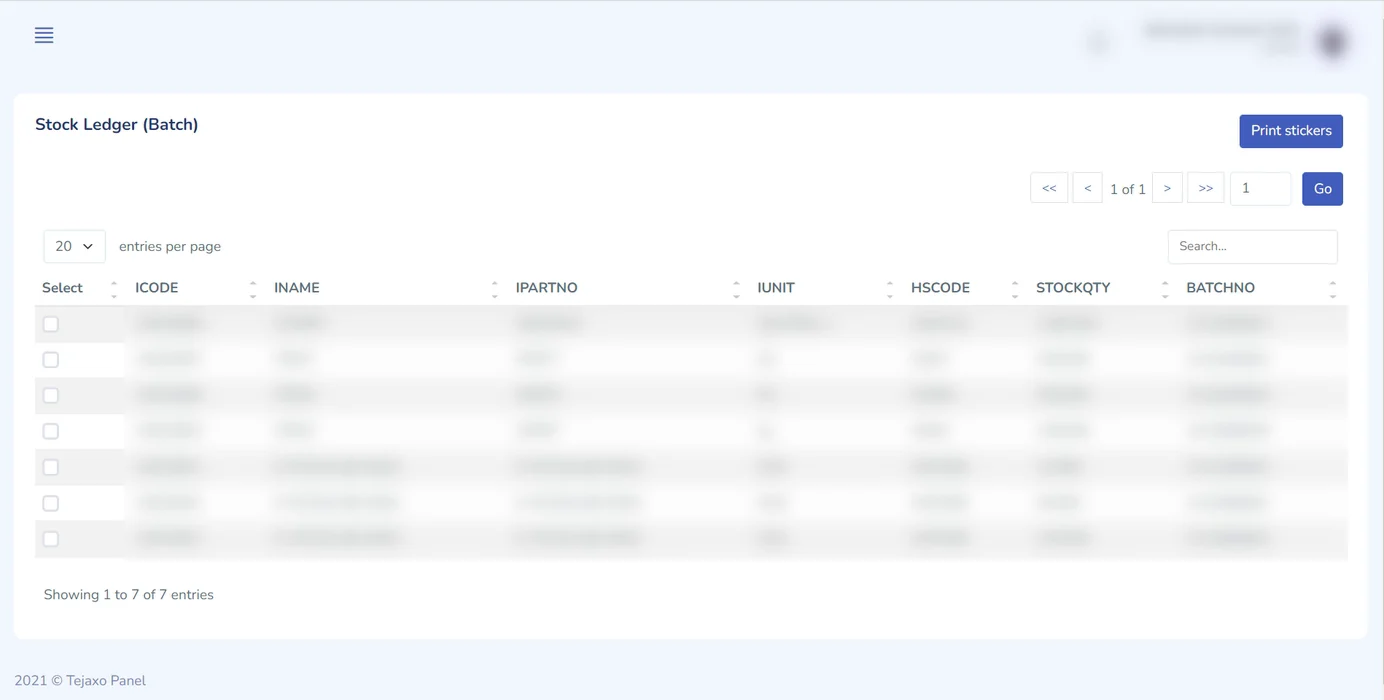
Tejaxo ERP is built so stock, production, quality, purchase and finance share one live database. That means a scanned issue request on the shop-floor app updates the same batch ledger that the accounts and planning teams see. Our web portal gives a batch-wise stock ledger with QR sticker printing and a dashboard of inward, issued, returned and batch stock totals. Tejaxo has been in business since 2017 and supports clients across India, on-site and remotely.
If you already run another ERP, we do not ask you to replace it. We extend it with shop-floor scanning and traceability where it is weak.
Book a free consultation
If you want to see how barcode and QR scanning would work in your own store, with your coils, batches and racks, we can walk you through it. Book a free consultation with Tejaxo and bring a sample of your current stock register. You can also write to info@tejaxo.com or call or WhatsApp +91 96717 27474.
Frequently asked questions
Which is better for a factory store, QR code or barcode?
For labels printed in-house and read by Android tablets, QR is usually the practical choice because any camera reads it from any angle and it fits small labels. Linear barcodes such as Code 128 suit supplier-printed labels and dedicated scanners. A good system reads both and keeps the code short, pointing to a record.
Can barcode inventory software track coils, batches and serial numbers?
Yes, if it is built for manufacturing. Each coil or lot gets its own label at receipt, each output batch records its parent, and assembled units get unique serial numbers. This gives backward and forward traceability. Retail-style barcode tools often skip parent links, so check this before buying.
Do we need special handheld scanners for barcode inventory in a factory?
Not necessarily. Many plants use Android tablets or phones with camera scanning, especially for QR codes. Dedicated handhelds help in high-volume stores or with difficult labels. Test your real labels and lighting before deciding, and confirm how the app behaves in weak connectivity areas.
Can barcode inventory software work with Tally or an existing ERP?
It can, depending on the product. Some tools sync stock and vouchers with Tally, while ERP-based scanning writes straight into the same database used by purchase, production and finance. If you use a larger ERP already, ask for an extension model that adds shop-floor scanning without replacing your core system.
How do we start with barcode inventory in a manufacturing plant?
Start with one pilot store or material family. Clean item masters and units first, test labels on real material, train storekeepers and operators, and run alongside the old register briefly. Once stock matches and scanning is routine, extend to work in progress, finished goods, serial numbers and bin locations.