

Excel is enough for a factory while one or two people run a few products from a single location. It stops being enough when several people update production, stock, job work and costing in separate files, because the sheets begin to disagree and nobody fully trusts the numbers. An ERP keeps all of this on one database, and every report still exports to Excel, so your team keeps its pivot tables and its habits.
This article is written for owners, plant heads and finance heads of Indian manufacturing units who are asking a practical question: is it time to move, and what actually changes on the shop floor if we do? It covers where Excel still works, five clear breakpoints, a side-by-side comparison, a decision checklist and a low-risk way to move.
Where Excel still works for a factory
Excel is a good tool, and it is not wrong to run a young business on it. It works well when:
- One or two people maintain the files and they sit close to the shop floor.
- You make a small number of products with simple bills of material.
- You have one location, few vendors and almost no job work going out.
- The owner can still personally check stock and dispatch every day.
- Accounts are handled in Tally or similar software, and production data is only for rough planning.
The trouble is that spreadsheets do not warn you when you cross the line. Growth shows up as small symptoms: a file with the name “final_v7”, a stock figure that differs between the sheet and the shelf, or a delivery promise that nobody can confirm without phoning the store. If you recognise these, read on.
Five breakpoints where a factory outgrows Excel
Most factories do not leave Excel on one particular day. They hit one or more of the five breakpoints below, and each one costs time and money long before a formal decision is made.
- Production tracking across stages and shifts
- Stock and batch control
- Job work and returnable material
- Costing that reflects what actually happened
- Many users, one version of the truth
The sections that follow take each one in turn.
Breakpoint 1: Production tracking on the shop floor
In a spreadsheet, production is whatever someone typed at the end of the shift, often copied from a paper slip. The entry arrives late, it may be rounded, and the next stage has no live way to see it. Rejections, downtime reasons and trim waste are usually squeezed into a remarks column, which cannot be summarised properly later.
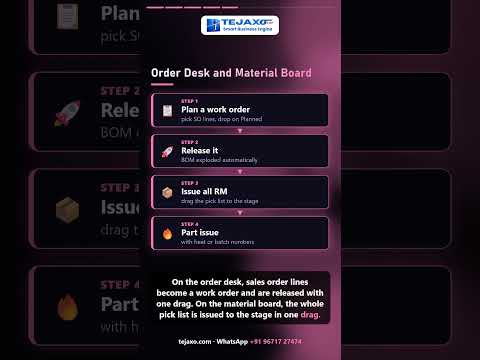
On one database, each work order moves through defined stages, and every stage entry holds its own input, output, rejection and downtime. The plant head sees stage-wise loss without asking anyone to prepare a report. Planners can move work between machines on a board instead of editing a plan sheet and mailing it around.
Typical signs that production has outgrown Excel:
- You cannot say which job is stuck at which stage without walking the floor.
- Machine downtime is known only as “it was down for some time”.
- The production plan is rebuilt every morning from several files.
- Dispatch commitments depend on one planner’s memory.
You can see how drag-and-drop boards work in our note on drag-and-drop production control boards.
Breakpoint 2: Stock and batch control
Stock is where spreadsheets and reality drift apart fastest. A issue slip is not entered, a return is entered twice, or one person edits an old copy. Soon there are three different stock figures: the sheet, the accounting software and the physical count. Teams then spend days at month-end deciding which one is right.
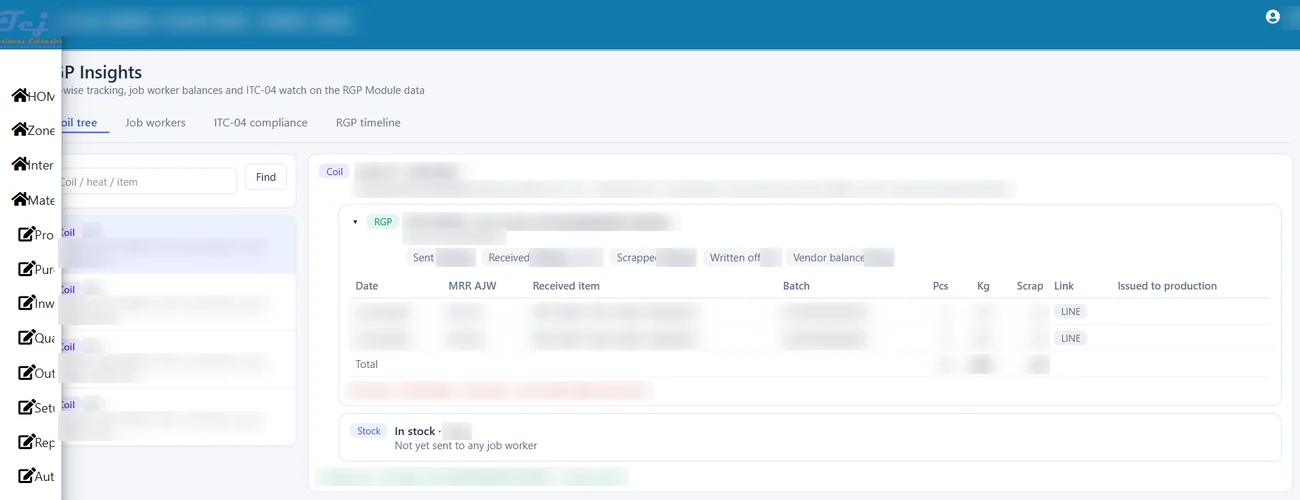
Batch and lot traceability is harder still. If a customer complaint arrives, can you trace a finished lot back to the raw material batch, the machine and the date? In Excel this usually means searching through several sheets, and sometimes the answer simply does not exist.
With an ERP, every receipt, issue, return and transfer is a document against the same item master. Stock is a result of those documents, not a number someone types. Batch links are saved row by row, so a question such as “where did this coil go?” has a direct answer, as in the coil tree screen below, which shows sent, received and scrap quantities for each coil.
Other benefits at this breakpoint include reorder levels that are calculated from actual consumption, and expiry or first-in-first-out picking for items that need it. For a wider view, see our guide to inventory management software for manufacturing.
Breakpoint 3: Job work and returnable material
For many Indian manufacturers, job work is the point where Excel really breaks. Material goes out to a job worker for plating, painting, machining or heat treatment under a delivery challan, comes back in parts, partly as scrap, sometimes in a different unit or form. Under GST, the principal has to account for these movements, and there are time limits for goods to return from a job worker (generally one year for inputs and three years for capital goods under the CGST rules). Goods that stay out beyond those limits can be treated as a supply. Please confirm the current rules and the ITC-04 filing frequency on the GST portal or with your tax adviser before relying on any summary.
A spreadsheet can list challans, but it struggles with the real questions:
- How much material is still lying with each job worker, by item and batch?
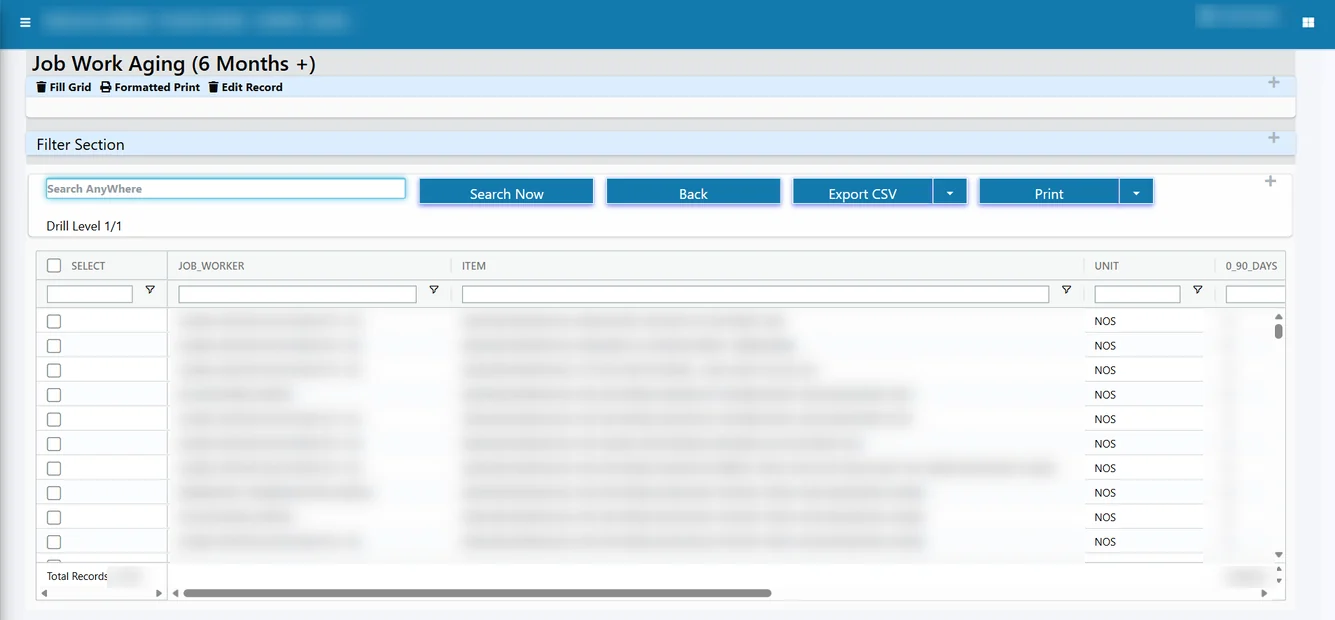
- Which challans are older than six months and need a follow-up?
- The material went out in kilograms and came back as pieces. How do we reconcile the two?
- One challan has several lines, and the return covers only some of them. What is the balance?
- A small loss has occurred. How do we close it with a reason and an audit trail, without editing old entries?
An ERP built for job work links the challan sent, the gate entry on return, the receipt after quality check and the scrap or write-off, all against the same record. Aging reports show what is pending and for how long, so nothing silently crosses the statutory window. Billing can follow the job worker’s weighed quantity while stock continues to be held in pieces. You can read more in our guides on job work software and returnable gate passes and on preparing ITC-04 data from the ERP.
Breakpoint 4: Costing that reflects what actually happened
Costing sheets are usually built once, using a standard material rate and an assumed wastage. After that, the world moves on. Purchase prices change, scrap is higher on one machine, a job worker’s charges are revised, and a bill of material is quietly altered on the floor. The sheet keeps showing the old margin, so you find the real figure only when the accounts are closed.
When purchase, production, stock and job work live on one database, each work order can collect its own material cost, process charges and losses. The owner can then ask a simple question: did this job make money? And get an answer that is based on actual documents. The same data supports budget-versus-actual comparisons, price variance checks and stock valuation by the method you choose.
For a deeper look, see work order costing and job profit.
Breakpoint 5: Many users, one version of the truth
The last breakpoint is organisational rather than technical. When several people edit files, you meet familiar problems: overwritten data, conflicting copies, broken formulas that nobody notices, and a sheet that only one person understands. If that person is absent or leaves, the factory is exposed.
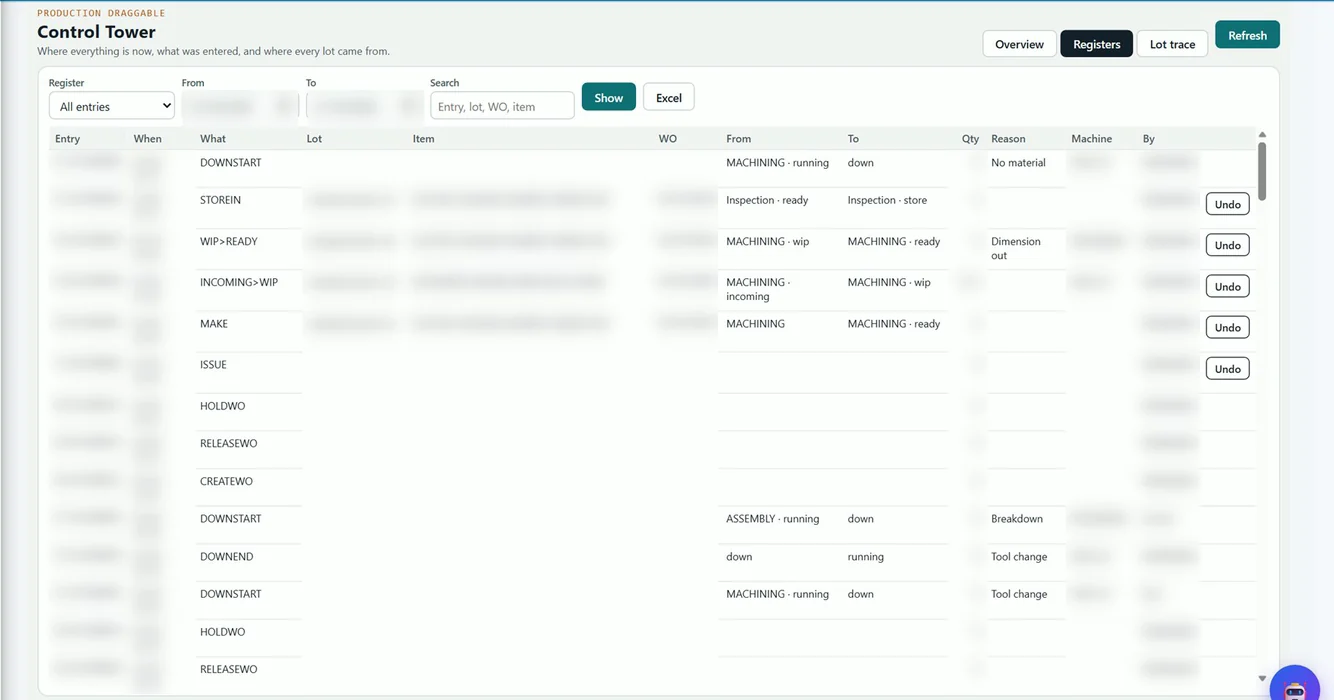
An ERP replaces file-level trust with role-level control. Users get only the screens and actions they need, approvals follow a defined path, and every important action is recorded with who did it and when. Some actions can be reversed through a controlled undo instead of overwriting history. The register screen below shows this kind of record for production moves.
ERP vs Excel for manufacturing: side-by-side comparison
| Area | Excel and separate files | One ERP database |
|---|---|---|
| Data entry | Typed again at each step, often at end of day | Each document pulls from the one before; nothing is keyed twice |
| Production status | Known after the shift, from paper slips | Stage-wise entries with rejection and downtime reasons |
| Stock | Differs between sheet, accounts and shelf | Result of receipts, issues and transfers on one item master |
| Batch traceability | Manual search across files | Batch links saved with every movement |
| Job work | Challan list with manual balance | Sent, received, scrap, write-off and aging on one record |
| Costing | Standard sheet, rarely updated | Actual material, process and loss per work order |
| Access control | File-level; anyone with the file can edit | Role-based rights, approvals and audit trail |
| Reporting | Built by hand each month | Ready reports, live dashboards, export to Excel |
Every Tejaxo ERP report still exports to Excel
A common fear is that moving to ERP means giving up the sheets your team knows well. It does not. Reports in Tejaxo ERP export to Excel, so your people can still build pivot tables, filter data and share files in the way they are used to. The difference is that the numbers underneath come from one live database rather than from someone’s last manual update.
Think of it this way: Excel stays as the analysis tool, while the ERP becomes the place where data is created. That also removes the biggest reason for arguments in review meetings, which is whose sheet is correct.
Tejaxo ERP ships with 1000+ standard reports, and the data can also feed live dashboards and Power BI. If your accounts are on Tally today, you can keep that relationship in mind while you plan; our page on moving from Tally to an ERP for manufacturers explains the bridge. If you extend SAP or Microsoft Dynamics, the message is different: we do not replace your ERP, we extend it on the shop floor.
A decision checklist: is it time to move?
Count how many of these statements are true for your unit today.
- More than three people update production or stock files.
- Stock in the sheet and the physical count rarely match.
- You send material to job workers regularly and cannot see the balance by vendor in a minute.
- You cannot trace a finished lot back to its raw material.
- Product costs are calculated once a year, or only at audit.
- Month-end involves several days of reconciling files.
- One employee is the only person who understands the main workbook.
- The owner needs to phone the floor to know dispatch status.
If two or three are true, you are close to a breakpoint and should start by mapping your process. If five or more are true, the cost of staying on spreadsheets is probably already higher than the effort of moving. For smaller units, our page on ERP for a small manufacturing business explains how to start with a realistic scope.
Moving from Excel to ERP without disrupting production
The move is less risky than most owners expect, because much of the work is organising data you already have.
- Start with masters. Item lists, customers, vendors, machines and bills of material are usually already in Excel and can be cleaned and imported.
- Load opening balances. Opening stock, party balances and pending job work are brought in as of a cut-off date.
- Run in parallel for a short period. Your team keeps the sheet while entering the same transactions in the ERP, then compares the two.
- Go module by module. Many factories begin with stores, purchase and production, then add job work, quality and payroll.
- Keep Excel for analysis. Use report exports for the pivots your managers already rely on.
Tejaxo has been in business since 2017, has worked with 50+ clients and supports clients across India on-site and remotely. Our team can look at your current sheets and show which breakpoints apply to you.
Next step
If your factory is running on spreadsheets and you are not sure whether it is time to move, a short discussion of your actual process is the best starting point. Book a free consultation with Tejaxo and bring your current Excel files, and we will show how the same work looks on one database.
Frequently asked questions
When is Excel no longer enough for a manufacturing company?
Excel stops being enough when several people update production, stock or job work files, and the figures no longer match the physical position. Other signs are no batch traceability, stale costing, days of month-end reconciliation, and dependence on one person who understands the main workbook. At that point, a shared database saves more time than spreadsheets.
Can ERP replace Excel completely in a factory?
Not necessarily, and it does not need to. ERP replaces Excel as the place where data is entered and stored. Excel remains useful for analysis, because ERP reports export to it. Your team can keep using pivot tables and filters, but the numbers come from one live database instead of manually maintained files.
How does ERP track job work better than Excel?
ERP links the challan sent, the gate entry on return, the receipt after quality check, and any scrap or write-off to one record. You can see pending material by job worker, item and batch, along with aging. Excel can list challans, but the balance, unit conversion and aging all depend on manual updates.
Is Tally with Excel enough for a manufacturing business?
It can work for a small unit. Tally handles accounts well, but production, batch tracking, job work and work order costing usually end up in separate Excel files. As volume grows, those files drift from the accounts. Many manufacturers then add an ERP that keeps shop floor and finance data together.
What happens to my existing Excel data when I move to ERP?
Most of it is reused. Item lists, customers, vendors, machines and bills of material are cleaned and imported as masters, and opening stock and balances are loaded as of a cut-off date. Many teams then run the sheet and the ERP in parallel for a short time before switching fully.