
Every stores manager has seen it. The supplier’s bill says 200 pieces, the truck brings 192, and quality rejects 12 of those for dents. The bill must be booked as it is, but you should pay only for 180 good pieces, and your input GST must come down to match. A proper debit note in ERP settles this gap without manual calculations, and without the stock and the books telling different stories.
In many plants the gap is handled with a phone call and a note in the margin. The debit note is made weeks later, if at all, and the purchase ledger never quite agrees with the supplier’s statement. This article walks through the five Tejaxo ERP screens from gate entry to Debit Note GST, with a worked example and what each step does to stock and to the trial balance.
The flow: five screens, one material receipt
Each step is done by the team that owns it, and each one hands clean data to the next:
- Gate Entry (security or stores): the vehicle and the supplier bill are logged.
- MRR (stores): bill quantity and actually received quantity are entered.
- Basic Quality (quality team): accepted and rejected quantity are decided.
- Purchase Voucher (accounts): the supplier bill is booked in accounts.
- Debit Note GST (accounts): shortage and rejection are recovered from the supplier.
Bill qty 200
Stock 0 · Books 0
Received 192
Stock 0 · Books 0
OK 180 · Rej 12
Stock +180
Billed 200
Supplier Cr 59,000
Short 8 · Rej 12
Supplier Dr 5,900
Step by step in Tejaxo ERP
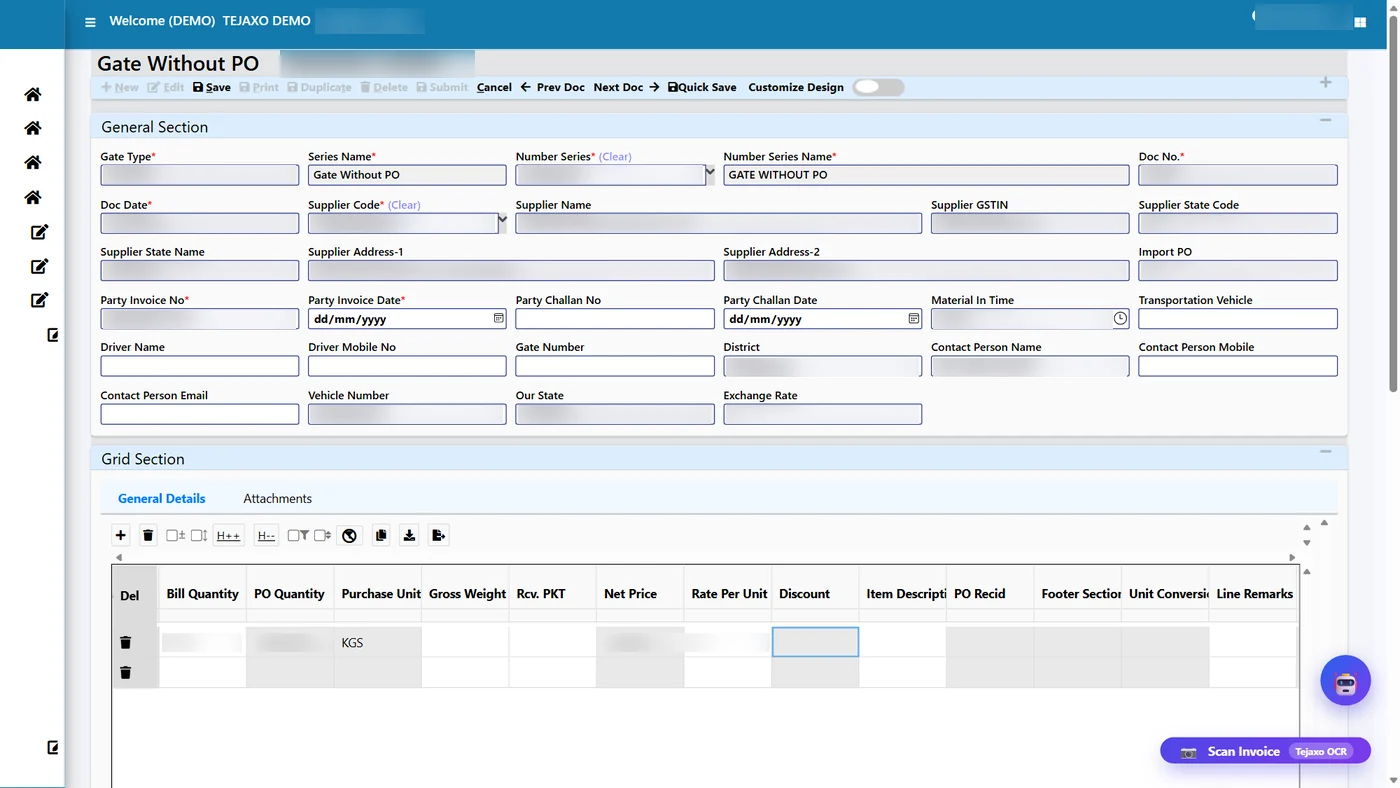
Step 1: Gate Inward Entry
Open Gate Inward Entry With PO, Without PO or After Job Work. Pick the supplier and the GSTIN and address fill in. Enter the bill number, bill date, vehicle number and transporter, then add the items with bill quantity and rate exactly as printed on the bill. Optionally, Auto Scan Invoice reads a PDF or photo of the bill and fills the screen for the user to check. On save, the entry waits for the MRR. Nothing moves in stock or accounts yet.
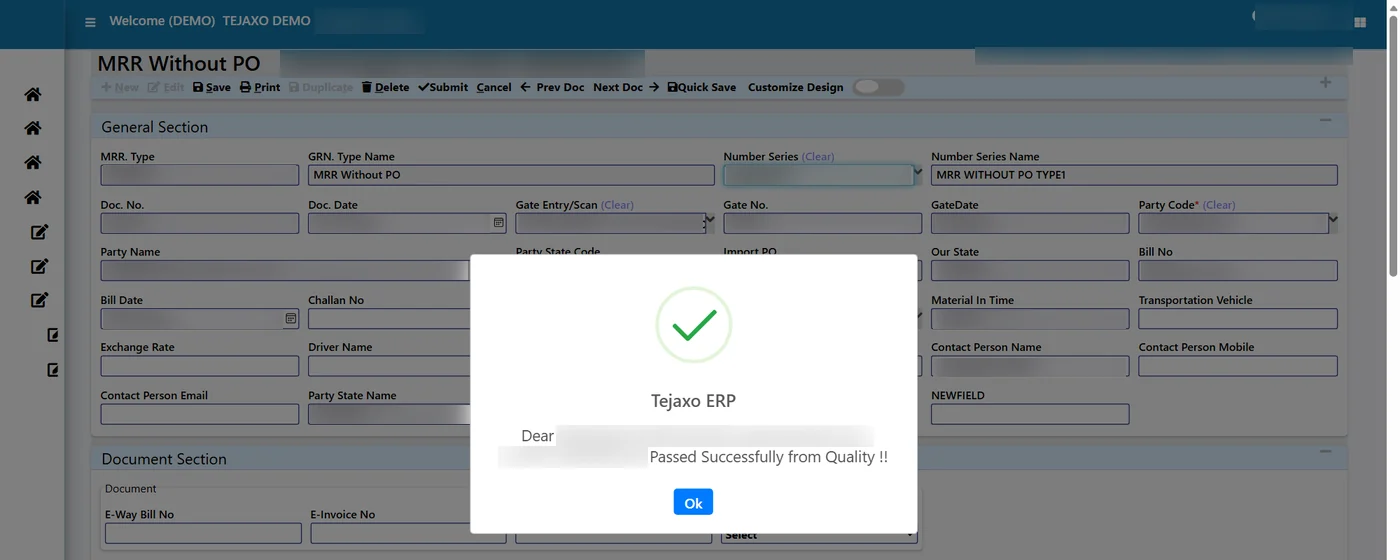
Step 2: Material Inward Entry (MRR)
Stores clicks New and picks the gate entry; supplier, bill and items fill in. Bill quantity stays as per the supplier bill and Received Qty is entered as counted. The shortage is simply bill minus received. Two controls apply here: a gate entry can be used in one MRR only, and a party’s bill number cannot repeat. Stock still does not move, because the lines wait for quality (unless your plant uses the direct-to-stock setting).
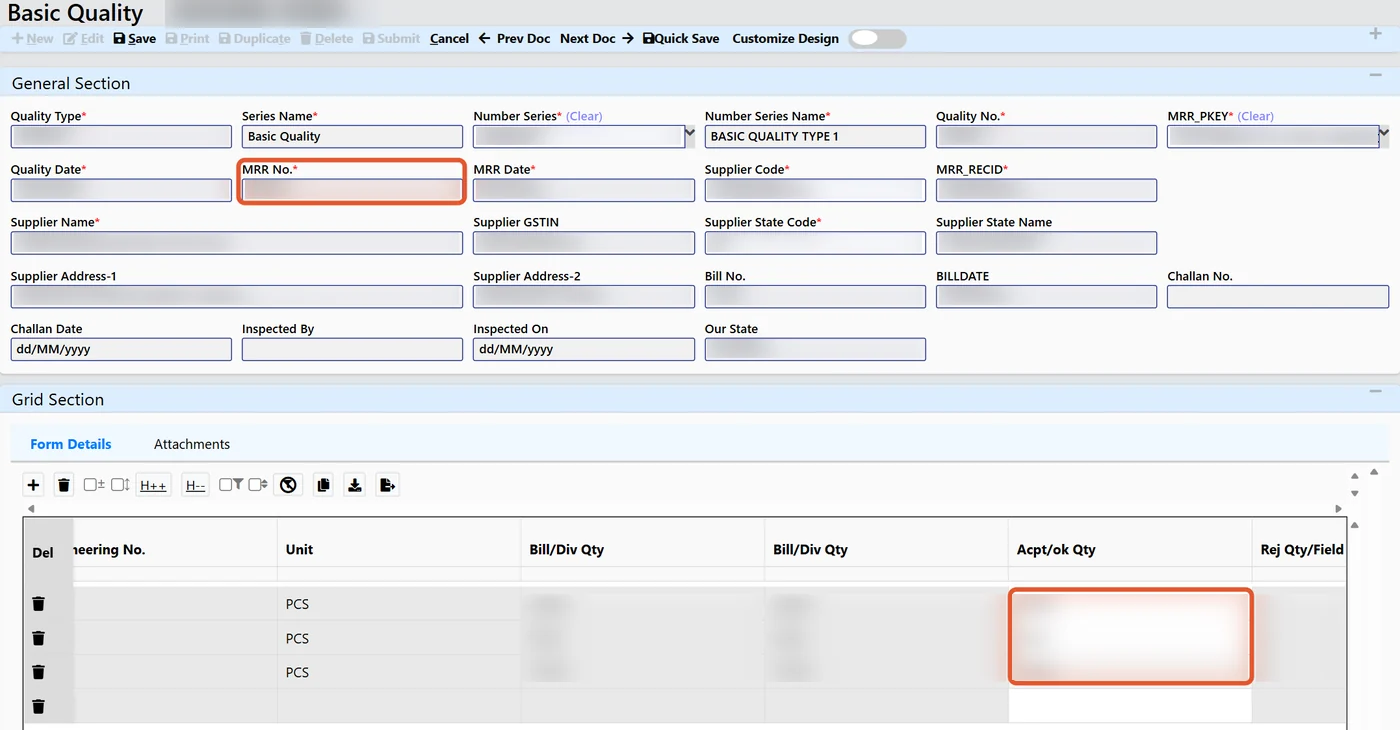
Step 3: Basic Quality
The quality team picks the pending MRR. The grid shows bill quantity, short or excess and an Acpt/ok Qty column. The inspector types the accepted quantity; rejected quantity is calculated as received minus accepted. Every rejected line needs a reason, or the screen will not save. On save, accepted quantity enters stock and rejected quantity is kept as a separate rejection line outside the Stock Summary.
Step 4: Purchase Voucher
Accounts picks the MRR to pass. Lines come in at bill quantity, not received quantity, because that is what the supplier’s tax invoice says. Accounts checks rate, GST and bill number against the paper bill and saves. There is one purchase voucher per MRR, and the MRR is then locked. Shortage and rejection are deliberately not reduced here; the debit note takes them back. This is also where the purchase voucher is matched against the PO and the receipt, the familiar 3-way match.
Step 5: Generate Debit Note
Open the saved Basic Quality of the MRR and click Generate Debit Note. Debit Note GST opens in a new tab with the party, MRR number and date, supplier bill number and date, one line with stock type SHORT for the short quantity and one with stock type REJECTION for the rejected quantity, and rate, taxable value and GST for those quantities only. Accounts checks the series, date, quantity and rate, and saves.
Before opening the debit note, the button checks that quality is saved, that there is a shortage or rejection, and that no debit note already exists for that MRR.
Worked example with sample numbers
Tejaxo Manufacturing receives a bill from Tejaxo Vendor for 200 pieces of Product A at ₹250, GST 18%, within the same state. Stores counts 192. Quality accepts 180 and rejects 12 for dents.
| Line | Qty | Taxable ₹ | GST 18% ₹ | Total ₹ |
|---|---|---|---|---|
| Supplier bill (Purchase Voucher) | 200 | 50,000 | 9,000 | 59,000 |
| Debit Note: shortage line (SHORT) | 8 | 2,000 | 360 | 2,360 |
| Debit Note: rejection line (REJECTION) | 12 | 3,000 | 540 | 3,540 |
| Net payable to supplier | 180 | 45,000 | 8,100 | 53,100 |
For an intra-state purchase, GST is CGST 9% plus SGST 9%. An inter-state purchase uses IGST 18%.
What it does to the trial balance
| Ledger | After purchase voucher | Debit note | After debit note |
|---|---|---|---|
| Supplier (Sundry Creditors) | Cr 59,000 | Dr 5,900 | Cr 53,100 |
| Purchase / item account | Dr 50,000 | Cr 5,000 | Dr 45,000 |
| Input CGST | Dr 4,500 | Cr 450 | Dr 4,050 |
| Input SGST | Dr 4,500 | Cr 450 | Dr 4,050 |
The books stay balanced at every step, and input GST is reversed in proportion to the quantity recovered. You can see this in Finance Reports > Trial Balance, condensed or detailed.
What it does to stock
Gate entry: 0. MRR: 0 (192 received, waiting for quality). Basic Quality: +180, with 12 held as a rejection line. Purchase voucher and debit note: no change. Closing stock is 180, which matches the physical good stock on the rack. The shortage never entered stock, so there is nothing to reverse.
Debit note line types
Each debit note line carries its own stock type, which decides how the line is treated:
- REJECTION (store flag R): rejected material physically sent back to the supplier.
- SHORT (store flag N): material never received; only the value is recovered.
- RATE DIFFERENCE (store flag N): a rate claim only, for example when the bill rate is higher than the agreed rate.
The stock type at the top of the screen is a shortcut that copies to every line; individual lines can then be changed, and save keeps each line as you set it. Both shortage and rejection post the same way in accounts; only the stock flag differs. Debit notes can also be signed in bulk with a digital signature, as explained on our digital signature certificate page.
Common mistakes and how the ERP prevents them
- Booking the bill at received quantity. This hides the shortage, so it is never claimed. Tejaxo ERP books the purchase voucher at bill quantity and recovers the gap separately.
- Rejecting without a reason. Basic Quality will not save until every rejected line has a reason, so the supplier can be told exactly why material came back.
- Two debit notes for one receipt. The button refuses if a debit note already exists for that MRR and tells you to open and edit it instead.
- Raising a debit note before quality. The button first checks that Basic Quality is saved for every line.
- Entering the same supplier bill twice. A party’s bill number cannot repeat on the MRR.
- Claiming for excess. If the supplier sends extra, the short figure is negative and no debit note is made for it.
Who this is for
Any manufacturer with regular raw material, bought-out or packing material receipts: auto component plants receiving castings and forgings, packaging units receiving film and board, and chemical plants receiving drums and bags. If your purchase team regularly asks the store, “What did we actually receive?”, this flow will save that conversation. The wider stock picture is covered on our inventory management software for manufacturing page.
How Tejaxo implements this
We begin with a discovery session with stores, quality and accounts to map how receipts, rejections and debit notes are handled today. In the pilot we load your own suppliers, items and open POs and run real receipts through the five screens, so each team sees its own data. Go-live includes training for each role, and the same Tejaxo team provides support afterwards. Tejaxo Technologies Pvt. Ltd. has been building manufacturing ERP since 2017 and serves 50+ clients.
Every short or rejected piece you do not recover is money and input GST left on the table. Book a free demo to see gate entry to debit note on sample data, or WhatsApp us on +91 96717 27474.
Frequently asked questions
How is a debit note created in Tejaxo ERP?
Open the saved Basic Quality of the MRR and click Generate Debit Note. Debit Note GST opens with the party, MRR, supplier bill details and one line each for the short and rejected quantity, with rate, taxable value and GST for those quantities only.
Why is the purchase voucher booked at bill quantity and not received quantity?
The supplier’s tax invoice is for the bill quantity, so the purchase voucher records it as billed. The shortage and rejection are then recovered through the Debit Note GST, which keeps the books matched to the supplier’s documents.
What happens to input GST when a debit note is raised?
The debit note reverses input GST in proportion to the quantity recovered. In the worked example, ₹900 of input GST is reversed on ₹5,000 of taxable value at 18%.
Is a debit note made for excess quantity received?
No. If the supplier sends more than the bill quantity, the excess shows as a negative short figure in Basic Quality, and no debit note is generated for it.
Does rejected material appear in the Stock Summary?
No. Only accepted quantity enters stock at Basic Quality. Rejected quantity is kept as a separate rejection line outside the Stock Summary, and you view it from Basic Quality.
Can the gate entry be filled from a scanned supplier bill?
Yes. Auto Scan Invoice reads a PDF or photo of the supplier bill and fills the gate entry screen, which the user checks and saves.