
Most plants plan production from the order book: whatever the customer wants this week goes on the machines this week. That works until the order book swings, a large order lands on a product that is already in stock, or a fast-moving item runs out because nobody planned to keep any. A master production schedule (MPS) sits between the sales plan and the shop floor. It says, for each finished product and period, how much the plant will make – after taking into account demand, the safety stock it wants to hold, the finished goods it already has and the work orders already running. This guide explains how to build one, with a worked month for three products.
The MPS formula
MPS quantity = demand + safety stock – finished-goods stock – open work orders. If the result is zero or negative, nothing new needs to be started for that product in the period. Each part matters:
- Demand – confirmed sales orders for the period, plus forecast for the products the plant makes to stock.
- Safety stock – the buffer the plant wants to hold against demand and supply variation; see the reorder point and safety stock calculator.
- Finished-goods stock – what is already in the store and free to sell.
- Open work orders – quantities already released to production and not yet finished.
Worked example: one month, three products
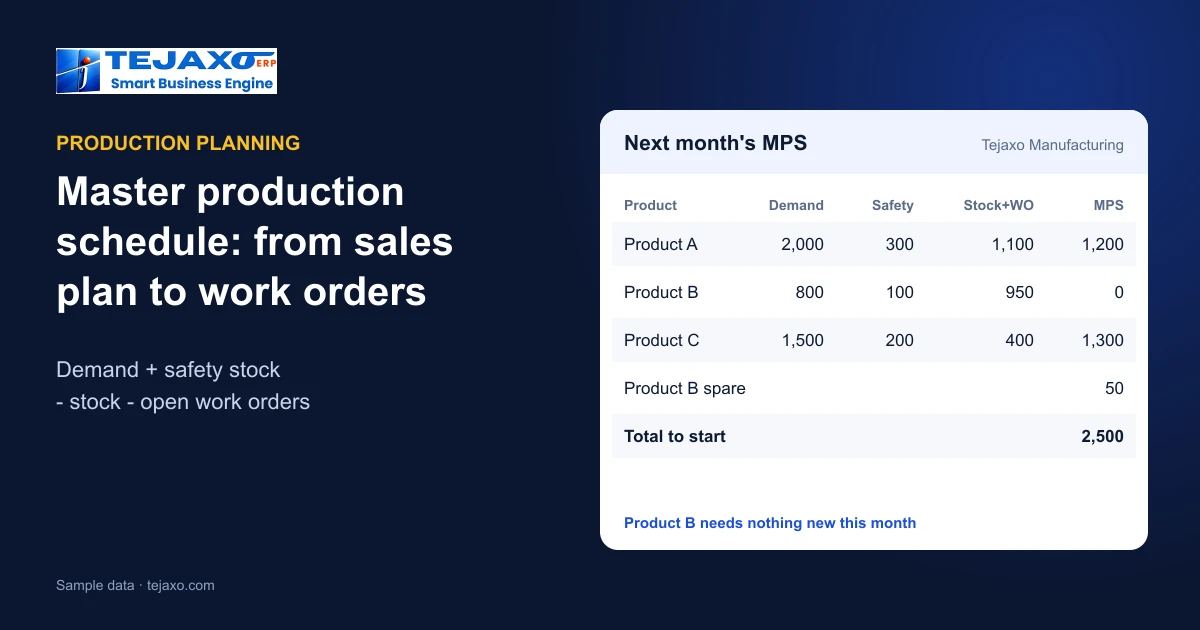
Tejaxo Manufacturing (sample data) prepares next month’s MPS. “Stock + WO” is finished-goods stock plus open work orders.
| Product | Demand | Safety | Stock + WO | MPS |
|---|---|---|---|---|
| Product A | 2,000 | 300 | 1,100 | 1,200 |
| Product B | 800 | 100 | 950 | 0 |
| Product C | 1,500 | 200 | 400 | 1,300 |
Product A needs 1,200 new pieces: 2,000 demand plus 300 safety stock, less 500 in stock and 600 already in production. Product B needs nothing new – stock and open work orders already cover demand and safety stock with 50 to spare, so starting another batch would only build inventory. Product C needs 1,300. Without the MPS, Product B would probably have been scheduled again simply because it has orders, while Product C – with little stock – would have been late. The calculation takes minutes once the numbers are reliable.
Where the demand number comes from
Demand is the number most often argued about. Confirmed orders are facts; forecast is a judgement. Keep them in separate columns so everyone can see how much of the plan rests on each. A simple, honest forecast – last year’s same month, adjusted for known changes, agreed with sales – is better than none, and much better than a target dressed up as a forecast. Review the forecast against actual orders every month; a forecast that is always 20% high quietly builds stock in the warehouse.
Safety stock per product, not one rule for all
Safety stock should reflect how variable a product’s demand is and how long it takes to replenish. A fast mover with steady orders and a short production cycle needs little; a product with lumpy orders or a long lead time on a key component needs more. Make-to-order specials need none. Reviewing safety stock each quarter, product by product, keeps the MPS from either chasing shortages or building stock nobody ordered.
From MPS to work orders and machines
- Split the MPS by week according to delivery dates, so material and capacity are needed when the orders are due, not all on day one.
- Create work orders – line-wise from sales orders for make-to-order products, or for stock for make-to-stock products.
- Run MRP on the work orders to find raw material and bought-out shortfalls; see MRP vs ERP.
- Schedule job cards forward on each machine’s available hours, and check machine load; see plant capacity planning.
- Review weekly – new orders, cancellations, rejections and breakdowns change the numbers.
Make-to-order, make-to-stock and the mix
A pure job shop makes almost everything to order, and its MPS is mostly the order book with safety stock for a few common parts. A plant with standard products makes to stock and plans from forecast. Most manufacturers are a mix: standard items held in stock, special items made only on order. The same formula serves both – safety stock is simply zero for make-to-order items, and forecast is zero where only confirmed orders count.
Frozen and flexible periods
Changing the schedule every day creates chaos on the floor. Many plants freeze the current week – only urgent changes approved by the plant head – keep the next week firm but adjustable, and treat later weeks as flexible planning. The MPS is then rebuilt every week for the flexible horizon, while the shop floor works to a stable plan for the next few days.
Reading the MPS against capacity
An MPS that the machines cannot produce is a wish list. After the first draft, compare the hours it needs on each machine group with the hours available. Where a group is overloaded, move quantities to earlier weeks with spare capacity, add a shift, use another machine, or send work to a job-work vendor – see job work software. Where a group is idle, consider building stock of fast movers within the safety-stock limit.
Measuring the schedule
- Schedule adherence – share of MPS quantity completed in the planned week.
- OTIF to customers – the result the MPS exists to protect; see OTIF and order backlog.
- Finished-goods stock against safety stock – too high means over-production, too low means risk.
- Changes inside the frozen week – a high count points to planning or material problems.
How Tejaxo ERP handles it
In Tejaxo ERP, production planning runs from a daily or monthly sales plan to a master production schedule calculated as demand + safety stock – FG stock – open work orders, then to work orders created line-wise from sales orders or for stock, and job cards scheduled forward on each machine’s hours. Plant capacity planning compares machines required per machine type with machines available and shows the shortfall, spare capacity and load %. The BOM Tree shows any finished good as a multi-level tree scaled to a planned build quantity, and production entries feed OEE, utilisation, MTBF and MTTR reports – see production planning software.
Common mistakes
- Ignoring open work orders, so the same demand is planned twice.
- No safety stock for fast movers, so every order becomes urgent.
- Planning the month in one block, so material and machines are overloaded in week one.
- Not checking capacity before releasing the schedule.
Next step
See the master production schedule, work orders and capacity load on your own products in a free demo.
Frequently asked questions
What is a master production schedule?
A plan of how much of each finished product the plant will make in each period, after taking demand, safety stock, finished-goods stock and open work orders into account.
How is the MPS quantity calculated?
MPS = demand + safety stock – finished-goods stock – open work orders. If the result is zero or negative, no new production is needed for that product in the period.
What is the difference between MPS and MRP?
The MPS decides how many finished products to make and when; MRP then works out the raw material and components needed for that schedule.
Should the MPS change every day?
No. Many plants freeze the current week, keep the next week firm but adjustable, and rebuild later weeks weekly, so the shop floor works to a stable plan.
How does capacity fit into the MPS?
After drafting the MPS, compare the machine hours it needs with hours available per machine group and move quantities, add shifts or use job work where a group is overloaded.
Does Tejaxo ERP calculate the MPS?
Yes. Production planning runs from a sales plan to an MPS of demand + safety stock – FG stock – open work orders, then to work orders and job cards scheduled on machine hours, with plant capacity load %.