

MRP and ERP are often used as if they were the same thing. They are not, and the difference matters when a manufacturer chooses software. MRP (material requirements planning) answers one question: what material do we need, how much and when? ERP (enterprise resource planning) runs the whole business – sales, purchase, stores, production, quality, finance and HR – in one system, and MRP is one engine inside it. This guide explains both, works through an MRP calculation step by step and shows when a plant needs which.
What MRP does
MRP starts from demand and works backwards to material. It takes three inputs – what has to be made (the production plan), what each product is made of (the bill of materials) and what is already available (stock and open orders) – and produces a list of shortages with the quantity and date each one is needed. Its output is a set of purchase requisitions for bought items and work orders for made items.
What ERP does
An ERP records every transaction in one database: enquiry and quotation, sales order, purchase order, gate entry and goods receipt, quality inspection, issue to production, finished goods, dispatch, invoice, GST, payments and the books. Because MRP inside an ERP reads live sales orders, live stock and live open purchase orders, its suggestions are only as good as those records – which is exactly why a stand-alone MRP fed from spreadsheets so often goes wrong.
MRP vs ERP at a glance
- Scope: MRP plans material; ERP runs the business, including MRP.
- Inputs: MRP needs demand, BOMs and stock; an ERP creates those records as the business works.
- Output: MRP gives requisitions and planned work orders; an ERP also turns them into purchase orders, receipts, issues, production entries and costs.
- Finance: MRP has none; an ERP values stock, costs work orders and keeps the books and GST.
- Typical user: MRP is used by the planner; an ERP is used by sales, purchase, stores, production, quality, accounts and the owner.
Worked example: one MRP run
Tejaxo Manufacturing has orders from Tejaxo Customer for 400 units of Product A this month (sample numbers). The planner wants a safety stock of 50 units. There are 120 finished units in stock and an open work order for 80 more.
Step 1 – master production schedule. Quantity to make = demand + safety stock – finished stock – open work orders = 400 + 50 – 120 – 80 = 250 units.
Step 2 – explode the BOM. One Product A needs 1 housing and 2 shafts, and each shaft is machined from 1.5 kg of bar. For 250 units: 250 housings, 500 shafts and 750 kg of bar.
Step 3 – net against stock and open orders. 90 housings are in stock and 60 are already on order, so 100 housings are short. 140 shafts are ready, so 360 must be machined, needing 540 kg of bar; 200 kg is in stock, so 340 kg is short.
Step 4 – act. MRP raises purchase requisitions for 100 housings and 340 kg of bar, and a work order for 360 shafts. In an ERP the requisitions go through approval to purchase orders, and the work order is scheduled on the machines’ hours.
Every number in that run came from a different department. If stock, open orders or the BOM are a week old, the requisitions are wrong – the main reason MRP works best inside an ERP.
How Tejaxo ERP plans production
- Sales plan to schedule: a daily or monthly sales plan feeds the master production schedule (demand + safety stock – finished stock – open work orders).
- Work orders: created line-wise from sales orders or for stock, with job cards scheduled forward on each machine’s hours – see production planning and MRP.
- Multi-level BOM: any product as an expandable tree, with quantities scaled to the planned build – see BOM software.
- Requisitions from MRP: shortfalls become purchase requisitions that flow to purchase orders, gate entry, goods receipt and quality.
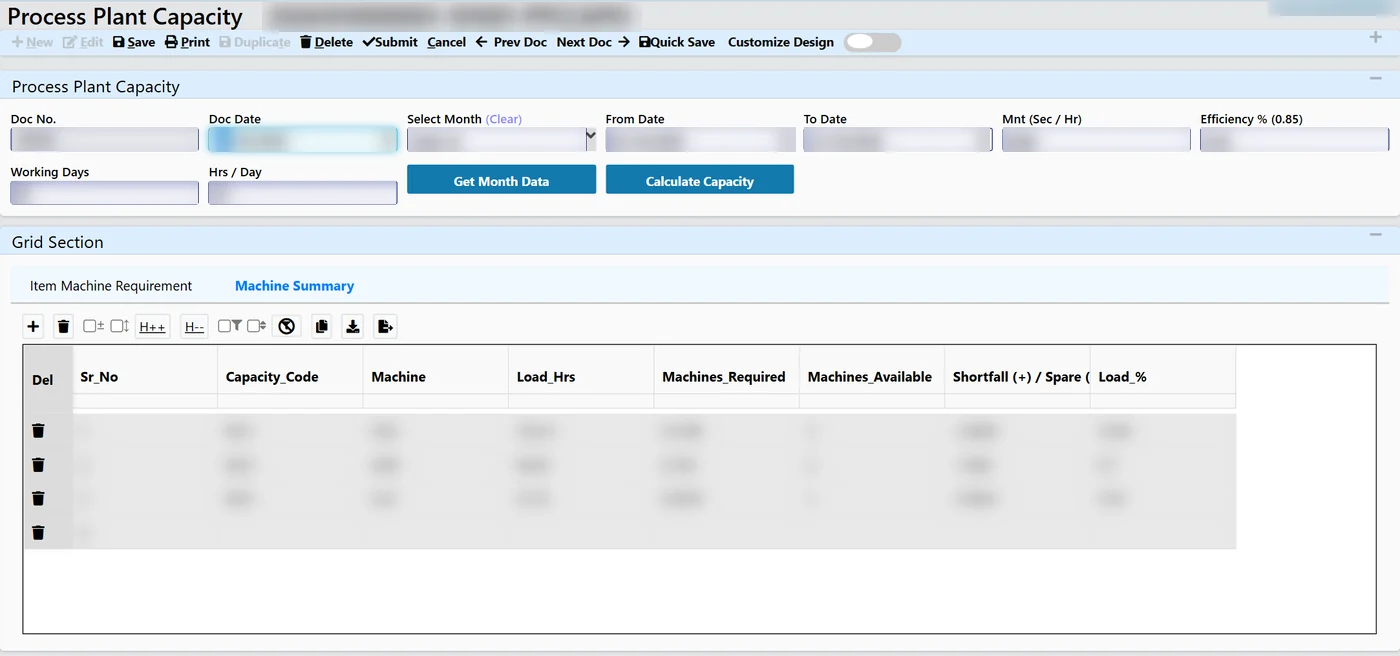
- Capacity: machines required against machines available by machine type, so an overloaded month shows up early – see machine capacity planning.
- Traceability: batch numbers carried from sales order and work order through MRP, purchase, receipt, issue and finished goods to the invoice.
When MRP alone is enough – and when you need ERP
A small shop with a few products, one store and an accountant on separate accounting software can sometimes manage with a planning sheet or a stand-alone MRP. A plant needs an ERP when any of these are true: several levels in the BOM, material lying with job workers, batch or heat traceability, more than one plant, quality records that customers audit, or an owner who wants the real cost of each order. If you are on Tally today, read when to move from Tally to an ERP.
Make-to-order and make-to-stock
MRP works for both, but the starting point differs. In a make-to-order plant, work orders are created line by line from confirmed sales orders, so every requisition can be traced to a customer order. In a make-to-stock plant, the sales plan and the safety stock drive the schedule, and work orders are raised for stock. Many plants run both – standard products for stock and special items against orders – which is another reason the schedule should be calculated from live orders and live stock rather than from last week’s sheet.
What to prepare before running MRP
- Clean item masters: one code per item, the right unit of measure and no duplicates.
- Complete BOMs: every level, with the correct quantity per unit and scrap allowance where you use one.
- Correct opening stock: a physical count by store and batch on the day you start.
- Open orders: pending purchase orders, open work orders and material lying with job workers.
- Planning rules: safety stock and re-order levels for important items, agreed with stores and purchase.
With these in place, the first MRP run gives requisitions the purchase team can trust.
Common MRP mistakes
- Wrong BOMs. A missing level or an old quantity multiplies into every requisition.
- Stock not up to date. Issues booked at month-end make MRP order material that is already on the floor.
- Ignoring open orders. Purchase orders and work orders already placed must be netted off, or the plant over-buys.
- No safety stock policy. Without it, every small delay becomes a line stoppage.
- Planning without capacity. Material can be on time while the machine is booked for weeks.
Next step
Bring one of your products and its BOM to a free demo, and we will run MRP on it in Tejaxo ERP – or try the interactive demo first.
Frequently asked questions
What is the difference between MRP and ERP?
MRP plans material: what to buy or make, how much and when. ERP runs the whole business in one system – sales, purchase, stores, production, quality, finance and HR – and includes MRP as its planning engine.
How is the MRP quantity calculated?
First the quantity to make: demand + safety stock – finished stock – open work orders. Then the BOM is exploded for that quantity and each item is netted against its stock and open orders; what remains is the shortage.
Is MRP a module of ERP?
In a manufacturing ERP, yes. MRP reads live sales orders, stock and open orders from the ERP and turns shortages into purchase requisitions and work orders.
What is the difference between MRP and MRP II?
MRP covers material only. MRP II adds capacity, shop-floor control and costing – most of which a manufacturing ERP now covers along with finance and the rest of the business.
Can a small manufacturer start with MRP only?
A small shop with few products can start with planning only, but as soon as BOMs have several levels, material sits with job workers or batches must be traced, MRP works much better inside an ERP.
Does Tejaxo ERP include MRP?
Yes. Tejaxo ERP builds the master production schedule from a sales plan, explodes multi-level BOMs, raises requisitions for shortfalls and schedules job cards on machine hours.